Email KQL Overview
Analyze email delivery performance, error patterns, and throughput.
Log Analytics Tables
ACS Email surfaces three Operational tables (see the ACS Email Logs schema):
ACSEmailSendMailOperational— One row perSendEmailAPI call. Tracks send-side metadata (correlation ID, recipient counts, attachment counts, size). Does not expose delivery status.ACSEmailStatusUpdateOperational— One row per lifecycle transition. Tracks per-recipient delivery state (Delivered,Bounced,Failed, etc.) viaDeliveryStatus, plusSmtpStatusCode,EnhancedSmtpStatusCode, andIsHardBounce(string per the documented schema).ACSEmailUserEngagementOperational— One row per recipient interaction (open, click) when engagement tracking is enabled.
Key Scenarios
| Scenario | KQL Query | Description |
|---|---|---|
| Total Send Volume | Send Volume | Count SendEmail API calls (daily total, hourly trend, 7-day rollup). |
| Delivery Failure Analysis | Email Delivery Status | Find the most common reasons for bounced or failed emails. |
| Bounce Rate Trends | Bounce Trends | Track the bounce rate of emails over time. |
| Sender Failure Rate | Sender Failure Rate | Surface senders with elevated failure rates (a proxy for throttling or reputation issues). |
Query Examples
Total Send Volume
ACSEmailSendMailOperational is the send-side ground truth: one row per SendEmail API call. Use it when you need the count of send attempts (not delivery outcomes — those live in ACSEmailStatusUpdateOperational).
Daily total send count
The simplest "how many emails did we attempt to send today" query — single number, no buckets.
Hourly send trend (timechart)
For monitoring spikes and quiet periods over the last 24 hours, bucket by hour and render as a line chart.
ACSEmailSendMailOperational
| where TimeGenerated > ago(24h)
| summarize Sends = count() by bin(TimeGenerated, 1h)
| order by TimeGenerated asc
| render timechart
7-day rollup with recipient fan-out
For weekly capacity planning, group by day and surface the total emails attempted plus the total recipients (one send can hit many recipients via To/Cc/Bcc):
ACSEmailSendMailOperational
| where TimeGenerated > ago(7d)
| summarize
    Sends = count(),
    TotalRecipients = sum(UniqueRecipientsCount),
    TotalSizeMB = round(sum(Size), 2)
    by Day = bin(TimeGenerated, 1d)
| order by Day asc
UniqueRecipientsCount counts every distinct recipient on a single SendEmail call (across To, Cc, Bcc). Size is the email size in megabytes per the documented schema.
Send volume by sender domain (via join)
ACSEmailSendMailOperational does not expose SenderDomain as a documented column per the Microsoft Learn schema — only ACSEmailStatusUpdateOperational does. To attribute send volume per sender domain, join the two tables on CorrelationId:
let SendRows =
    ACSEmailSendMailOperational
    | where TimeGenerated > ago(7d)
    | project CorrelationId, SendTime = TimeGenerated;
let StatusRows =
    ACSEmailStatusUpdateOperational
    | where TimeGenerated > ago(7d)
    | where isnotempty(SenderDomain)
    | summarize arg_min(TimeGenerated, SenderDomain) by CorrelationId;
SendRows
| join kind=inner StatusRows on CorrelationId
| summarize Sends = dcount(CorrelationId) by bin(SendTime, 1d), SenderDomain
| order by SendTime asc
arg_min picks the first status row per CorrelationId to avoid double-counting (each send produces multiple status rows). dcount(CorrelationId) then counts each send exactly once even if the join multiplies rows.
Inner join excludes pending sends
kind=inner excludes very recent sends whose status rows have not yet been written. For near-real-time send totals, use the Daily total send count query against ACSEmailSendMailOperational directly. Use this join for historical attribution (yesterday and older), not for current-hour dashboards.
Reconciling KQL count vs Portal Metric
You will see two slightly different numbers for the same time window:
| Source | What it represents |
|---|---|
ACSEmailSendMailOperational (this table) | Log row per SendEmail operation (send-side operational record per the documented schema) |
Email Service API Requests metric (Portal → Metrics) | Aggregated API request count surfaced on the Communication Services standard metrics blade |
The two are different telemetry surfaces — one is operational logs, the other is platform metrics — so counts may differ for the same time window and should be reconciled loosely. For "how many emails did our application attempt to deliver", trust ACSEmailSendMailOperational. For "how is the API endpoint trending in Portal alerts and dashboards", trust the metric. See Monitoring → Viewing Email Metrics in Azure Monitor for the Portal-side view of this same data.
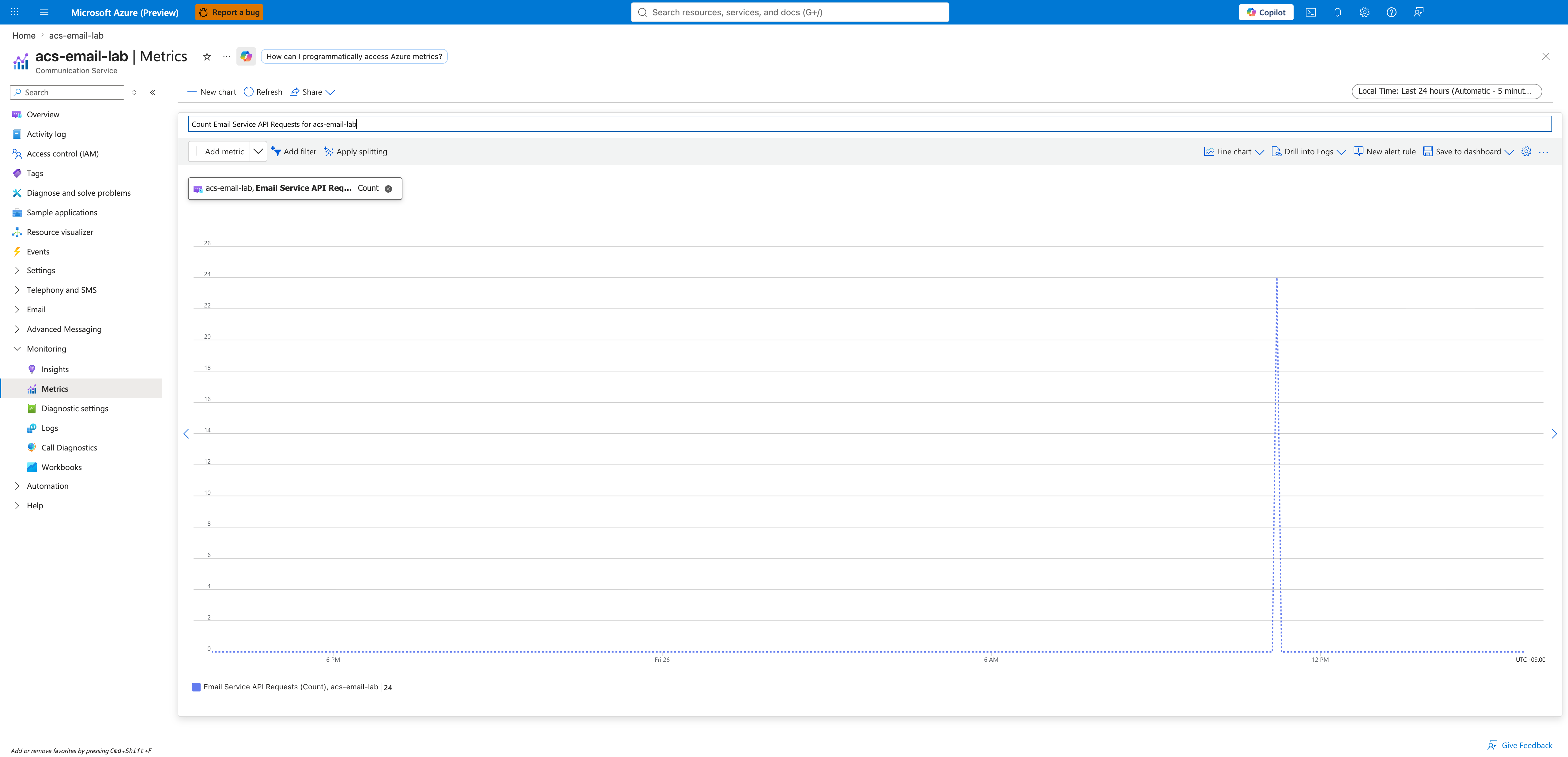
The capture above shows the Portal Metrics view of the same send-volume data — a 24-request spike at 12 PM Friday. The Daily total send count KQL run against the same workspace may return a slightly different number because the two are independent telemetry pipelines.
Cross-check with status updates
To prove the send volume produced expected lifecycle events, run the breakdown query from Email Delivery Checklist:
ACSEmailStatusUpdateOperational
| where TimeGenerated > ago(24h)
| summarize Count=count() by DeliveryStatus
| order by Count desc
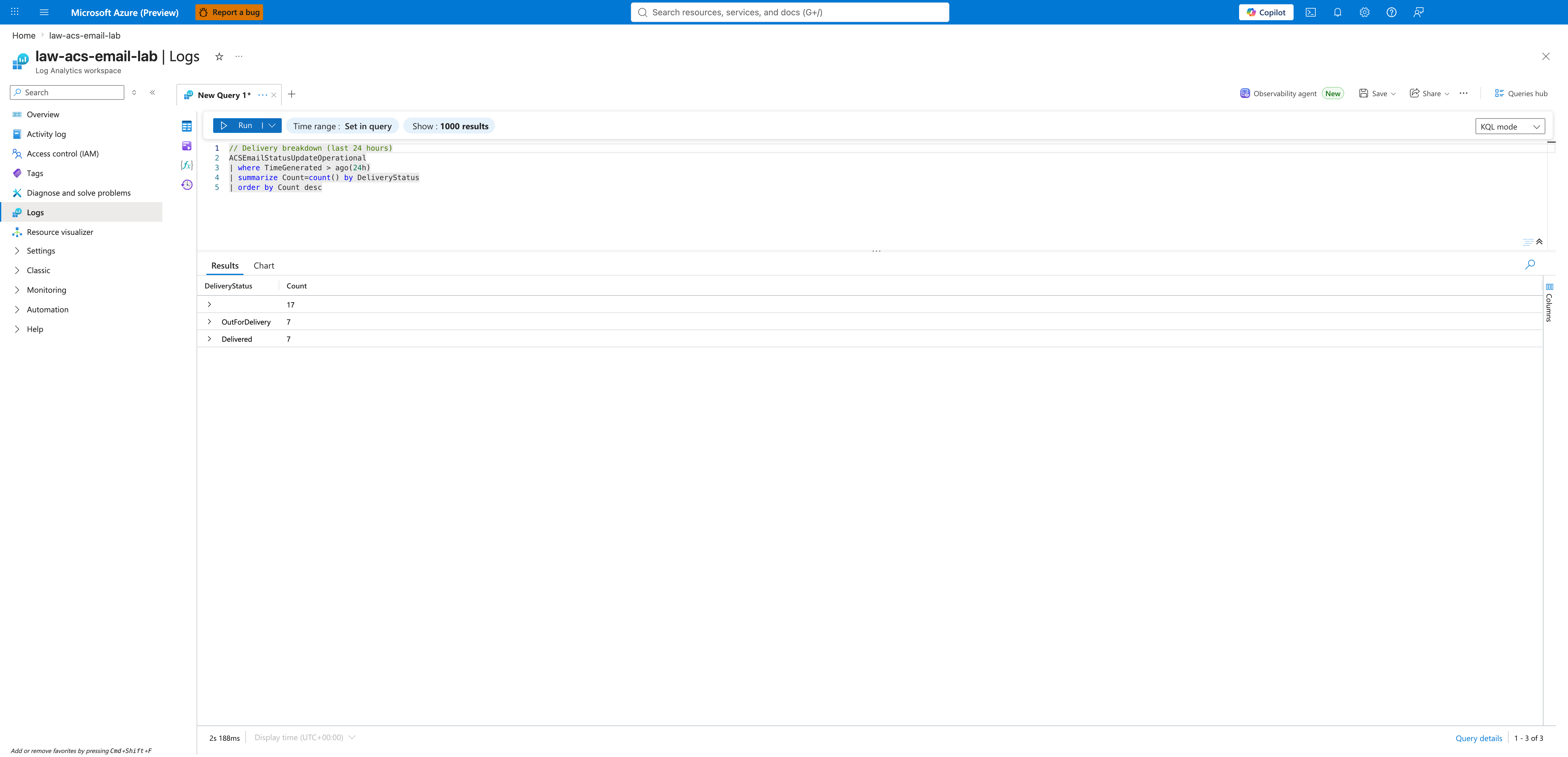
A 7-email send burst can produce many more status-update rows than sends because ACSEmailStatusUpdateOperational records lifecycle transitions rather than one row per send. In the capture above, 7 sends correspond to 31 status-update rows (17 blank/initial + 7 OutForDelivery + 7 Delivered), which is consistent with a healthy delivery pipeline. To compare 1:1 against send-side rows, filter the status table with where isnotempty(RecipientId) to get only recipient-level terminal transitions.
Bounce Rate Trends
Track the percentage of recipient-level rows that did not reach Delivered, bucketed hourly.
ACSEmailStatusUpdateOperational
| where TimeGenerated > ago(24h)
| where isnotempty(RecipientId)
| summarize
    TotalRecipients = count(),
    Failed = countif(DeliveryStatus != "Delivered")
    by bin(TimeGenerated, 1h)
| project TimeGenerated, BounceRate = (toreal(Failed) / TotalRecipients) * 100
| render timechart
isnotempty(RecipientId) filters out the message-level rows (Dropped, OutForDelivery, Queued), keeping only recipient-level transitions so each recipient is counted exactly once.
Sender Failure Rate
The Email schema does not expose an explicit Throttled delivery status. To surface senders that may be hitting throttling or reputation issues, look for elevated failure rates per SenderDomain instead:
ACSEmailStatusUpdateOperational
| where TimeGenerated > ago(1h)
| where isnotempty(RecipientId)
| summarize
    Total = count(),
    Failed = countif(DeliveryStatus in ("Failed", "Bounced", "Quarantined"))
    by SenderDomain
| extend FailureRate = todouble(Failed) / todouble(Total)
| where Total >= 20 and FailureRate > 0.10
| order by FailureRate desc
If you need finer-grained signals, group by SenderDomain, SenderUsername and inspect SmtpStatusCode / EnhancedSmtpStatusCode on the failing rows for the carrier's reason code.
See Also
- Email Delivery Status KQL
- Email Delivery Failures Playbook
- Monitoring Azure Communication Services — full Log Analytics + alert setup