Troubleshooting Mental Model
This page provides a classification model for App Service incidents so you can start with the correct evidence source instead of guessing.
Core idea: classify the problem first, then investigate deeply.
Why this model matters
Most incident delays come from category mistakes:
- startup failures investigated as pure application bugs
- outbound DNS/SNAT failures investigated as CPU problems
- deployment events ignored while symptoms are treated as random instability
This classification helps you avoid looking at the wrong logs from the start.
Classification flowchart
flowchart TD
    A[Observed symptom] --> B{Primary failure signal}
    B -->|5xx, latency, routing| C[Category 1: Request path issue]
    B -->|Container not ready, ping failures| D[Category 2: App startup issue]
    B -->|Degradation over time| E[Category 3: Runtime degradation]
    B -->|Dependency timeout, DNS, connection reset| F[Category 4: Dependency or outbound issue]
    B -->|Regression after change, restart, swap| G[Category 5: Deployment recycle platform event]

    C --> C1[Start with HTTP + platform path evidence]
    D --> D1[Start with console startup signals]
    E --> E1[Start with memory disk timeout progression]
    F --> F1[Start with outbound and resolver evidence]
    G --> G1[Start with Activity Log and config delta]
The Portal's Diagnose and solve problems blade mirrors the five-category classification above. Availability and Performance aligns to the request path and runtime degradation, Configuration and Management plus Deployment align to deployment and platform events, Networking is the counterpart to dependency and outbound issues, and Diagnostic Tools (Auto-Heal, Network Troubleshooter) is the mitigation toolbox. Check the Risk alerts panel before running any KQL; when it isn't empty, it's the fastest pre-classification signal.
Category summary matrix
| Category | Typical Symptoms | First Signal to Check | Common Mistake |
|---|---|---|---|
| Request path issue | 5xx, latency spikes, forwarding errors | AppServiceHTTPLogs status/time trend | assuming every 5xx is app code |
| App startup issue | container did not respond, warm-up timeout | AppServiceConsoleLogs startup sequence | checking only live request traces |
| Runtime degradation | slow over time, recycle, queue timeout | memory/disk trend + console timeout signatures | looking only at CPU |
| Dependency/outbound issue | connect timeout, DNS failures, reset/refused | console/app dependency errors + DNS checks | restarting app without validating outbound cause |
| Deployment/recycle/platform event | incident starts after deploy/swap/config change | Activity Log + platform lifecycle events | treating change-related incidents as random noise |
1) Category: Request Path Issue
Request path issues are failures in the inbound flow from client to app response.
Typical symptom patterns
- 500/502/503 appearing at endpoint level
- latency increase before error-rate increase
- only specific routes or methods failing
- proxy/forwarding failures in incident timeline
For request-path incidents, the Application Insights Failed requests and Server response time tiles are the first signal, together revealing whether the path is failing outright or merely slow. Start with a one-hour window and widen to compare against the daily baseline if needed. Treat the request count as the denominator: a request spike with no failure-rate increase is normal load, while flat request volume with rising failures points to a routing or upstream issue.
First signal to check
AppServiceHTTPLogs
| where TimeGenerated > ago(2h)
| summarize total=count(), err5xx=countif(ScStatus >= 500 and ScStatus < 600), p95=percentile(TimeTaken,95) by bin(TimeGenerated, 5m), CsUriStem
| order by TimeGenerated asc
Common mistakes
- interpreting one status code in isolation without timing context
- ignoring route concentration (
CsUriStem) and focusing only on global totals - skipping platform logs that can explain 502/503 transitions
Recommended playbooks
2) Category: App Startup Issue
Startup issues occur when runtime readiness never stabilizes after deployment, recycle, or slot event.
Typical symptom patterns
- deployment marked successful but app unavailable
container didn't respond to HTTP pings- warm-up succeeds in one slot but fails after swap
- immediate 503 after restart or rollout
First signal to check
AppServiceConsoleLogs
| where TimeGenerated > ago(6h)
| where ResultDescription has_any ("startup", "didn't respond", "could not bind", "listen", "warm-up", "health")
| project TimeGenerated, ResultDescription, Host
| order by TimeGenerated desc
Common mistakes
- assuming deployment success equals startup success
- validating only app code and skipping startup command/port binding
- confusing warm-up path behavior with health check behavior
Recommended playbooks
- Container Didn't Respond to HTTP Pings
- Warm-up vs Health Check
- Deployment Succeeded but Startup Failed
- Slot Swap Failed During Warm-up
3) Category: Runtime Degradation
Runtime degradation means the app starts correctly but performance deteriorates due to memory, disk, or worker execution behavior.
Typical symptom patterns
- increasing latency over hours followed by restart/recycle
- intermittent timeout errors while CPU appears moderate
No space left on deviceand logging/write failures- request queueing and worker timeout under burst traffic
First signal to check
AppServiceConsoleLogs
| where TimeGenerated > ago(24h)
| where ResultDescription has_any ("No space left on device", "OOM", "killed", "timeout", "WORKER TIMEOUT")
| project TimeGenerated, ResultDescription
| order by TimeGenerated desc
Common mistakes
- relying on CPU as the only capacity metric
- missing trend-based failures because only point-in-time checks are used
- restarting repeatedly instead of identifying memory/disk growth pattern
Recommended playbooks
4) Category: Dependency / Outbound Issue
Outbound issues occur when the app runtime is healthy but calls to external systems fail due to DNS, SNAT, routing, or dependency-side latency.
Typical symptom patterns
- connection timeout, reset, or refused errors during dependency calls
- failures cluster on endpoints that call one external service
- DNS resolution failures in VNet-integrated environments
- intermittent behavior that worsens with outbound concurrency
First signal to check
AppServiceConsoleLogs
| where TimeGenerated > ago(6h)
| where ResultDescription has_any ("getaddrinfo", "Name or service not known", "Temporary failure in name resolution", "ConnectTimeout", "ReadTimeout", "connection reset", "connection refused")
| project TimeGenerated, ResultDescription
| order by TimeGenerated desc
Common mistakes
- treating all dependency failures as provider outages
- skipping DNS verification from inside app context
- assuming SNAT without correlating with traffic shape and outbound fan-out
Recommended playbooks
- SNAT or Application Issue?
- DNS Resolution (VNet-Integrated)
- Private Endpoint / Custom DNS Route Confusion
5) Category: Deployment / Recycle / Platform Event
This category covers incidents triggered by operational changes rather than steady-state code behavior.
Typical symptom patterns
- errors begin immediately after deployment or configuration update
- instability appears after slot swap
- restart/recycle events correlate with outage window
- app behavior differs between staging and production slot
Portal view: Activity log as the first signal
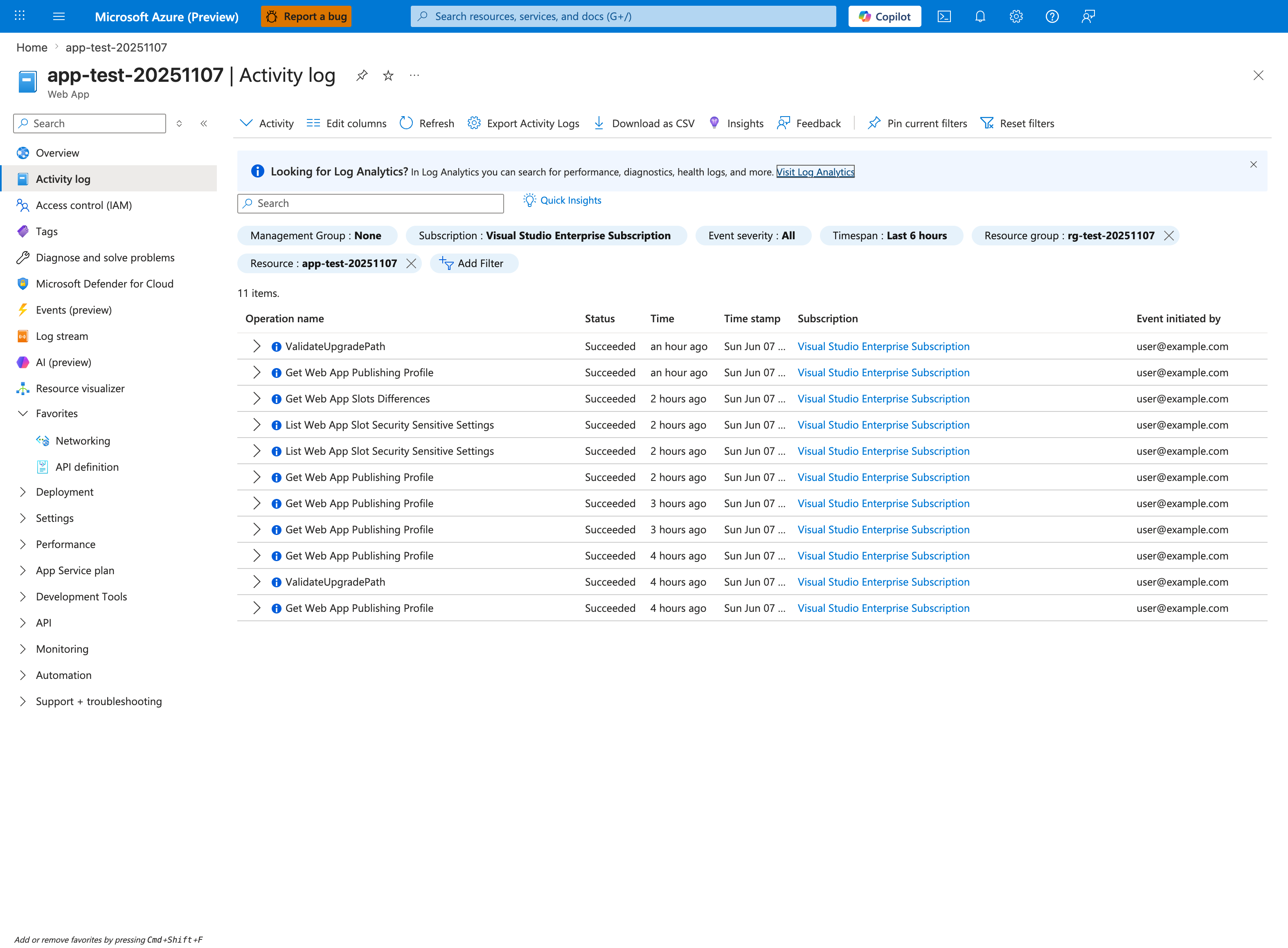
Purpose: Show where control-plane operations on the app are audited.
Look for: The Timespan and Resource filters and the Operation name, Status, and Event initiated by columns.
Expected result: Each management operation appears with its status and who started it; widen the timespan to cover the incident window.
For Category 5 incidents, the Activity log is the authoritative timeline of every control-plane change against this Web App. The first question to answer is "what operation immediately preceded the incident window?" — sort by Time descending and look for Update Site, Update Configuration, Update App Settings, Microsoft.Web/sites/publish/Action, or any slot-swap operation in the hour before symptoms began. The Event initiated by column distinguishes a human deploy from a CI/CD service principal or platform-initiated change. The Timespan: Last 6 hours filter chip should match the incident window; widen to 24 hours if the suspected change is older. Pair this with the CLI/KQL commands below to extract the change details (Update App Settings operations log the new values in their JSON payload).
First signal to check
az monitor activity-log list --resource-group <resource-group> --offset 24h
az webapp config appsettings list --resource-group <resource-group> --name <app-name>
az webapp config show --resource-group <resource-group> --name <app-name>
| Command | Purpose |
|---|---|
az monitor activity-log list --resource-group <resource-group> --offset 24h | Lists recent control-plane operations in the resource group so you can correlate symptoms with restarts, deployments, or configuration changes. |
--resource-group <resource-group> --offset 24h | Scopes the activity-log search to this resource group. |
--offset 24h | Limits the activity-log query to this recent time window. |
az webapp config appsettings list --resource-group <resource-group> --name <app-name> | Lists the app settings currently applied to this web app so you can inspect runtime or deployment configuration. |
--resource-group <resource-group> --name <app-name> | Looks up the resource in this resource group. |
--name <app-name> | Targets this web app. |
az webapp config show --resource-group <resource-group> --name <app-name> | Shows the web app's site configuration so you can inspect runtime, startup, logging, or auth settings. |
--resource-group <resource-group> --name <app-name> | Looks up the resource in this resource group. |
--name <app-name> | Targets this web app. |
AppServicePlatformLogs
| where TimeGenerated > ago(24h)
| where ResultDescription has_any ("restart", "recycle", "swap", "deploy", "configuration", "health")
| project TimeGenerated, OperationName, ResultDescription
| order by TimeGenerated desc
Common mistakes
- treating deployment/change correlation as coincidence
- failing to compare slot-specific settings and sticky configuration
- applying runtime mitigations without first validating config drift
Recommended playbooks
Classification workflow in practice
- Pick one dominant symptom and timestamp window.
- Map to one of the five categories using the flowchart.
- Run only the first evidence query for that category.
- If evidence contradicts the category, reclassify immediately.
- Open the linked playbook and continue with hypothesis-driven analysis.
Anti-patterns this model prevents
- Wrong-table bias: querying the same table for every incident type.
- Single-metric bias: letting CPU charts decide all hypotheses.
- No-change blind spot: ignoring deployment and config events.
- Premature root cause: selecting one familiar explanation before evidence correlation.
Use category labels in incident notes
Add an explicit category label in the first incident update. Example: "Initial classification: Category 4 (Dependency/Outbound), confidence medium." This keeps the team aligned on which evidence to collect first.
See Also
- Troubleshooting Method
- Detector Map
- Architecture Overview
- Evidence Map
- Decision Tree
- Playbooks Index
- KQL Query Library