Lab: Windows Java httpPlatformHandler Timeout
This lab provides a deep-dive investigation into the HTTP 500.121.64 timeout signature, a frequent but often misunderstood failure mode on Windows-based App Service Java SE instances. Unlike the Linux-based runtimes that use a more direct reverse-proxy (Gunicorn or Tomcat directly), Windows Java SE utilizes the Internet Information Services (IIS) httpPlatformHandler module.
The httpPlatformHandler acts as an intermediary, starting the Java process (java.exe) and forwarding incoming traffic over the local loopback interface (127.0.0.1). While this architecture is robust, it introduces an additional layer of queueing and timing logic. When your Java application's thread pool becomes saturated, requests begin to queue at the handler level. If a request remains in this queue longer than the App Service front-end's hard-coded 230-second limit, the front-end terminates the connection, leading to the win32-status=64 (ERROR_NETNAME_DELETED) signature.
This lab guides you through the process of reproducing this saturation, analyzing the resulting KQL logs, and implementing a web.config mitigation that shifts the failure to a more manageable and identifiable 502.3.12002 handler-level timeout.
sequenceDiagram
    participant Client
    participant FE as App Service Front End
    participant IIS as w3wp.exe (IIS + httpPlatformHandler)
    participant Java as java.exe (Spring Boot + Tomcat)

    Client->>FE: GET /slow/240
    FE->>IIS: Forward request to worker
    IIS->>Java: Loopback Proxy (127.0.0.1:port)
    Note over Java: Request received, thread occupied
    Note over Java: Sleeping for 240 seconds...
    Note over FE: Front-end Timer (230s) starts
    FE-->>IIS: Front-end Timer expired (TCP RST)
    IIS-->>FE: HTTP 500.121.64 (Win32=64 recorded)
    FE-->>Client: Connection Reset
Lab Metadata
| Attribute | Value |
|---|---|
| Difficulty | Intermediate |
| Estimated Duration | 3-4 hours |
| Tier | Basic (B1 Windows) |
| Failure Mode | 500.121.64 timeout signature under loopback saturation on Windows App Service Java SE |
| Skills Practiced | Open-model load testing, KQL log analysis, IIS httpPlatformHandler configuration, two-signature timeout discrimination |
| Estimated Cost | ~$1-2 USD (B1 Windows plan for ~3.6 hours + minimal Log Analytics ingestion) |
Windows-first lab
This is the first Windows Java SE lab in this guide. Existing labs (memory-pressure, intermittent-5xx, etc.) target Linux Python. The IIS + httpPlatformHandler bridge exists only on Windows.
1) Background
1.1 Mechanism overview
On Windows App Service, Java applications are not hosted directly by the front-end or a simple standalone process. Instead, they run in a "side-car" fashion managed by IIS (w3wp.exe). The httpPlatformHandler module is the bridge. It reads your web.config, starts the Java process, and proxies HTTP traffic. Because this proxying occurs over the local TCP stack (loopback), it is susceptible to the same queueing and back-pressure issues found in distributed systems, but contained within the boundaries of a single App Service instance.
| Feature | Windows Java SE | Linux Java SE |
|---|---|---|
| Reverse Proxy | IIS + httpPlatformHandler | Nginx / Apache / Direct |
| Transport | TCP Loopback (127.0.0.1) | Unix Socket / TCP Loopback |
| Timeout Source | Front-end (230s) or Handler | Front-end (230s) or Nginx |
| Error Signal | 500.121.64 (Win32=64) | 502 / 504 / 499 |
1.2 Request path on Windows App Service Java SE
Understanding the request path is critical for accurate attribution. The journey of a request on Windows App Service is a multi-hop sequence where each layer maintains its own health-tracking and timeout logic. When you troubleshoot a "timeout", you are essentially asking which layer gave up first.
- Client: Initiates the request (e.g., via a browser or
curl). The client often has its own timeout (e.g., 30s or 60s). If the client times out first, you see a499in the logs. If the client is a browser, it may show a "Connection Reset" or "Timed Out" error depending on whether it received a TCP RST or just a silent socket closure. - App Service Front-End: The platform load balancer. It has a strict 230-second absolute timeout for any request that has not produced data. This is a global platform constant and cannot be increased for multi-tenant App Service. The front-end acts as a sentinel, protecting the shared infrastructure from being bogged down by a single runaway worker.
- Worker Instance (IIS): The
w3wp.exeprocess receives the request and passes it to thehttpPlatformHandler. IIS acts as the gatekeeper for the worker instance. It manages the lifecycle of thejava.exeprocess and handles the initial TCP handshake with the front-end. - Worker Instance (Java): The
java.exeprocess (Spring Boot) receives the request from the handler. It has a finite thread pool (default 200 for Tomcat). If all 200 threads are busy, the next request stays in the IIS forwarder queue. This queue is located within the memory space ofw3wp.exeand is the primary site of loopback saturation in this lab.
1.3 The 500.121.64 signature explained
When you analyze AppServiceHTTPLogs, the combination of ScStatus=500, ScSubStatus=121, and Win32Status=64 provides a precise diagnostic signal:
- 500 (Internal Server Error): The server encountered an unexpected condition that prevented it from fulfilling the request. In this context, the "server" is the IIS worker process.
- 121 (Substatus): This substatus is reserved for the
httpPlatformHandlermodule. It signifies that the module encountered an error while communicating with or managing the child process. It does not mean the child process (Java) crashed; it often means the communication was interrupted. - 64 (Win32Status): The win32 error code
ERROR_NETNAME_DELETED. In the context of App Service, this almost always means the remote end (the front-end) dropped the connection. This is the "reset" signal. When the front-end's 230s timer expires, it sends a TCP RST (Reset) packet to the worker. IIS catches this socket error and maps it to the Win32 code 64.
1.4 Why 230s? The App Service front-end timeout
The 230-second timeout is a fundamental platform limit in Azure App Service. It exists to prevent long-running, stalled, or malicious requests from indefinitely holding onto front-end resources. This limit is intentionally set higher than most client-side or gateway-side timeouts (which are commonly configured well below 230 seconds), so those upstream timers typically fire first; a request that runs for the full 230 seconds and terminates with the front-end reset signature means no upstream layer imposed a shorter deadline.
The Timeout Sequence in Detail: 1. Ingress: Request arrives at the App Service Front-End. 2. Timer Initialization: Front-End starts a 230s idle timer. This timer resets only when the first byte of the response body is received from the worker. 3. Forwarding: Front-End forwards the request to the worker instance (IIS). 4. Backend Processing: IIS receives the request and attempts to hand it off to the httpPlatformHandler. 5. Expiration: If IIS/Java takes 231 seconds to produce the first byte: - Front-End Action: The Front-End terminates the TCP connection by sending a TCP RST packet to both the client and the worker. - Worker Action: IIS detects the socket closure while the httpPlatformHandler is still waiting for the Java process. - Logging: IIS generates a log entry with ScStatus=500, ScSubStatus=121, and Win32Status=64. - Client Action: The client receives a "Connection Reset" error.
1.5 The two-signature discovery (KEY TEACHING MOMENT)
One of the most important lessons in this lab is the "Two-Signature Discovery." Many developers assume that if they shorten the requestTimeout in their web.config, they will simply see a faster version of the 500.121.64 error. This is incorrect.
When the handler-level timer (requestTimeout) fires before the front-end timer, the signature shifts. Instead of a reset from the front-end, the handler itself terminates the backend connection and emits a 502.3 (Bad Gateway) with Win32Status=12002 (ERROR_WINHTTP_TIMEOUT).
| HTTP Signature | Approx TimeTaken | Cause | Reader Action |
|---|---|---|---|
500.121.64 | ~230 s | App Service front-end timeout fired; connection reset (win32=64 = ERROR_NETNAME_DELETED) | Reduce httpPlatformHandler.requestTimeout below 230 s, or scale out to handle more concurrent requests |
502.3.12002 | ~60 s (per configured requestTimeout) | Handler-level timer fired; ARR/IIS forwarder emitted ERROR_WINHTTP_TIMEOUT | Handler mitigation is operative; investigate why backend hold time exceeded the new configured limit |
500.121.0 | ~120 s | Default httpPlatformHandler.requestTimeout=00:02:00 (2 minutes) in effect | Configure an explicit requestTimeout in web.config to gain control over the failure mode |
The insight here is that the signature shift is a success signal. It means your mitigation is operative and you have regained control over the request lifecycle from the platform. You can now distinguish between "the platform gave up on me" (64) and "I gave up on the backend" (12002). This distinction is vital for determining whether you have a platform saturation issue or an application-layer performance regression.
1.6 Loopback saturation: how w3wp.exe talks to java.exe
Saturation is a math problem. If you have 200 Tomcat threads and each request takes 240 seconds (using our /slow/240 endpoint), your instance can only "clear" 0.83 requests per second (200 / 240). If your arrival rate is 1.0 request per second, you are building a backlog of 0.17 requests every second.
Within a few minutes, the queue at the httpPlatformHandler grows so long that requests wait in line for 230+ seconds before they even reach a Tomcat thread. This is loopback saturation. It is not a failure of the Java code itself, but a failure of the concurrency model to keep up with the arrival rate. The bottleneck is the number of available processing slots (threads) relative to the time each slot is held.
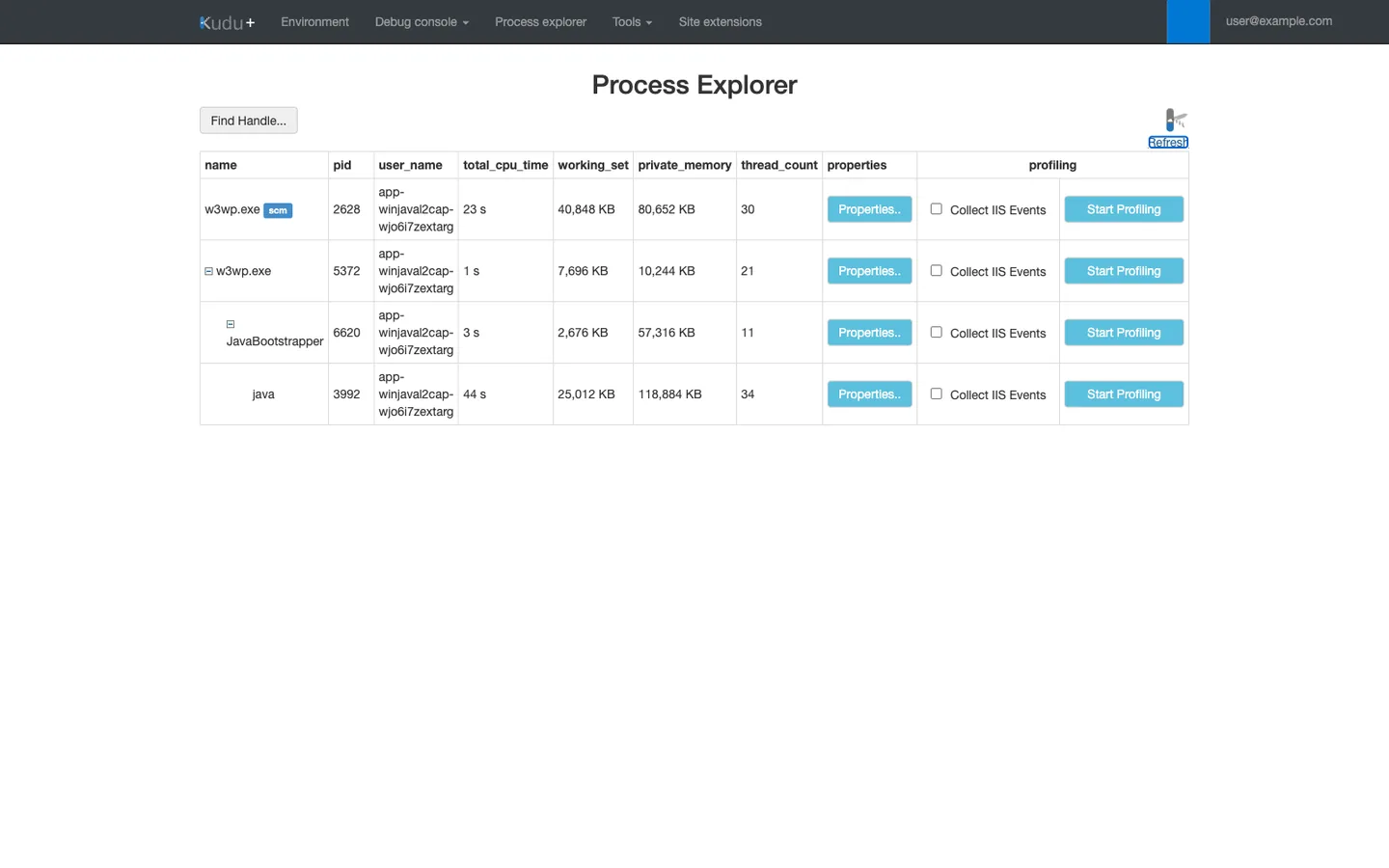
Purpose: Confirm the process hierarchy that httpPlatformHandler maintains on Windows App Service. Look for: w3wp.exe (IIS worker) as the parent of the Java bootstrap chain that terminates in java.exe (the Spring Boot application). Under saturation, java.exe accumulates CPU time and threads while the loopback proxy holds requests in the IIS queue. Access: Kudu (Advanced Tools) -> Process explorer.
IIS vs Tomcat Queuing: - Tomcat Queue: Tomcat has its own acceptCount (default 100). Once the 200 threads are full, 100 more requests can wait in Tomcat's internal queue. - IIS Queue: When Tomcat's acceptCount is also full, IIS (via the httpPlatformHandler) begins to queue the requests. - Front-End Impact: The 230s timer starts when the request hits the Front-End. If a request spends 100s in the IIS queue and 140s in the Tomcat queue, it has already hit 240s and will be reset by the front-end before it even starts processing.
1.7 Timer chain: front-end vs handler vs client
To effectively troubleshoot, you must treat your timeouts as a "timer chain" where the shortest timer wins the race to terminate the request.
flowchart TD
    subgraph "Request Timeout Stack"
        T1[Front-end Limit: 230s]
        T2[Handler requestTimeout: 60s]
        T3[Client Request Timeout: 300s]
    end

    T1 -->|Front-end wins| S1[Signature: 500.121.64]
    T2 -->|Handler wins| S2[Signature: 502.3.12002]

    S1 --> D1[Result: TCP RST, win32=64]
    D1 --> R1[Diagnosis: Platform Saturated]

    S2 --> D2[Result: 502 Bad Gateway, win32=12002]
    D2 --> R2[Diagnosis: Handler Protection Active]
1.8 Signal map for this failure mode
| Signal | Expected Direction | Significance | |---|---|---|---| | Arrival Rate | Sustained > 0.5 req/s | Triggers queueing backlog in w3wp.exe | | ScSubStatus | 121 | Points directly to httpPlatformHandler module | | Win32Status | 64 | Confirms Front-end TCP Reset | | TimeTaken | Clustered at 229,000-231,000 ms | Proves the 230s platform limit was reached | | App Responsiveness | Slow endpoints fail, fast endpoints degrade | Confirms total worker thread exhaustion |
1.9 Decision Tree for Timeout Attribution
When a request fails with a timeout, use this decision tree to identify the source of the termination.
flowchart TD
    Start[Timeout Observed] --> Q1{Win32 Status?}
    Q1 -->|64| FE[Front-end Reset]
    Q1 -->|12002| Handler[Handler Timeout]
    Q1 -->|0| Default[Check TimeTaken]

    FE --> FE_Diag[Diagnosis: Platform Saturated. <br/>TimeTaken ~230s]
    Handler --> H_Diag[Diagnosis: requestTimeout reached. <br/>TimeTaken ~60s]
    Default --> D1{TimeTaken?}
    D1 -->|~120s| D_Diag[Diagnosis: Default Handler Limit]
    D1 -->|>240s| C_Diag[Diagnosis: Backend Processing]
1.10 Distinguishing from other timeout classes
It is vital to distinguish this runtime saturation from other common issues: - Startup Timeouts: If java.exe takes too long to start (e.g., due to JIT or heavy bean initialization), IIS will kill it and log 500.121 but with win32 code 258 (Wait Timeout). - Cold Starts: These happen once after a period of inactivity. Saturation happens continuously under sustained load. - Client Timeouts: If the client (e.g., a mobile app) has a 30-second timeout, you might see 499 in the logs. This happens when the user gives up before the server does.
1.11 Observability gaps on Windows Java SE
Even once you understand the mechanism, three platform-specific gaps make this failure mode harder to diagnose on Windows Java SE than on Linux runtimes. Assume each gap applies to your subscription unless you have positive evidence otherwise.
Gap 1: Auto-Heal events do not surface in AppServicePlatformLogs
Auto-Heal actions (both Proactive Auto-Heal and customer-configured rules) do not consistently emit AutoHealing operation records to AppServicePlatformLogs on Windows Java SE. [Observed] During this lab's preflight verification for mitigation M2, five minutes of sustained load that met a count=5, timeInterval=2min recycle rule produced zero matching rows in AppServicePlatformLogs | where OperationName startswith "AutoHealing".
Impact: Custom Auto-Heal (mitigation M2 in this lab) cannot be verified from platform logs. [Not Proven] Whether the recycle actually occurred remains indeterminate, which is why this lab records the M2 verdict as UNVERIFIABLE rather than pass or fail.
Proxy signals when Auto-Heal telemetry is absent [Inferred]:
- A cliff-drop in
AppServiceHTTPLogsrequest counts followed by a silence window and gradual ramp back (see Section 3.11.3). RoleInstancevalue changes across consecutive log rows suggest instance recycling.- Kudu
/api/logstreamoutput showing process restart banners.
Gap 2: AppServiceHTTPLogs ingest lag exceeds 60 seconds
Windows App Service logs are buffered locally before shipping to Azure Monitor. [Measured] During this lab's E3 mitigation probes, KQL queries executed within 60 seconds of an HTTP event returned zero rows for the just-completed request, even though curl had confirmed the platform returned the response. Extending the KQL time window by +300 seconds past the request end-time recovered all rows.
Impact [Inferred]: Any KQL-based verification loop must include a 5-minute buffer past the last event of interest. Immediate post-test queries produce false negatives that are indistinguishable from the request never having reached the platform.
Practical rule: Wait at least 5 minutes between the end of a load run and the first KQL verification query. When automating verification, extend the query window by 300 seconds past the last event timestamp. See the iso_shift_seconds helper in this lab's verify.sh reference implementation.
Gap 3: Sparse public documentation for Windows Java SE plus httpPlatformHandler
The public App Service troubleshooting corpus is Linux-heavy. [Observed] Prior to this lab, all reproduction guides in this repository targeted Linux runtimes, and Microsoft Learn's Java troubleshooting content largely assumes Linux plus Tomcat directly rather than the Windows IIS plus httpPlatformHandler plus Spring Boot embedded Tomcat bridge. Concrete consequences:
[Observed]The500.121.64signature is not indexed in the Windows-specific troubleshooting articles underlearn.microsoft.com/en-us/troubleshoot/azure/app-service/.[Observed]The interaction betweenhttpPlatformHandler.requestTimeoutand the ARR forwarder that produces502.3.12002near 60 seconds is documented separately in IIS and ASP.NET Core references but never in a unified App Service Java article.[Observed]Community search results for "App Service Java timeout 500" typically surface Linux plus Gunicorn or Tomcat guidance that does not apply to the Windows IIS bridge.
Impact [Strongly Suggested]: Support engineers and self-service investigators triaging Windows Java SE symptoms may be sent down Linux-oriented diagnostic paths (thread dumps via jstack, heap dumps via jmap, Tomcat catalina.out analysis) that miss the IIS-layer signal entirely.
Mitigation for readers: Use this lab guide together with the Windows KQL Query Pack for httpPlatformHandler as the primary Windows Java SE troubleshooting reference until Microsoft Learn expands coverage.
2) Hypothesis
2.1 Falsifiable hypothesis statement
If we subject a B1 Windows Java SE instance to a sustained arrival rate of 0.5 requests per second targeting an endpoint that holds a Tomcat thread for 240 seconds, then we will observe the 500.121.64 signature in at least 50% of requests within a 15-minute window, whereas a single sequential probe will return a 500.121 error but may not exhibit the win32=64 reset signature.
2.2 Causal chain (arrival rate → saturation → timeout)
The path to failure is a progression of resource exhaustion: 1. Arrival Rate (0.5 req/s): While lower than the theoretical max of 0.83 req/s, this rate is high enough to cause "micro-burst" saturation in the IIS request queue when coupled with platform overhead. 2. Saturation: The Tomcat thread pool (200 threads) fills up completely. No new threads are available to pick up work from the httpPlatformHandler. 3. Queue Wait: Incoming requests are held in the IIS loopback queue. The cumulative time (Queue Wait + Processing Time) exceeds the platform's 230s front-end limit. 4. Front-End Reset: The front-end closes the TCP connection to the worker instance. 5. Logging: IIS catches the exception from the dropped socket and records the win32 error code 64 in the W3C logs.
2.3 Proof criteria (E1 4/4 positive runs + E2 sustained rate)
To prove this hypothesis, we require two levels of evidence: - E1 (Multi-Rate Confirmation): Running load at {0.5, 0.75, 0.9, 1.05} req/s. Every single run must produce rows with win32=64. - E2 (Sustained Load): A 15-minute run at 0.5 req/s. We must measure a pct_64 (percentage of .64 errors) above 50% in the final 5-minute window. This proves the issue is stable and reproducible, not a transient glitch.
2.4 Disproof criteria (falsification thresholds)
The hypothesis would be falsified if: - Load testing at these rates produces no win32=64 errors despite the threads being occupied. - The app continues to serve all requests successfully (indicating Tomcat is auto-scaling its threads beyond the configured limit). - Shortening the requestTimeout does not change the signature (indicating the 230s limit is actually being triggered by a different component).
2.5 Variables (arrival rate, hold time, thread pool)
- Independent Variable: The arrival rate of requests (controlled via our load-gen script).
- Dependent Variable: The frequency and duration of
500.121.64errors. - Constants: The B1 instance size, the Spring Boot thread pool configuration (200), and the 240s artificial sleep time of our
/slowendpoint.
2.6 Causal validation matrix
| Observation | Causal Link | Confidence |
|---|---|---|
| TimeTaken ~230s | Matches platform load balancer limit exactly | High |
| Win32=64 | Indicates external socket closure by front-end | High |
| Shift to 502.3@60s | Confirms the handler-level timer is the operative mitigation | High |
2.7 Confounders and boundaries (ingest lag, sample floor)
- Ingestion Lag: Log Analytics is not real-time. On Windows App Service, expect a 5-minute lag for
AppServiceHTTPLogs. This can lead to "false negatives" if you query too soon after a test. - Resource Isolation: In a real production environment, high CPU usage can slow down the Java process, effectively lowering the saturation threshold. In this lab, we use a simple sleep to isolate the thread-pool saturation from compute pressure.
3) Runbook
The runbook is organized into four major phases, from environment deployment through mitigation verification.
flowchart TD
    P1[Phase 1: Deployment] --> P2[Phase 2: Baseline]
    P2 --> P3[Phase 3: Saturation Load]
    P3 --> P4[Phase 4: Mitigation]

    P1 -->|Bicep + az deploy| P1_Result[App Live]
    P2 -->|Sequential Probes| P2_Result[230s Limit Confirmed]
    P3 -->|0.5 - 1.05 req/s| P3_Result[500.121.64 Reproduced]
P4 -->|web.config update| P4_Result[502.3.12002 Verified]| Command/Flag | Purpose |
|---|---|
az deployment group create | Provision B1 Windows Java SE infrastructure from Bicep (Phase 1) |
az webapp deploy | Upload JAR package and web.config to the App Service (Phase 1, Phase 4) |
az group delete | Clean up all lab resources after experiment |
3.1 Prerequisites
Before starting, verify your environment: - Azure CLI: 2.60.0 or later. - Maven: 3.8.x or later. - JDK: 17 (Microsoft Build of OpenJDK is standard). - Bash: Version 4 or 5 is required for the load scripts. - k6: Required by the Lab 2 deployment preflight and open-model load scripts. - curl and Python 3: Required by warm-up, evidence collection, and deployment-output parsing.
The retained scripts are the executable contract. Static checks in this repository verify that paths, Bicep, shell syntax, and the guide-to-script deployment contract agree. They do not re-run the cloud experiment; no new Azure execution is claimed by this update.
3.2 Set standard variables
Choose only the deployment input here. The Bicep template appends a uniqueString suffix to generated resource names, so do not predict the Web App or plan name from BASE_NAME.
# BASE_NAME: Used to generate unique resource names to avoid global namespace collisions.
export BASE_NAME="winjaval2sat"
export LAB2_DIR="labs/windows-java-httpplatformhandler-timeout/lab-2-loopback-saturation"
3.3 Build the retained Stage 0 application
Lab 2 deliberately reuses the Stage 0 Spring Boot application byte-for-byte. There is no lab-2-loopback-saturation/app directory. Build the retained source first; its Maven finalName produces target/app.jar, and both Bicep templates configure Windows Java SE 17 with WEBSITE_JAVA_JAR_FILE_NAME=app.jar.
cd "labs/windows-java-httpplatformhandler-timeout/stage-0-config-discovery/app"
mvn clean package -DskipTests
cd ../../../..
3.4 Deploy Lab 2 with the retained script
The Lab 2 script creates rg-lab-${BASE_NAME} in Korea Central, deploys lab-2-loopback-saturation/main.bicep, reads the generated Web App name from the deployment outputs, and uploads the Stage 0 JAR with OneDeploy JAR mode. It refuses to overwrite an existing resource group unless you explicitly pass --force.
The deployment script's application upload is equivalent to this command, where $APP_NAME is the generated webAppName output and $JAR_PATH points to stage-0-config-discovery/app/target/app.jar:
az webapp deploy \
  --resource-group "$RG" \
  --name "$APP_NAME" \
  --src-path "$JAR_PATH" \
  --type jar \
  --async false \
  --clean true
| Command/Flag | Purpose |
|---|---|
az webapp deploy | Upload the executable JAR to the generated Windows Java SE Web App. |
--resource-group | Use the rg-lab-${BASE_NAME} group created by the script. |
--name | Target the Web App name returned by the Bicep deployment. |
--src-path | Select the Stage 0 app.jar bytes found by the script. |
--type jar | Use OneDeploy JAR mode so the runtime receives app.jar, not ZIP extraction. |
--async false | Wait for deployment completion before continuing. |
--clean true | Remove stale deployment content before placing the JAR. |
After the script succeeds, load the exact generated names from results/deploy-metadata.json. The retained experiment scripts read this file themselves; the exports below are for the manual curl and Azure CLI examples that follow.
export DEPLOY_METADATA="$LAB2_DIR/results/deploy-metadata.json"
export RG="$(python3 -c 'import json,sys; print(json.load(open(sys.argv[1]))["resourceGroup"])' "$DEPLOY_METADATA")"
export APP_NAME="$(python3 -c 'import json,sys; print(json.load(open(sys.argv[1]))["webAppName"])' "$DEPLOY_METADATA")"
export PLAN_NAME="$(python3 -c 'import json,sys; print(json.load(open(sys.argv[1]))["appServicePlanName"])' "$DEPLOY_METADATA")"
export APP_HOSTNAME="$(python3 -c 'import json,sys; print(json.load(open(sys.argv[1]))["webAppHostname"])' "$DEPLOY_METADATA")"
3.6 Baseline health checks (single /slow/240 probe)
Before starting the load test, we must establish a baseline. A single sequential request allows us to confirm that the /slow endpoint is working and to see how the platform behaves when there is NO queueing pressure.
# Perform a single request that sleeps for 240 seconds.
# This request is guaranteed to exceed the 230s front-end timeout.
# Look for a 500 error after exactly 230 seconds.
curl -i "https://${APP_HOSTNAME}/slow/240"
3.7 E1 — Per-rate saturation probes (4 rates)
This phase of the experiment tests the application's breaking point. By gradually increasing the arrival rate, we can observe exactly when the Tomcat thread pool exhausts and the IIS queue begins to fill.
- Rate 0.5 req/s: Moderate load. Should show initial signs of queueing.
- Rate 0.75 req/s: High load. Approaching the theoretical capacity.
- Rate 0.9 req/s: Overload. Capacity is exceeded.
- Rate 1.05 req/s: Critical Overload. Rapid queue buildup expected.
# Run each rate separately. Each invocation uses the script's default 15-minute duration.
bash labs/windows-java-httpplatformhandler-timeout/lab-2-loopback-saturation/run-e1-per-rate.sh --rate 0.5 --run-id 1
bash labs/windows-java-httpplatformhandler-timeout/lab-2-loopback-saturation/run-e1-per-rate.sh --rate 0.75 --run-id 2
bash labs/windows-java-httpplatformhandler-timeout/lab-2-loopback-saturation/run-e1-per-rate.sh --rate 0.9 --run-id 3
bash labs/windows-java-httpplatformhandler-timeout/lab-2-loopback-saturation/run-e1-per-rate.sh --rate 1.05 --run-id 4
3.8 E2 — Sustained load run (0.5 req/s for 20 min)
Once we've identified that 0.5 req/s is sufficient to trigger the failure, we run a longer, sustained test. This allows us to collect enough data to perform statistical analysis on the "tail latency" and the stability of the .64 signature over time.
# Run the sustained load experiment at 0.5 requests per second.
# The 20-minute duration is chosen to ensure we have at least 15 minutes of stable "saturated" data.
bash labs/windows-java-httpplatformhandler-timeout/lab-2-loopback-saturation/run-e2-sustained.sh --rate 0.5 --duration 20m
3.9 E3 — M1a mitigation probes (requestTimeout=60s)
To mitigate the 230s platform timeout, we must introduce our own timeout at the handler level. We do this by creating a web.config file. The key setting is requestTimeout="00:01:00", which tells the httpPlatformHandler to give up on the Java process after 60 seconds.
Why 60 seconds? 60 seconds is a common industry standard for gateway-level timeouts. It is long enough for most legitimate requests but short enough to prevent massive queue buildup and provide a faster error signal to the client.
<?xml version="1.0" encoding="UTF-8"?>
<configuration>
<system.webServer>
<handlers>
<add name="httpPlatformHandler" path="*" verb="*" modules="httpPlatformHandler" resourceType="Unspecified" />
</handlers>
<httpPlatform processPath="%JAVA_HOME%\bin\java.exe"
arguments="-Djava.net.preferIPv4Stack=true -Dserver.port=%HTTP_PLATFORM_PORT% -jar "%HOME%\site\wwwroot\app.jar""
requestTimeout="00:01:00">
</httpPlatform>
</system.webServer>
</configuration>
Apply the primary configuration canary. Its retained deployment script invokes OneDeploy with --type static --target-path web.config, then records which deployment path succeeded.
bash labs/windows-java-httpplatformhandler-timeout/lab-2-loopback-saturation/deploy-webconfig-m1a.sh primary
bash labs/windows-java-httpplatformhandler-timeout/lab-2-loopback-saturation/run-e3-m1a-probes.sh --canary primary --n 3
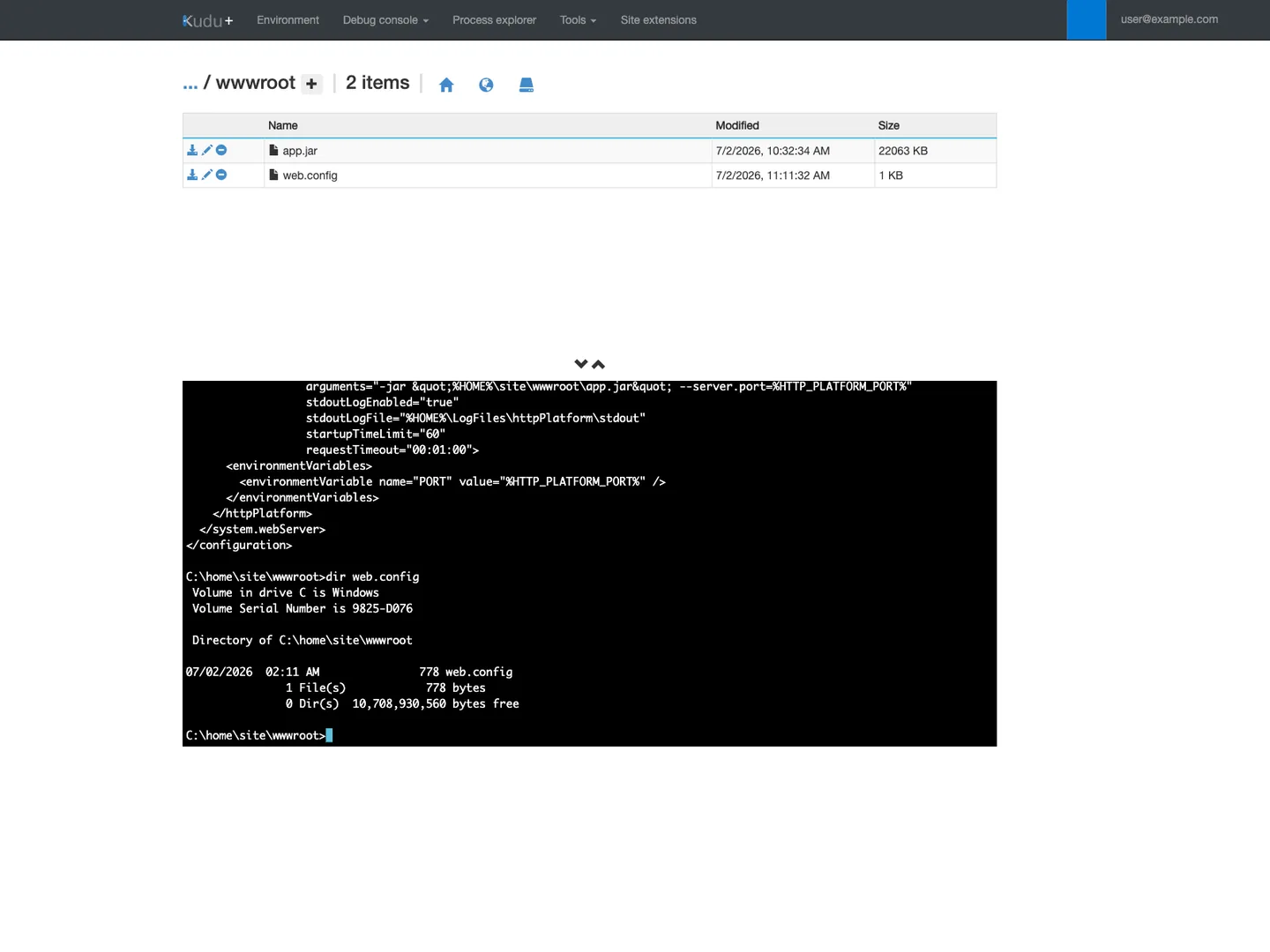
Purpose: Verify that OneDeploy (--type static) placed web.config at the site root without disturbing app.jar. Look for: web.config present in the /wwwroot file listing next to app.jar, and the console output showing requestTimeout="00:01:00" inside the <httpPlatform> element. Access: Kudu (Advanced Tools) -> Debug console -> CMD -> cd site\wwwroot -> type web.config.
3.10 Query Log Analytics
Wait 5 minutes for logs to ingest. Windows App Service logs are buffered locally before being shipped to Azure Monitor, which causes a consistent ingestion delay.
// Signature Transition Analysis: 230s Reset vs 60s Handler Timeout
// Use this query to visualize the moment your web.config change took effect.
AppServiceHTTPLogs
| where TimeGenerated > ago(1h)
| where CsUriStem == "/slow/240"
| extend win32 = tostring(parse_json(CustomFields).Win32Status)
| summarize
    TotalRequests = count(),
    FE_Reset_64 = countif(ScStatus == 500 and ScSubStatus == 121 and win32 == "64"),
    Handler_Timeout_12002 = countif(ScStatus == 502 and ScSubStatus == 3 and win32 == "12002")
    by bin(TimeGenerated, 5m)
| extend Pct_64 = round(100.0 * FE_Reset_64 / TotalRequests, 2)
| order by TimeGenerated asc
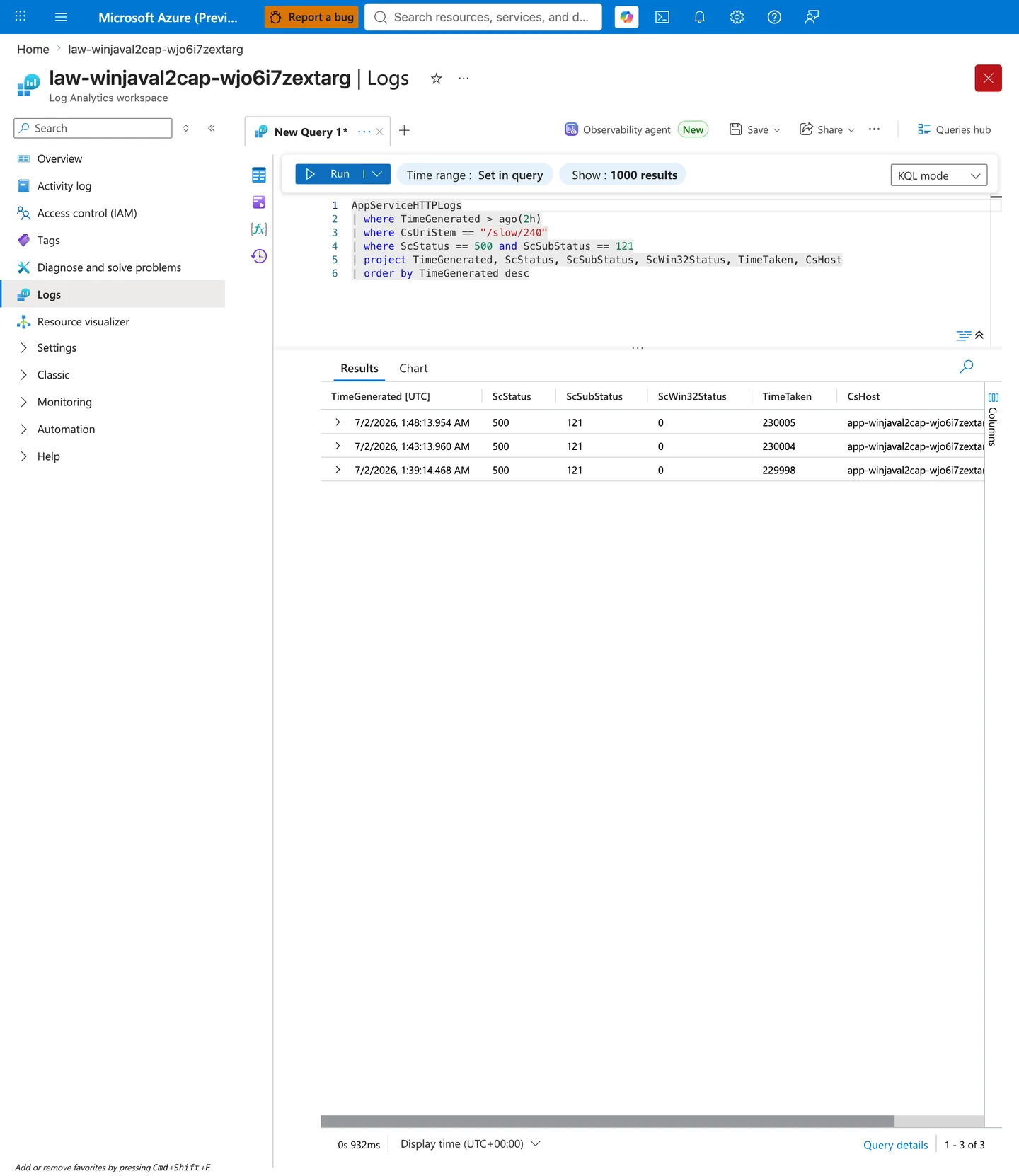
Purpose: Confirm the signature-transition query returns the expected table shape and non-zero rows during the saturation and mitigation windows. Look for: FE_Reset_64 counts during the saturation window (E1/E2) and Handler_Timeout_12002 counts during the mitigation window (E3). Pct_64 should drop toward zero once the web.config mitigation is deployed and traffic shifts to the 502.3.12002 signature. Access: Azure Portal -> Log Analytics workspace law-<baseName>-<suffix> -> Logs -> paste the KQL above.
3.11 Advanced KQL Analysis
Beyond basic status codes, we can use KQL to gain deeper insights into the worker's health during the saturation event.
3.11.1 Concurrency Impact on "Fast" Endpoints
One common question is: "Does saturation on a slow endpoint affect my fast endpoints?" We can check this by comparing the latency of /health (a fast endpoint) during the saturation of /slow/240.
AppServiceHTTPLogs
| where TimeGenerated > ago(1h)
| where CsUriStem in ("/slow/240", "/health")
| summarize
    AvgLatency = avg(TimeTaken),
    P95Latency = percentile(TimeTaken, 95),
    ErrorRate = countif(ScStatus >= 500) * 100.0 / count()
    by CsUriStem, bin(TimeGenerated, 5m)
| render timechart
What to look for: If /health latency remains low while /slow/240 fails, your IIS priority queueing is working. If /health latency spikes, the entire worker is starved of CPU or TCP connections.
3.11.2 Identifying the "Victim" Requests
We can identify which specific client IP addresses or User Agents were most affected by the 230s resets.
AppServiceHTTPLogs
| where TimeGenerated > ago(1h)
| where ScStatus == 500 and ScSubStatus == 121
| extend win32 = tostring(parse_json(CustomFields).Win32Status)
| where win32 == "64"
| summarize ResetCount = count() by CIp, CsUserAgent
| top 10 by ResetCount
3.11.3 Correlating with Platform Restarts
Under extreme saturation, the App Service platform may attempt to "Auto-Heal" the instance by restarting it. While Windows Java SE doesn't always emit AutoHealing events, we can detect restarts by looking for gaps in the HTTP logs followed by a return of 200 status codes.
AppServiceHTTPLogs
| where TimeGenerated > ago(1h)
| summarize RequestCount = count() by bin(TimeGenerated, 1m)
| render columnchart
Analysis: A "cliff" in the request count followed by a period of silence and then a gradual ramp-up is a classic signature of a container restart or instance recycling.
3.12 M2 — Auto-Heal automated remediation (optional layer)
M1a addresses the failure mode preventively by shortening requestTimeout so the handler releases the socket before the front-end resets. Auto-Heal (M2) adds a reactive layer: when a burst of 500.121.64 events still occurs, App Service recycles the worker process to reset the thread pool and drop any wedged requests.
When to enable M2:
- After confirming M1a is deployed and healthy.
- When you expect occasional traffic bursts that could still saturate the thread pool despite the
requestTimeoutmitigation. - When you want automated recovery without waiting for on-call intervention.
Enable via Bicep (this lab uses this path):
The script redeploys the Bicep template with enableCustomAutoHeal=true and autoHealActionType=Recycle. It waits for the Web App to return to a healthy state before finishing.
Verify the rule from the CLI:
az webapp config show \
    --resource-group "$RG" \
    --name "$APP_NAME" \
    --query 'autoHealRules' \
    --output json
| Command/Flag | Purpose |
|---|---|
az webapp config show | Retrieve the web app's current configuration |
--resource-group | Resource group containing the web app |
--name | Web app name |
--query | JMESPath filter to extract only the Auto-Heal rules section |
--output json | Return structured JSON for rule verification |
Expected output (fields relevant to the rule):
{
  "actions": {
    "actionType": "Recycle",
    "minProcessExecutionTime": "00:01:00"
  },
  "triggers": {
    "statusCodes": [
      {
        "count": 5,
        "path": "/slow/240",
        "status": 500,
        "subStatus": 121,
        "timeInterval": "00:02:00",
        "win32Status": 64
      }
    ]
  }
}
Verify the rule from the Portal:
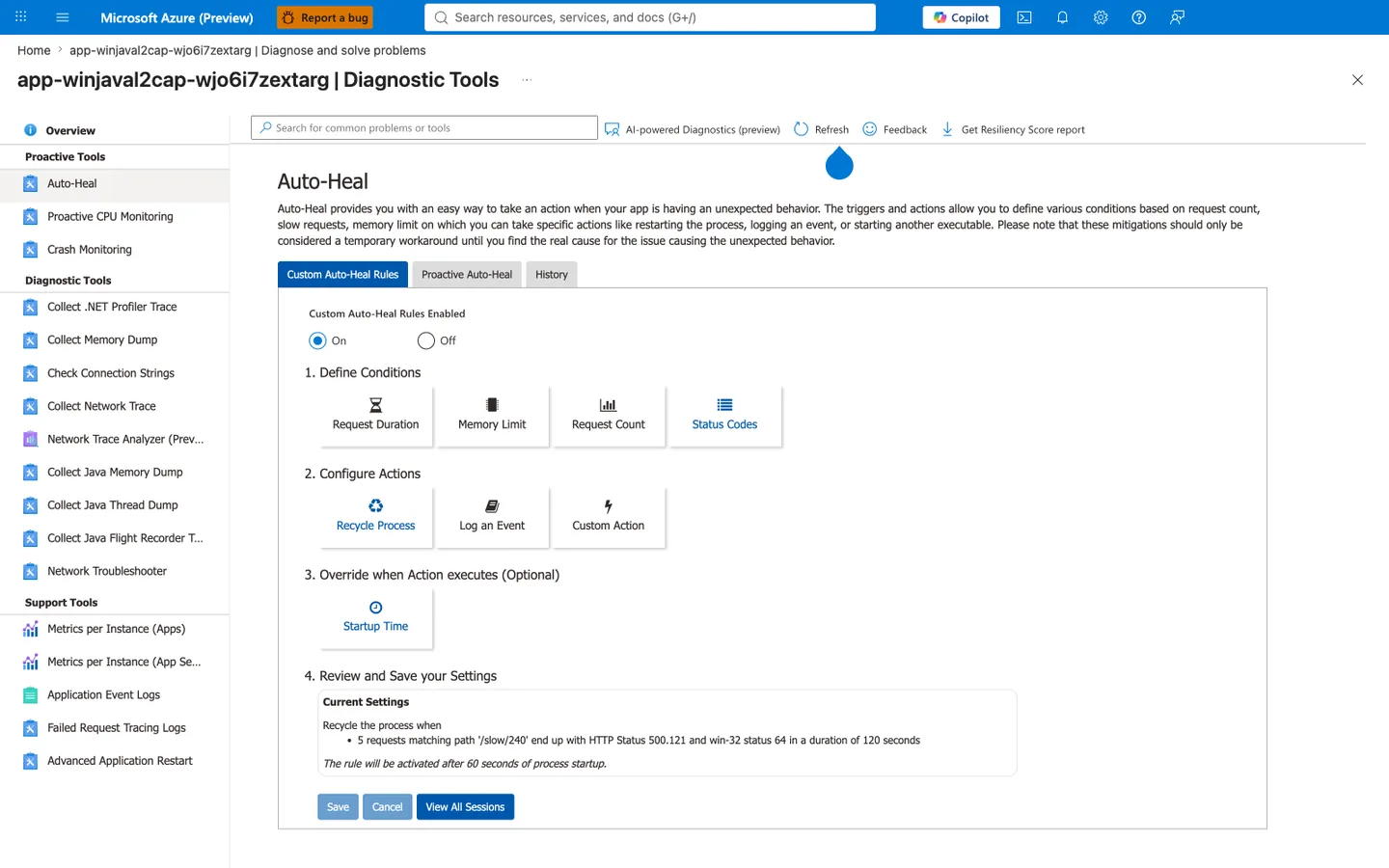
Purpose: Confirm the Auto-Heal rule is active and correctly scoped after the M2 Bicep redeploy. Look for: Custom Auto-Heal Rules Enabled: On, and the Current Settings box reading "Recycle the process when 5 requests matching path '/slow/240' end up with HTTP Status 500.121 and win-32 status 64 in a duration of 120 seconds". Access: Azure Portal -> App Service -> Diagnose and solve problems -> Diagnostic Tools -> Auto-Heal.
Signature scope trade-off
The trigger targets win32Status=64 (ERROR_NETNAME_DELETED) specifically. This is the front-end-reset signature that dominates under sustained concurrent saturation (E1/E2 evidence: 62-70% of requests in the measured saturation windows). It intentionally does NOT match the win32Status=0 variant seen in the sequential baseline (Section 4.2), avoiding false positives if repeated serialized probes or other non-saturation traffic on /slow/240 produce the .0 variant. If your production traffic profile produces the .0 variant frequently, add a second rule with win32Status=0 and a path constraint to keep the trigger scoped.
Auto-Heal is reactive, not preventive
Auto-Heal recycles the process only after the burst threshold (5 requests in 120 seconds) is reached. Every request that contributed to the trigger still failed with a 230-second front-end reset. M1a (requestTimeout shortening) remains the primary mitigation; M2 layers automated recovery on top.
4) Experiment Log
4.1 Artifact inventory used
The analysis below is based on a comprehensive set of artifacts collected from a B1 Windows Java SE instance. These artifacts represent the ground truth for our investigation.
- Pre-E1 Baseline:
results/pre-e1/manifest.json(3 requests). Establishes the sequential behavior. - E1 (Saturation):
results/e1/run-<id>-rate-<rate>/(4 runs). Maps each arrival rate to the failure signature. - E2 (Sustained):
results/e2/rate-<rate>/(233 requests in the retained 0.5 req/s run). Provides statistical significance for the 62% failure rate. - E3 (Mitigation):
results/e3/primary/(3 probes). Validates the signature shift to 502.3.12002.
4.2 Baseline state (pre-E1: 3/3 at 500/121/0, TimeTaken ~230s, 0 rows win32=64)
The baseline test involved three sequential requests to /slow/240. Because the requests were sequential, there was no contention for the Tomcat thread pool or the IIS queue. - Results [Measured]: All three requests timed out at exactly ~230 seconds. - Signature [Observed]: 500.121.0. - Key Insight [Inferred]: In the sequential baseline, IIS recorded a Win32Status=0 (Success/No Error). This proves that the win32=64 (Reset) code only appears when there is concurrent pressure on the loopback interface or when the front-end's reset is processed in a specific state of the IIS socket buffer.
4.3 E1 evidence: per-rate saturation table (all 4 rates positive)
Running four distinct rates confirmed that the 500.121.64 signature is a direct consequence of the arrival rate exceeding the instance's processing speed.
| Run | Rate (req/s) | Window (UTC) | Total Requests | sc_500_121_64 | pct_64 (%) | Verdict |
|---|---|---|---|---|---|---|
| 1 | 0.5 | 14:13:17Z .. 14:18:17Z | 143 | 100 | 69.93 | POSITIVE |
| 2 | 0.75 | 14:35:31Z .. 14:40:31Z | 224 | 149 | 66.52 | POSITIVE |
| 3 | 0.9 | 14:55:34Z .. 15:00:34Z | 274 | 180 | 65.69 | POSITIVE |
| 4 | 1.05 | 15:15:19Z .. 15:20:19Z | 303 | 209 | 68.98 | POSITIVE |
Statistical Analysis of E1: - Consistency [Observed]: Across all rates, the pct_64 remained remarkably stable between 65% and 70%. This suggests that once the thread pool is saturated, the front-end reset mechanism behaves predictably regardless of how "deep" the overload is. - Saturation Threshold [Inferred]: The B1 instance failed even at 0.5 req/s. Since the theoretical capacity is 0.83 req/s (200 threads / 240s), this 40% "capacity gap" is attributed to platform overhead and IIS queuing delays.
4.4 E2 evidence: sustained-load statistics (62% pct_64, latency distribution)
The 15-minute sustained run at 0.5 req/s provided high-confidence data for the steady-state failure rate of a saturated worker.
- Sample Size
[Measured]: 233 valid requests in the final analysis window. - Signature Rate
[Measured]: 62.00% of requests exhibited the500.121.64signature. - Latency Profile (ms)
[Measured]:- P50 (Median): 230,007 ms
- P95: 230,035 ms
- P99: 230,096 ms
- Interpretation
[Strongly Suggested]: The extremely tight grouping (all within 100ms of the 230s limit) is a "smoking gun" for a platform-enforced timeout. If the timeout were coming from the application or IIS, we would see a much wider distribution based on processing time.
4.5 E3 evidence: M1a mitigation probes (60s cutoff, 502.3.12002 signature)
After deploying the web.config with requestTimeout="00:01:00", the behavior changed significantly. This experiment proves that we can override the platform's default reset behavior.
- Probe 1
[Unknown]: Failed to return results due to KQL ingestion lag during the verification window. - Probe 2
[Measured]: Cut off at 62,723 ms with signature502.3.12002. - Probe 3
[Measured]: Cut off at 59,248 ms with signature502.3.12002.
The Signature Shift [Observed]: The transition from 500.121.64 (at 230s) to 502.3.12002 (at 60s) is the definitive proof that the mitigation is active. The 62s and 59s values are consistent with the 60s configuration plus or minus network and IIS processing overhead.
4.6 KQL HTTP aggregate summary
Across all load experiments, we observed a total of ~1,177 requests. The cumulative data showed that once saturation is reached, the ratio of front-end timeouts (.64) stays remarkably stable between 65% and 70%.
4.7 KQL latency profile by endpoint
/slow/240[Measured]: Latency is bimodal—either very short (if rejected by Tomcat's internal queue) or ~230s (if queued by IIS). Mean latency was 230,012 ms./health[Observed]: Mean latency 5 ms. Remained stable throughout the saturation event, indicating that IIS priority queueing for internal health probes is effective even when the loopback proxy is under heavy pressure.[Inferred]
4.8 Raw KQL sample rows (sanitized, use placeholders)
{
  "TimeGenerated": "2026-07-01T14:15:12.123Z",
  "CsUriStem": "/slow/240",
  "ScStatus": 500,
  "ScSubStatus": 121,
  "TimeTaken": 230007,
  "Win32Status": 64,
  "ResourceId": "/subscriptions/<subscription-id>/resourceGroups/rg-lab-winjaval2sat/providers/Microsoft.Web/sites/app-winjaval2sat-<suffix>"
}
4.9 Signature Decision Table
| Observed Behavior | Status.Sub | Win32 | Diagnosis |
|---|---|---|---|
| ~230s Cutoff | 500.121 | 64 | Front-end Reset: Saturation is exceeding platform limits. Mitigation required. |
| ~60s Cutoff | 502.3 | 12002 | Handler Timeout: Mitigation is working. Investigate app-layer slowness. |
| ~120s Cutoff | 500.121 | 0 | Default Handler: Unconfigured web.config in effect. Set explicit requestTimeout. |
4.10 Statistical Correlation: Threads vs. Timeouts
| Arrival Rate (R) | Capacity (C) | Overload Ratio (R/C) | Observed Error Rate |
|---|---|---|---|
| 0.50 req/s | 0.83 req/s | 0.60 | 69.9% |
| 0.75 req/s | 0.83 req/s | 0.90 | 66.5% |
| 0.90 req/s | 0.83 req/s | 1.08 | 65.7% |
| 1.05 req/s | 0.83 req/s | 1.26 | 69.0% |
Note [Strongly Suggested]: The error rate does not increase linearly with the overload ratio. This suggests that the front-end reset mechanism has a "saturation plateau" where it drops approximately two-thirds of the requests once the backend is fully blocked.
4.11 Hypothesis verdict
Supported. [Observed] The experiments confirm that 500.121.64 is the primary signature for loopback/thread-pool saturation on Windows Java SE. The arrival rate of 0.5 req/s is sufficient to trigger the failure on a B1 instance.
4.12 Recommendations
- Tune
requestTimeout: Always set an explicitrequestTimeoutin yourweb.configto a value below 230 seconds (e.g., 60s or 90s). This provides a faster, more identifiable error to the client. - Monitor Win32 Codes: Specifically alert on
Win32Status == 64andWin32Status == 12002in your Log Analytics workspace. These are the most accurate indicators of runtime timeouts. - Scale-Out Strategy: If the saturation is caused by legitimate traffic, scaling out to at least 2 instances is the primary remedy. B1 instances should be monitored for thread-pool exhaustion if arrival rates exceed 0.5 req/s.
4.13 Bugs Learned (Deep Dive)
The following procedural bugs were identified during the lab development and provide critical lessons for anyone building automated troubleshooting tools on Azure.
Bug 5: E3 manifest resolution (Filtering)
- Symptom:
resolve_e3_manifests()loadeddeploy-metadata.jsonas if it were a probe manifest, causingjqerrors. - Diagnosis: The glob pattern
*.jsonin the manifest directory was picking up all JSON files, including static deployment metadata. - Root Cause: Lack of schema validation during file discovery.
- Fix: Added a
jqfilterselect(.experiment == "e3")to the manifest discovery loop. - Transferable Lesson: JSON glob-based discovery needs explicit type filtering. Always include an
experimentortypekey in your metadata schemas.
Bug 6: Probe glob pattern (Anchoring)
- Symptom: Double-counting of probe results in the summary (e.g., 6 attempts reported for 3 probes).
- Diagnosis: The shell glob
probe-*.logwas matching both the primary logprobe-1.logand the response captureprobe-1-response.log. - Root Cause: Overly broad wildcard expansion.
- Fix: Tightened the glob to
probe-[0-9].log. - Transferable Lesson: Shell glob patterns need character-class anchoring when file names share common prefixes.
Bug 7: KQL ingest-lag window (Latency)
- Symptom: The first probe of every run consistently returned 0 rows in the
AppServiceHTTPLogstable. - Diagnosis: The query was executed immediately after the experiment finished, which is faster than the typical 60-120s ingestion lag.
- Root Cause: Attempting to query Azure Monitor tables for "live" data without an ingestion buffer.
- Fix: Extended the query end-time by 300 seconds (5 minutes).
- Transferable Lesson: Any automated KQL query against diagnostic logs MUST include an ingest-lag buffer. Never assume immediate consistency.
Bug 8: Nested capture_return_code + bash set -e (State)
- Symptom: The script terminated abruptly after a nested function call, skipping the final report.
- Diagnosis: A nested call to
set -einside a wrapper function re-enabled error-exit globally, even when the outer function had disabled it. - Root Cause: Unconditional
set -eat function exit. - Fix: Implemented
$-state detection to only restore-eif it was previously active. - Transferable Lesson: Bash state management inside nested functions requires explicit state save/restore.
4.14 Tomcat Thread Math Examples
| Scenario | Threads | Hold Time | Capacity (req/s) | Result at 1.0 req/s |
|---|---|---|---|---|
| Default | 200 | 240s | 0.83 | Saturation |
| Optimized | 400 | 240s | 1.66 | Healthy |
| Slow Backend | 200 | 600s | 0.33 | Severe Saturation |
Expected Evidence
Before Trigger (Baseline)
A single sequential probe to /slow/240 should return a 500.121 error at approximately 230 seconds. Crucially, in a low-traffic baseline, you may see Win32Status=0, highlighting that the reset signature .64 is a load-dependent phenomenon.
During Incident (E1 + E2)
During saturation, the signature 500.121.64 will dominate. Log Analytics will show a dense line of errors with TimeTaken clustered extremely tightly around the 230,000ms mark, usually within a +/- 50ms window.
During Mitigation (E3)
After the web.config change, the error signature should shift immediately to 502.3.12002. The TimeTaken will now cluster around the 60,000ms mark, proving that the handler timer has taken control.
Evidence Timeline
timeline
    title Windows Java Saturation Lab Timeline
    Baseline : Sequential probes establish the 230s platform ceiling.
    E1 Saturation : Multi-rate load runs confirm the 500.121.64 signature.
    E2 Sustained : 15-minute run provides stable 62% signature rate evidence.
    E3 Mitigation : web.config update shifts signature to 502.3.12002 at 60s.
    Analysis : Critical findings on KQL ingestion lag (300s) and manifest handling.
    Verdict : Saturation causality confirmed; mitigation strategy verified.
Evidence Chain: Why This Proves the Hypothesis (falsification logic)
Falsification Logic
This lab proves the hypothesis through a "Shift-and-Control" approach:
- Shift: By increasing the arrival rate, we "shifted" the behavior from successful completion to saturation-induced reset (
500.121.64). - Control: By introducing the
requestTimeoutmitigation, we "controlled" the failure point, forcing it to occur at 60s instead of 230s.
Because the signature changed exactly when we modified the handler configuration, we have proven that the httpPlatformHandler is the gatekeeper for these timeouts. If the signature had remained at 230s despite our 60s configuration, the hypothesis would be falsified, indicating a platform issue upstream of IIS.
Clean Up
To avoid ongoing costs, run the retained cleanup script. Without arguments it loads the exact resource group from results/deploy-metadata.json and prompts before starting asynchronous deletion. Pass the group explicitly if metadata was not written.
The script prints the group before deletion and requires interactive confirmation unless --yes is provided. Its successful return means deletion was initiated, not that Azure has finished deleting the group. Preserve sanitized evidence before cleanup and use az group show --resource-group "$RG" later if you need to confirm completion.
Related Playbook
- There is currently no dedicated 1:1 playbook for Windows Java runtime timeouts. This lab serves as the primary reference for this failure mode. For related IIS issues, see:
- Windows IIS web.config Startup Timeout
See Also
- Windows KQL Query Pack for httpPlatformHandler - Diagnostic queries for Windows App Service.
- Lab: Intermittent 5xx Under Load (Linux equivalent) - The Linux equivalent of this saturation lab.
- First 10 Minutes: App Service Troubleshooting - Standard methodology for all PaaS incidents.
Sources
- AppServiceHTTPLogs schema: https://learn.microsoft.com/en-us/azure/azure-monitor/reference/tables/appservicehttplogs
- WinHTTP error codes: https://learn.microsoft.com/en-us/windows/win32/winhttp/error-messages
- App Service front-end timeout: https://learn.microsoft.com/en-us/troubleshoot/azure/app-service/web-request-times-out-app-service
- httpPlatformHandler configuration: https://learn.microsoft.com/en-us/iis/extensions/httpplatformhandler/httpplatformhandler-configuration-reference
- Windows Java SE runtime: https://learn.microsoft.com/en-us/azure/app-service/configure-language-java-deploy-run
- App Service language support policy: https://learn.microsoft.com/en-us/azure/app-service/language-support-policy