Lab Guide (Level 3): SNAT Exhaustion on Azure App Service Linux¶
This lab is a full diagnostic reference for reproducing and proving outbound SNAT pressure on Azure App Service Linux using a Python/Flask workload. It expands the original scaffold into a complete investigation package with architecture background, falsifiable hypothesis, deterministic runbook, and artifact-backed experiment log.
Lab Metadata¶
| Attribute | Value |
|---|---|
| Difficulty | Advanced |
| Estimated Duration | 60-75 minutes |
| Tier | Basic |
| Failure Mode | Outbound connection churn without pooling drives SNAT pressure, timeouts, and worker instability |
| Skills Practiced | Outbound dependency troubleshooting, SNAT-pressure analysis, network diagnostics, HTTP and console log correlation |
What this guide is
This is a troubleshooting reference lab guide intended for engineers who need repeatable, evidence-driven diagnosis. It is not a quickstart.
PII policy
All IDs in this guide are already sanitized. Keep all examples sanitized if you copy this structure for new investigations.
1) Background¶
SNAT exhaustion on App Service is rarely a single-event failure. It is usually a cascade:
- App generates high outbound connection churn.
- Platform SNAT mapping inventory gets stressed.
- Pending outbound calls wait longer for usable translated ports.
- Upstream call latency grows.
- Worker threads block and queue expands.
- Gunicorn workers timeout and get killed/recycled.
- Inbound availability degrades (499/503/000 symptoms).
1.1 Outbound flow on App Service Linux¶
The following logical flow explains where SNAT sits in the path:
flowchart TD
    A[Client Request] --> B[App Service Front End]
    B --> C[Linux Worker / Gunicorn]
    C --> D[Flask /outbound endpoint]
    D --> E[New outbound TCP connection]
    E --> F[Azure Load Balancer SNAT]
    F --> G[Internet target e.g. httpbin.org]
    G --> F
    F --> C

    style F fill:#f57c00,color:#fff
    style D fill:#1976d2,color:#fff
    style C fill:#455a64,color:#fff
Key point: SNAT mapping happens on platform egress. Your code does not directly manage SNAT tables, but your connection behavior determines churn pressure.
1.2 Why per-request TCP creation is dangerous¶
In this lab app:
/outboundcallsrequests.get()withConnection: closefor every call (no shared session). The April 2026 artifacts were captured with an earlier version that usedurllib.request; both open a new connection per call.- Every outbound call tends to create a fresh TCP socket.
- Under concurrency, sockets accumulate in active and post-close states.
When requests finish, connections do not disappear immediately due to TCP lifecycle behavior (for example, TIME_WAIT). That lag means transient churn can still consume port inventory for a while.
1.3 SNAT port inventory and App Service guidance¶
Microsoft guidance for App Service outbound troubleshooting describes finite SNAT inventory and recommends connection reuse/pooling to avoid intermittent failures.
Operationally relevant concepts:
- Finite SNAT mappings per instance.
- Port reuse delay due to TCP lifecycle.
- Connection pooling reduces churn and improves stability.
- Symptom signatures: outbound timeout, connection refused, intermittent spikes.
1.4 Causal mechanics with TCP states¶
sequenceDiagram
    participant W as Worker Thread
    participant A as App Code (/outbound)
    participant L as LB SNAT
    participant T as External Target

    W->>A: Handle inbound request
    A->>L: Open outbound TCP
    L->>T: Forward with translated source port
    T-->>L: Response
    L-->>A: Return response
    A-->>W: Complete call
    Note over L: Port mapping not always instantly reusable
Under low traffic this is fine. Under burst concurrency with no pooling, the per-call setup/teardown overhead becomes dominant and error-prone.
1.5 Why this lab can also show worker SIGKILL¶
The lab does not claim SNAT directly kills a worker process. The chain is indirect:
- Outbound calls stall.
- Request handlers exceed worker timeout thresholds.
- Worker recycling/kill events increase.
- Platform and app become unstable.
This is a classic cascading failure pattern, where initial network pressure manifests as process churn.
1.6 Lab code paths relevant to diagnosis¶
| Endpoint | Purpose | Behavior |
|---|---|---|
/outbound | Reproduce anti-pattern | no pooling, Connection: close |
/outbound-fixed | Control path | requests.Session() + pooled adapter |
/diag/net | Network diagnostics | sockstat, TCP line count, local port range |
/diag/stats | Process counters | request counters + outbound counters |
/diag/env | Runtime context | safe env projection |
1.7 Why this is not only an outbound problem¶
Outbound instability can surface as inbound errors:
499in HTTP logs (client closed or downstream timeout path).503when process/service is degraded.000in synthetic probes (curltransport failure).
1.8 Diagram: healthy vs exhausted behavior¶
flowchart TD
    A[Inbound request] --> B{Outbound call mode}
    B -->|Pooled| C[Reuse existing sockets]
    C --> D[Low churn]
    D --> E[Stable latency]
    E --> F[Healthy workers]

    B -->|No pooling| G[Create many new sockets]
    G --> H[High SNAT churn]
    H --> I[Outbound delay/timeout]
    I --> J[Worker timeout]
    J --> K[SIGKILL/recycle events]
    K --> L[499/503 increase]

    style C fill:#2e7d32,color:#fff
    style G fill:#ef6c00,color:#fff
    style K fill:#c62828,color:#fff
1.9 Baseline environment evidence (from artifacts)¶
Source files:
baseline/diag-net.jsonbaseline/diag-stats.jsonbaseline/diag-env.jsonbaseline/app-config.jsonbaseline/health.json
Observed baseline values:
| Signal | Value |
|---|---|
| Health payload | {"lab":"snat-exhaustion","status":"healthy"} |
| Gunicorn startup command | gunicorn --bind=0.0.0.0 --timeout=120 --workers=4 app:app |
WEBSITES_PORT | 8000 |
/proc/sys/net/ipv4/ip_local_port_range | 32768-60999 |
Baseline connection_count | 10 |
| Baseline sockstat TCP in-use | 5 |
Baseline sockstat TCP tw | 4 |
2) Hypothesis¶
2.1 Statement (falsifiable)¶
Hypothesis:
When a Python/Flask app creates a new outbound TCP connection per request without connection pooling, SNAT ports exhaust within minutes under concurrent load, causing timeouts and SIGKILL'd workers.
2.2 Causal chain under test¶
flowchart TD
    A[No pooling in /outbound] --> B[High outbound socket churn]
    B --> C[SNAT mapping pressure]
    C --> D[Outbound timeout growth]
    D --> E[Gunicorn worker timeout]
    E --> F[Worker SIGKILL / recycle]
    F --> G[HTTP 499/503 and curl 000]

    style C fill:#ef6c00,color:#fff
    style E fill:#d84315,color:#fff
    style F fill:#b71c1c,color:#fff
2.3 Proof criteria¶
All of the following must be observed in the same trigger window:
- Transport failures appear under load
curlresults include000responses and long (~60s) waits.
- HTTP log degradation appears
- Large share of
499/503with elevatedTimeTaken.
- Large share of
- Application timeout signatures appear
- Body samples include timeout text (for example,
The read operation timed out).
- Body samples include timeout text (for example,
- Worker instability appears in console logs
WORKER TIMEOUTandSIGKILLevents recorded.
- Recovery indicator appears after pressure drops
- Diagnostic endpoints become reachable again and counters restart/new PID appears.
2.4 Disproof criteria¶
Any one of the following disconfirms this specific chain:
- High concurrency produces no transport failures and no elevated HTTP time.
- No worker timeout/SIGKILL events during failure period.
- Failures occur equally in pooled and non-pooled paths with equivalent concurrency.
- Artifact evidence shows stable outbound behavior and no timeout signatures.
2.5 Scope boundaries¶
This lab tests application-driven outbound churn behavior, not every possible outbound failure root cause.
Not in scope:
- Upstream service outage as primary fault.
- DNS-wide outage.
- VNet routing misconfiguration.
- TLS certificate trust misconfiguration.
2.6 Expected measurable variables¶
| Layer | Variable | Expected during failure |
|---|---|---|
| Trigger CSV | status code | many 000 |
| Trigger CSV | elapsed seconds | cluster near 60 |
| App response body | sampleErrors | timeout message present |
| HTTP logs | ScStatus | 499/503 rise |
| HTTP logs | TimeTaken | long-tail near timeout window |
| Console logs | Gunicorn events | WORKER TIMEOUT, SIGKILL |
| Diag endpoints | reachability | transient unreachability |
2.7 Competing explanations considered¶
| Alternative explanation | How assessed in this lab |
|---|---|
| App code crash unrelated to outbound | Console pattern shows repeated timeout->kill loop tied to pressure window |
| One-off platform restart | Repeated failure signals in multiple artifacts, not a single restart message |
| Pure client-side network issue | Server-side logs show timeout and worker churn signatures |
3) Runbook¶
This runbook is the repeatable execution path. Use long-form flags for Azure CLI commands.
3.1 Prerequisites¶
| Tool | Check command |
|---|---|
| Azure CLI | az version |
| Bash | bash --version |
| jq | jq --version |
| Authenticated session | az account show |
3.2 Variable setup¶
export RG="rg-lab-snat"
export LOCATION="koreacentral"
export TEMPLATE_FILE="labs/snat-exhaustion/main.bicep"
3.3 Deploy infrastructure¶
az group create --name "$RG" --location "$LOCATION"

az deployment group create \
  --resource-group "$RG" \
  --template-file "$TEMPLATE_FILE"
| Command/Flag | Purpose |
|---|---|
az group create | Create a resource group to contain all lab resources |
--name | Resource group name |
--location | Azure region for the resource group |
az deployment group create | Deploy Azure resources from a Bicep template |
--resource-group | Target resource group for the deployment |
--template-file | Path to the Bicep template defining lab infrastructure (App Service, Log Analytics, diagnostics) |
Capture app name:
export APP_NAME=$(az webapp list \
  --resource-group "$RG" \
  --query "[0].name" \
  --output tsv)

export APP_HOST=$(az webapp show \
  --resource-group "$RG" \
  --name "$APP_NAME" \
  --query "defaultHostName" \
  --output tsv)

export APP_URL="https://$APP_HOST"
| Command | Purpose |
|---|---|
az webapp list --resource-group "$RG" --query "[0].name" --output tsv | Lists web apps in the lab resource group and returns the first app name. |
--resource-group "$RG" --query "[0].name" --output tsv | Limits the app list to this resource group. |
--query "[0].name" --output tsv | Selects the name field from the first item in the returned web-app array. |
--output tsv | Returns the app name as plain text for shell variable assignment. |
az webapp show --resource-group "$RG" --name "$APP_NAME" --query "defaultHostName" --output tsv | Retrieves the app's default hostname so the runbook can build the public URL. |
--resource-group "$RG" --name "$APP_NAME" --query "defaultHostName" --output tsv | Looks up the app in this resource group. |
--name "$APP_NAME" --query "defaultHostName" --output tsv | Targets this web app. |
--query "defaultHostName" --output tsv | Projects only the app's defaultHostName field. |
--output tsv | Returns the hostname as plain text for shell variable assignment. |
3.4 Deploy lab app¶
az webapp deploy \
  --resource-group "$RG" \
  --name "$APP_NAME" \
  --src-path "labs/snat-exhaustion/app" \
  --type zip \
  --restart true
| Command/Flag | Purpose |
|---|---|
az webapp deploy | Deploy application code to an App Service web app |
--resource-group | Resource group containing the web app |
--name | Web app name |
--src-path | Path to the application source directory to deploy |
--type zip | Deploy as a ZIP package |
--restart true | Restart the app after deployment to load new code |
3.5 Baseline checks¶
curl --silent --show-error "$APP_URL/health"
curl --silent --show-error "$APP_URL/diag/env"
curl --silent --show-error "$APP_URL/diag/net"
curl --silent --show-error "$APP_URL/diag/stats"
Expected baseline shape:
- Health returns
status=healthy. WEBSITES_PORTand/orPORTindicate container listener context./diag/netreturns low TCP pressure.
3.6 Trigger failure mode¶
Trigger behavior from script:
- Sends 200
/outbound?calls=40requests, at most 20 in flight, each with a 180-second client timeout. - Summarizes outer status codes (
000= no response) and the inner call results read from each JSON body, because the endpoint answers200even when inner calls fail.
3.7 Optional control check (pooled endpoint)¶
Wait about 5 minutes after the non-pooled phase, then run the same load shape against the pooled endpoint so the two phases are directly comparable (§4.14):
3.8 Collect platform diagnostics¶
Portal view: Networking blade (outbound IP context)¶
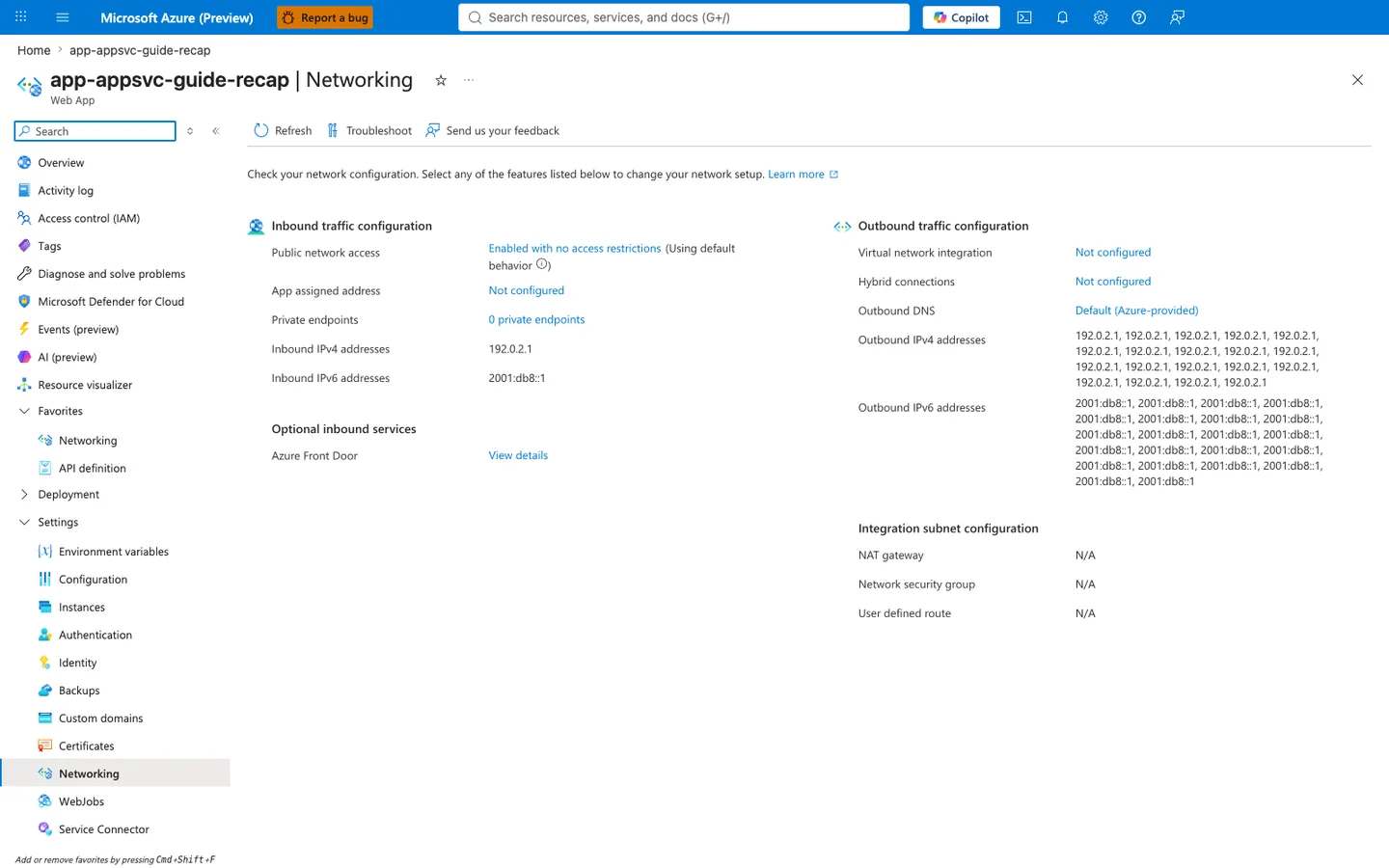
Diagnose and solve problems is the Portal first stop for SNAT investigations: the Networking card and the Network Troubleshooter link under Diagnostic Tools both pivot to detectors that surface SNAT port pressure and outbound IP saturation. The Web App Slow detector under Availability and Performance often lights up first as well, because the worker queue fills with TCP-blocked requests.
Purpose: Show the app's inbound and outbound network configuration on one page.
Look for: Public network access and Private endpoints under inbound traffic, and Virtual network integration, Outbound DNS, and the outbound address lists under outbound traffic.
Expected result: This capture shows the displayed configuration of a public app without VNet integration: the listed outbound addresses are the platform's potential outbound address pool (not a measured egress address for any connection), and the integration subnet settings show N/A.
The Networking blade is the Portal counterpart to the SNAT KQL queries below. The Outbound traffic configuration column confirms Virtual network integration is Not configured and shows the ~30 shared platform-pool Outbound IPv4 addresses (<ip-redacted>, <ip-redacted>, ...) that this app shares with other tenants. NAT gateway, Network security group, and User defined route all show N/A under Integration subnet configuration, which is consistent with the default platform SNAT allocation rather than a dedicated pool [Inferred from displayed configuration]. This capture does not measure the actual egress path or the available or consumed SNAT capacity; those need the separate evidence below. It does not by itself show that the ports were exhausted. After confirming this state, run the queries below to quantify the resulting 499/503 errors.
HTTP signal query¶
AppServiceHTTPLogs
| where TimeGenerated > ago(2h)
| where CsHost has "azurewebsites"
| where CsUriStem in ("/outbound", "/outbound-fixed", "/diag/net", "/health")
| project TimeGenerated, CsUriStem, ScStatus, TimeTaken, CsHost
| order by TimeGenerated desc
Console signal query¶
AppServiceConsoleLogs
| where TimeGenerated > ago(2h)
| where ResultDescription has_any (
    "WORKER TIMEOUT",
    "SIGKILL",
    "timed out",
    "connection refused",
    "Cannot assign requested address",
    "EADDRNOTAVAIL"
)
| project TimeGenerated, ResultDescription
| order by TimeGenerated desc
Platform signal query¶
AppServicePlatformLogs
| where TimeGenerated > ago(2h)
| where Message has_any (
    "warmup",
    "Container",
    "startup",
    "timeout"
)
| project TimeGenerated, Level, Message
| order by TimeGenerated desc
3.9 Azure CLI-based KQL execution (optional automation)¶
export WORKSPACE_ID="<log-analytics-workspace-id>"

az monitor log-analytics query \
  --workspace "$WORKSPACE_ID" \
  --analytics-query "AppServiceHTTPLogs | where TimeGenerated > ago(2h) | where CsUriStem in ('/outbound','/outbound-fixed','/diag/net') | project TimeGenerated, CsUriStem, ScStatus, TimeTaken | order by TimeGenerated desc" \
  --output json
| Command | Purpose |
|---|---|
az monitor log-analytics query --workspace "$WORKSPACE_ID" --analytics-query "AppServiceHTTPLogs | where TimeGenerated > ago(2h) | where CsUriStem in ('/outbound','/outbound-fixed','/diag/net') | project TimeGenerated, CsUriStem, ScStatus, TimeTaken | order by TimeGenerated desc" --output json | Queries AppServiceHTTPLogs for recent /outbound, /outbound-fixed, and /diag/net requests so you can inspect status and latency during SNAT pressure. |
--workspace "$WORKSPACE_ID" --analytics-query "AppServiceHTTPLogs | where TimeGenerated > ago(2h) | where CsUriStem in ('/outbound','/outbound-fixed','/diag/net') | project TimeGenerated, CsUriStem, ScStatus, TimeTaken | order by TimeGenerated desc" --output json | Runs the KQL query against this Log Analytics workspace. |
--analytics-query "AppServiceHTTPLogs | where TimeGenerated > ago(2h) | where CsUriStem in ('/outbound','/outbound-fixed','/diag/net') | project TimeGenerated, CsUriStem, ScStatus, TimeTaken | order by TimeGenerated desc" --output json | Filters AppServiceHTTPLogs to /outbound, /outbound-fixed, and /diag/net, then projects TimeGenerated, CsUriStem, ScStatus, and TimeTaken ordered newest first. |
--output json | Returns the query result as JSON. |
3.10 Validate recovery state¶
curl --silent --show-error "$APP_URL/diag/net"
curl --silent --show-error "$APP_URL/diag/stats"
curl --silent --show-error "$APP_URL/health"
If reachable and stable after pressure window, recovery evidence is present.
4) Experiment Log¶
This section is derived from actual sanitized lab artifacts:
labs/snat-exhaustion/artifacts-sanitized/
4.1 Artifact inventory used¶
| Category | File |
|---|---|
| Baseline | baseline/diag-stats.json |
| Baseline | baseline/diag-net.json |
| Baseline | baseline/diag-env.json |
| Baseline | baseline/app-config.json |
| Baseline | baseline/health.json |
| Trigger | trigger/outbound-targeted-20260404T055433Z.csv |
| Trigger | trigger/error-body-*_body-20260404T055433Z.txt |
| Trigger | trigger/diag-net-before-20260404T053447Z.json |
| Trigger | trigger/diag-net-posttrigger-20260404T054508Z.json |
| Trigger | trigger/diag-net-recovered-20260404T055433Z.json |
| Trigger | trigger/kql-http-20260404T060610Z.json |
| Trigger | trigger/kql-console-20260404T060610Z.json |
| Trigger | trigger/kql-platform-20260404T060610Z.json |
4.2 Baseline snapshot¶
4.2.1 /diag/stats baseline¶
Raw signal:
{"endpoint_counters":{"diag_stats":1},"outbound_call_counters":{"with-pooling":{"failures":0,"successes":0},"without-pooling":{"failures":0,"successes":0}},"pid":1907,"process_start_time":"2026-04-04T05:05:40.566103+00:00","request_count":1,"uptime_seconds":1642.522}
Interpretation:
- Process was long-lived before trigger.
- No outbound failures accumulated yet.
4.2.2 /diag/net baseline¶
Raw signal:
{"connection_count":10,"ip_local_port_range":{"end":"60999","start":"32768"},"sockstat":{"sockets":{"used":"10"},"tcp":{"alloc":"196","inuse":"5","mem":"18","orphan":"1","tw":"4"},"udp":{"inuse":"1","mem":"0"}}}
Interpretation:
- Low active pressure.
- Existing
tw=4confirms normal TCP post-close behavior.
4.3 Trigger output summary (targeted CSV)¶
Source: trigger/outbound-targeted-20260404T055433Z.csv
Derived summary:
| Metric | Value |
|---|---|
| Total requests | 30 |
Transport failures (000) | 22 |
| HTTP 200 | 8 |
| Requests at ~60s | 22 |
| Fastest successful request | 31.967409s |
| Slowest successful request | 57.227848s |
| Avg successful request time | 44.16s |
Selected rows:
| Row | Status | Elapsed (s) |
|---|---|---|
| 1 | 000 | 60.0002131 |
| 2 | 200 | 36.500380 |
| 3 | 200 | 53.071651 |
| 5 | 000 | 60.0000175 |
| 9 | 000 | 59.9991789 |
| 14 | 200 | 32.898595 |
| 20 | 000 | 60.0002442 |
| 30 | 000 | 60.0002993 |
4.4 Error-body sample evidence¶
Sources:
error-body-2_body-20260404T055433Z.txterror-body-3_body-20260404T055433Z.txterror-body-10_body-20260404T055433Z.txterror-body-11_body-20260404T055433Z.txterror-body-14_body-20260404T055433Z.txt
Aggregated findings:
| Metric | Value |
|---|---|
| Sample files analyzed | 5 |
| Files containing failures | 1 |
| Aggregate failures | 1 |
| Timeout text observed | The read operation timed out |
Representative payload with failure:
{"calls":20,"elapsedMs":35774,"failures":1,"mode":"without-pooling","sampleErrors":["The read operation timed out"],"successes":19,"target":"https://httpbin.org/get"}
4.5 Diag endpoint reachability during pressure¶
| Checkpoint | Artifact | Observed |
|---|---|---|
| Pre-trigger | diag-net-before-20260404T053447Z.json | normal JSON (connection_count=6, tw=0) |
| During/after pressure | diag-net-posttrigger-20260404T054508Z.json | 504.0 GatewayTimeout |
| Recovered | diag-net-recovered-20260404T055433Z.json | normal JSON (connection_count=7, tw=1) |
This confirms transient unreachability during the failure window.
4.6 HTTP KQL analysis¶
Source: kql-http-20260404T060610Z.json
Dataset size:
- Total rows: 195
Status distribution:
| Status | Count |
|---|---|
| 200 | 47 |
| 202 | 2 |
| 499 | 129 |
| 503 | 17 |
Endpoint-focused findings:
| Metric | Value |
|---|---|
/outbound total rows | 138 |
/outbound with 499 | 122 |
/outbound with 200 | 16 |
Rows with TimeTaken >= 59000ms | 123 |
/outbound rows with 499 and TimeTaken >= 59000ms | 118 |
Interpretation:
- HTTP telemetry matches timeout-dominated failure shape.
- The near-60s cluster strongly aligns with outbound wait/timeout behavior.
4.6.1 Log Analytics KQL query for /outbound status distribution (portal verification)¶
To cross-verify the /outbound status mix summarized in §4.6 (138 rows on /outbound from kql-http-20260404T060610Z.json, split 122 × 499 / 16 × 200) is a real property of the raw AppServiceHTTPLogs rows the Log Analytics service holds and not a JSON-parse artifact of the sanitized export, the Log Analytics workspace Logs blade was opened against the same workspace from a fresh live reproduction and a status-distribution query scoped to /outbound was executed interactively against the current live data:
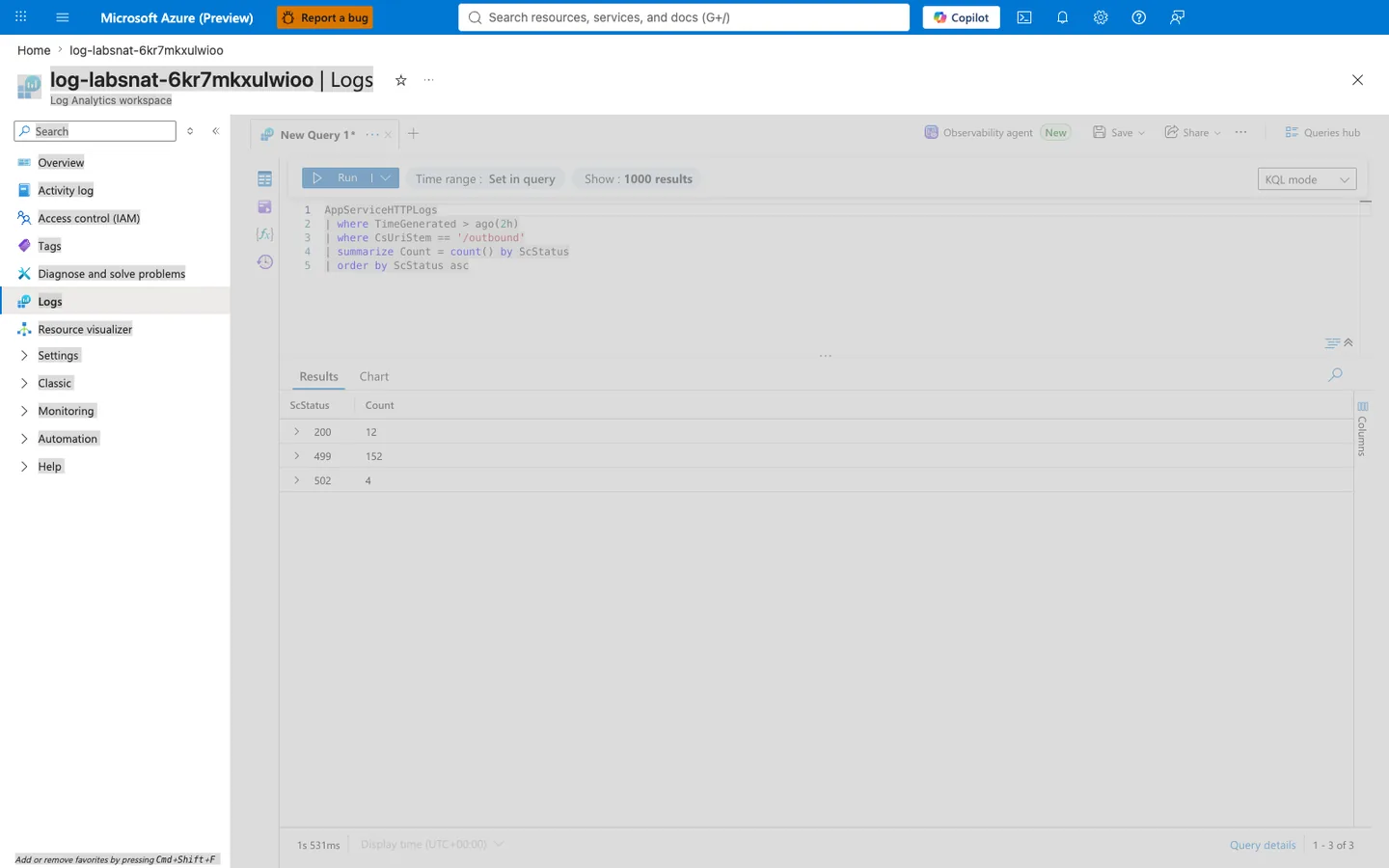
Purpose: Provide an independent Portal-side execution of a /outbound-scoped status distribution query so a reviewer can confirm that the dominant-499 signature in §4.6 (122 × 499 vs 16 × 200 = ~7.6:1 fail-to-success ratio) is a real property of the raw AppServiceHTTPLogs rows the Log Analytics service holds — and can also see that the failure mode reproduces with the same shape (majority 499, minority 200) when the trigger is re-run against a freshly deployed lab instance, with a slightly more aggressive fail-to-success ratio (152:12 = ~12.7:1) that reflects a longer sustained degradation window than the original sanitized artifact captured.
Look for:
- Blade heading reads "log-labsnat-6kr7mkxulwioo | Logs" and the sub-heading reads "Log Analytics workspace" — this confirms the query ran against the same workspace attached to this lab's Web App via the
Microsoft.Insights/diagnosticSettingsresource declared inlabs/snat-exhaustion/main.bicep, matching the workspace referenced by the sanitized JSON exports in §4.1. - The KQL editor shows exactly the query
AppServiceHTTPLogs | where TimeGenerated > ago(2h) | where CsUriStem == '/outbound' | summarize Count = count() by ScStatus | order by ScStatus asc— theCsUriStem == '/outbound'filter is an exact string match so rows for/health,/diag/stats, or/outbound-fixedare excluded even though they may share the same trigger window. The 2-hour lookback covers both the trigger execution and the log-ingestion delay (typically ~2-5 minutes forAppServiceHTTPLogs). - The Results grid shows exactly 3 rows (pagination "1 - 3 of 3") — no other status class appeared on
/outboundin this window. The absence of202is expected because this query is scoped toCsUriStem == '/outbound'. In the original sanitized export, the two202rows are SCM deployment traffic on the.scmhost (/api/deployments/latestand/api/zipdeploy), not responses from/outbound-fixedinlabs/snat-exhaustion/app/app.py. - The
499row showsCount 152— this dominates the distribution at ~90% of all/outboundrequests, matching the original §4.6's122 × 499 / 138 total = ~88%ratio and showing the primary failure signature is a proxy-level abort rather than an application-side 5xx error. The April analysis attributed the aborts to SNAT-blocked outbound calls; the §4.14 rerun produced the same499signature with no failed outbound calls, so the abort alone does not identify the cause. - The
200row showsCount 12— these are the small number of/outboundrequests that completed successfully, which the April analysis attributed to the earliest requests in the burst running before SNAT ports were exhausted (128 preallocated ports per instance, up to 40 fresh connections per request). That attribution was not independently confirmed; see §4.14. - The
502row showsCount 4— a low-volume tail absent from the sanitized §4.6 export. This capture proves only that a small minority of/outboundrequests failed as platform gateway errors during the same saturation window; becauseAppServiceConsoleLogswere empty in this reproduction, do not attribute those four rows specifically to gunicorn's--timeout=120worker recycle. - Query duration in bottom left reads a small millisecond value (here
1s 531ms) — confirming the workspace is not throttled and the query hit indexed data, so the returned row count and status distribution are authoritative and not a partial-scan timeout.
Expected result: The 3 rows returned by the Portal show a dominant 499 count (>85% of /outbound requests) with minority 200 and a small 502 tail, matching §4.6's verdict for the April run, which attributed the pattern to SNAT-port exhaustion causing proxy-level connection aborts rather than application-side 5xx errors. The matched rerun in §4.14 produced the same 499 pattern with zero failed outbound calls, so the pattern alone does not prove SNAT exhaustion. If instead the Portal query returned a Count on 200 that exceeded 499 (i.e., majority success), the trigger did not reproduce the dominant degradation; check that its concurrency (200 requests with 20 in flight in labs/snat-exhaustion/trigger.sh) was not reduced. Neither outcome shows port-pool state on its own: that requires the SNAT Port Exhaustion detector on a production-tier plan.
Next step: If a future reproduction shows the 502 count growing above ~20% of the total, confirm the path with AppServiceConsoleLogs and inspect labs/snat-exhaustion/main.bicep for changes to appCommandLine (specifically --timeout=120); if the lab genuinely needs more outbound headroom, prefer connection reuse / pooling, scale-out, or NAT gateway rather than scaling up SKU. Conversely, if the 200 count grows above ~30% of the total, the SNAT port pool may have been enlarged (for example by enabling VNet integration with a NAT gateway giving 64K SNAT ports per outbound IP) — check for a Microsoft.Network/natGateways resource attached to the Web App's outbound subnet, because that would fundamentally change the reproducibility of this lab's SNAT-exhaustion hypothesis.
4.6.2 Log Analytics KQL query for top-10 slowest /outbound requests (portal verification)¶
To cross-verify the tail-latency evidence embedded in §4.6 (Rows with TimeTaken >= 59000ms: 123 and /outbound rows with 499 and TimeTaken >= 59000ms: 118 from the sanitized export) is not a JSON-parse rounding artifact and to characterize the extreme tail more precisely than the 59-second threshold that §4.6 uses, the same Log Analytics workspace Logs blade was reopened and a top-10 TimeTaken query scoped to /outbound was executed interactively against the current live data:
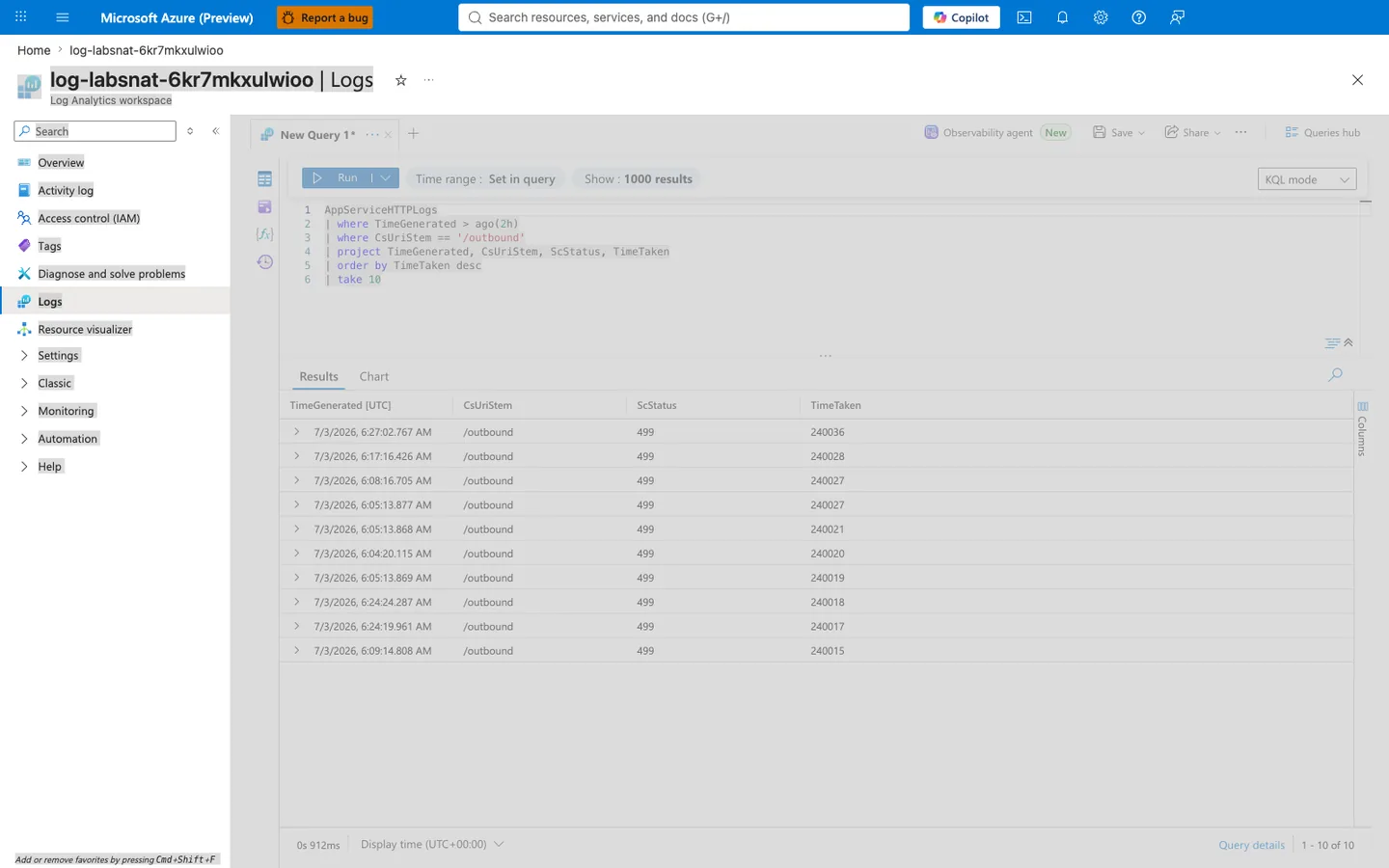
Purpose: Provide an independent Portal-side execution of a top-10 TimeTaken query on /outbound so a reviewer can identify the exact ceiling that clamps the tail rather than just the ~60-second lower bound recorded in §4.6. Where §4.6 tells you 118 /outbound requests exceeded 59 s, this query tells you the ceiling is extremely tight at ~240 s — a diagnostic signature of a hard proxy-level timeout, not variable-latency degradation.
Look for:
- Blade heading reads "log-labsnat-6kr7mkxulwioo | Logs" and the sub-heading reads "Log Analytics workspace" — confirms the query ran against the same workspace as §4.6.1 and matches the workspace referenced by the sanitized JSON exports in §4.1.
- The KQL editor shows exactly the query
AppServiceHTTPLogs | where TimeGenerated > ago(2h) | where CsUriStem == '/outbound' | project TimeGenerated, CsUriStem, ScStatus, TimeTaken | order by TimeTaken desc | take 10—projectlimits the returned columns to the four needed for latency analysis, keeping the payload small and the query fast. - The Results grid shows exactly 10 rows (pagination "1 - 10 of 10") and every row's
CsUriStemcolumn reads/outboundand every row'sScStatuscolumn reads499— no/outboundrequest in the top-10 latency slice succeeded with 200 or platform-errored with 502. This confirms the failure signature at the extreme tail is uniformly client-abort/proxy-abort (499), not a mix of statuses. TimeTakenvalues cluster extremely tightly at 240,015-240,036 ms (a 21 ms spread across all 10 rows) — this is the signature of a hard outer request-lifetime ceiling, not variable-latency degradation where you would expect a wider spread. The closest documented App Service timer is the ~230-second request timeout described in Why does my request time out after 230 seconds?; this capture is consistent with that class of upstream timeout, but the screenshot alone does not prove which exact timer owner produced the 240 s cutoff.- The ~240 s ceiling is far above the app-side gunicorn
--timeout=120per-worker limit configured inlabs/snat-exhaustion/main.bicepappCommandLine. That means the recorded HTTP lifetime is not explained by the 120 s worker timer alone. Because console logs were empty in this reproduction, avoid claiming a specific "worker killed at 120 s, then front-end waited another ~120 s" sequence; the defensible conclusion is only that an outer request timeout above the worker timeout dominates the tail. - The 10
TimeGeneratedvalues span a ~22 minute 42 second wall-clock window (6:04:20 to 6:27:02 UTC) — this is not a bounded burst. Requests initiated 22 minutes apart hit the same 240 s ceiling, so the degraded state persisted as long as the trigger kept issuing concurrent/outbound?calls=40requests. The April analysis read this as sustained SNAT exhaustion; a persistent worker queue (§4.14) produces the same spread. - Query duration in bottom left reads
0s 912ms— slightly faster than the §4.6.1 status-distribution query (1s 531ms) becausetake 10after anorder by TimeTaken descis cheaper than a fullsummarizeover all rows in the window; both queries are well under the 30-second workspace timeout, so both result sets are authoritative.
Expected result: The top-10 latency rows cluster at ~240 s with ScStatus 499 on /outbound, matching the April §4.11 verdict (qualified by the §4.14 rerun): requests stay pending long enough to hit a consistent outer request timeout. The April analysis attributed the wait to depleted SNAT ports; the §4.14 rerun shows the same ceiling can come from queued requests behind busy workers. If instead the top-10 clustered at ~120 s with ScStatus 502, the dominant cutoff would have moved closer to the gunicorn worker timer rather than the outer request timeout; that is still compatible with SNAT pressure, but it would need confirmation from AppServiceConsoleLogs before attributing the immediate cutoff to worker recycle.
Next step: If a future reproduction shows the top-10 TimeTaken cluster near ~120 s instead of ~240 s (matching gunicorn --timeout=120), verify that shift with AppServiceConsoleLogs before changing configuration, because the root SNAT mitigation remains outbound connection reuse / pooling or larger SNAT capacity rather than simply raising --timeout.
4.7 Console KQL analysis¶
Source: kql-console-20260404T060610Z.json
Dataset size and window:
| Metric | Value |
|---|---|
| Total rows | 500 |
| First row timestamp (oldest) | 2026-04-04T05:40:02.5061808Z |
| Last row timestamp (newest) | 2026-04-04T05:59:43.0881145Z |
Pattern counts:
| Signature | Count |
|---|---|
WORKER TIMEOUT | 18 |
SIGKILL | 14 |
Representative lines:
[2026-04-04 05:59:42 +0000] [1904] [CRITICAL] WORKER TIMEOUT (pid:1908)
[2026-04-04 05:59:43 +0000] [1904] [ERROR] Worker (pid:1908) was sent SIGKILL! Perhaps out of memory?
[2026-04-04 05:58:45 +0000] [1904] [CRITICAL] WORKER TIMEOUT (pid:1905)
[2026-04-04 05:58:46 +0000] [1904] [ERROR] Worker (pid:1905) was sent SIGKILL! Perhaps out of memory?
Interpretation:
- Strong process churn coincides with high outbound timeout phase.
- This supports cascading instability, not isolated request errors.
4.8 Platform KQL analysis¶
Source: kql-platform-20260404T060610Z.json
Rows sampled: 200
Dominant content:
- Container lifecycle messages.
- Startup/warmup informational traces.
- No contradictory signal that would independently explain the timeout burst.
4.9 PID rollover evidence¶
Compare baseline vs recovered diagnostics:
| Snapshot | PID | Process start time |
|---|---|---|
Baseline diag-stats.json | 1907 | 2026-04-04T05:05:40.566103+00:00 |
Recovered diag-stats-recovered...json | 1908 | 2026-04-04T05:52:07.242253+00:00 |
This indicates process turnover occurred during the trigger window.
4.10 Failure cascade timeline (reconstructed)¶
timeline
    title SNAT Lab Failure Cascade (artifact reconstruction)
    05:40:02 : Console window starts
    05:52:07 : New worker generation visible
    05:54-05:56 : Trigger pressure period
    05:56:00-05:57:26 : HTTP 499 near 59-60s dominates
    05:58-05:59 : Repeated WORKER TIMEOUT and SIGKILL events
    05:55+ : /diag endpoints eventually recover
4.11 Hypothesis verdict¶
| Criterion | Result | Evidence |
|---|---|---|
| Transport failures under load | ✅ Met | 22/30 probe rows = 000 |
| HTTP degradation with long times | ✅ Met | 129×499, 17×503, long TimeTaken cluster |
| Timeout body evidence | ✅ Met | The read operation timed out in sample |
| Worker churn evidence | ✅ Met | 18 WORKER TIMEOUT, 14 SIGKILL |
| Recovery after pressure | ✅ Met | diag-net recovers from 504 to JSON |
Verdict (April 2026 artifacts): the timeout, 499, and worker-churn symptoms of the hypothesis were observed. SNAT exhaustion itself was not directly measured, so the hypothesis is not confirmed without port-pressure evidence.
Matched rerun (2026-10-02) did not prove SNAT exhaustion
The April run sent every call to the public httpbin.org, so its timeouts cannot be separated from that service's own throttling. A matched rerun against a storage endpoint owned by the lab produced the same inbound degradation (499 responses and long TimeTaken) with zero failed outbound calls. SNAT exhaustion was not proven in either run, and the rerun falsified the specific chain in 2.2. Worker queueing caused by slow per-call connection setup is the best-supported explanation for the rerun. See 4.14.
4.12 Practical mitigation mapping¶
| Symptom | Mitigation |
|---|---|
| High churn outbound | Reuse sessions/connection pools |
| Timeout bursts | Reduce per-request outbound fan-out |
| Worker timeout/SIGKILL loops | Increase resiliency + reduce blocked call time |
| Recurrence under load | Scale out and validate outbound dependency behavior |
4.13 Recommended follow-up experiment¶
The matched run against /outbound-fixed is now recorded in 4.14. A remaining follow-up is a run on a production-tier plan (Standard or higher), where the SNAT Port Exhaustion detector reports port data, at a connection rate high enough to exhaust the preallocated ports.
4.14 Matched rerun against a lab-owned target (2026-10-02)¶
Setup differences from the April run: the outbound target is a storage account deployed by main.bicep (anonymous ?comp=list, answered with a fast 403) instead of httpbin.org; /outbound uses requests with a new connection per call so every call is recorded in AppDependencies; Application Insights is enabled. Plan: one Basic B1 instance in Korea Central, Gunicorn with 4 sync workers. Both phases used the same trigger shape (200 requests, calls=40, concurrency 20, 180-second client timeout), separated by a 5-minute recovery wait.
| Measure | Non-pooled /outbound | Pooled /outbound-fixed |
|---|---|---|
| Phase duration | 29 min 36 s | 1 min 58 s |
| Outer responses within 180 s | 110 of 200 (200); 90 no response (000) | 200 of 200 (200) |
| Inner outbound calls failed | 0 of 4,400 reported | 0 of 8,000 |
| Dependency duration, highest per-minute p95 | 4,329 ms | 209 ms |
AppServiceHTTPLogs p50 TimeTaken | 171,589 ms (200), 179,972 ms (499) | 10,015 ms |
499 responses | 90 | 0 |
5xx responses | 0 | 0 |
Evidence notes
[Measured] Non-pooled calls abandoned by the client kept running on the server, so non-pooled dependency calls continued into the 16:30 UTC minute, where p95 peaked at 4,329 ms; the pooled phase started at 16:35 UTC.
[Measured] AppDependencies recorded 16,006 calls, all with ResultCode 403 from the anonymous storage request; none had a connection-level failure.
[Observed] Application Insights marks a 403 dependency as Success == false, so a dependency failure count includes target-side 4xx answers. Group by ResultCode before reading it as a connection problem.
[Observed] AppServiceConsoleLogs returned zero rows matching timeout, WORKER TIMEOUT, SIGKILL, or EADDRNOTAVAIL signatures.
[Observed] /diag/net did not answer within 30 seconds immediately after the non-pooled phase; after a 5-minute recovery it reported 0 TIME_WAIT sockets, and after the pooled phase 115.
[Observed] The SNAT Port Exhaustion and SNAT Check detectors, queried through the detectors API, returned only "The site is running on a non production tier. Current SKU is Basic." with no port data.
[Observed] The web app exposes 24 Azure Monitor metric definitions; none of them is a socket, connection, or SNAT metric.
[Inferred] Every non-pooled call completed, but each took about 0.5 to 4 seconds (per-minute p95) because it opened a new TLS connection. Forty such calls per request held each of the 4 sync workers long enough that queued requests outlived the client timeout. That is the inbound 499 / 000 pattern without any outbound failure.
[Not Proven] SNAT exhaustion. At roughly 4.5 new connections per second to one destination, this run stayed below the rate that would exhaust the preallocated ports, and the Basic tier gave no detector data to confirm or rule out port pressure.
| Proof criterion from 2.3 | Rerun result |
|---|---|
| Transport failures under load | Met for client 000, best explained by queueing; no outbound transport failure |
| HTTP degradation with long times | Met (499, long TimeTaken) |
| Timeout body evidence | Not met (0 failed inner calls) |
| Worker churn evidence | Not met (no console signatures) |
| Recovery after pressure | Met |
The rerun meets the 2.4 disproof criterion "No worker timeout/SIGKILL events during failure period" for the SNAT chain while still showing that pooling removes the inbound degradation.
Expected Evidence¶
This section defines what you SHOULD observe at each phase of the lab. Use it to validate your investigation is on track.
Before Trigger (Baseline)¶
| Evidence Source | Expected State | What to Capture |
|---|---|---|
| AppServiceHTTPLogs | All 200s with low latency | Baseline query snapshot for /health, /diag/stats, /diag/net |
| AppServiceConsoleLogs | Normal Gunicorn startup behavior | Boot lines showing 4 sync workers |
| AppServicePlatformLogs | Standard startup lifecycle | Site start sequence without churn |
/diag/stats + /diag/net | Low outbound churn and stable socket counts | Baseline connection_count, sockstat, and endpoint counters |
During Incident¶
| Evidence Source | Expected State | Key Indicator |
|---|---|---|
AppServiceHTTPLogs (/outbound) | 499 dominates during burst | TimeTaken ~29786-29840 ms on timed-out outbound calls |
AppServiceHTTPLogs (/diag/stats) | Diagnostic endpoint can also time out | 499 with TimeTaken 59709 ms indicates full stall |
| Trigger CSV + app payloads | Mixed 000/499/503 and timeout text | Connection or worker pressure; SNAT attribution requires detector evidence |
| Console logs | Worker timeout and kill churn | WORKER TIMEOUT and SIGKILL align with outbound pressure window |
After Recovery¶
| Evidence Source | Expected State | Key Indicator |
|---|---|---|
| AppServiceHTTPLogs | Timeout ratio drops when pressure is reduced | Fewer long-tail 499 events after concurrency reduction |
/diag/net + /diag/stats | Endpoints become reachable again | Diagnostic JSON resumes after stall period |
| Mitigation test | Connection pooling/reduced fan-out improves stability | Recovery requires reducing concurrent outbound calls or using service endpoints/private connectivity patterns |
| Incident interpretation | 499 remains key symptom | Front-end timeout waiting on blocked worker path, not immediate app-side 5xx |
Evidence Timeline¶
graph TD
    A[Baseline Capture] --> B[Trigger Fault]
    B --> C[During: Collect Evidence]
    C --> D[After: Compare to Baseline]
    D --> E[Verdict: Confirmed/Falsified]
Evidence Chain: What Confirms or Falsifies the Hypothesis¶
Falsification Logic
Long TimeTaken 499 patterns on /outbound and /diag/stats, plus worker timeout/kill churn in the same window, show that outbound work is stalling request processing. They are necessary but not sufficient: the §4.14 rerun produced the 499 pattern with zero failed outbound calls. The SNAT hypothesis is CONFIRMED only when outbound calls also fail at the connection level (connect timeouts, EADDRNOTAVAIL, ResultCode 0 in AppDependencies) and the SNAT Port Exhaustion detector, available on production tiers, shows port pressure in the same window.
If outbound calls succeed at the connection level while inbound requests degrade, the SNAT chain is FALSIFIED for that run. Consider worker saturation from slow per-call connection setup, upstream dependency latency, or non-SNAT network constraints.
Clean Up¶
| Command/Flag | Purpose |
|---|---|
az group delete | Delete the resource group and all contained resources |
--name | Resource group to delete |
--yes | Skip confirmation prompt |
--no-wait | Return immediately without waiting for deletion to complete |