Lab Guide: Slot Swap Config Drift (Sticky vs Non-Sticky Settings)
This Level 3 lab guide reproduces a slot swap on Azure App Service Linux and proves, using real artifacts, how configuration behaves across swap boundaries. The lab shows why teams often perceive "drift" after a healthy swap.
Lab Metadata
| Attribute | Value |
|---|---|
| Difficulty | Intermediate |
| Estimated Duration | 45-60 minutes |
| Tier | Standard |
| Failure Mode | Apparent post-swap config drift caused by misunderstanding sticky versus non-sticky app settings |
| Skills Practiced | Deployment slot troubleshooting, sticky-setting validation, pre/post swap comparison, lifecycle log interpretation |
Lab outcome summary
The artifacts show an exact textbook result:
FEATURE_FLAG(non-sticky) swapped with the app context.DB_CONNECTION_STRING(sticky) stayed with each slot.
This is expected App Service slot behavior, not accidental misconfiguration.
1) Background
Slot swap incidents are often not platform failures. They are frequently interpretation failures.
To troubleshoot accurately, you must separate:
- Slot routing behavior.
- Sticky/non-sticky config behavior.
- Process restart and warm-up lifecycle behavior.
1.1 Deployment slots are separate runtime surfaces
Each slot is a separate runtime endpoint with its own hostname and runtime lifecycle.
flowchart TD
    subgraph AppService[Single App Service App]
        P[Production Slot\nHostname: app.azurewebsites.net]
        S[Staging Slot\nHostname: staging.azurewebsites.net]
    end
    U[Users] --> P
    O[Operators/Testers] --> S
Even when slots share plan resources, they maintain independent runtime state and per-slot app setting context.
1.2 Swap behavior model
Swap can be thought of as role exchange with warm-up safeguards, not just a file copy.
sequenceDiagram
    participant Ops as Operator
    participant Platform as App Service Platform
    participant Stage as Staging Slot
    participant Prod as Production Slot

    Ops->>Platform: Start swap (staging -> production)
    Platform->>Stage: Validate and warm source runtime
    Stage-->>Platform: Warm-up probe succeeded
    Platform->>Prod: Shift production role
    Platform->>Stage: Shift staging role
    Platform-->>Ops: Swap completed
1.3 Sticky and non-sticky settings
The critical rule set:
| Setting class | During swap | Operational impact |
|---|---|---|
Non-sticky (slotSetting=false) | Moves with swapped app context | Looks like value "changed" on production |
Sticky (slotSetting=true) | Stays attached to physical slot | Looks like value "did not change" despite code swap |
This lab intentionally mixes one of each to produce a clear differential.
1.4 Why this creates perceived "drift"
After swap, operators may expect all values to follow code.
If that mental model is wrong:
- Non-sticky setting movement appears surprising.
- Sticky setting stability appears inconsistent.
In reality, both are correct outcomes.
1.5 Template-level implementation in this lab
From main.bicep:
- Production and staging are both configured with Python 3.11 runtime.
FEATURE_FLAGdiffers by slot (v1vsv2) and is non-sticky.DB_CONNECTION_STRINGdiffers by slot and is marked sticky viaslotConfigNames.
slotConfigNames excerpt:
resource slotConfigNames 'Microsoft.Web/sites/config@2023-12-01' = {
  name: '${webApp.name}/slotConfigNames'
  properties: {
    appSettingNames: [
      'DB_CONNECTION_STRING'
    ]
    connectionStringNames: []
  }
}
1.6 Expected before/after state map
flowchart TB
    subgraph BeforeSwap[Before Swap]
        P1[Production\nFEATURE_FLAG=v1\nDB_CONNECTION_STRING=prod-server]
        S1[Staging\nFEATURE_FLAG=v2\nDB_CONNECTION_STRING=staging-server]
    end

    subgraph AfterSwap[After Swap]
        P2[Production\nFEATURE_FLAG=v2\nDB_CONNECTION_STRING=prod-server]
        S2[Staging\nFEATURE_FLAG=v1\nDB_CONNECTION_STRING=staging-server]
    end

    P1 --> S2
    S1 --> P2
1.7 Warm-up lifecycle context
Swap operations are tightly coupled with startup/warm-up behavior:
- Container and app startup events occur around swap windows.
- Probe success transitions appear in
AppServicePlatformLogs. - Gunicorn startup appears in
AppServiceConsoleLogs.
This guide includes both config-state proof and lifecycle proof.
1.8 Why this lab matters
For production release safety, teams must be able to answer:
- Did the swap perform correctly?
- Did sticky settings stay where intended?
- Did non-sticky settings move as expected?
- Were restarts/warm-up transitions healthy?
This lab provides an evidence-driven method to answer all four.
2) Hypothesis
2.1 Formal hypothesis statement
When performing a slot swap, non-sticky app settings move with the swapped app context while slot settings (deployment slot settings) remain with the destination slot, creating apparent config drift only for operators who expect all settings to swap uniformly.
2.2 Causal chain
flowchart TD
    A[Pre-swap config divergence by slot] --> B[Swap staging to production]
    B --> C[Non-sticky values exchange]
    B --> D[Sticky values remain slot-bound]
    C --> E[Production FEATURE_FLAG changes]
    D --> F[Production DB setting remains]
    E --> G[Perceived drift if sticky model unknown]
    F --> G
2.3 Proof criteria
The hypothesis is supported only if all conditions are met:
- Pre-swap production and staging values are different for both targeted settings.
- Post-swap
FEATURE_FLAGvalues are exchanged across slots. - Post-swap
DB_CONNECTION_STRINGvalues are unchanged per physical slot. - App settings metadata confirms
DB_CONNECTION_STRINGis sticky (slotSetting=true). - Lifecycle logs show restart/warm-up progression around swap time.
2.4 Disproof criteria
Any of these disproves the hypothesis:
FEATURE_FLAGdoes not exchange across slots after confirmed swap.DB_CONNECTION_STRINGexchanges despite sticky metadata.- Sticky metadata absent or inconsistent in pre-swap app settings.
- No lifecycle evidence near swap operation window.
2.5 Controlled and dependent variables
| Category | Values |
|---|---|
| Controlled inputs | Same app code package, same runtime, same region, same plan |
| Independent event | Single swap command (staging -> production) |
| Dependent signals | /config JSON, /diag/slots hash/state, process start timestamps, KQL logs |
2.6 Anticipated data pattern
| Signal | Expected observation |
|---|---|
FEATURE_FLAG | v1/v2 exchange |
DB_CONNECTION_STRING | prod/staging remains per slot |
| Process start | New startup timestamps near swap |
| Platform logs | Warm-up probe success + started/stopping lifecycle messages |
3) Runbook
This runbook is designed for deterministic replay. Commands use long flags only.
3.1 Prerequisites
| Requirement | Verification |
|---|---|
| Azure CLI installed | az version |
| Active login | az account show |
| Bash shell | bash --version |
| Python 3 | python3 --version |
3.2 Environment setup
Convention note:
- In command usage, this guide references
$RG,$APP_NAME, etc. - In declarations, variable names are written without
$(shell syntax).
3.3 Deploy lab infrastructure
az group create \
  --name "$RG" \
  --location "$LOCATION"

az deployment group create \
  --resource-group "$RG" \
  --template-file "labs/slot-swap-config-drift/main.bicep" \
  --parameters "baseName=$BASE_NAME"
| Command/Flag | Purpose |
|---|---|
az group create | Create the resource group for lab resources |
--name | Resource group name |
--location | Azure region for the resource group |
az deployment group create | Deploy the Bicep template to provision App Service with production and staging slots |
--template-file | Path to the Bicep template that configures sticky and non-sticky settings across slots |
--parameters baseName | Base name prefix for all generated resource names |
3.4 Resolve app and slot URLs
APP_NAME=$(az webapp list \
  --resource-group "$RG" \
  --query "[0].name" \
  --output tsv)

PRODUCTION_HOST=$(az webapp show \
  --resource-group "$RG" \
  --name "$APP_NAME" \
  --query "defaultHostName" \
  --output tsv)

STAGING_HOST="$APP_NAME-staging.azurewebsites.net"
PRODUCTION_URL="https://$PRODUCTION_HOST"
STAGING_URL="https://$STAGING_HOST"
| Command | Purpose |
|---|---|
az webapp list --resource-group "$RG" --query "[0].name" --output tsv | Lists web apps in the lab resource group and returns the first app name. |
--resource-group "$RG" --query "[0].name" --output tsv | Limits the app list to this resource group. |
--query "[0].name" --output tsv | Selects the name field from the first item in the returned web-app array. |
--output tsv | Returns the app name as plain text for shell variable assignment. |
az webapp show --resource-group "$RG" --name "$APP_NAME" --query "defaultHostName" --output tsv | Retrieves the production slot's default hostname so the runbook can build the production URL. |
--resource-group "$RG" --name "$APP_NAME" --query "defaultHostName" --output tsv | Looks up the web app in this resource group. |
--name "$APP_NAME" --query "defaultHostName" --output tsv | Targets this web app's production slot. |
--query "defaultHostName" --output tsv | Projects only the production slot defaultHostName field. |
--output tsv | Returns the hostname as plain text for shell variable assignment. |
3.5 Validate slot settings metadata
Inspect production settings:
az webapp config appsettings list \
  --resource-group "$RG" \
  --name "$APP_NAME" \
  --query "[?name=='SCM_DO_BUILD_DURING_DEPLOYMENT' || name=='DB_CONNECTION_STRING' || name=='FEATURE_FLAG'].{name:name,value:value,slotSetting:slotSetting}"
| Command | Purpose |
|---|---|
az webapp config appsettings list --resource-group "$RG" --name "$APP_NAME" --query "[?name=='SCM_DO_BUILD_DURING_DEPLOYMENT' \|\| name=='DB_CONNECTION_STRING' \|\| name=='FEATURE_FLAG'].{name:name,value:value,slotSetting:slotSetting}" | Lists the production slot app settings and narrows them to the three settings the lab compares before the swap. |
--resource-group "$RG" --name "$APP_NAME" --query "[?name=='SCM_DO_BUILD_DURING_DEPLOYMENT' \|\| name=='DB_CONNECTION_STRING' \|\| name=='FEATURE_FLAG'].{name:name,value:value,slotSetting:slotSetting}" | Looks up the app settings in this resource group. |
--name "$APP_NAME" --query "[?name=='SCM_DO_BUILD_DURING_DEPLOYMENT' \|\| name=='DB_CONNECTION_STRING' \|\| name=='FEATURE_FLAG'].{name:name,value:value,slotSetting:slotSetting}" | Targets this web app's production slot settings. |
--query "[?name=='SCM_DO_BUILD_DURING_DEPLOYMENT' \|\| name=='DB_CONNECTION_STRING' \|\| name=='FEATURE_FLAG'].{name:name,value:value,slotSetting:slotSetting}" | Filters the settings list to SCM_DO_BUILD_DURING_DEPLOYMENT, DB_CONNECTION_STRING, and FEATURE_FLAG, then projects each setting's name, value, and slotSetting. |
Inspect staging settings:
az webapp config appsettings list \
  --resource-group "$RG" \
  --name "$APP_NAME" \
  --slot "staging" \
  --query "[?name=='SCM_DO_BUILD_DURING_DEPLOYMENT' || name=='DB_CONNECTION_STRING' || name=='FEATURE_FLAG'].{name:name,value:value,slotSetting:slotSetting}"
Expected pre-swap model:
| name | production value | staging value | slotSetting |
|---|---|---|---|
| SCM_DO_BUILD_DURING_DEPLOYMENT | true | true | false |
| DB_CONNECTION_STRING | prod-server.database.windows.net | staging-server.database.windows.net | true |
| FEATURE_FLAG | v1 | v2 | false |
Portal view: Configuration blade (slot-aware settings entry point)
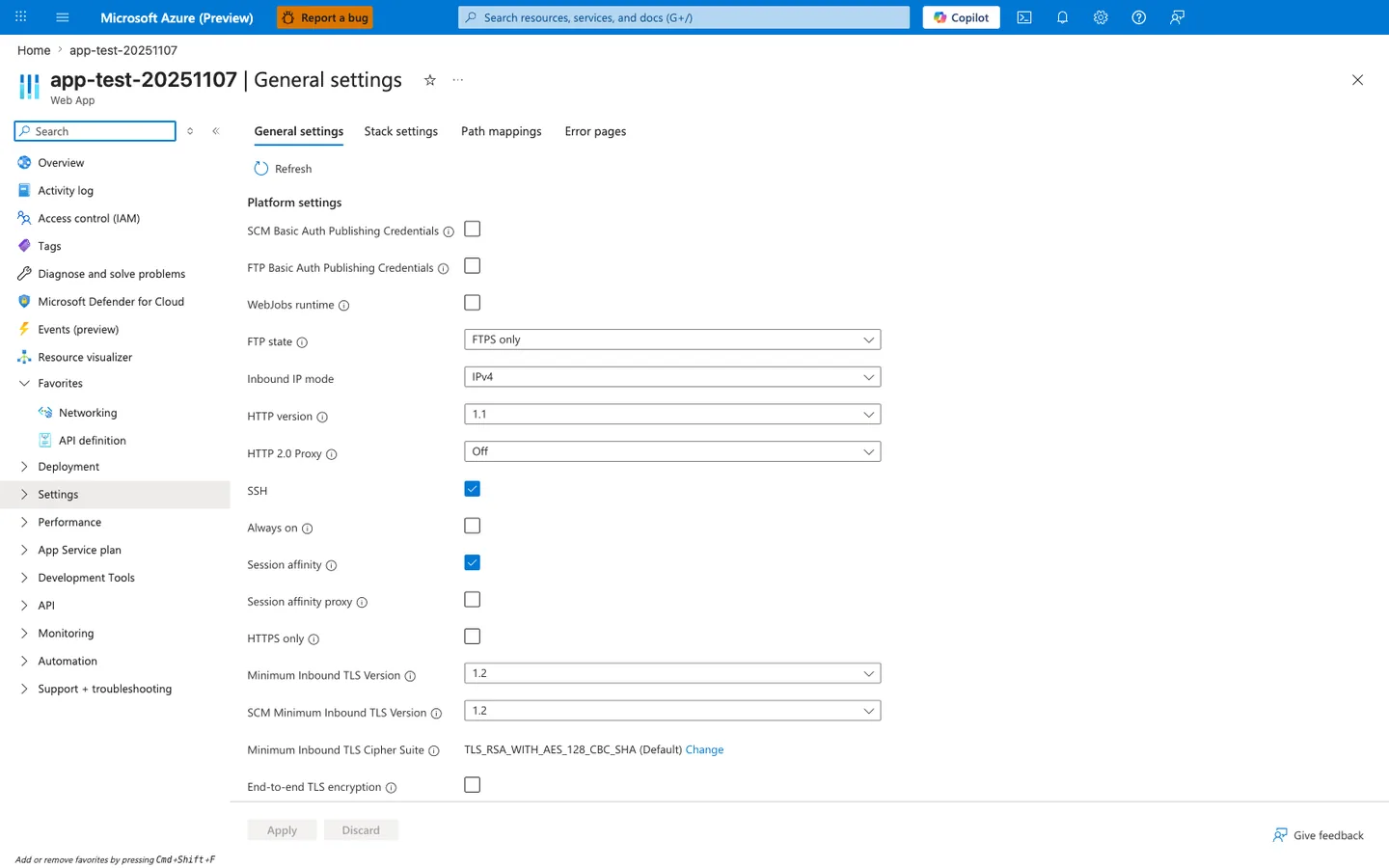
The Configuration blade is the Portal control plane for the same settings the CLI commands above expose. The Application settings sub-tab (not shown in this capture, which focuses on General settings) is where the per-row Deployment slot setting checkbox appears - that checkbox is the visual representation of the slotSetting:true flag in the expected pre-swap table above (DB_CONNECTION_STRING row). General settings (active here) governs platform behavior like Always on and Session affinity and follows different swap rules than App Settings; consult section 1.3 before changing anything here mid-incident. Use this blade to spot-check the sticky/non-sticky shape of your settings without parsing CLI JSON, then cross-reference the post-swap behavior with the KQL evidence in section 3.10.
3.6 Capture pre-swap runtime evidence
curl --silent --show-error "$PRODUCTION_URL/config"
curl --silent --show-error "$STAGING_URL/config"

curl --silent --show-error "$PRODUCTION_URL/diag/slots"
curl --silent --show-error "$STAGING_URL/diag/slots"

curl --silent --show-error "$PRODUCTION_URL/diag/stats"
curl --silent --show-error "$PRODUCTION_URL/diag/env"
Representative pre-swap output:
{"DB_CONNECTION_STRING":"prod-server.database.windows.net","FEATURE_FLAG":"v1","PROCESS_START_UTC":"2026-04-04T05:13:59.196136+00:00","WEBSITE_SLOT_NAME":"Production"}
{"DB_CONNECTION_STRING":"staging-server.database.windows.net","FEATURE_FLAG":"v2","PROCESS_START_UTC":"2026-04-04T05:34:02.102318+00:00","WEBSITE_SLOT_NAME":"Production"}
3.7 Execute swap
az webapp deployment slot swap \
  --resource-group "$RG" \
  --name "$APP_NAME" \
  --slot "staging" \
  --target-slot "production"
| Command/Flag | Purpose |
|---|---|
az webapp deployment slot swap | Execute a slot swap operation between two deployment slots |
--slot "staging" | Source slot whose app context will move to the target |
--target-slot "production" | Destination slot that receives the swapped app context; sticky settings remain here |
Wait for immediate post-swap stabilization:
3.8 Capture post-swap runtime evidence
curl --silent --show-error "$PRODUCTION_URL/config"
curl --silent --show-error "$STAGING_URL/config"

curl --silent --show-error "$PRODUCTION_URL/diag/slots"
curl --silent --show-error "$PRODUCTION_URL/diag/stats"
Representative post-swap output:
{"DB_CONNECTION_STRING":"prod-server.database.windows.net","FEATURE_FLAG":"v2","PROCESS_START_UTC":"2026-04-04T05:46:56.764695+00:00","WEBSITE_SLOT_NAME":"Production"}
{"DB_CONNECTION_STRING":"staging-server.database.windows.net","FEATURE_FLAG":"v1","PROCESS_START_UTC":"2026-04-04T05:49:05.541050+00:00","WEBSITE_SLOT_NAME":"Production"}
3.9 Run full trigger script (optional)
The script does:
- Package deployment to both slots.
- Pre-swap config capture.
- Swap execution.
- Post-swap capture.
- Behavior summary booleans:
- feature swapped
- sticky DB remained
- process restart observed
3.10 KQL runbook queries
The Activity log blade is the Portal anchor for swap-drift investigations, giving you the audit trail of every ARM operation against the app with timestamps, initiator, and status. Scope the Resource chip to the app and set Timespan to the swap window, then read Event initiated by to see which principal triggered each operation when correlating against the sticky-versus-non-sticky settings table.
3.10.1 HTTP request evidence
AppServiceHTTPLogs
| where TimeGenerated > ago(2h)
| where CsHost has "app-labswap"
| project TimeGenerated, CsUriStem, ScStatus, TimeTaken, CsHost
| order by TimeGenerated desc
3.10.2 Console startup evidence
AppServiceConsoleLogs
| where TimeGenerated > ago(2h)
| where ResultDescription has_any ("Starting gunicorn", "Booting worker", "App path is set", "Oryx", "Listening at")
| project TimeGenerated, ResultDescription
| order by TimeGenerated desc
3.10.3 Platform lifecycle evidence
AppServicePlatformLogs
| where TimeGenerated > ago(2h)
| where Message has_any ("WarmUpProbeSucceeded", "Site startup probe succeeded", "Site started", "StoppingSite", "CreatingContainer", "PullingImage")
| project TimeGenerated, Level, Message
| order by TimeGenerated desc
3.11 Real output snippets from this lab
Platform warm-up progression:
2026-04-04T05:49:05.8804667Z  State: Starting, Action: WarmUpProbeSucceeded ... Site startup probe succeeded after 55.2013831 seconds.
2026-04-04T05:49:06.6769441Z  Site started.
Console startup progression:
[2026-04-04 05:49:04 +0000] [1895] [INFO] Starting gunicorn 25.3.0
[2026-04-04 05:49:04 +0000] [1896] [INFO] Booting worker with pid: 1896
[2026-04-04 05:49:04 +0000] [1897] [INFO] Booting worker with pid: 1897
HTTP verification calls:
2026-04-04T05:51:21.610129Z  /config      200   47
2026-04-04T05:51:22.477189Z  /config      200   14
2026-04-04T05:51:24.143418Z  /diag/slots  200   11
3.12 Operator checklist
| Check | Pass condition |
|---|---|
| Sticky metadata validated | DB_CONNECTION_STRING has slotSetting=true |
| Pre-swap captured | /config captured for both slots |
| Swap command successful | No CLI error and status returned |
| Post-swap captured | /config captured for both slots |
| Behavior validated | FEATURE_FLAG exchanged, DB stayed |
| Lifecycle validated | warm-up/start events visible in KQL |
3.13 Decision tree for incident responders
flowchart TD
    A[Post-swap config surprise] --> B{Is setting sticky?}
    B -->|Yes| C[Expected to remain with slot]
    B -->|No| D[Expected to move with swapped context]
    C --> E{Observed unchanged?}
    D --> F{Observed exchanged?}
    E -->|Yes| G[Behavior correct]
    E -->|No| H[Investigate setting metadata]
    F -->|Yes| G
    F -->|No| H
    G --> I[Check warm-up and HTTP health]
    H --> J[Review slotConfigNames and deployment pipeline]
4) Experiment Log
All data below is sourced from:
labs/slot-swap-config-drift/artifacts-sanitized/
4.1 Artifact inventory
| Category | Files |
|---|---|
| Baseline state | config-prod.json, config-staging.json |
| Baseline setting metadata | app-settings-prod.json, app-settings-staging.json |
| Baseline diagnostics | diag-slots-prod.json, diag-slots-staging.json, diag-stats-prod.json, diag-env-prod.json, app-config.json |
| Trigger state captures | config-prod-before-20260404T054527Z.json, config-staging-before-20260404T054527Z.json, config-prod-after-20260404T055128Z.json, config-staging-after-20260404T055128Z.json |
| Trigger diagnostics | diag-slots-postswap-20260404T055128Z.json, diag-stats-postswap-20260404T055128Z.json |
| KQL exports | kql-http-20260404T060610Z.json, kql-console-20260404T060610Z.json, kql-platform-20260404T060610Z.json |
4.2 Baseline evidence
4.2.1 Baseline config snapshots
Production baseline:
{"DB_CONNECTION_STRING":"prod-server.database.windows.net","FEATURE_FLAG":"v1","PROCESS_START_UTC":"2026-04-04T05:13:59.196136+00:00","WEBSITE_SLOT_NAME":"Production"}
Staging baseline:
{"DB_CONNECTION_STRING":"staging-server.database.windows.net","FEATURE_FLAG":"v2","PROCESS_START_UTC":"2026-04-04T05:34:01.911025+00:00","WEBSITE_SLOT_NAME":"Production"}
4.2.2 Baseline app setting metadata
Production (baseline/app-settings-prod.json):
| name | slotSetting | value |
|---|---|---|
| SCM_DO_BUILD_DURING_DEPLOYMENT | false | true |
| DB_CONNECTION_STRING | true | prod-server.database.windows.net |
| FEATURE_FLAG | false | v1 |
Staging (baseline/app-settings-staging.json):
| name | slotSetting | value |
|---|---|---|
| SCM_DO_BUILD_DURING_DEPLOYMENT | false | true |
| DB_CONNECTION_STRING | true | staging-server.database.windows.net |
| FEATURE_FLAG | false | v2 |
4.2.3 Baseline diagnostics
baseline/diag-stats-prod.json:
{"endpoint_counters":{"<unknown>":1,"diag_env":1,"diag_slots":1,"diag_stats":1,"index":1},"last_config_snapshot":null,"pid":1898,"process_start_time":"2026-04-04T05:13:59.135627+00:00","request_count":6,"uptime_seconds":1212.651}
baseline/diag-env-prod.json highlights:
| Key | Value |
|---|---|
| PORT | 8000 |
| DB_CONNECTION_STRING | prod-server.database.windows.net |
| FEATURE_FLAG | v1 |
| WEBSITE_HOSTNAME | redacted production host |
| WEBSITE_SLOT_NAME | <unset> |
4.3 Trigger pre-swap captures
From trigger artifacts:
| File | DB_CONNECTION_STRING | FEATURE_FLAG | PROCESS_START_UTC |
|---|---|---|---|
config-prod-before-20260404T054527Z.json | prod-server.database.windows.net | v1 | 2026-04-04T05:13:59.196136+00:00 |
config-staging-before-20260404T054527Z.json | staging-server.database.windows.net | v2 | 2026-04-04T05:34:02.102318+00:00 |
4.4 Trigger post-swap captures
From trigger artifacts:
| File | DB_CONNECTION_STRING | FEATURE_FLAG | PROCESS_START_UTC |
|---|---|---|---|
config-prod-after-20260404T055128Z.json | prod-server.database.windows.net | v2 | 2026-04-04T05:46:56.764695+00:00 |
config-staging-after-20260404T055128Z.json | staging-server.database.windows.net | v1 | 2026-04-04T05:49:05.541050+00:00 |
4.5 Assertion table: expected vs observed
| Assertion | Expected | Observed | Verdict |
|---|---|---|---|
| Production FEATURE_FLAG swaps from v1 to v2 | Yes | Yes | Pass |
| Staging FEATURE_FLAG swaps from v2 to v1 | Yes | Yes | Pass |
| Production DB remains prod-server | Yes | Yes | Pass |
| Staging DB remains staging-server | Yes | Yes | Pass |
4.6 Programmatic summary checks (artifact-derived)
| Check | Result |
|---|---|
feature_swapped | True |
db_sticky | True |
These checks produce a deterministic proof of sticky/non-sticky mechanics.
4.7 Process restart evidence
Using timestamp differences from before/after JSON:
| Perspective | Before | After | Delta seconds |
|---|---|---|---|
| Production endpoint | 05:13:59.196136 | 05:46:56.764695 | 1977.569 |
| Staging endpoint | 05:34:02.102318 | 05:49:05.541050 | 903.439 |
This indicates new process generations became active during swap lifecycle.
4.7.1 Sticky/non-sticky configuration (portal verification)
To confirm which app settings are eligible to move with the swap (and therefore which can drive the process regeneration observed in the timestamp deltas above), the Environment variables blade was captured against the production slot from a fresh live reproduction:
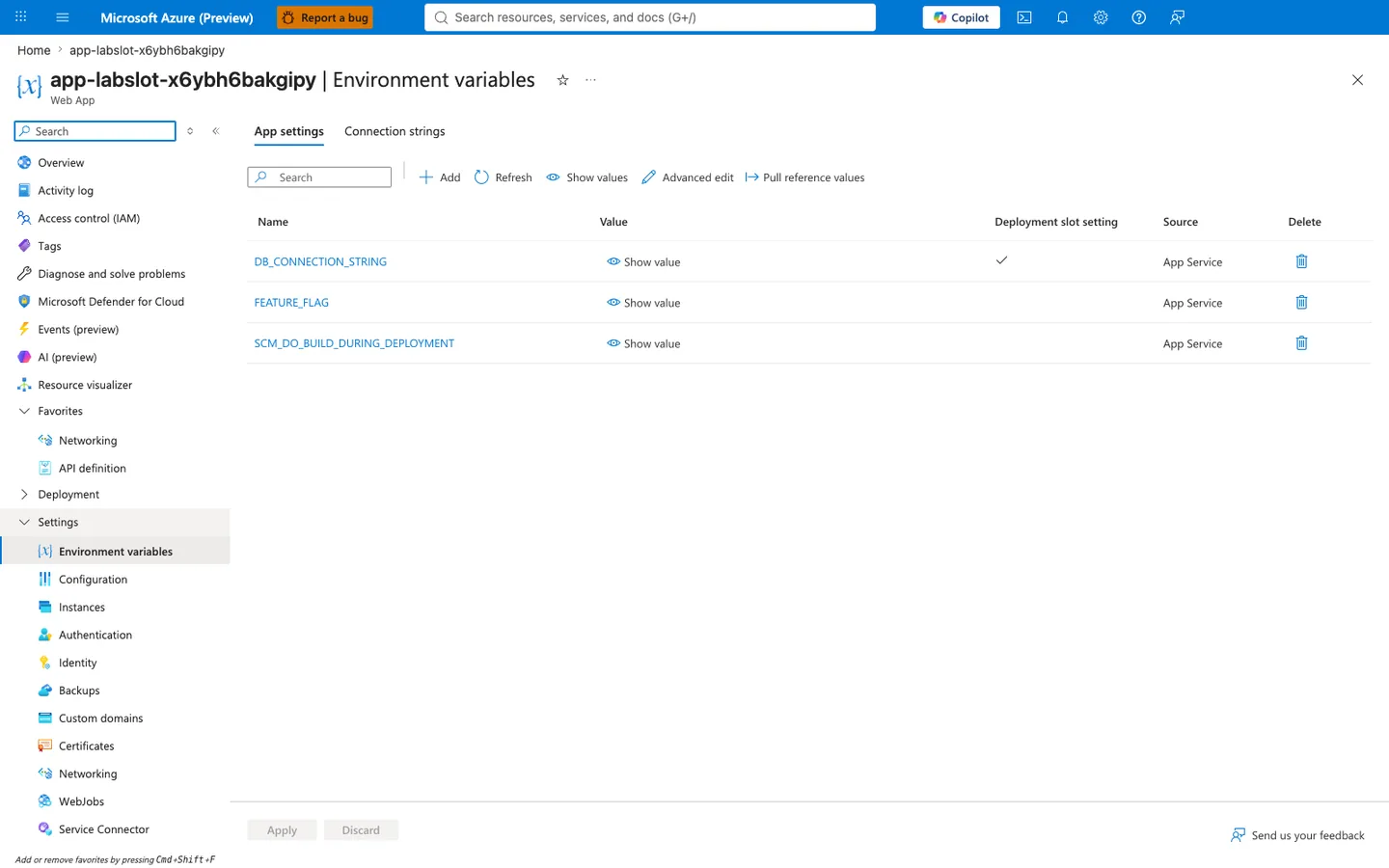
Purpose: Cross-verify visually that the Portal control-plane marks DB_CONNECTION_STRING as slot-sticky and FEATURE_FLAG and SCM_DO_BUILD_DURING_DEPLOYMENT as non-sticky. This complements the runtime timestamp deltas in the table above by showing the platform-level precondition consistent with the swap-driven restart interpretation used here: only non-sticky app settings move to the destination slot on swap, and only settings whose value actually changes on swap trigger a process regeneration.
Look for:
- Blade heading reads "app-labslot-x6ybh6bakgipy | Environment variables" with the App settings tab active.
DB_CONNECTION_STRINGrow: Deployment slot setting checkbox CHECKED.FEATURE_FLAGrow: Deployment slot setting checkbox UNCHECKED.SCM_DO_BUILD_DURING_DEPLOYMENTrow: Deployment slot setting checkbox UNCHECKED.- Apply and Discard buttons at the bottom are both disabled (no pending edits, so the displayed state equals the persisted state).
Expected result: The sticky checkbox on DB_CONNECTION_STRING matches the slotConfigNames.appSettingNames array in main.bicep (only DB_CONNECTION_STRING is registered as sticky). If the Portal instead showed FEATURE_FLAG as sticky or DB_CONNECTION_STRING as non-sticky, the runtime behavior in section 4.5 (FEATURE_FLAG swapped, DB stayed) would not reproduce, and the process-restart deltas above would need to be attributed to an unrelated cause such as a worker recycle.
Next step: Cross-check this Portal state against section 4.6's programmatic assertions (feature_swapped = True, db_sticky = True) — the two evidence layers should agree. If they disagree (Portal shows one contract, runtime observes another), suspect a race between Bicep re-deployment and the swap trigger, and re-verify by running az webapp config appsettings list --slot production against the parent site resource.
4.8 /diag/slots snapshots and config hash evolution
Pre-swap production (baseline/diag-slots-prod.json):
{"config_hash":"027d574d88e7b2722dc7da98bc5d1bb337a75f1331bb795d2a83aba6ce291fd7","current_config":{"DB_CONNECTION_STRING":"prod-server.database.windows.net","FEATURE_FLAG":"v1","PROCESS_START_UTC":"2026-04-04T05:13:59.196136+00:00","WEBSITE_SLOT_NAME":"Production"}}
Pre-swap staging (baseline/diag-slots-staging.json):
{"config_hash":"7f5ed03ca7b0fdd301f27ed036155631ca62ffce8a18b4fe5bce0235f02216bc","current_config":{"DB_CONNECTION_STRING":"staging-server.database.windows.net","FEATURE_FLAG":"v2","PROCESS_START_UTC":"2026-04-04T05:34:02.102318+00:00","WEBSITE_SLOT_NAME":"Production"}}
Post-swap sample (trigger/diag-slots-postswap-20260404T055128Z.json):
{"config_hash":"4069415d1d95ca3d38f723e476f8956726634a0b7fddf338499168a7d7198b3d","current_config":{"DB_CONNECTION_STRING":"prod-server.database.windows.net","FEATURE_FLAG":"v2","PROCESS_START_UTC":"2026-04-04T05:46:57.025552+00:00","WEBSITE_SLOT_NAME":"Production"}}
4.8.1 Swap operation activity log (portal verification)
To confirm that the config hash transition captured in the JSON snapshots above is correlated with a distinct ARM control-plane action, the Activity log blade was captured and the "Swap Web App Slots" row was expanded from a fresh live reproduction:
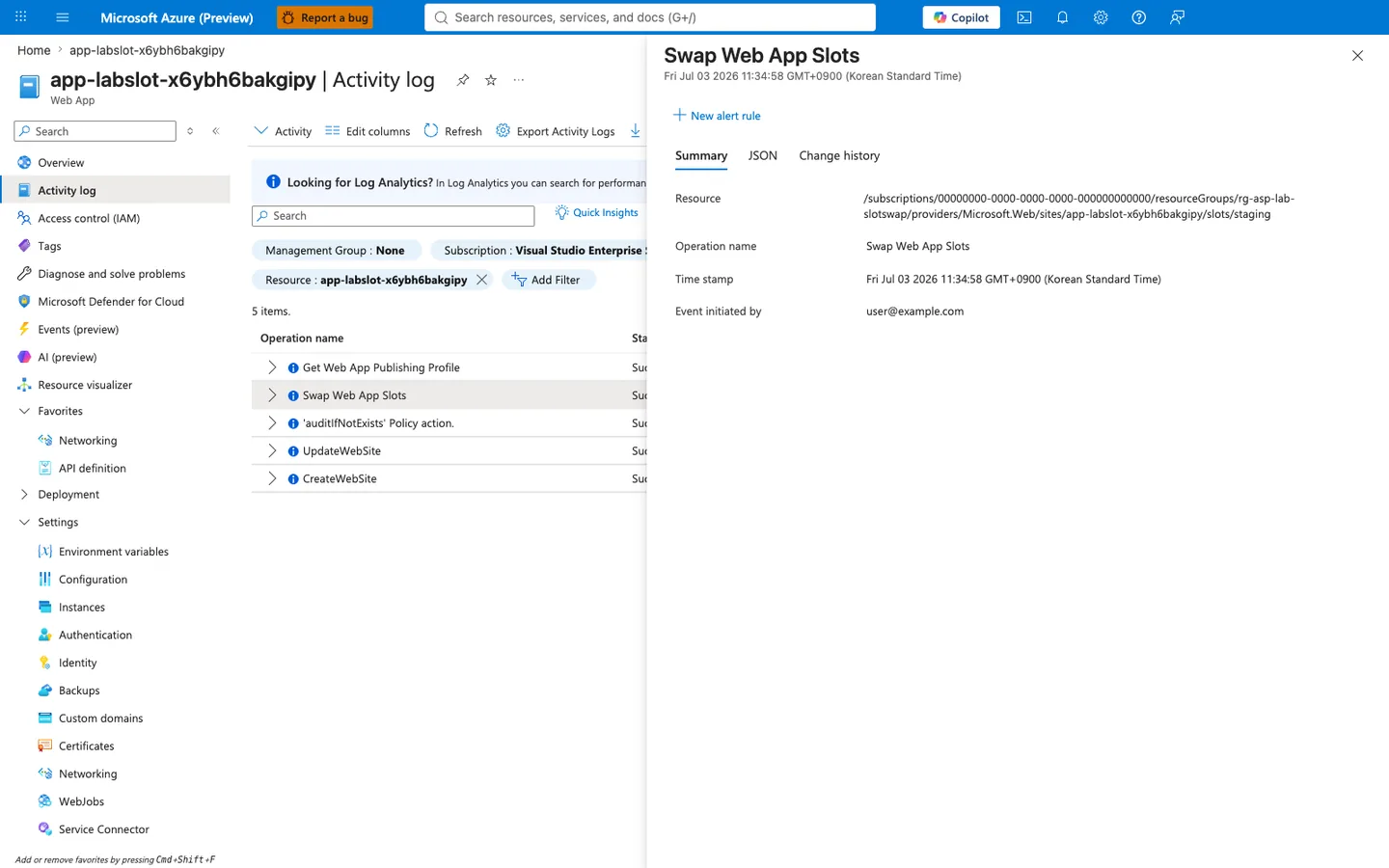
Purpose: Provide an independent ARM control-plane record that the swap operation whose runtime effects are captured in the JSON snapshots above actually completed as a discrete action, correlated in time with the config hash transition from 027d… (pre-swap) to 4069… (post-swap). The Activity log and the /diag/slots runtime endpoint measure different layers (ARM operation acknowledgement vs. data-plane environment observation), so this capture cross-verifies for existence and time-window alignment — not for exact timestamp equality with PROCESS_START_UTC.
Look for:
- Blade heading reads "app-labslot-x6ybh6bakgipy | Activity log".
- The grid contains a row with Operation name "Swap Web App Slots".
- The selected "Swap Web App Slots" row shows Status "Succeeded".
- Detail panel Resource path ends in
/slots/staging— the swap operation is scoped to the source slot per ARM semantics. - Detail panel Time stamp falls in the same window as the
PROCESS_START_UTCregeneration observed in section 4.7's timestamp deltas. - Detail panel Event initiated by shows a real identity (sanitized in this capture to
user@example.com).
Expected result: Exactly one "Swap Web App Slots" row per swap trigger, with a Succeeded status. The detail panel time stamp is consistent with (not necessarily identical to) the process-restart deltas in section 4.7 — the ARM operation completes when the platform accepts the swap, while the runtime PROCESS_START_UTC advances when the destination worker observes the new environment and re-initializes.
Next step: If the Activity log shows the swap as Failed or Cancelled while section 4.6's feature_swapped = True still holds, treat it as a control-plane vs. data-plane inconsistency — capture the JSON tab of the failed operation record and open a support case referencing both the Activity log JSON and the /diag/slots config hash transition so the platform team can reconcile the two evidence layers.
4.9 KQL export volume summary
| Export file | Rows |
|---|---|
kql-http-20260404T060610Z.json | 23 |
kql-console-20260404T060610Z.json | 94 |
kql-platform-20260404T060610Z.json | 200 |
4.10 HTTP evidence details
Representative rows from HTTP export:
| TimeGenerated (UTC) | Path | Status | TimeTaken (ms) | Host |
|---|---|---|---|---|
| 2026-04-04T05:45:28.655039Z | /config | 200 | 120 | production host |
| 2026-04-04T05:45:29.538204Z | /config | 200 | 30 | staging host |
| 2026-04-04T05:47:47.997103Z | / | 200 | 8 | staging host |
| 2026-04-04T05:47:48.045794Z | / | 200 | 29 | production host |
| 2026-04-04T05:50:24.579835Z | /config | 200 | 92 | production host |
| 2026-04-04T05:51:21.610129Z | /config | 200 | 47 | production host |
| 2026-04-04T05:51:22.477189Z | /config | 200 | 14 | staging host |
| 2026-04-04T05:51:24.143418Z | /diag/slots | 200 | 11 | production host |
Observation: both slots remained reachable and healthy during/after swap evidence window.
4.11 Console evidence details
Representative console lines:
| TimeGenerated (UTC) | Message |
|---|---|
| 2026-04-04T05:49:04.0022069Z | Starting gunicorn 25.3.0 |
| 2026-04-04T05:49:04.0105079Z | Listening at: http://0.0.0.0:8000 (1895) |
| 2026-04-04T05:49:04.0742069Z | Booting worker with pid: 1896 |
| 2026-04-04T05:49:04.163576Z | Booting worker with pid: 1897 |
| 2026-04-04T05:49:04.6153423Z | Control socket listening at /root/.gunicorn/gunicorn.ctl |
| 2026-04-04T05:48:51.0515103Z | Oryx Version: 0.2.20260130.1 ... |
Observation: process lifecycle aligns with swap-time startup sequence.
4.12 Platform lifecycle evidence details
Representative platform lines:
| TimeGenerated (UTC) | Level | Message excerpt |
|---|---|---|
| 2026-04-04T05:48:01.0779209Z | Informational | Action: PullingImage |
| 2026-04-04T05:48:06.2231082Z | Informational | Action: CreatingContainer ... |
| 2026-04-04T05:48:10.1875541Z | Informational | Action: WaitingForSiteWarmUpProbeSuccess |
| 2026-04-04T05:49:05.8804667Z | Informational | Action: WarmUpProbeSucceeded ... 55.2013831 seconds |
| 2026-04-04T05:49:06.6769441Z | Informational | Site started. |
| 2026-04-04T05:49:26.7486051Z | Informational | State: Stopping, Action: StoppingSite |
| 2026-04-04T05:49:32.464447Z | Informational | Site ... stopped. |
These lines validate that the swap involved observable start/stop/warm-up transitions.
4.13 Hypothesis evaluation matrix
| Criterion | Status | Evidence source |
|---|---|---|
| Pre-swap value divergence present | Pass | config-prod-before, config-staging-before |
| Non-sticky value exchanged | Pass | config-prod-after, config-staging-after |
| Sticky value remained slot-bound | Pass | same artifacts + metadata |
| Sticky metadata explicit | Pass | app-settings-prod, app-settings-staging |
| Lifecycle around swap observed | Pass | kql-console, kql-platform |
Final hypothesis verdict: Supported.
4.14 Key finding (required conclusion)
Perfect config drift demo
The experiment precisely matches documented swap behavior:
FEATURE_FLAG(non-sticky) swapped with code.DB_CONNECTION_STRING(sticky/slot-setting) stayed with the slot.
This proves the sticky setting mechanism works exactly as documented.
4.15 Practical lessons for release engineering
- Treat sticky/non-sticky classification as release-critical metadata.
- Include pre/post slot snapshots in every production swap runbook.
- Align incident response language with slot semantics ("expected movement" vs "drift").
- Use KQL lifecycle evidence to distinguish swap mechanics from app defects.
4.16 Recommended production controls
| Control | Why |
|---|---|
IaC enforcement for slotConfigNames | Prevent accidental non-sticky secrets |
| Swap pre-check script | Catch config surprises before cutover |
| Post-swap smoke tests on both hostnames | Verify both resulting roles |
| KQL dashboards for swap windows | Fast incident interpretation |
4.17 Pre-swap checklist template
| Item | Complete |
|---|---|
| Sticky settings inventory reviewed | ☐ |
| Non-sticky feature flags reviewed | ☐ |
| Pre-swap snapshots captured (both slots) | ☐ |
| Warm-up endpoint validated | ☐ |
| Rollback strategy documented | ☐ |
4.18 Post-swap checklist template
| Item | Complete |
|---|---|
Production /config verified | ☐ |
Staging /config verified | ☐ |
| Sticky values unchanged by slot | ☐ |
| Non-sticky values exchanged | ☐ |
| Startup/warm-up logs healthy | ☐ |
4.19 Reproducibility and data integrity notes
- Every numeric and string value in this section is sourced from checked-in sanitized artifacts.
- Hostnames and subscription identifiers are redacted where required.
- No placeholders were used for experimental result tables.
4.20 Limitations and scope
This lab validates swap/config semantics for this specific setup:
- Linux App Service, Python runtime.
- S1 plan, single app with one staging slot.
- Two controlled app settings.
It does not attempt to benchmark multi-slot, multi-instance, or multi-region swap complexity.
Expected Evidence
This section defines what you SHOULD observe at each phase of the lab. Use it to validate your investigation is on track.
Before Trigger (Baseline)
| Evidence Source | Expected State | What to Capture |
|---|---|---|
Slot configuration endpoint (/config) | Production and staging show different values before swap | Production: DB_CONNECTION_STRING=prod-server..., Staging: DB_CONNECTION_STRING=staging-server... |
| App settings metadata | Sticky classification is explicitly configured | DB_CONNECTION_STRING has slotSetting=true; FEATURE_FLAG has slotSetting=false |
| Baseline slot snapshots | Pre-swap state recorded for both slots | config-prod-before, config-staging-before, diag-slots artifacts |
During Incident
| Evidence Source | Expected State | Key Indicator |
|---|---|---|
/config after swap | App stays healthy but values shift by sticky rules | Production /config returns 200 in ~63 ms while showing swapped/non-swapped mix |
| AppServiceConsoleLogs | Runtime boot appears normal during swap window | Gunicorn startup lines and Listening at: http://0.0.0.0:8000 |
| AppServicePlatformLogs | Swap lifecycle includes startup churn without direct app crash | LastError: ContainerTimeout visible from deployment/startup lifecycle context |
After Recovery
| Evidence Source | Expected State | Key Indicator |
|---|---|---|
| Post-swap config comparison | Non-sticky moved, sticky remained slot-bound | FEATURE_FLAG exchanged, DB_CONNECTION_STRING stayed with each slot |
| Slot behavior interpretation | Swap operation itself is healthy | Endpoints remain 200 while data-plane config differs by slot policy |
| Operational conclusion | Root cause is config governance, not swap failure | Missing/incorrect sticky setting design explains perceived drift |
Evidence Timeline
graph TD
    A[Baseline Capture] --> B[Trigger Fault]
    B --> C[During: Collect Evidence]
    C --> D[After: Compare to Baseline]
    D --> E[Verdict: Confirmed/Falsified]
Evidence Chain: Why This Proves the Hypothesis
Falsification Logic
If you observe healthy HTTP 200 behavior with post-swap configuration values that follow sticky/non-sticky rules (FEATURE_FLAG swapped, DB_CONNECTION_STRING remained slot-bound), the hypothesis is CONFIRMED because the platform executed swap correctly and the perceived drift comes from slot-setting semantics.
If you do NOT observe this pattern (for example sticky values swap unexpectedly or swap fails operationally), the hypothesis is FALSIFIED — consider alternatives such as missing slotConfigNames, manual config mutation, or incomplete swap execution.
Clean Up
| Command/Flag | Purpose |
|---|---|
az group delete | Delete the resource group and all contained lab resources |
--yes | Skip confirmation prompt for non-interactive execution |
--no-wait | Return immediately without waiting for deletion to complete |
Related Playbook
See Also
- Playbook: Slot Swap Restart / Config Drift / Warm-up Race
- Playbook: Slot Swap Failed During Warm-up
- Playbook: Warm-up vs Health Check
- KQL: Restart Timing Correlation
- Troubleshooting Method