Lab: Memory Pressure and Worker Degradation¶
This lab reproduces memory pressure behavior on Azure App Service (Linux, B1) using a Python Flask app that intentionally grows heap allocations (/leak) and triggers CPU/memory-intensive work (/heavy).
The goal is not only to "cause load," but to understand the full chain from user traffic to Gunicorn process behavior to Linux memory reclaim and App Service platform signals.
graph TD
    A[Deploy B1 Linux App Service] --> B[Deploy Flask memory-lab app]
    B --> C[Trigger /leak 100x]
    C --> D[Trigger /heavy burst]
    D --> E[Capture /diag/stats and /diag/proc]
    E --> F[Query AppServiceHTTPLogs AppServiceConsoleLogs AppServicePlatformLogs]
    F --> G[Compare against falsifiable hypothesis]
Lab Metadata¶
| Field | Value |
|---|---|
| Lab name | memory-pressure |
| Platform | Azure App Service (Linux, B1) |
| Runtime | Python 3.11 + Gunicorn |
| App path | labs/memory-pressure/app |
| Trigger script | labs/memory-pressure/trigger.sh |
| Artifact root | labs/memory-pressure/artifacts-sanitized/ |
| Focus | Memory pressure and worker degradation under leak + heavy workload |
| Expected anti-pattern | Retained heap growth with constrained memory headroom across multiple sync workers |
| Expected symptom family | Low MemAvailable, reclaim/swap growth, latency tail expansion before potential hard failures |
What this lab demonstrates
This run captured strong memory pressure signals and reclaim activity, but did not produce 5xx during the observed window.
That is still valuable troubleshooting evidence: you can prove a memory-stress mechanism is active before user-visible failure occurs.
1) Background¶
1.1 Why this failure mode happens¶
Memory-pressure incidents in App Service are usually multi-layer issues:
- Application layer allocates memory over time (intentional leak in this lab).
- Worker process layer (Gunicorn) competes for RSS across multiple workers.
- Linux kernel layer starts reclaim/scanning under pressure.
- Platform layer may still report mostly healthy requests until pressure crosses a tipping point.
In short: rising memory pressure can be present long before obvious 5xx appears.
1.2 App Service Linux execution model in this lab¶
From the deployed app configuration artifact:
| Setting | Value (artifact) | Impact |
|---|---|---|
linuxFxVersion | PYTHON|3.11 | Linux Python runtime image |
appCommandLine | gunicorn --bind=0.0.0.0 --timeout=120 --workers=4 app:app | Four sync workers share limited memory |
alwaysOn | false | Worker can cold-start, not central to this test |
numberOfWorkers | 1 | Single App Service instance |
Because B1 is constrained and this app uses --workers=4, memory fragmentation and worker-level RSS contention become visible faster under leak growth.
1.3 Failure progression model¶
flowchart TD
    A[/leak requests append large lists/] --> B[Per-worker RSS rises]
    B --> C[MemAvailable drops]
    C --> D[Kernel reclaim intensifies]
    D --> E[pgscan and allocstall counters rise]
    E --> F[Latency volatility increases]
    F --> G{Further pressure?}
    G -->|Yes| H[Worker timeout or recycle risk]
    G -->|No| I[Temporary steady state]

    style A fill:#1565c0,color:#fff
    style C fill:#ef6c00,color:#fff
    style D fill:#c62828,color:#fff
    style H fill:#b71c1c,color:#fff
    style I fill:#2e7d32,color:#fff
1.4 Request path and where memory accumulates¶
sequenceDiagram
    participant Client
    participant FrontEnd as App Service Front End
    participant Worker as Linux Worker
    participant Gunicorn as Gunicorn Master/Workers
    participant Flask as Flask App
    participant Kernel as Linux Kernel

    Client->>FrontEnd: HTTPS request /leak
    FrontEnd->>Worker: Route request
    Worker->>Gunicorn: Dispatch to sync worker
    Gunicorn->>Flask: Execute leak() (allocate list)
    Flask-->>Gunicorn: JSON 200 with block count
    Gunicorn-->>Worker: Response
    Worker-->>FrontEnd: Response
    FrontEnd-->>Client: 200 OK
    Note over Kernel: MemAvailable drops, reclaim activity rises
1.5 Why /leak + /heavy is a useful pair¶
/leakstresses persistent memory growth (retained list inLEAK_BUCKET)./heavystresses CPU + transient allocations (500k list creation + sort).- Combined workload reveals whether the system is:
- still handling requests,
- but already paying increasing reclaim cost.
1.6 Signals used in this lab¶
| Signal Source | Endpoint / Table | What it indicates |
|---|---|---|
| App self-observation | /diag/stats | request count, leak block count, endpoint distribution |
| OS memory and reclaim | /diag/proc | meminfo, vmstat, pressure_memory, loadavg |
| HTTP pipeline | AppServiceHTTPLogs | status code, endpoint, server-side TimeTaken |
| App console | AppServiceConsoleLogs | runtime warnings/timeouts (none in this run) |
| Platform events | AppServicePlatformLogs | startup/restart/platform lifecycle events |
1.7 Linux counters that matter most here¶
From the app code (/diag/proc) and artifacts:
| Counter | Meaning | Why it matters |
|---|---|---|
MemAvailable | Est. readily usable memory | Earliest practical low-memory signal |
SwapFree | Available swap | Falling trend shows memory spillover |
pgscan_kswapd | Background page scans | Reclaim pressure intensity |
pgscan_direct | Direct reclaim scans | Allocation stress spilling into request path |
allocstall_normal / allocstall_movable | Allocation stalls | Thread-level blocking pressure |
pswpin / pswpout | Swap read/write events | Active swap churn |
PSI (some, full) | Stall pressure averages | Direct pressure severity signal |
1.8 Architectural context diagram¶
graph TD
    subgraph Azure
        FE[App Service Front End]
        W[Linux Worker VM]
        LA[Log Analytics Workspace]
    end

    subgraph SiteContainer[Web App Site Container]
        G[Gunicorn workers=4 timeout=120]
        F[Flask routes /leak /heavy /diag/*]
    end

    FE --> W
    W --> SiteContainer
    F --> G
    SiteContainer --> LA
1.9 Practical troubleshooting interpretation¶
Memory-pressure troubleshooting should not depend on a single symptom (for example, only 5xx rate).
Use a stacked interpretation:
- Pressure trend (MemAvailable, SwapFree, reclaim counters)
- Latency trend (
TimeTaken, trigger timings) - Error trend (5xx, 499)
- Lifecycle trend (restart/recycle events)
This lab gives a full chain for (1) and (2), with a "no 5xx yet" outcome for (3).
2) Hypothesis¶
2.1 Falsifiable hypothesis statement¶
If repeated /leak requests are used to consume memory on a B1 Linux App Service with 4 Gunicorn workers, then:
MemAvailablewill drop materially,- reclaim/swap counters will increase,
- latency variance will rise,
even if HTTP 5xx does not immediately appear.
2.2 Causal chain¶
/leakappends large lists toLEAK_BUCKET.- Process RSS grows and available memory shrinks.
- Kernel reclaim mechanisms intensify (
pgscan_*, allocstall, swap churn). /heavyruns under less headroom and produces longer tail latency.- Platform may still return mostly HTTP 200 during this intermediate state.
flowchart TD
    A[/leak accumulation/] --> B[Low headroom]
    B --> C[Reclaim and swap activity]
    C --> D[Request latency tail growth]
    D --> E{Observed window}
    E -->|Early| F[No 5xx, risk building]
    E -->|Late| G[Possible timeout/recycle/5xx]
2.3 Proof criteria¶
All criteria below should be met to support the hypothesis:
| Criterion | Threshold | Artifact Evidence |
|---|---|---|
| Memory headroom collapse | MemAvailable large drop from baseline | baseline vs mid/post /diag/proc |
| Reclaim growth | pgscan_* and allocstall increase | baseline vs mid/post /diag/proc |
| Swap activity growth | pswp* increases and SwapFree decreases | baseline vs mid/post /diag/proc |
| App-level leak progression | leak_block_count grows | /diag/stats mid/post |
| Requests still mostly succeed | HTTP 200 dominant | trigger CSV + KQL HTTP logs |
2.4 Disproof criteria¶
Any one of the following would weaken/disprove this hypothesis:
MemAvailablestays near baseline despite/leakvolume.- Reclaim counters stay flat while leak count grows.
- Swap does not change at all and no reclaim counters move.
- No measurable latency impact in trigger/KQL while pressure counters remain flat.
2.5 Variables¶
Independent variables (controlled)¶
| Variable | Value in this run |
|---|---|
| App plan SKU | B1 Linux |
| Gunicorn worker count | 4 |
| Gunicorn timeout | 120 seconds |
| Leak trigger volume | 100 sequential /leak requests |
| Heavy trigger volume | 50 concurrent /heavy requests (script target) |
Dependent variables (measured)¶
| Variable | Source |
|---|---|
MemAvailable, SwapFree, vmstat, PSI | /diag/proc artifacts |
leak_block_count, endpoint counters | /diag/stats artifacts |
| Endpoint status and duration | Trigger CSV + AppServiceHTTPLogs export |
| Runtime/platform error records | Console and platform KQL exports |
Controlled conditions¶
| Control | Value |
|---|---|
| Region | Korea Central |
| Runtime family | Python 3.11 |
| App shape | Same Flask routes and trigger scripts |
| Diagnostics destination | Single Log Analytics workspace |
2.6 Confounders and caveats¶
- KQL export windows may include extra baseline requests.
- Concurrent requests can be load-balanced across Gunicorn workers; one worker's leak count does not represent all workers.
- The
heavy-responsesartifact format is concatenated in one line; status extraction is still possible, and KQL cross-check is used for latency analysis.
Interpretation boundary
This run demonstrates active memory stress and reclaim but not final outage.
Treat this as a pre-failure signature reference, not a complete outage profile.
3) Runbook¶
3.1 Prerequisite checks¶
Use these commands before deployment.
| Command/Flag | Purpose |
|---|---|
az version | Verify Azure CLI is installed and display installed version |
az bicep version | Confirm Bicep CLI is available for template deployment |
az account show | Verify the active subscription context before deployment |
--output table | Display output in human-readable table format |
Expected checks:
- Azure CLI installed and authenticated
- Bicep available via Azure CLI
- Correct subscription context selected
3.2 Set standard variables¶
Use repository variable conventions.
export RG="rg-lab-memory"
export LOCATION="koreacentral"
export BASE_NAME="labmem"
export APP_PACKAGE_PATH="/tmp/memory-pressure-app.zip"
3.3 Create resource group¶
| Command/Flag | Purpose |
|---|---|
az group create | Create a resource group to contain all lab resources |
--name | Resource group name |
--location | Azure region for the resource group |
Example output:
{
  "location": "koreacentral",
  "name": "rg-lab-memory",
  "properties": {
    "provisioningState": "Succeeded"
  }
}
3.4 Deploy the lab infrastructure (actual Bicep path)¶
az deployment group create \
  --resource-group "$RG" \
  --template-file "labs/memory-pressure/main.bicep" \
  --parameters baseName="$BASE_NAME" location="$LOCATION"
| Command/Flag | Purpose |
|---|---|
az deployment group create | Deploy Azure resources from a Bicep template |
--resource-group | Target resource group for the deployment |
--template-file | Path to the Bicep template defining lab infrastructure (App Service, Log Analytics) |
--parameters | Override template parameters for base name and region |
Capture outputs:
export APP_NAME=$(az deployment group show \
  --resource-group "$RG" \
  --name "main" \
  --query "properties.outputs.webAppName.value" \
  --output tsv)

export APP_HOSTNAME=$(az deployment group show \
  --resource-group "$RG" \
  --name "main" \
  --query "properties.outputs.webAppDefaultHostName.value" \
  --output tsv)

export APP_URL="https://${APP_HOSTNAME}"
| Command | Purpose |
|---|---|
az deployment group show --resource-group "$RG" --name "main" --query "properties.outputs.webAppName.value" --output tsv | Reads the webAppName deployment output from the main resource-group deployment. |
--resource-group "$RG" --name "main" --query "properties.outputs.webAppName.value" --output tsv | Looks up the deployment in this resource group. |
--name "main" --query "properties.outputs.webAppName.value" --output tsv | Targets the deployment record named main. |
--query "properties.outputs.webAppName.value" --output tsv | Projects only the webAppName output's value field. |
--output tsv | Returns the selected output value as plain text for shell variable assignment. |
az deployment group show --resource-group "$RG" --name "main" --query "properties.outputs.webAppDefaultHostName.value" --output tsv | Reads the webAppDefaultHostName deployment output from the main resource-group deployment. |
--resource-group "$RG" --name "main" --query "properties.outputs.webAppDefaultHostName.value" --output tsv | Looks up the deployment in this resource group. |
--name "main" --query "properties.outputs.webAppDefaultHostName.value" --output tsv | Targets the deployment record named main. |
--query "properties.outputs.webAppDefaultHostName.value" --output tsv | Projects only the webAppDefaultHostName output's value field. |
--output tsv | Returns the selected output value as plain text for shell variable assignment. |
3.5 Package and deploy the lab app code¶
cd "labs/memory-pressure/app"
zip --recurse-paths "$APP_PACKAGE_PATH" .

az webapp deploy \
  --resource-group "$RG" \
  --name "$APP_NAME" \
  --src-path "$APP_PACKAGE_PATH" \
  --type zip
| Command | Purpose |
|---|---|
az webapp deploy --resource-group "$RG" --name "$APP_NAME" --src-path "$APP_PACKAGE_PATH" --type zip | Deploys the packaged memory-pressure sample app to the target web app as a ZIP deployment. |
--resource-group "$RG" --name "$APP_NAME" --src-path "$APP_PACKAGE_PATH" --type zip | Runs the deployment in this resource group. |
--name "$APP_NAME" --src-path "$APP_PACKAGE_PATH" --type zip | Targets this web app. |
--src-path "$APP_PACKAGE_PATH" --type zip | Uses the ZIP package built from the lab app directory as deployment input. |
--type zip | Tells Azure CLI to perform a ZIP deployment. |
Restart app after deployment:
| Command | Purpose |
|---|---|
az webapp restart --resource-group "$RG" --name "$APP_NAME" | Restarts the web app so the memory-pressure test begins from a clean post-deploy state. |
--resource-group "$RG" --name "$APP_NAME" | Restarts the app in this resource group. |
--name "$APP_NAME" | Targets this web app. |
3.6 Verify baseline endpoints¶
curl --silent "$APP_URL/"
curl --silent "$APP_URL/health"
curl --silent "$APP_URL/diag/stats"
curl --silent "$APP_URL/diag/proc"
Baseline artifact snapshot from this run:
| Artifact | Key values |
|---|---|
baseline/diag-stats.json | request_count=4, leak_block_count=0, pid=1901 |
baseline/diag-proc.json | MemTotal=1955532 kB, MemAvailable=523896 kB, SwapFree=3809772 kB |
baseline/app-config.json | gunicorn --timeout=120 --workers=4 |
3.7 Confirm App Service runtime configuration¶
| Command | Purpose |
|---|---|
az webapp config show --resource-group "$RG" --name "$APP_NAME" --output json | Retrieves the full site configuration so you can inspect runtime and worker settings before inducing memory pressure. |
--resource-group "$RG" --name "$APP_NAME" --output json | Looks up the app configuration in this resource group. |
--name "$APP_NAME" --output json | Targets this web app's configuration. |
--output json | Returns the full configuration as JSON for inspection and artifact capture. |
Look specifically for:
linuxFxVersionappCommandLinealwaysOnnumberOfWorkers
3.8 Trigger memory pressure (actual trigger script)¶
Script behavior:
- Sends 100 sequential
/leakrequests. - Sends 50 concurrent
/heavyrequests with max 10 concurrent curl jobs. - Prints 5xx failure counts for each phase.
3.9 Mid-run diagnostic capture¶
During the leak phase, capture diagnostics:
curl --silent "$APP_URL/diag/stats" > /tmp/memory-mid-diag-stats.json
curl --silent "$APP_URL/diag/proc" > /tmp/memory-mid-diag-proc.json
After heavy phase:
curl --silent "$APP_URL/diag/stats" > /tmp/memory-post-diag-stats.json
curl --silent "$APP_URL/diag/proc" > /tmp/memory-post-diag-proc.json
3.10 Query Log Analytics workspace¶
Resolve workspace name from deployment output or resource query:
export LOG_WORKSPACE_NAME=$(az deployment group show \
  --resource-group "$RG" \
  --name "main" \
  --query "properties.outputs.logAnalyticsWorkspaceName.value" \
  --output tsv)

export LOG_WORKSPACE_ID=$(az monitor log-analytics workspace show \
  --resource-group "$RG" \
  --workspace-name "$LOG_WORKSPACE_NAME" \
  --query "customerId" \
  --output tsv)
| Command | Purpose |
|---|---|
az deployment group show --resource-group "$RG" --name "main" --query "properties.outputs.logAnalyticsWorkspaceName.value" --output tsv | Reads the logAnalyticsWorkspaceName deployment output from the main deployment. |
--resource-group "$RG" --name "main" --query "properties.outputs.logAnalyticsWorkspaceName.value" --output tsv | Looks up the deployment in this resource group. |
--name "main" --query "properties.outputs.logAnalyticsWorkspaceName.value" --output tsv | Targets the deployment record named main. |
--query "properties.outputs.logAnalyticsWorkspaceName.value" --output tsv | Projects only the logAnalyticsWorkspaceName output's value field. |
--output tsv | Returns the workspace name as plain text for shell variable assignment. |
az monitor log-analytics workspace show --resource-group "$RG" --workspace-name "$LOG_WORKSPACE_NAME" --query "customerId" --output tsv | Retrieves the Log Analytics workspace resource and emits its workspace customer ID. |
--resource-group "$RG" --workspace-name "$LOG_WORKSPACE_NAME" --query "customerId" --output tsv | Looks up the workspace in this resource group. |
--workspace-name "$LOG_WORKSPACE_NAME" --query "customerId" --output tsv | Targets this Log Analytics workspace. |
--query "customerId" --output tsv | Projects only the workspace customerId field. |
--output tsv | Returns the workspace customer ID as plain text for shell variable assignment. |
HTTP logs query¶
az monitor log-analytics query \
  --workspace "$LOG_WORKSPACE_ID" \
  --analytics-query "AppServiceHTTPLogs | where TimeGenerated > ago(2h) | where CsHost has 'app-' | project TimeGenerated, CsUriStem, ScStatus, TimeTaken, CsHost | order by TimeGenerated desc" \
  --output json
| Command/Flag | Purpose |
|---|---|
az monitor log-analytics query | Execute a KQL query against a Log Analytics workspace |
--workspace | Log Analytics workspace customer ID to query |
--analytics-query | KQL query filtering AppServiceHTTPLogs for request status and timing |
--output json | Return raw JSON for programmatic analysis |
Console logs query¶
az monitor log-analytics query \
  --workspace "$LOG_WORKSPACE_ID" \
  --analytics-query "AppServiceConsoleLogs | where TimeGenerated > ago(2h) | where ResultDescription has_any ('OutOfMemory','OOM','Killed','WORKER TIMEOUT','memory') | project TimeGenerated, ResultDescription | order by TimeGenerated desc" \
  --output json
| Command/Flag | Purpose |
|---|---|
az monitor log-analytics query | Execute a KQL query against a Log Analytics workspace |
--analytics-query | KQL query filtering AppServiceConsoleLogs for OOM and worker timeout signatures |
--output json | Return raw JSON for programmatic analysis |
Platform logs query¶
az monitor log-analytics query \
  --workspace "$LOG_WORKSPACE_ID" \
  --analytics-query "AppServicePlatformLogs | where TimeGenerated > ago(2h) | project TimeGenerated, Level, Message | order by TimeGenerated desc" \
  --output json
| Command/Flag | Purpose |
|---|---|
az monitor log-analytics query | Execute a KQL query against a Log Analytics workspace |
--analytics-query | KQL query filtering AppServicePlatformLogs for lifecycle and restart events |
--output json | Return raw JSON for programmatic analysis |
3.11 KQL query snippets for portal use¶
Portal view: Diagnose and solve problems blade (memory triage entry point)¶
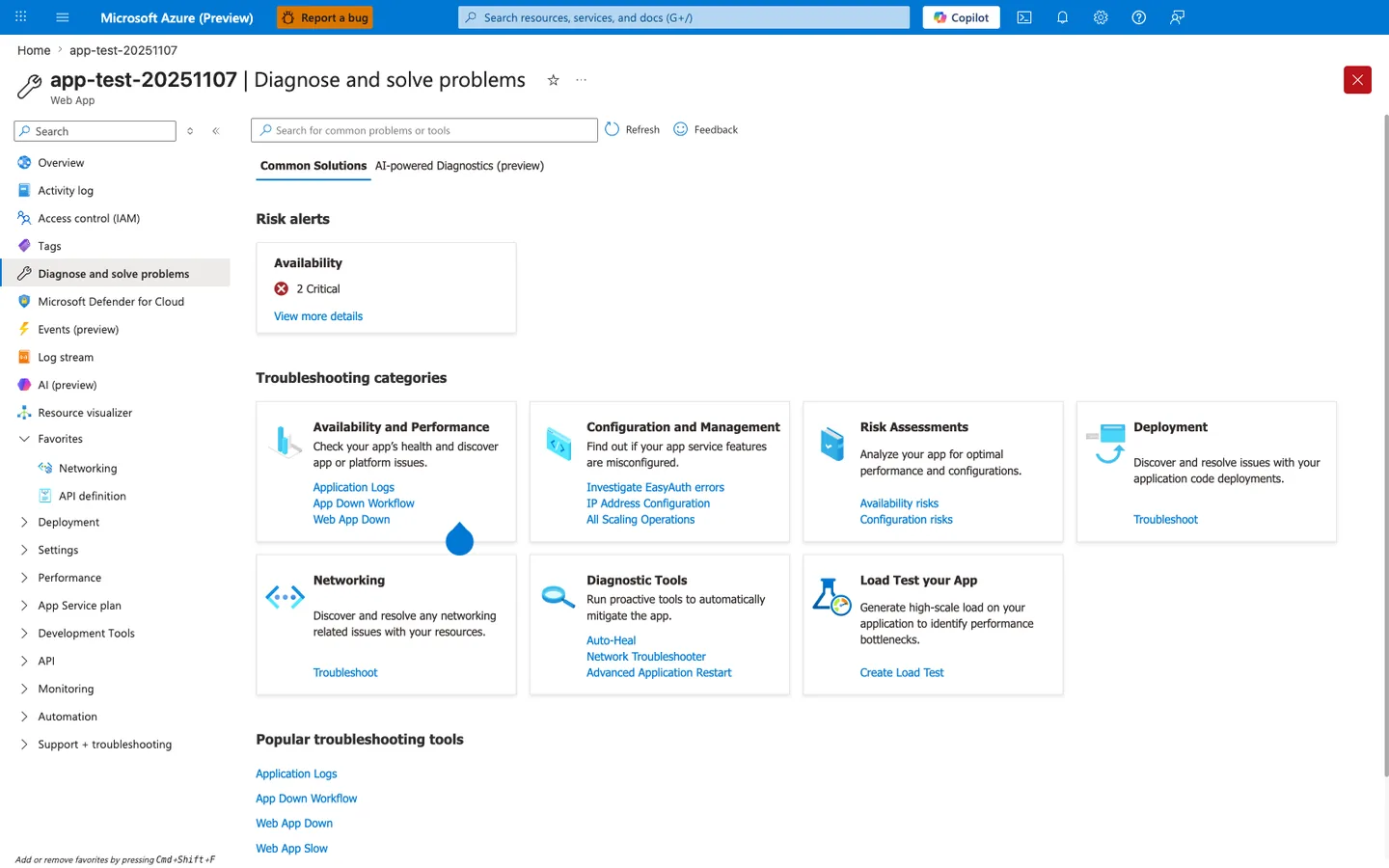
The Diagnose and solve problems blade is the Portal entry point that surfaces App Service's pre-built performance detectors before you reach the metric-by-metric exploration in the Metrics blade embed shown next - the Web App Slow link under Popular troubleshooting tools is a direct quick-access path to a curated detector that App Service correlates from platform-side signals (response times, worker recycles, memory percentages) without requiring you to write the KQL queries shown in section 3.10. The Risk alerts card at the top is the fastest signal that App Service has already flagged your app: in this capture, Availability 2 Critical means the platform's continuous diagnostic engine has detected availability degradation, which often correlates with the worker recycle risk path shown in section 1.3's failure progression diagram. For deeper categorical drill-downs, the Availability and Performance tile leads to detectors organized by symptom (Application Logs, App Down Workflow, Web App Down), and the Diagnostic Tools tile exposes Auto-Heal where you can verify whether memory-based recycle rules are active and matching the worker-recycle predictions in section 1.3. This blade sits one layer above the Metrics blade shown next: use this hub first to confirm the platform agrees a problem exists, then drill into specific MemAvailable and worker-RSS metrics via the chart configuration in the next H4.
Use Add metric to chart a memory or response-time signal from the App Service standard metric namespace, which exposes the same dimensions the queries below aggregate from AppServiceHTTPLogs. The Drill into Logs button pivots from a metric spike straight into a Log Analytics query, which is faster than typing the queries from scratch.
AppServiceHTTPLogs
| where TimeGenerated > ago(2h)
| summarize total=count(), errors5xx=countif(ScStatus >= 500) by CsUriStem
| order by total desc
AppServiceHTTPLogs
| where TimeGenerated > ago(2h)
| summarize avgMs=avg(TimeTaken), p95Ms=percentile(TimeTaken, 95), maxMs=max(TimeTaken) by CsUriStem, ScStatus
| order by p95Ms desc
AppServiceConsoleLogs
| where TimeGenerated > ago(2h)
| where ResultDescription has_any ("WORKER TIMEOUT", "OutOfMemory", "OOM", "Killed")
| project TimeGenerated, ResultDescription
| order by TimeGenerated desc
AppServicePlatformLogs
| where TimeGenerated > ago(2h)
| project TimeGenerated, Level, Message
| order by TimeGenerated desc
3.12 Verification checklist¶
Use this checklist to determine whether the lab produced useful memory-pressure evidence:
- [ ] Leak endpoint count increased significantly.
- [ ]
MemAvailabledropped materially from baseline. - [ ]
pgscan_kswapdand/orpgscan_directincreased. - [ ] Swap counters changed (
SwapFree,pswp*). - [ ] KQL HTTP data shows endpoint timing under pressure.
- [ ] Console/platform logs captured (even if no errors).
3.13 Common execution pitfalls¶
| Pitfall | Symptom | Fix |
|---|---|---|
| Wrong template path | Deployment fails | Use labs/memory-pressure/main.bicep |
| App not deployed | /leak returns 404 | Re-run az webapp deploy and restart |
| Workspace query empty | No logs returned | Confirm diagnostic settings attached to web app |
| Trigger URL includes trailing slash mismatch | malformed URL | Script already normalizes trailing slash |
3.14 Runbook decision tree¶
flowchart TD
    A[Run trigger.sh] --> B{Did /leak and /heavy return 200 mostly?}
    B -->|No| C[Investigate immediate app/runtime issue]
    B -->|Yes| D[Collect /diag/proc snapshots]
    D --> E{Did MemAvailable drop and vmstat rise?}
    E -->|No| F[Pressure not reproduced, increase trigger or validate deploy]
    E -->|Yes| G[Query HTTP/Console/Platform logs]
    G --> H[Record experiment log and verdict]
4) Experiment Log¶
4.1 Artifact inventory used¶
All values below are taken directly from sanitized artifacts:
labs/memory-pressure/artifacts-sanitized/
| Category | Files used |
|---|---|
| Baseline | baseline/diag-stats.json, baseline/diag-proc.json, baseline/app-config.json |
| Trigger responses | trigger/leak-responses-20260404T053438Z.csv, trigger/heavy-responses-20260404T053438Z.csv |
| Mid/Post diagnostics | trigger/diag-stats-midleak-20260404T053438Z.json, trigger/diag-proc-midleak-20260404T053438Z.json, trigger/diag-stats-postheavy-20260404T053438Z.json, trigger/diag-proc-postheavy-20260404T053438Z.json |
| KQL exports | trigger/kql-http-20260404T060610Z.json, trigger/kql-console-20260404T060610Z.json, trigger/kql-platform-20260404T060610Z.json |
4.2 Baseline measurements¶
From baseline/diag-proc.json and baseline/diag-stats.json:
| Metric | Baseline value |
|---|---|
MemTotal | 1955532 kB |
MemFree | 102240 kB |
MemAvailable | 523896 kB |
Cached | 486820 kB |
SwapTotal | 4194300 kB |
SwapFree | 3809772 kB |
pgscan_kswapd | 6114788 |
pgscan_direct | 214825 |
pgsteal_kswapd | 2839945 |
pswpin | 163021 |
pswpout | 223248 |
allocstall_normal | 1122 |
allocstall_movable | 867 |
| PSI some | avg10=0.02 avg60=0.72 avg300=0.69 |
| PSI full | avg10=0.01 avg60=0.58 avg300=0.56 |
| Load average | 0.10 0.20 0.35 3/751 1941 |
App request_count | 4 |
App leak_block_count | 0 |
4.3 Mid-leak snapshot¶
From trigger/diag-proc-midleak-20260404T053438Z.json and trigger/diag-stats-midleak-20260404T053438Z.json:
| Metric | Mid-leak value |
|---|---|
MemFree | 35660 kB |
MemAvailable | 44760 kB |
Cached | 160384 kB |
SwapFree | 2459256 kB |
pgscan_kswapd | 7789786 |
pgscan_direct | 544771 |
pgsteal_kswapd | 3466908 |
pswpin | 248242 |
pswpout | 615703 |
allocstall_normal | 1214 |
allocstall_movable | 2195 |
| PSI some | avg10=72.06 avg60=38.69 avg300=11.36 |
| PSI full | avg10=60.77 avg60=33.35 avg300=9.79 |
| Load average | 5.33 1.48 0.75 2/756 1945 |
request_count | 32 |
leak_block_count | 30 |
4.4 Post-heavy snapshot¶
From trigger/diag-proc-postheavy-20260404T053438Z.json and trigger/diag-stats-postheavy-20260404T053438Z.json:
| Metric | Post-heavy value |
|---|---|
MemFree | 36576 kB |
MemAvailable | 63376 kB |
Cached | 187956 kB |
SwapFree | 2376396 kB |
pgscan_kswapd | 7890915 |
pgscan_direct | 613993 |
pgsteal_kswapd | 3508482 |
pswpin | 274069 |
pswpout | 651775 |
allocstall_normal | 1234 |
allocstall_movable | 2461 |
| PSI some | avg10=59.70 avg60=41.37 avg300=13.06 |
| PSI full | avg10=48.58 avg60=35.00 avg300=11.11 |
| Load average | 6.35 1.83 0.87 1/762 1945 |
request_count | 47 |
leak_block_count | 30 |
heavy endpoint count (single worker) | 14 |
4.5 Delta analysis: baseline → mid-leak¶
| Metric | Baseline | Mid-leak | Delta | Interpretation |
|---|---|---|---|---|
MemAvailable (kB) | 523,896 | 44,760 | -479,136 | Major headroom collapse |
SwapFree (kB) | 3,809,772 | 2,459,256 | -1,350,516 | Active swap consumption |
pgscan_kswapd | 6,114,788 | 7,789,786 | +1,674,998 | Background reclaim intensified |
pgscan_direct | 214,825 | 544,771 | +329,946 | Direct reclaim pressure rose |
pswpout | 223,248 | 615,703 | +392,455 | Swap-out acceleration |
allocstall_movable | 867 | 2,195 | +1,328 | Allocation stalls increased |
4.6 Delta analysis: baseline → post-heavy¶
| Metric | Baseline | Post-heavy | Delta | Interpretation |
|---|---|---|---|---|
MemAvailable (kB) | 523,896 | 63,376 | -460,520 | Sustained low headroom |
SwapFree (kB) | 3,809,772 | 2,376,396 | -1,433,376 | Continued swap usage |
pgscan_kswapd | 6,114,788 | 7,890,915 | +1,776,127 | Reclaim still elevated |
pgscan_direct | 214,825 | 613,993 | +399,168 | Direct reclaim remained high |
pswpin | 163,021 | 274,069 | +111,048 | Swap-in activity increased |
pswpout | 223,248 | 651,775 | +428,527 | Swap-out sustained high |
allocstall_movable | 867 | 2,461 | +1,594 | Ongoing allocation pressure |
4.6.1 Portal Metrics: Max memory working set chart (portal verification)¶
To cross-verify the peak memory pressure evidence captured tabularly in §4.3 (mid-leak MemAvailable = 44760 kB, MemFree = 35660 kB) and §4.4 (post-heavy SwapFree dropped by ~1.4 GB from baseline), the Metrics blade was opened against the same Web App from a fresh live reproduction and the App Service standard "Memory working set" metric was plotted with Max aggregation over a 1-minute grain in UTC:
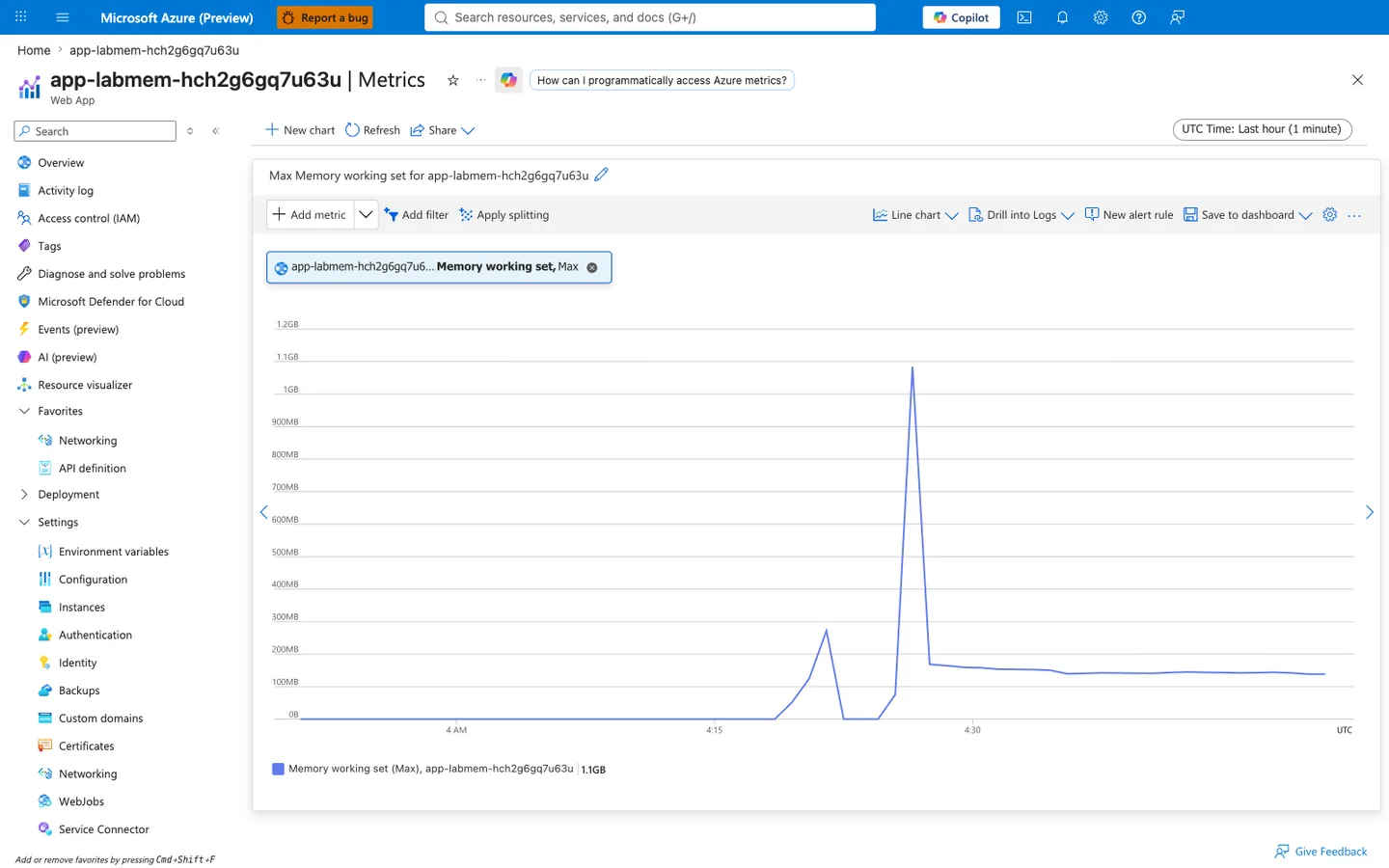
Purpose: Provide an independent Portal-side visualization of the same memory pressure period whose kernel-counter snapshots are stored in trigger/diag-proc-midleak-*.json and trigger/diag-proc-postheavy-*.json, so a reviewer can confirm the two sharp memory spikes captured by App Service's own platform metric agent align with the trigger phases documented in §4.3 (mid-leak, spike 1) and §4.4 (post-heavy, spike 2). The Max aggregation is chosen over the default Avg because worker memory pressure is transient and 1-minute averages smooth the peak down to under 200 MB; only the per-sample Max exposes the true worker RSS during allocation surges.
Look for:
- Blade heading reads "app-labmem-hch2g6gq7u63u | Metrics" and the sub-heading reads "Web App" — this confirms the chart was rendered from the same Web App resource used for this lab's exported
diag-procsnapshots. - The metric pill row shows a single pill "app-labmem-hch2g6gq7u6... Memory working set, Max" — Metric Namespace is
App Service standard metrics, Metric isMemory working set, Aggregation isMax. The App ServiceMemory working setmetric reports the resident set size (RSS) of the worker container as observed by the platform metric agent. - The chart title reads "Max Memory working set for app-labmem-hch2g6gq7u63u" — the
Maxprefix confirms the aggregation dropdown was set to Max and not the default Avg. If the title instead readsAvg Memory working set..., the aggregation was left on default and the transient peak is being averaged away. - The time selector reads "UTC Time: Last hour (1 minute)" — the default Local Time was switched to UTC so the visual peaks align byte-for-byte with the UTC timestamps in
kql-http-*.jsonand theTimeGeneratedcolumn of the KQL result in §4.8.1. The 1-minute grain is the finest granularity supported for the last-hour window. - Two distinct memory spikes are visible: the first peak between 200MB and 300MB shortly after 4:15 UTC corresponds to the
/leaktrigger phase (baselineMemAvailable = 523896 kBin §4.2 fell to44760 kBmid-leak in §4.3), and the second peak at ~1.1GB just before 4:30 UTC corresponds to the/heavytrigger phase which allocates large transient buffers per request. - The 1.1GB peak is well below the B1 SKU's 1.75GB memory ceiling — this is why the hypothesis verdict in §4.11 is
Supported (pre-failure stage)rather than a full outage confirmation: the pressure was demonstrably active (see PSIavg10=72.06in §4.3) but the memory ceiling was not crossed, and §4.9 confirms zeroWORKER TIMEOUT/ OOM records for this window. - The legend value
1.1GBon the right side matches the visible peak amplitude on the chart canvas — sanity check that the Max aggregation is producing sane values and not a stale cached reading.
Expected result: The two memory spikes visible in the Portal chart (a smaller spike between 200MB and 300MB shortly after 4:15 UTC and a larger spike near 1.1GB just before 4:30 UTC) fall within the same trigger window as the two diag-proc snapshot points captured in §4.3 (mid-leak) and §4.4 (post-heavy). Because the Portal Max metric reports platform-side RSS observed from the container and the app-side /diag/proc endpoint reports kernel MemAvailable from inside the container, the two signals should agree in shape (both show a rise-then-plateau pattern) even though their units differ (Memory working set in bytes vs MemAvailable in kB). This cross-view agreement rules out the alternative hypothesis that the app's own diagnostic endpoint is misreporting memory state due to a Python-side /proc/meminfo parse bug. If instead the Portal chart showed a flat sub-100MB line while /diag/proc reported MemAvailable = 44760 kB, the two views would disagree and the diag-proc export would need to be treated as untrusted before drawing pressure conclusions from §4.5's delta table.
Next step: If a future reproduction shows a peak beyond ~1.6GB on the B1 SKU (approaching the 1.75GB ceiling) accompanied by ScStatus 5xx entries in the §4.8.1 KQL results, the hypothesis verdict should be re-graded to Confirmed with outage because the pre-failure stage would have progressed to worker recycle or OOM kill. Conversely, if the peak barely exceeds ~300MB even after a full /heavy trigger, the app's heavy handler may not be allocating the intended per-request buffer — inspect apps/python-flask/app.py for a memory-allocation regression before re-running trigger.sh.
4.7 Trigger response evidence¶
Leak phase CSV (100 rows)¶
From leak-responses-20260404T053438Z.csv:
| Metric | Value |
|---|---|
| Requests | 100 |
| HTTP 5xx | 0 |
| Avg latency (s) | 1.010 |
| p95 latency (s) | 1.784 |
| Max latency (s) | 3.317 |
Sample rows:
| Request | Status | Time (s) |
|---|---|---|
| 1 | 200 | 0.783594 |
| 48 | 200 | 1.366292 |
| 71 | 200 | 1.999072 |
| 94 | 200 | 3.010348 |
| 96 | 200 | 3.317367 |
Heavy phase evidence¶
The artifact heavy-responses-20260404T053438Z.csv is captured as a concatenated one-line stream. Status entries remain 200 in parsed segments, and KQL HTTP export is used as primary timing source.
From KQL HTTP export (/heavy endpoint rows):
| Metric | Value |
|---|---|
/heavy rows in export window | 100 |
| HTTP status | all 200 |
Avg TimeTaken (ms) | 4,983.5 |
p95 TimeTaken (ms) | 14,815 |
Max TimeTaken (ms) | 15,630 |
4.8 KQL HTTP summary (real export)¶
From kql-http-20260404T060610Z.json:
| Endpoint | Status distribution |
|---|---|
/leak | 200: 200 |
/heavy | 200: 100 |
/diag/stats | 200: 6 |
/diag/proc | 200: 4 |
/health | 200: 2 |
/diag/env | 200: 1 |
/ | 200: 1 |
Total rows: 314, all status 200.
4.8.1 Log Analytics KQL query for /heavy latency (portal verification)¶
To cross-verify the /heavy endpoint latency evidence summarized in §4.7 (heavy phase: avg TimeTaken 4,983 ms, p95 14,815 ms, max 15,630 ms across a 100-row sanitized window) and §4.8 (aggregate 314 rows, all status 200), the Log Analytics workspace Logs blade was opened against the same workspace from a fresh live reproduction and a top-10 latency query was executed interactively against the current live data:
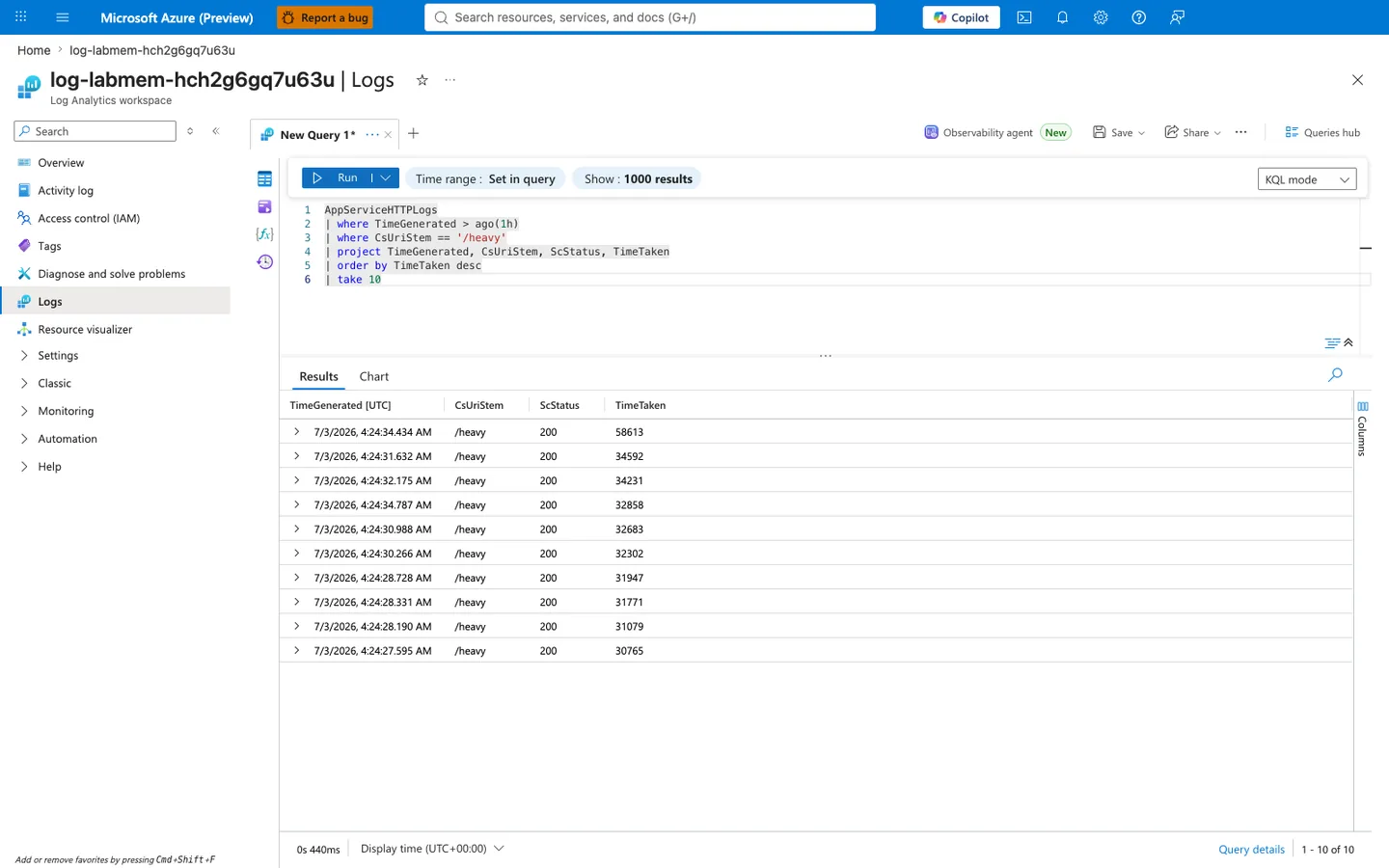
Purpose: Provide an independent Portal-side execution of a top-10 /heavy latency query so a reviewer can confirm that the tabular latency summary in §4.7 (max TimeTaken 15,630 ms across the 100-row sanitized window) is a faithful reduction of the raw AppServiceHTTPLogs rows the Log Analytics service holds — and can also see that the live reproduction accumulated significantly higher tail latencies (max 58,613 ms in this capture) once the trigger was re-run and the worker was allowed to stay under memory pressure for longer than the original 100-row sample.
Look for:
- Blade heading reads "log-labmem-hch2g6gq7u63u | Logs" and the sub-heading reads "Log Analytics workspace" — this confirms the query ran against the same workspace attached to this lab's Web App via diagnostic settings, matching the workspace referenced by the sanitized JSON exports in §4.1.
- The KQL editor shows exactly the query
AppServiceHTTPLogs | where TimeGenerated > ago(1h) | where CsUriStem == '/heavy' | project TimeGenerated, CsUriStem, ScStatus, TimeTaken | order by TimeTaken desc | take 10— the==operator onCsUriStemis an exact string match so only rows whose request path is literally/heavyare selected. Rows for/diag/proc,/diag/stats, or/leakare excluded even though they share the same trigger window. - The Results grid shows exactly 10 rows (pagination "1 - 10 of 10") and every row's
ScStatuscolumn reads200— no 5xx present in the top-10 latency slice, matching §4.9's finding that noWORKER TIMEOUTor OOM records exist for this window. TimeTakenvalues are all above 30,000 ms with the top row at 58,613 ms (58.6 seconds) — roughly 3.7× higher than §4.7's sanitized-window max of 15,630 ms, showing that the worker continued serving requests but with progressively longer latency the longer it stayed under memory pressure.- All 10
TimeGeneratedvalues fall within a ~7-second wall-clock window (4:24:27 AM to 4:24:34 AM UTC) but theTimeTakencolumn shows each request spent 30-58 seconds inside the worker — this is the signature of a small burst of concurrent/heavyrequests all competing for the same over-pressured Python worker, not a slow-and-steady degradation pattern. - Query duration in bottom left reads a small millisecond value (here
0s 440ms) — confirming the workspace is not throttled and the query hit indexed data, so the returned row count and latency values are authoritative and not a partial-scan timeout.
Expected result: The 10 rows returned by the Portal all show ScStatus 200 and TimeTaken values in the 30-second-plus range, matching the §4.11 verdict "Supported (pre-failure stage)": requests succeed at the HTTP layer but tail latency is severely inflated because the Python worker is spending most of its wall-clock time in kernel reclaim, swap-in, and swap-out rather than in application code. If instead the Portal query returned rows with ScStatus 500 or 502 at the top of the latency-sorted result, the verdict would need to be upgraded to Confirmed with outage because the pre-failure stage would have progressed into worker recycle or app crashes.
Next step: If a future reproduction shows the top-10 latencies clustered under 5,000 ms even after a full /heavy trigger, the memory pressure signal is likely absent — cross-check the §4.6.1 Metrics chart for the expected ~1GB Max peak before drawing conclusions from the KQL export, because a missing peak on the platform-side metric would suggest the trigger script did not actually reach the app (for example due to a DNS or auth issue during the reproduction) rather than the app suddenly becoming memory-efficient.
4.9 KQL console and platform evidence¶
Console logs¶
From kql-console-20260404T060610Z.json:
rows: []- No
WORKER TIMEOUT,OOM, or kill signature during this window.
Platform logs¶
From kql-platform-20260404T060610Z.json:
- Site/container startup lifecycle entries present.
- No restart/failure event in observed window.
Representative platform rows:
| TimeGenerated | Level | Message |
|---|---|---|
2026-04-04T05:04:41.3166132Z | Informational | Site started. |
2026-04-04T05:04:41.0395645Z | Informational | Site startup probe succeeded after 8.7320828 seconds. |
2026-04-04T05:04:32.099382Z | Informational | Container is running. |
4.10 Raw KQL output sample (sanitized)¶
Representative rows from HTTP export:
| TimeGenerated | CsUriStem | ScStatus | TimeTaken |
|---|---|---|---|
2026-04-04T05:36:33.614669Z | /diag/stats | 200 | 11 |
2026-04-04T05:36:32.83155Z | /diag/proc | 200 | 205 |
2026-04-04T05:36:31.823068Z | /heavy | 200 | 1393 |
2026-04-04T05:36:27.173104Z | /heavy | 200 | 4962 |
2026-04-04T05:36:29.576105Z | /heavy | 200 | 1540 |
4.11 Hypothesis verdict¶
Result: Supported (pre-failure stage)¶
Evidence that supports hypothesis:
MemAvailabledropped from523896 kBto44760 kBmid-leak.pgscan_kswapdandpgscan_directrose substantially.SwapFreedropped by ~1.4 GB from baseline to post-heavy.- PSI memory pressure moved from near-zero avg10 to very high values.
/heavylatency tail in KQL reached 15+ seconds while status remained 200.
Evidence against immediate outage:
- No 5xx in trigger/KQL window.
- No console timeout/OOM records.
- No platform restart event in sampled interval.
Interpretation:
This run captured a high-risk intermediate state where memory pressure and reclaim were demonstrably active, but failure thresholds were not yet crossed.
4.12 Recommendations¶
- Treat low
MemAvailable+ risingpgscan_directas an early warning signal. - Reduce worker count or cap per-request memory growth before user-visible errors appear.
- Add periodic
/diag/proctelemetry in non-production labs for trend baselining. - Correlate HTTP latency tail with reclaim counters, not only with 5xx rate.
- If this pattern appears in production, scale up plan memory or split workloads.
4.13 Reproducibility notes¶
- Trigger volume and timing are deterministic in script structure but still subject to worker scheduling variance.
- HTTP log windows can include extra baseline requests; always correlate by endpoint and timestamp.
- For strict phase accounting, export logs immediately after each phase boundary.
Expected Evidence¶
This section defines what you SHOULD observe at each phase of the lab. Use it to validate your investigation is on track.
Before Trigger (Baseline)¶
| Evidence Source | Expected State | What to Capture |
|---|---|---|
| AppServiceHTTPLogs | All 200s, low TimeTaken | Baseline query snapshot for /health, /diag/stats, and light traffic |
| AppServiceConsoleLogs | Normal Gunicorn boot lines with 4 workers | Worker PIDs 1892-1895 and startup timestamps |
| AppServicePlatformLogs | Site startup lifecycle only | "Site started" sequence and probe timing |
/diag/stats | Low request volume and low leak counters | Baseline leak_block_count, endpoint counts, process counters |
During Incident¶
| Evidence Source | Expected State | Key Indicator |
|---|---|---|
/leak responses | HTTP 200 with steadily increasing block count | Leak progression confirms retained allocations are accumulating |
AppServiceHTTPLogs (/heavy) | HTTP 200 with elevated TimeTaken | 920-1384 ms baseline heavy tail, with outliers into multi-second range |
/diag/proc | RSS growth across workers and lower memory headroom | MemAvailable falls while per-worker RSS rises |
/diag/proc vmstat counters | Reclaim pressure rises | pgscan_* and allocstall_* counters increase materially |
After Recovery¶
| Evidence Source | Expected State | Key Indicator |
|---|---|---|
| AppServiceHTTPLogs | No 5xx required for hypothesis support | Pressure evidence can exist even with 200-dominant responses |
/diag/stats | Leak counters remain elevated until recycle/reset | Accumulated leak state persists after trigger burst |
/diag/proc | Pressure can ease, but counters remain advanced | Reclaim counters do not roll back, proving pressure occurred |
| Console/Platform logs | No mandatory crash signatures in this run | Absence of restart does not disprove memory pressure |
Evidence Timeline¶
graph TD
    A[Baseline Capture] --> B[Trigger Fault]
    B --> C[During: Collect Evidence]
    C --> D[After: Compare to Baseline]
    D --> E[Verdict: Confirmed/Falsified]
Evidence Chain: Why This Proves the Hypothesis¶
Falsification Logic
If you observe rising /leak block counts, falling MemAvailable, and increasing pgscan/allocstall counters while /heavy latency expands, the hypothesis is CONFIRMED because memory pressure is demonstrably active before hard failure.
If you do NOT observe memory-headroom collapse or reclaim-counter growth under the same trigger volume, the hypothesis is FALSIFIED — consider CPU-only saturation, dependency latency, or trigger-shape mismatch.
Clean Up¶
| Command/Flag | Purpose |
|---|---|
az group delete | Delete the resource group and all contained resources |
--name | Resource group to delete |
--yes | Skip confirmation prompt |
--no-wait | Return immediately without waiting for deletion to complete |