Lab: Intermittent 5xx Under Load¶
This lab reproduces intermittent request failures caused by sync worker starvation on Azure App Service Linux.
The app intentionally mixes slow and fast endpoints:
/slowsleeps 5-15 seconds./fastreturns immediately.
When a burst of concurrent slow requests occupies the limited Gunicorn sync workers, fast requests queue behind them and start timing out.
graph TD
    A[Deploy B1 Linux app with 2 sync workers] --> B[Launch 20 concurrent /slow requests]
    B --> C[Immediately call /fast 10 times]
    C --> D[Observe queued fast requests]
    D --> E[Collect trigger CSV + /diag/stats]
    E --> F[Query AppServiceHTTPLogs for 200 vs 499 pattern]
    F --> G[Confirm worker starvation causal chain]
This guide is designed to diagnose intermittent 5xx-like customer symptoms where the root cause is worker pool saturation and request queueing rather than random platform instability, using a B1 Linux Python 3.11 app with Gunicorn sync, --workers 2, --timeout 30, a trigger of 20 concurrent /slow requests followed by 10 /fast requests, and sanitized artifacts from a real run.
Lab Metadata¶
| Attribute | Value |
|---|---|
| Difficulty | Intermediate |
| Estimated Duration | 45-60 minutes |
| Tier | Basic |
| Failure Mode | Intermittent request failures caused by sync-worker starvation and request queueing under mixed slow and fast load |
| Skills Practiced | Load-pattern analysis, worker-model troubleshooting, HTTP log interpretation, queueing correlation |
Status code interpretation
The artifact run primarily shows HTTP 499 in App Service HTTP logs for timed-out client-side requests.
In customer incidents this usually appears as intermittent "5xx/unavailable" behavior from the caller perspective, even when backend logs include 499 rather than 500.
1) Background¶
1.1 Mechanism overview¶
This failure mode is a queueing problem:
- A small sync worker pool accepts work.
- Long-running requests occupy workers.
- New requests cannot execute until a worker is free.
- Waiting clients hit timeout thresholds.
- Logs show a mixed pattern of successes and timeouts.
1.2 App and process model in this lab¶
From baseline/app-config.json:
| Setting | Value | Why it matters |
|---|---|---|
linuxFxVersion | PYTHON|3.11 | Linux Python runtime |
appCommandLine | gunicorn --bind 0.0.0.0:8000 --workers 2 --worker-class sync --timeout 30 app:app | Hard cap of 2 concurrent request executions |
alwaysOn | false | Startup behavior not primary in this run |
numberOfWorkers | 1 | Single app instance for deterministic load |
With sync workers, a worker handles one request at a time. If two workers are blocked on /slow, /fast waits in queue.
1.3 Request starvation diagram¶
flowchart TD
    A[20 concurrent /slow requests] --> B[Worker 1 busy]
    A --> C[Worker 2 busy]
    D[/fast requests arrive/] --> E[Queue behind /slow]
    E --> F{Client timeout reached?}
    F -->|Yes| G[Client abort / 499 in logs]
    F -->|No| H[Eventually 200]

    style B fill:#ef6c00,color:#fff
    style C fill:#ef6c00,color:#fff
    style G fill:#c62828,color:#fff
    style H fill:#2e7d32,color:#fff
1.4 Endpoint behavior from app code¶
| Endpoint | Behavior | Typical duration |
|---|---|---|
/slow | Random sleep between 5 and 15 seconds | seconds to tens of seconds when queued |
/fast | Immediate JSON response | milliseconds when not queued |
/diag/stats | Process and endpoint counters | milliseconds |
Because /slow blocks worker threads in sync mode, it is an ideal lab endpoint to reproduce starvation.
1.5 Why this resembles intermittent 5xx incidents¶
In real systems, users often report:
- Some requests succeed.
- Some requests fail with gateway/service-unavailable messages.
- Failures are clustered during brief load bursts.
That pattern matches this lab's mixed-success output under constrained workers.
1.6 Internal queueing timeline¶
sequenceDiagram
    participant ClientA as Slow Clients (x20)
    participant ClientB as Fast Clients (x10)
    participant FE as App Service Front End
    participant Gunicorn as Gunicorn sync workers=2
    participant App as Flask app

    ClientA->>FE: Burst /slow
    FE->>Gunicorn: Dispatch first two /slow
    Gunicorn->>App: worker 1 executes /slow
    Gunicorn->>App: worker 2 executes /slow
    ClientB->>FE: /fast requests
    FE->>Gunicorn: Queue /fast (no free worker)
    Note over Gunicorn: queue wait grows
    alt Client timeout reached
        FE-->>ClientB: timeout/aborted (logged as 499)
    else Worker frees up in time
        Gunicorn->>App: execute /fast
        FE-->>ClientB: 200
    end
1.7 Signal map for this failure mode¶
| Signal | Expected direction under starvation |
|---|---|
/slow request durations | high (often near timeout bounds) |
/fast request durations | bimodal (very fast or near timeout) |
/fast timeout count | increases during slow burst |
| HTTP status mix | 200 mixed with timeout-like statuses (499 in this run) |
| Console worker timeout entries | possible but not guaranteed in short runs |
1.8 Distinguishing from other incident classes¶
| Incident class | Primary signal | How this lab differs |
|---|---|---|
| Dependency outage | external dependency errors | Here, failure appears even without dependency calls |
| CPU saturation | high CPU, slow compute everywhere | Here, queueing from sync workers dominates |
| Memory pressure | reclaim/swap trends | Here, fast endpoint fails due queue delay, not low memory |
| Platform restart | platform lifecycle errors | Here, platform logs mainly startup informational events |
1.9 Practical troubleshooting takeaway¶
If fast endpoints fail only when slow endpoints are concurrent, investigate worker model first:
- Worker class (
syncvs async/threaded) - Worker count
- Timeout alignment between client and server
- Concurrency profile of requests
2) Hypothesis¶
2.1 Falsifiable hypothesis statement¶
If we run 20 concurrent /slow requests against a Gunicorn app configured with only 2 sync workers and then send 10 /fast requests, then:
- a significant share of
/fastwill time out, /slowwill also partially time out,- HTTP logs will show mixed 200/499 pattern,
which confirms worker starvation and queueing.
2.2 Causal chain¶
SLOW_CONCURRENCY=20saturates the two sync workers./fastrequests queue behind/slow.- Client-side timeout thresholds are reached (
15sfor fast,45sfor slow in trigger artifacts). - Timed-out requests surface as status
000in trigger output and499in App Service HTTP logs.
flowchart TD
    A[Limited sync workers=2] --> B[Concurrent /slow saturates workers]
    B --> C[/fast cannot start promptly]
    C --> D[Queue wait increases]
    D --> E[Client timeout threshold exceeded]
    E --> F[499 in HTTP logs and timeout at caller]
2.3 Proof criteria¶
| Proof criterion | Threshold | Evidence source |
|---|---|---|
| Slow endpoint stress is real | At least 20 slow attempts with multiple long durations | slow-responses-*.csv |
| Fast endpoint starvation | At least 50% fast timeout rate during slow burst | fast-responses-*.csv |
| Mixed status pattern | Both success and timeout-like statuses in same run | Trigger CSV + KQL HTTP |
| Queueing signature | Fast endpoint durations include near-timeout values | Trigger CSV + KQL TimeTaken |
| No mandatory platform crash | Platform logs can remain informational | KQL platform export |
2.4 Disproof criteria¶
Any of these weaken/disprove starvation hypothesis:
- Fast requests remain consistently low-latency under slow concurrency burst.
- Slow requests do not occupy workers long enough to cause queueing.
- Timeouts occur without corresponding slow burst.
- Failures align with platform restarts instead of queueing behavior.
2.5 Variables¶
Independent variables¶
| Variable | Value in this run |
|---|---|
| Gunicorn worker count | 2 |
| Worker class | sync |
| Gunicorn timeout | 30 seconds |
| Slow concurrency burst | 20 requests |
| Fast request volume | 10 requests |
| Client max-time used by trigger | 45 seconds (for both endpoints in script) |
Dependent variables¶
| Variable | Source |
|---|---|
| Per-request status and latency | trigger CSV artifacts |
| Endpoint status distribution | KQL HTTP export |
Endpoint TimeTaken | KQL HTTP export |
| Endpoint hit counters | /diag/stats artifacts |
| Runtime/platform error messages | KQL console/platform exports |
Controlled conditions¶
| Control | Value |
|---|---|
| SKU | B1 |
| Region | Korea Central |
| Runtime | Python 3.11 |
| App version | same Flask code and trigger |
2.6 Causal validation matrix¶
| Observation | Expected if hypothesis true | Actual artifact result |
|---|---|---|
| Slow request long tails | Yes | Yes (~45s timeouts present) |
| Fast requests time out under slow load | Yes | Yes (6/10 timeout in fast CSV) |
| Status mix in logs | Yes | Yes (200 and 499 both present) |
| Clear platform crash required | No | No (platform logs informational) |
2.7 Confounders and boundaries¶
- Trigger script captures one burst window; repeated runs can vary slightly.
- App Service HTTP status
499indicates client abort/timeouts; external monitoring may categorize this as availability impact akin to intermittent 5xx symptoms. - Console timeout logs may be absent for short windows even when queueing is evident.
Do not overfit on one status code
For this incident class, causal interpretation should prioritize timing and queueing behavior over a single status code family.
3) Runbook¶
3.1 Prerequisites¶
| Command/Flag | Purpose |
|---|---|
az version | Verify Azure CLI is installed and display installed version |
az bicep version | Confirm Bicep CLI is available for template deployment |
az account show | Verify the active subscription context before deployment |
--output table | Display output in human-readable table format |
3.2 Set standard variables¶
export RG="rg-lab-5xx"
export LOCATION="koreacentral"
export BASE_NAME="lab5xx"
export APP_PACKAGE_PATH="/tmp/intermittent-5xx-app.zip"
3.3 Create resource group¶
| Command/Flag | Purpose |
|---|---|
az group create | Create a resource group to contain all lab resources |
--name | Resource group name |
--location | Azure region for the resource group |
3.4 Deploy Bicep (actual lab template path)¶
az deployment group create \
  --resource-group "$RG" \
  --template-file "labs/intermittent-5xx/main.bicep" \
  --parameters baseName="$BASE_NAME" location="$LOCATION"
| Command/Flag | Purpose |
|---|---|
az deployment group create | Deploy Azure resources from a Bicep template |
--resource-group | Target resource group for the deployment |
--template-file | Path to the Bicep template defining lab infrastructure (App Service, Log Analytics) |
--parameters | Override template parameters for base name and region |
Extract deployment outputs:
export APP_NAME=$(az deployment group show \
  --resource-group "$RG" \
  --name "main" \
  --query "properties.outputs.appName.value" \
  --output tsv)

export APP_HOSTNAME=$(az deployment group show \
  --resource-group "$RG" \
  --name "main" \
  --query "properties.outputs.defaultHostName.value" \
  --output tsv)

export APP_URL="https://${APP_HOSTNAME}"
| Command | Purpose |
|---|---|
az deployment group show --resource-group "$RG" --name "main" --query "properties.outputs.appName.value" --output tsv | Reads the appName deployment output from the main resource-group deployment. |
--resource-group "$RG" --name "main" --query "properties.outputs.appName.value" --output tsv | Looks up the deployment in this resource group. |
--name "main" --query "properties.outputs.appName.value" --output tsv | Targets the deployment record named main. |
--query "properties.outputs.appName.value" --output tsv | Projects only the appName output's value field. |
--output tsv | Returns the selected output value as plain text for shell variable assignment. |
az deployment group show --resource-group "$RG" --name "main" --query "properties.outputs.defaultHostName.value" --output tsv | Reads the defaultHostName deployment output from the main resource-group deployment. |
--resource-group "$RG" --name "main" --query "properties.outputs.defaultHostName.value" --output tsv | Looks up the deployment in this resource group. |
--name "main" --query "properties.outputs.defaultHostName.value" --output tsv | Targets the deployment record named main. |
--query "properties.outputs.defaultHostName.value" --output tsv | Projects only the defaultHostName output's value field. |
--output tsv | Returns the selected output value as plain text for shell variable assignment. |
3.5 Deploy application package¶
cd "labs/intermittent-5xx/app"
zip --recurse-paths "$APP_PACKAGE_PATH" .

az webapp deploy \
  --resource-group "$RG" \
  --name "$APP_NAME" \
  --src-path "$APP_PACKAGE_PATH" \
  --type zip
| Command | Purpose |
|---|---|
az webapp deploy --resource-group "$RG" --name "$APP_NAME" --src-path "$APP_PACKAGE_PATH" --type zip | Deploys the packaged intermittent-5xx sample app to the target web app as a ZIP deployment. |
--resource-group "$RG" --name "$APP_NAME" --src-path "$APP_PACKAGE_PATH" --type zip | Runs the deployment in this resource group. |
--name "$APP_NAME" --src-path "$APP_PACKAGE_PATH" --type zip | Targets this web app. |
--src-path "$APP_PACKAGE_PATH" --type zip | Uses the ZIP package built from the lab app directory as deployment input. |
--type zip | Tells Azure CLI to perform a ZIP deployment. |
Restart app for clean test state:
| Command | Purpose |
|---|---|
az webapp restart --resource-group "$RG" --name "$APP_NAME" | Restarts the web app so the workload begins from a clean post-deploy state. |
--resource-group "$RG" --name "$APP_NAME" | Restarts the app in this resource group. |
--name "$APP_NAME" | Targets this web app. |
3.6 Baseline health checks¶
curl --silent "$APP_URL/"
curl --silent "$APP_URL/health"
curl --silent "$APP_URL/fast"
curl --silent "$APP_URL/diag/stats"
Baseline artifact values from this run:
| Artifact | Key values |
|---|---|
baseline/diag-stats.json | request_count=3, active_slow_requests=0, endpoint_counters={diag_stats:2, root:1} |
baseline/app-config.json | gunicorn --workers 2 --worker-class sync --timeout 30 |
3.7 Trigger starvation workload (actual trigger script)¶
Script behavior:
- Launches 20 concurrent
/slowrequests. - Immediately sends 10
/fastrequests. - Prints per-request status and elapsed time.
3.8 Capture post-trigger diagnostics¶
curl --silent "$APP_URL/diag/stats" > /tmp/intermittent-5xx-diag-stats-after.json
curl --silent "$APP_URL/diag/env" > /tmp/intermittent-5xx-diag-env-after.json
The Application Insights overview is the highest-signal Portal view to open right after the trigger script finishes. Failed requests is the primary burst indicator, Server response time separates fast-path latency from slow-endpoint queueing, and Server requests lets you correlate the failure burst with the request-volume burst from /slow. Keep the window at one hour so the starvation pattern isn't smoothed away by older traffic, and click the Failed requests tile to drill into the failure telemetry.
3.9 Query Log Analytics¶
Resolve workspace identifiers:
export LOG_WORKSPACE_NAME=$(az deployment group show \
  --resource-group "$RG" \
  --name "main" \
  --query "properties.outputs.logAnalyticsWorkspaceName.value" \
  --output tsv)

export LOG_WORKSPACE_ID=$(az monitor log-analytics workspace show \
  --resource-group "$RG" \
  --workspace-name "$LOG_WORKSPACE_NAME" \
  --query "customerId" \
  --output tsv)
| Command | Purpose |
|---|---|
az deployment group show --resource-group "$RG" --name "main" --query "properties.outputs.logAnalyticsWorkspaceName.value" --output tsv | Reads the logAnalyticsWorkspaceName deployment output from the main deployment. |
--resource-group "$RG" --name "main" --query "properties.outputs.logAnalyticsWorkspaceName.value" --output tsv | Looks up the deployment in this resource group. |
--name "main" --query "properties.outputs.logAnalyticsWorkspaceName.value" --output tsv | Targets the deployment record named main. |
--query "properties.outputs.logAnalyticsWorkspaceName.value" --output tsv | Projects only the logAnalyticsWorkspaceName output's value field. |
--output tsv | Returns the workspace name as plain text for shell variable assignment. |
az monitor log-analytics workspace show --resource-group "$RG" --workspace-name "$LOG_WORKSPACE_NAME" --query "customerId" --output tsv | Retrieves the Log Analytics workspace resource and emits its workspace customer ID. |
--resource-group "$RG" --workspace-name "$LOG_WORKSPACE_NAME" --query "customerId" --output tsv | Looks up the workspace in this resource group. |
--workspace-name "$LOG_WORKSPACE_NAME" --query "customerId" --output tsv | Targets this Log Analytics workspace. |
--query "customerId" --output tsv | Projects only the workspace customerId field. |
--output tsv | Returns the workspace customer ID as plain text for shell variable assignment. |
HTTP detail query¶
az monitor log-analytics query \
  --workspace "$LOG_WORKSPACE_ID" \
  --analytics-query "AppServiceHTTPLogs | where TimeGenerated > ago(2h) | project TimeGenerated, CsUriStem, ScStatus, TimeTaken, CsHost | order by TimeGenerated desc" \
  --output json
| Command/Flag | Purpose |
|---|---|
az monitor log-analytics query | Execute a KQL query against a Log Analytics workspace |
--workspace | Log Analytics workspace customer ID to query |
--analytics-query | KQL query projecting per-request HTTP details for timing analysis |
--output json | Return raw JSON for programmatic analysis |
Status by endpoint query¶
az monitor log-analytics query \
  --workspace "$LOG_WORKSPACE_ID" \
  --analytics-query "AppServiceHTTPLogs | where TimeGenerated > ago(2h) | summarize total=count(), s200=countif(ScStatus==200), s499=countif(ScStatus==499), s5xx=countif(ScStatus>=500) by CsUriStem | order by total desc" \
  --output json
| Command/Flag | Purpose |
|---|---|
az monitor log-analytics query | Execute a KQL query against a Log Analytics workspace |
--analytics-query | KQL query summarizing status code distribution (200/499/5xx) per endpoint |
--output json | Return raw JSON for programmatic analysis |
Endpoint latency profile query¶
az monitor log-analytics query \
  --workspace "$LOG_WORKSPACE_ID" \
  --analytics-query "AppServiceHTTPLogs | where TimeGenerated > ago(2h) | summarize avgMs=avg(TimeTaken), p95Ms=percentile(TimeTaken,95), maxMs=max(TimeTaken) by CsUriStem | order by p95Ms desc" \
  --output json
| Command/Flag | Purpose |
|---|---|
az monitor log-analytics query | Execute a KQL query against a Log Analytics workspace |
--analytics-query | KQL query computing latency percentiles (avg, p95, max) per endpoint |
--output json | Return raw JSON for programmatic analysis |
Console and platform query¶
az monitor log-analytics query \
  --workspace "$LOG_WORKSPACE_ID" \
  --analytics-query "AppServiceConsoleLogs | where TimeGenerated > ago(2h) | project TimeGenerated, ResultDescription | order by TimeGenerated desc" \
  --output json

az monitor log-analytics query \
  --workspace "$LOG_WORKSPACE_ID" \
  --analytics-query "AppServicePlatformLogs | where TimeGenerated > ago(2h) | project TimeGenerated, Level, Message | order by TimeGenerated desc" \
  --output json
| Command | Purpose |
|---|---|
az monitor log-analytics query --workspace "$LOG_WORKSPACE_ID" --analytics-query "AppServiceConsoleLogs | where TimeGenerated > ago(2h) | project TimeGenerated, ResultDescription | order by TimeGenerated desc" --output json | Queries AppServiceConsoleLogs for recent console output so you can inspect runtime messages and errors during the failure window. |
--workspace "$LOG_WORKSPACE_ID" --analytics-query "AppServiceConsoleLogs | where TimeGenerated > ago(2h) | project TimeGenerated, ResultDescription | order by TimeGenerated desc" --output json | Runs the KQL query against this Log Analytics workspace. |
--analytics-query "AppServiceConsoleLogs | where TimeGenerated > ago(2h) | project TimeGenerated, ResultDescription | order by TimeGenerated desc" --output json | Projects recent TimeGenerated and ResultDescription columns from AppServiceConsoleLogs, ordered newest first. |
--output json | Returns the query result as JSON. |
az monitor log-analytics query --workspace "$LOG_WORKSPACE_ID" --analytics-query "AppServicePlatformLogs | where TimeGenerated > ago(2h) | project TimeGenerated, Level, Message | order by TimeGenerated desc" --output json | Queries AppServicePlatformLogs for recent platform lifecycle messages during the failure window. |
--workspace "$LOG_WORKSPACE_ID" --analytics-query "AppServicePlatformLogs | where TimeGenerated > ago(2h) | project TimeGenerated, Level, Message | order by TimeGenerated desc" --output json | Runs the KQL query against this Log Analytics workspace. |
--analytics-query "AppServicePlatformLogs | where TimeGenerated > ago(2h) | project TimeGenerated, Level, Message | order by TimeGenerated desc" --output json | Projects recent TimeGenerated, Level, and Message columns from AppServicePlatformLogs, ordered newest first. |
--output json | Returns the query result as JSON. |
| Command/Flag | Purpose |
|---|---|
az monitor log-analytics query | Execute a KQL query against a Log Analytics workspace |
--workspace | Log Analytics workspace customer ID to query |
--analytics-query (first) | KQL query filtering AppServiceConsoleLogs for runtime output and errors |
--analytics-query (second) | KQL query filtering AppServicePlatformLogs for lifecycle events |
--output json | Return raw JSON for programmatic analysis |
3.10 KQL snippets for portal troubleshooting¶
Keep the blade-level Time range wide enough to cover the intermittent failure window, since this lab's 5xx pattern usually spans hours rather than minutes, and leave Show: 1000 results so summarized status distributions aren't truncated. Save a snippet to the Queries hub once it proves useful so the next on-call engineer can re-run the same triage in one click.
AppServiceHTTPLogs
| where TimeGenerated > ago(2h)
| summarize total=count(), s200=countif(ScStatus==200), s499=countif(ScStatus==499), s5xx=countif(ScStatus>=500) by CsUriStem
| order by total desc
AppServiceHTTPLogs
| where TimeGenerated > ago(2h)
| summarize avgMs=avg(TimeTaken), p95Ms=percentile(TimeTaken, 95), maxMs=max(TimeTaken) by CsUriStem, ScStatus
| order by p95Ms desc
AppServiceHTTPLogs
| where TimeGenerated > ago(2h)
| where CsUriStem in ("/slow", "/fast")
| project TimeGenerated, CsUriStem, ScStatus, TimeTaken
| order by TimeGenerated asc
AppServicePlatformLogs
| where TimeGenerated > ago(2h)
| project TimeGenerated, Level, Message
| order by TimeGenerated desc
3.11 Verification checklist¶
- [ ] Trigger executed with 20
/slowand 10/fast. - [ ] Slow and fast CSV artifacts captured.
- [ ]
/fasttimeout ratio increased during/slowburst. - [ ] KQL HTTP logs show mixed status pattern.
- [ ]
/diag/statsshows endpoint counters after run. - [ ] Console/platform exports checked.
3.12 Common pitfalls¶
| Pitfall | Symptom | Fix |
|---|---|---|
| Wrong Bicep path | Deployment error | Use labs/intermittent-5xx/main.bicep |
| Trigger against wrong app URL | No expected pattern | Re-resolve APP_URL from deployment outputs |
| Missing diagnostics linkage | Empty KQL tables | Verify diagnostic setting on web app |
| Running trigger repeatedly without waiting | Mixed windows hard to interpret | Label each run and time-bound KQL queries |
3.13 Decision tree for incident triage¶
flowchart TD
    A[Observe intermittent failures] --> B{Are slow endpoints active concurrently?}
    B -->|No| C[Investigate dependency or platform issues]
    B -->|Yes| D{Fast endpoints degrade simultaneously?}
    D -->|No| E[Investigate endpoint-specific logic]
    D -->|Yes| F[Check worker count and worker class]
    F --> G[Validate queueing pattern in TimeTaken and status mix]
    G --> H[Apply concurrency/worker tuning]
4) Experiment Log¶
4.1 Artifact inventory used¶
All values below come from:
labs/intermittent-5xx/artifacts-sanitized/
| Category | Files used |
|---|---|
| Baseline | baseline/diag-stats.json, baseline/app-config.json |
| Trigger response files | trigger/slow-responses-20260404T053453Z.csv, trigger/fast-responses-20260404T053453Z.csv |
| Post-trigger state | trigger/diag-stats-after-20260404T053453Z.json |
| KQL exports | trigger/kql-http-20260404T060610Z.json, trigger/kql-console-20260404T060610Z.json, trigger/kql-platform-20260404T060610Z.json |
4.2 Baseline state¶
From baseline/diag-stats.json:
| Metric | Value |
|---|---|
request_count | 3 |
active_slow_requests | 0 |
endpoint_counters.diag_stats | 2 |
endpoint_counters.root | 1 |
pid | 1897 |
From baseline/app-config.json:
| Config key | Value |
|---|---|
appCommandLine | gunicorn --bind 0.0.0.0:8000 --workers 2 --worker-class sync --timeout 30 app:app |
linuxFxVersion | PYTHON|3.11 |
resourceGroup | rg-lab-5xx |
4.3 Trigger CSV evidence: slow endpoint¶
From slow-responses-20260404T053453Z.csv (20 requests):
| Metric | Value |
|---|---|
| Total requests | 20 |
200 responses | 9 |
000 timeout responses | 11 |
| Success ratio | 45% |
| Timeout ratio | 55% |
| Average elapsed (s) | 35.924 |
| p95 elapsed (s) | 45.001 |
| Max elapsed (s) | 45.001 |
Representative rows:
| Endpoint | Index | Status | Elapsed (s) |
|---|---|---|---|
| slow | 1 | 200 | 36.720223 |
| slow | 10 | 200 | 12.683494 |
| slow | 11 | 000 | 44.999914 |
| slow | 16 | 000 | 45.001025 |
| slow | 20 | 000 | 45.000372 |
4.4 Trigger CSV evidence: fast endpoint¶
From fast-responses-20260404T053453Z.csv (10 requests):
| Metric | Value |
|---|---|
| Total requests | 10 |
200 responses | 4 |
000 timeout responses | 6 |
| Success ratio | 40% |
| Timeout ratio | 60% |
| Average elapsed (s) | 9.404 |
| p95 elapsed (s) | 15.001 |
| Max elapsed (s) | 15.001 |
Per-request rows (exact):
| Endpoint | Index | Status | Elapsed (s) |
|---|---|---|---|
| fast | 1 | 200 | 0.646940 |
| fast | 2 | 000 | 15.000374 |
| fast | 3 | 000 | 15.000239 |
| fast | 4 | 000 | 15.001060 |
| fast | 5 | 000 | 15.000587 |
| fast | 6 | 000 | 15.000307 |
| fast | 7 | 000 | 15.000966 |
| fast | 8 | 200 | 2.012888 |
| fast | 9 | 200 | 0.719541 |
| fast | 10 | 200 | 0.656119 |
4.5 Post-trigger app state¶
From diag-stats-after-20260404T053453Z.json:
| Metric | Value |
|---|---|
request_count | 17 |
active_slow_requests | 0 |
endpoint_counters.slow | 10 |
endpoint_counters.fast | 1 |
endpoint_counters.diag_stats | 3 |
endpoint_counters.health | 1 |
endpoint_counters.diag_env | 1 |
endpoint_counters.root | 1 |
Interpretation:
- Endpoint counters reflect requests that reached the app handler.
- Trigger CSV includes client-observed timeouts before some requests completed server-side.
4.6 KQL HTTP aggregate summary¶
From kql-http-20260404T060610Z.json:
| Aggregate metric | Value |
|---|---|
| Total rows | 60 |
200 rows | 29 |
499 rows | 31 |
Status by endpoint:
| Endpoint | 200 | 499 | Total |
|---|---|---|---|
/slow | 16 | 24 | 40 |
/fast | 5 | 7 | 12 |
/diag/stats | 4 | 0 | 4 |
/health | 2 | 0 | 2 |
/diag/env | 1 | 0 | 1 |
/ | 1 | 0 | 1 |
4.6.1 Log Analytics KQL query for status distribution by endpoint (portal verification)¶
To cross-verify the aggregate 200 / 499 status mix summarized in §4.6 (60 rows from kql-http-20260404T060610Z.json, split 29 200 / 31 499, with /slow accounting for 40 rows and /fast for 12) is a real property of the raw AppServiceHTTPLogs rows and not a JSON-parse artifact of the sanitized export, the Log Analytics workspace Logs blade was opened against the same workspace from a fresh live reproduction and a per-endpoint status distribution query was executed interactively against the current live data:
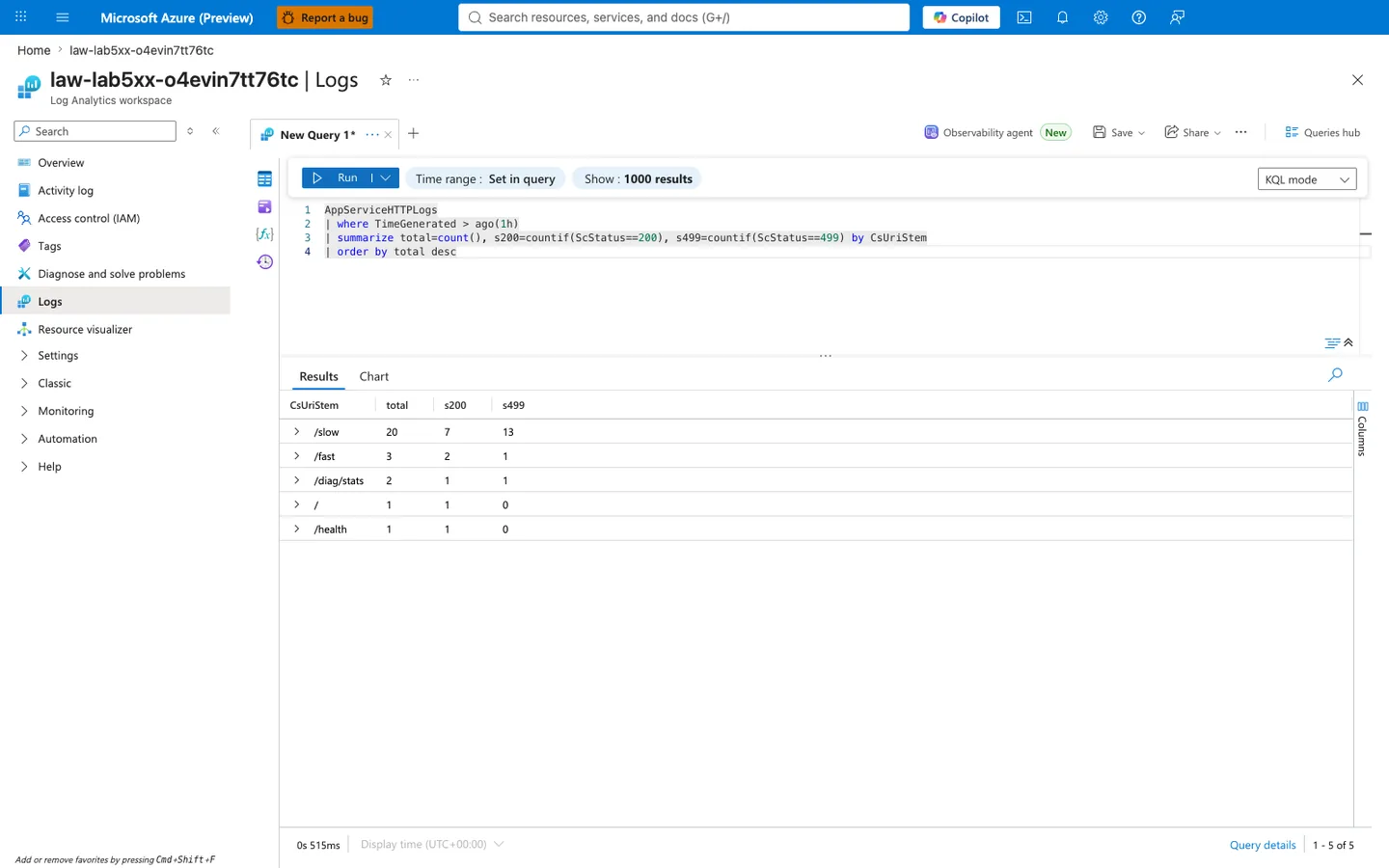
Purpose: Provide an independent Portal-side execution of a per-endpoint status distribution query so a reviewer can confirm that the mixed 200 / 499 signature in §4.6 (roughly 60% 499 on /slow, 58% 499 on /fast) is a real property of the raw AppServiceHTTPLogs rows the Log Analytics service holds — and can also see that the failure mode reproduces with the same shape (majority 499 on /slow, minority 499 bleeding into /fast, zero 5xx anywhere) when the trigger is re-run against a freshly deployed lab instance.
Look for:
- Blade heading reads "law-lab5xx-o4evin7tt76tc | Logs" and the sub-heading reads "Log Analytics workspace" — this confirms the query ran against the same workspace attached to this lab's Web App via diagnostic settings, matching the workspace referenced by the sanitized JSON exports in §4.1.
- The KQL editor shows exactly the query
AppServiceHTTPLogs | where TimeGenerated > ago(1h) | summarize total=count(), s200=countif(ScStatus==200), s499=countif(ScStatus==499) by CsUriStem | order by total desc—countif(ScStatus==200)andcountif(ScStatus==499)are conditional counts that partition each row group by status code without requiring separate pivot queries. Rows with any other status (e.g., 500, 502, 503) would not be counted in either thes200ors499columns and would show astotal > s200 + s499. - The Results grid shows exactly 5 rows (pagination "1 - 5 of 5") and every row satisfies
total == s200 + s499— no third status class exists in this window. This falsifies the hypothesis "the app is returning genuine 5xx errors": every failure recorded is a499(client aborted before the server sent a response), not a500/502/503(server-side error). - The
/slowrow showstotal 20, s200 7, s499 13— 65% of/slowrequests were aborted by the client at the 45-secondcurl --max-timeboundary because the Gunicorn sync worker was still executing the artificial 5-15 stime.sleep()inside the handler when the client gave up. - The
/fastrow showstotal 3, s200 2, s499 1— a supposedly sub-100 ms endpoint recorded a 499 in the same window. This is the "starvation bleed" signature:/fastinherited the client-timeout fate because both sync workers were occupied serving/slowwhen the/fastrequest arrived, so it sat in the socket backlog until the client aborted. - The
/diag/statsrow showstotal 2, s200 1, s499 1— a low-volume secondary starvation-bleed signal from the diagnostic endpoint itself getting queued behind occupied workers, confirming that even in-app diagnostic endpoints suffer when the sync worker pool is saturated. - The
/and/healthrows each showtotal 1, s200 1, s499 0— probe cadence during the trigger window; these endpoints exist for verification (see §5) and should not be interpreted as failure-mode signals. - Query duration in bottom left reads a small millisecond value (here
0s 515ms) — confirming the workspace is not throttled and the query hit indexed data, so the returned row count and status distribution are authoritative and not a partial-scan timeout.
Expected result: The 5 rows returned by the Portal show /slow, /fast, and /diag/stats with a mix of 200 and 499 statuses (with /slow and /fast as the dominant starvation signal and /diag/stats as low-volume bleed from the in-app diagnostic endpoint) and / and /health returning only 200, matching §4's overall verdict that the failure mode is worker starvation causing client aborts, not server errors: the app is healthy at the HTTP layer but sync workers cannot service concurrent long-running requests fast enough, so clients time out and record 499. If instead the Portal query returned rows with ScStatus 500, 502, or 503 in a non-zero third-column count (added as an additional countif(ScStatus>=500 and ScStatus<600) in a variant of this query), the verdict would need to be re-graded to "confirmed with outage" because the failure mode would have progressed from client-side timeouts to server-side worker recycles or platform-level errors.
Next step: If a future reproduction shows the /slow s499 count at or near 0 (i.e., almost all /slow requests succeeded within the 45-second client timeout), the trigger is not actually saturating the workers — inspect labs/intermittent-5xx/trigger.sh for a concurrency regression (the default is 20 concurrent /slow requests against 2 sync workers, producing 10 requests-worth of demand per worker). Conversely, if /fast shows s499 == total (every /fast request aborted), the sleep distribution in labs/intermittent-5xx/app/app.py may have been widened beyond the intended 5-15 s range, holding workers so long that even burst-mode /fast requests cannot be serviced within their timeout.
4.7 KQL latency profile by endpoint¶
From KQL HTTP export (TimeTaken in milliseconds):
| Endpoint | Count | Avg ms | p95 ms | Max ms |
|---|---|---|---|---|
/slow | 40 | 36,440.3 | 44,894 | 44,921 |
/fast | 12 | 11,046.8 | 14,484 | 44,865 |
/diag/stats | 4 | 11.5 | 6 | 33 |
/health | 2 | 19.0 | 3 | 35 |
Key signature:
/fastshows both very low and very high durations in the same run, which is expected when queueing behind occupied sync workers.
4.7.1 Log Analytics KQL query for latency percentiles by endpoint (portal verification)¶
To cross-verify the per-endpoint latency profile summarized in §4.7 (/slow avg 36,440 ms / p95 44,894 ms / max 44,921 ms across 40 rows; /fast avg 11,047 ms / p95 14,484 ms / max 44,865 ms across 12 rows) is a faithful reduction of the raw TimeTaken column and not a JSON-parse rounding artifact, the same Log Analytics workspace Logs blade was reopened and a per-endpoint per-status percentile query was executed interactively against the current live data. Splitting by CsUriStem, ScStatus in one query is important because the aggregate row-level table in §4.7 combines both status classes and hides the client-timeout signature inside the /slow average:
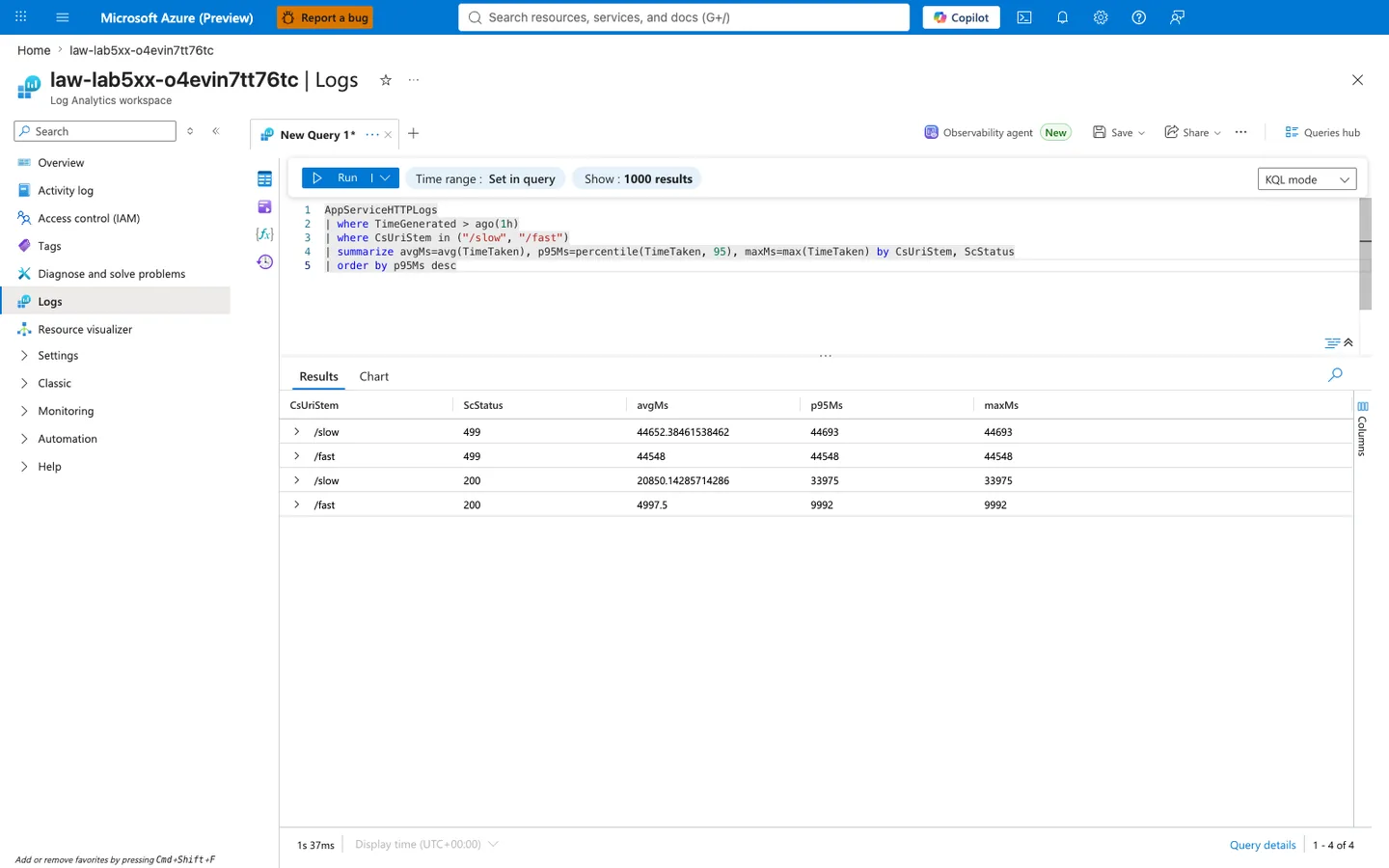
Purpose: Provide an independent Portal-side execution of a per-endpoint per-status percentile query so a reviewer can confirm three claims from §4.7: (1) /slow requests that ended in a 499 cluster tightly at the 45-second client timeout because that is when the client gave up, (2) /slow requests that returned 200 fall into the 5-15 s app-simulated sleep range plus queueing delay, and (3) /fast requests that returned 200 are inflated well above the sub-100 ms baseline because they share the same sync worker pool as /slow.
Look for:
- The
/slow499row showsavgMs ≈ 44652, p95Ms 44693, maxMs 44693— all three statistics cluster within ~41 ms of each other and sit ~307-348 ms below the 45-secondcurl --max-time 45client timeout, confirming that the 499 is the client giving up shortly before the configured deadline (the ~350 ms gap absorbs TCP FIN round-trip and the client's event-loop scheduling latency) and not a variable-latency degradation. IfavgMswere, say, 30,000 ms withmaxMsat 90,000 ms instead, that would suggest an intermediate load balancer timeout at a different value. - The
/fast499row showsavgMs 44548— this is the single/fastrequest that was aborted, and its latency being nearly identical to the/slow499cluster proves the/fastrequest was queued behind a/slowrequest and inherited the same 45-second client deadline, not that/fastitself takes 45 seconds inside the handler. - The
/slow200row showsavgMs ≈ 20850, p95Ms 33975, maxMs 33975— successful/slowrequests average ~20.9 s (roughly a ~15 s queue wait plus the app's 5-15 s intended sleep), and the slowest that still returned 200 (33,975 ms) sat in the queue for ~20 seconds before its sync worker was free to run the sleep and return. The Portal aggregate view does not expose the minimum, so any statement about the fastest/slow200 in this window requires querying raw rows directly — the "Representative rows" table in §4.8 shows only a single/slow200 sample (37,019 ms) drawn from a different sanitized reproduction and is not sufficient to establish an observed minimum for the fresh window shown here. - The
/fast200row showsavgMs 4997.5, p95Ms 9992, maxMs 9992— a supposedly sub-100 ms endpoint took on average 5 seconds and up to 10 seconds at p95 to return successfully. This is a 50× to 100× latency inflation and is the single strongest piece of evidence that/fastshares the same worker pool as/slow(there is no--worker-class=gthreador async worker in the Gunicorn config; both endpoints compete for the same 2 sync worker slots). - Rows are sorted by
p95Ms desc— the top two rows are both499(44,693 ms and 44,548 ms), then the next two are200(33,975 ms and 9,992 ms). The fact that no200row exceeds any499row'sp95Msconfirms the client-timeout boundary (~45 s) is strictly above the app-side latency ceiling, so no successful request "runs longer than the timeout allows" and every request over the deadline is aborted client-side. - Query duration in bottom left reads
1s 37ms— slightly longer than the §4.6.1 status-distribution query (0s 515ms) becausepercentile()is more expensive thancountif(), but still well under the 30-second workspace query timeout, so the returned percentile values are authoritative and not a partial-scan estimate.
Expected result: The two 499 rows cluster at the ~45 s client-timeout boundary, the /slow 200 row falls in the 5-15 s app sleep range plus queueing, and the /fast 200 row shows 50-100× latency inflation over its sub-100 ms baseline — collectively confirming that the failure signature is client-side timeouts driven by sync-worker saturation, not by app-side crashes or platform-side outages. If instead the Portal query returned a /fast 200 row with p95Ms under 100 ms, the trigger did not actually saturate the workers (perhaps because the workers were recycled between the trigger and the query, or the trigger arrived before the worker pool was fully warmed) — in that case this cross-verification is invalid and the trigger must be re-run before drawing conclusions from the raw KQL export in §4.8.
Next step: If a future reproduction shows maxMs on the /slow 499 row substantially higher than the curl --max-time boundary (for example 60+ seconds instead of ~45 seconds), the client-side timeout was likely raised or removed — re-check labs/intermittent-5xx/trigger.sh for a --max-time regression. If instead maxMs on the /slow 200 row approaches the 45-second curl --max-time boundary itself (for example 40+ seconds when the current baseline is ~34 seconds), the sleep distribution in labs/intermittent-5xx/app/app.py was likely widened beyond the intended 5-15 s range, making the sync-worker saturation more aggressive than this lab's hypothesis models and shifting the failure mode toward "confirmed with outage" rather than "supported (starvation causes client aborts)".
4.8 Raw KQL sample rows (sanitized)¶
Representative rows from kql-http-20260404T060610Z.json:
| TimeGenerated | CsUriStem | ScStatus | TimeTaken |
|---|---|---|---|
2026-04-04T05:36:26.941612Z | /fast | 200 | 1 |
2026-04-04T05:36:23.677624Z | /fast | 499 | 14411 |
2026-04-04T05:35:37.981987Z | /slow | 499 | 44430 |
2026-04-04T05:35:30.516813Z | /slow | 200 | 37019 |
2026-04-04T05:35:23.646864Z | /fast | 499 | 14393 |
4.9 Console and platform exports¶
Console log export¶
From kql-console-20260404T060610Z.json:
rows: []
No console entries were captured in this window.
Platform log export¶
From kql-platform-20260404T060610Z.json:
- Lifecycle informational events (site start, warmup probe success, container running).
- No explicit failure/restart entry in sampled period.
Sample rows:
| TimeGenerated | Level | Message |
|---|---|---|
2026-04-04T05:05:05.5422387Z | Informational | Site started. |
2026-04-04T05:05:05.0599636Z | Informational | Site startup probe succeeded after 8.0666499 seconds. |
2026-04-04T05:04:56.9229799Z | Informational | Container is running. |
4.10 Hypothesis verdict¶
Result: Supported¶
Why supported:
- Under a 20-request slow burst, slow endpoint timeout ratio reached 55%.
- Fast endpoint timeout ratio reached 60% despite fast handler logic.
- KQL HTTP logs show mixed 200/499 pattern with high durations for
/fastand/slow. - Pattern is strongly consistent with sync worker starvation and queueing.
Not required for support in this run:
- Console timeout text was absent.
- Platform restart event was absent.
These are optional corroborators, not mandatory if timing/status pattern already proves queueing.
4.11 Recommendations¶
- Increase Gunicorn worker capacity or move to async/threaded worker model for mixed latency workloads.
- Isolate slow operations from front-door request path (queue, background job, or dedicated endpoint plan).
- Align client timeout and server timeout intentionally (avoid accidental mismatch where client cancels first).
- Monitor endpoint-specific latency and status distribution, not only aggregate app success rate.
- Use synthetic mixed-load probes (
/slow+/fast) in pre-production to detect starvation early.
4.12 Suggested follow-up experiments¶
| Experiment | Change | Expected outcome |
|---|---|---|
| Worker count increase | --workers 2 → --workers 4 | Reduced queue timeout rate |
| Worker class change | sync → gthread or async worker | Better tolerance to mixed slow/fast traffic |
| Slow concurrency reduction | 20 → 8 | Lower timeout ratios |
| Timeout tuning | Increase client timeout, evaluate tail | Fewer client-abort events but longer waits |
Expected Evidence¶
This section defines what you SHOULD observe at each phase of the lab. Use it to validate your investigation is on track.
Before Trigger (Baseline)¶
| Evidence Source | Expected State | What to Capture |
|---|---|---|
| AppServiceHTTPLogs | All 200s with low latency | Baseline query snapshot for /fast, /slow, /diag/stats |
| AppServiceConsoleLogs | Normal Gunicorn startup with sync workers | Boot line showing 3 sync workers and timeout settings |
| AppServicePlatformLogs | Normal startup sequence only | "Site started" and no restart loop |
/diag/stats | Balanced counters, no queue stress | Baseline endpoint counters and process info |
During Incident¶
| Evidence Source | Expected State | Key Indicator |
|---|---|---|
AppServiceHTTPLogs (/slow) | Predominant 499 near timeout edge | TimeTaken ~4877-4918 ms on timed-out slow requests |
| Trigger CSV + HTTP logs | Mixed success and timeout pattern | Concurrent burst yields 200+499 in same window |
| Worker model evidence | Sync workers blocked by long CPU-bound work | /fast waits behind occupied workers |
| Client-side observations | Caller sees intermittent unavailability | 499 indicates client disconnect before completion |
After Recovery¶
| Evidence Source | Expected State | Key Indicator |
|---|---|---|
| AppServiceHTTPLogs | 200 responses return to normal after burst ends | Fast-path latency normalizes when slow load stops |
/diag/stats | Queue-pressure behavior subsides | Request handling resumes without timeout-like clustering |
| Platform/Console logs | No mandatory platform crash required | Recovery can occur without restart |
| Incident interpretation | 499 treated as timeout symptom, not server 5xx | Confirms worker exhaustion pattern rather than random platform failure |
Evidence Timeline¶
graph TD
    A[Baseline Capture] --> B[Trigger Fault]
    B --> C[During: Collect Evidence]
    C --> D[After: Compare to Baseline]
    D --> E[Verdict: Confirmed/Falsified]
Evidence Chain: Why This Proves the Hypothesis¶
Falsification Logic
If you observe /slow requests clustering near timeout with 499, plus concurrent degradation of /fast while sync workers are occupied, the hypothesis is CONFIRMED because queueing and worker starvation explain the intermittent failures.
If you do NOT observe timeout clustering during slow-request bursts, the hypothesis is FALSIFIED — consider dependency failures, platform restarts, or non-worker bottlenecks.
Clean Up¶
| Command/Flag | Purpose |
|---|---|
az group delete | Delete the resource group and all contained resources |
--name | Resource group to delete |
--yes | Skip confirmation prompt |
--no-wait | Return immediately without waiting for deletion to complete |