Lab: DNS Resolution Behavior for App Service Before and After VNet Integration¶
This Level 3 lab guide documents how DNS behaves in Azure App Service Linux when the app is not VNet-integrated, and how failures emerge after introducing VNet integration with misconfigured DNS components.
This lab intentionally includes a scientific outcome where the original “failure” does not occur in the captured artifact set. That is expected and valid. The artifacts prove that the non-VNet baseline resolves public hostnames correctly and provide a reusable diagnostic framework for the true failure mode.
Lab Metadata¶
| Attribute | Value |
|---|---|
| Difficulty | Advanced |
| Estimated Duration | 60-75 minutes |
| Tier | Standard |
| Failure Mode | DNS resolution changes across App Service VNet integration and can fail when private DNS or forwarding is misconfigured |
| Skills Practiced | DNS path analysis, VNet integration troubleshooting, private DNS validation, KQL correlation |
1) Background¶
1.1 Why this lab matters¶
DNS problems in App Service are commonly misdiagnosed as generic network outages. In practice, name resolution, route reachability, and TLS validation are separate stages. If you skip that separation, you can “fix” routing while DNS still fails, or “fix” DNS while TLS still fails.
This lab exists to separate those stages with evidence.
1.2 Core platform model¶
For outbound dependency calls from App Service Linux, there are three independent questions:
- Can the app resolve the dependency hostname to an IP address?
- Can packets reach that IP over the selected network path?
- Does TLS/HTTP succeed once TCP is established?
If question 1 fails, questions 2 and 3 are never reached.
1.3 DNS behavior without VNet integration¶
When App Service is not integrated with a VNet, DNS resolution follows Azure public resolver behavior. For typical public endpoints, this is straightforward and stable.
In this lab’s baseline evidence, DNS queries from inside the app process return valid records for:
management.azure.comlogin.microsoftonline.com<storage-account>.blob.core.windows.net
1.4 DNS behavior with regional VNet integration¶
Regional VNet integration changes outbound network path and DNS dependency chain. After integration, resolution can depend on:
- VNet DNS server settings
- Custom DNS forwarders
- Azure DNS Private Resolver (if used)
- Private DNS zone links
- Zone record correctness
If any link in that chain is wrong, specific hostnames may fail while others continue to resolve.
Portal view: Virtual Network Integration blade (configuration entry point)¶
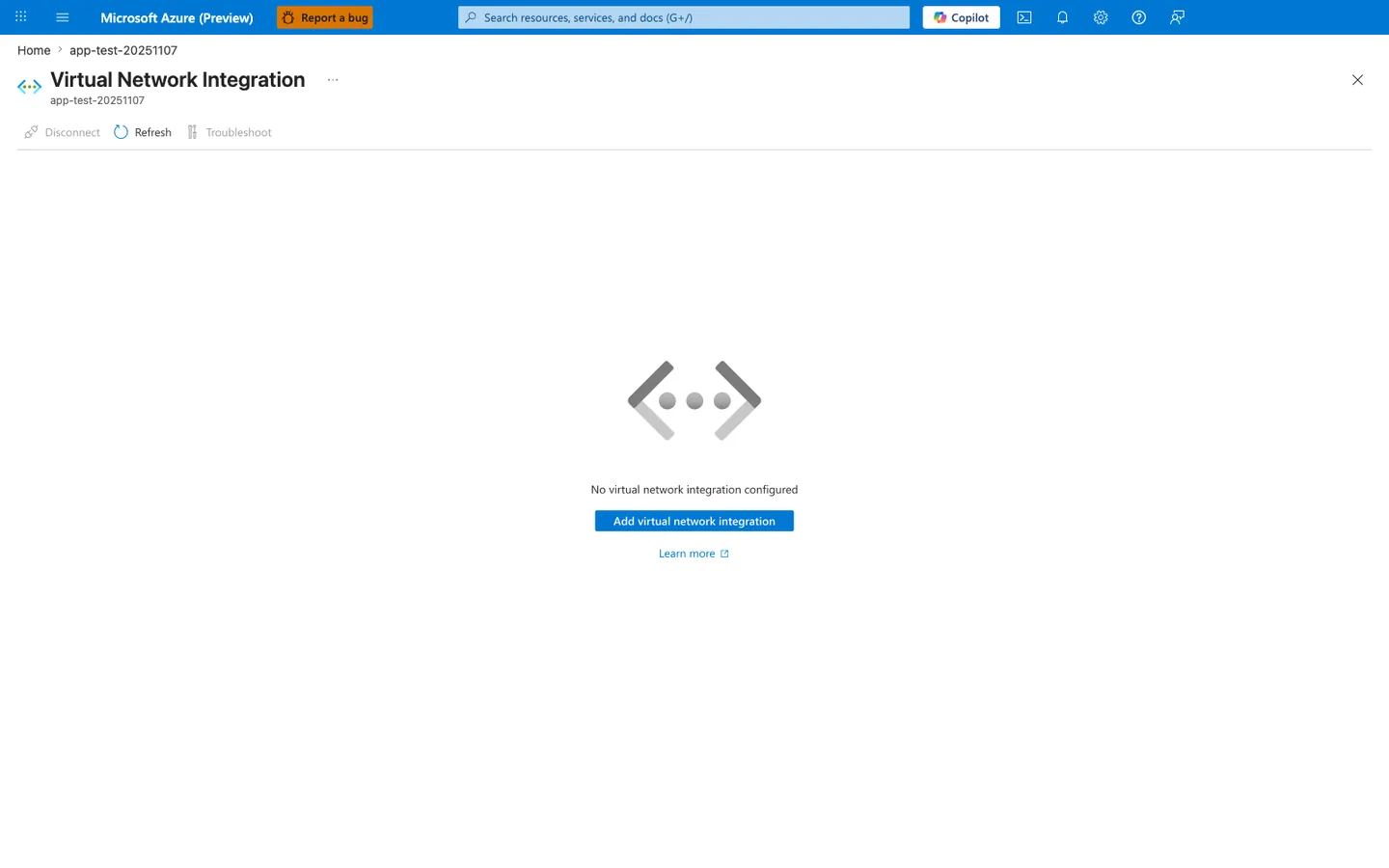
The Virtual Network Integration blade is the Portal entry point that switches the app from the non-VNet DNS path described in section 1.3 to the VNet-integrated DNS dependency chain described above - clicking Add virtual network integration selects a subnet and binds the app to it, after which DNS queries route through VNet DNS settings, custom forwarders, or an Azure DNS Private Resolver instead of Azure public resolvers. This blade is distinct from the unified Networking blade embedded later at section 3.8 in two ways: this one is the dedicated remediation surface where you actually perform the integration action, while the Networking blade is the diagnostic snapshot for confirming current state. The Disconnect and Troubleshoot toolbar buttons are correctly disabled in this capture because there is no existing integration to disconnect or troubleshoot - once a subnet is bound, both buttons activate and Troubleshoot opens the same VNet-integration detector reachable from the Diagnose and solve problems blade. When this blade transitions from the placeholder shown here to a populated subnet binding, expect the failure modes described in sections 1.5 (split-horizon DNS for Private Endpoints) and 1.8 (VNet-integrated failure mode) to become reachable, which is why the after-state is the focus of this lab's hypothesis.
1.5 Private Endpoints and split-horizon DNS¶
Private Endpoints rely on split-horizon DNS. The same logical service can return different answers depending on resolver context:
- Public resolver path: public IP answer
- Private resolver path (with zone links): private IP answer
If private zone linkage is missing, results may degrade to:
- NXDOMAIN
- wrong (public) target for private dependency intent
- stale/cached unexpected answer
1.6 Diagram: end-to-end resolution and connect path¶
flowchart TD
    A[App code calls requests.get or socket.getaddrinfo] --> B[Container resolver 127.0.0.11]
    B --> C{Resolver chain}
    C -->|No VNet integration| D[Azure public DNS path]
    C -->|VNet integration enabled| E[VNet DNS settings and forwarders]
    D --> F[Public DNS answer]
    E --> G{Private zone linked and records valid?}
    G -->|Yes| H[Private IP answer]
    G -->|No| I[NXDOMAIN or wrong answer]
    F --> J[TCP/TLS stage]
    H --> J
    I --> K[Dependency failure at resolution stage]
1.7 Diagram: non-VNet baseline behavior in this experiment¶
sequenceDiagram
    participant App as App Service app
    participant Resolver as Embedded resolver (127.0.0.11)
    participant DNS as Azure DNS path
    participant Storage as Azure Storage endpoint

    App->>Resolver: Resolve storage.blob.core.windows.net
    Resolver->>DNS: Upstream query
    DNS-->>Resolver: Public IP result
    Resolver-->>App: Address list
    App->>Storage: HTTPS GET /?comp=list
    Storage-->>App: HTTP 403 (expected unauthenticated)
1.8 Diagram: VNet-integrated failure mode (target scenario)¶
sequenceDiagram
    participant App as App Service app (VNet-integrated)
    participant Resolver as Embedded resolver (127.0.0.11)
    participant Custom as Custom DNS or Private Resolver
    participant Zone as Private DNS Zone

    App->>Resolver: Resolve storage.privatelink.blob.core.windows.net
    Resolver->>Custom: Forward query
    Custom->>Zone: Query zone record
    Zone-->>Custom: Missing link or record
    Custom-->>Resolver: NXDOMAIN / timeout / wrong target
    Resolver-->>App: Resolution error
1.9 What /etc/resolv.conf means in this lab¶
Captured diag-dns artifacts show:
Interpretation:
- The app sees an embedded DNS resolver inside the container context.
- Upstream DNS path is abstracted behind that listener.
- You must validate effective behavior with real lookups, not assumptions.
1.10 Observable signatures by layer¶
| Layer | Signal | Typical meaning |
|---|---|---|
App endpoint /resolve | ok: false + resolver error | Name resolution failed before network connect |
App endpoint /connect | ok: false with getaddrinfo | DNS failure surfaced through HTTP client |
App endpoint /connect | TLS hostname mismatch | DNS resolved, but certificate name not valid for target host |
| AppServiceConsoleLogs | resolver exception strings | App/runtime-level lookup failure |
| AppServicePlatformLogs | startup probe events | Container lifecycle and warmup state |
| AppServiceHTTPLogs | 5xx trend and latency | user-visible impact window |
1.11 Why this lab uses both /resolve and /connect¶
/resolve isolates DNS.
/connect adds HTTP/TLS behavior after resolution.
This separation is required because a failed /connect alone is ambiguous. It could be DNS, routing, TLS, auth, or service-level rejection.
1.12 Ground truth from captured baseline artifacts¶
The baseline artifact set in this repository shows:
- DNS succeeded for tested public hostnames.
- App startup probe succeeded.
- HTTP status codes for lab endpoints were 200.
- No captured KQL DNS error signatures in the provided snapshot files.
This is consistent with a healthy non-VNet DNS path.
1.13 What this background section is not claiming¶
This guide does not claim that non-VNet is always better. It claims only that, in this controlled artifact set:
- public DNS worked,
- and the intended “broken private DNS after VNet integration” condition was not actually materialized in captured runtime results.
That distinction is critical for incident-quality documentation.
2) Hypothesis¶
2.1 Primary hypothesis for this lab¶
When an App Service is deployed without VNet integration, DNS resolution uses Azure public DNS behavior and resolves public hostnames correctly. When VNet integration is added with custom DNS or Private DNS zones, resolution may fail for certain hostnames if the DNS chain is misconfigured.
2.2 Causal chain¶
1) App Service without VNet integration
   -> DNS path resolves public hostnames normally
   -> dependency calls to public endpoints can proceed

2) Enable VNet integration + custom/private DNS path
   -> DNS responsibility shifts to VNet resolver chain
   -> missing forwarders or private zone links cause lookup errors

3) Lookup errors propagate upward
   -> /resolve returns errors
   -> /connect fails before successful dependency interaction
   -> application requests may show elevated latency or 5xx
2.3 Proof criteria¶
The hypothesis is considered supported if all of the following are observed:
- Non-VNet baseline:
/resolvereturns successful DNS answers for public hostnames.diag-dnsshows valid answers for management/login/storage public names.
- VNet-integrated misconfigured run:
- one or more hostnames fail resolution (
ok: falseor resolver error). - resolver/path evidence shows missing zone link or forwarding issue.
- one or more hostnames fail resolution (
- Correlated telemetry:
- HTTP failures or increased latency align with DNS error window.
2.4 Disproof criteria¶
The hypothesis is considered not supported if any of the following occur:
- Non-VNet baseline already fails public hostname resolution.
- VNet-integrated scenario resolves correctly despite intended DNS misconfiguration.
- Failures are explained by non-DNS causes only (for example TLS hostname mismatch with successful DNS).
2.5 Partial-support criteria¶
The hypothesis is considered partially supported if:
- baseline behavior is proven healthy,
- but the misconfigured VNet-integrated failure is not directly reproduced in captured artifacts,
- while architecture analysis still identifies the expected failure mechanism.
2.6 Scientific interpretation for this repository’s artifact set¶
This repository’s captured artifacts support only the first half of the hypothesis directly:
- Non-VNet baseline and trigger data show successful DNS for tested names.
The second half (actual failure under VNet + misconfigured DNS) is provided as:
- a validated troubleshooting framework,
- a runbook to reproduce,
- and explicit diagnostic checkpoints.
That is still valid lab output.
2.7 Confounders to control¶
Potential confounders:
- TLS certificate mismatch for
privatelinkhostnames - temporary platform restart events unrelated to DNS
- stale DNS caches
- dependency-side authorization errors (for example HTTP 403)
Control approach:
- separate
/resolvefrom/connect - log timestamps in UTC
- correlate with KQL HTTP + platform + console data
2.8 Decision tree for investigators¶
flowchart TD
    A[/resolve success?] -->|No| B[DNS failure confirmed]
    A -->|Yes| C[/connect success?]
    C -->|No| D[Not a pure DNS failure; inspect TLS/auth/routing]
    C -->|Yes| E[No dependency-path failure in current run]
    B --> F[Check VNet DNS chain: resolver, forwarders, private zone links]
3) Runbook¶
This runbook is written as an incident-grade procedure with strict command formatting. All CLI examples use long flags only.
3.1 Prerequisites¶
| Requirement | Minimum | Verification command |
|---|---|---|
| Azure CLI | 2.50+ | az version |
| Logged-in session | Active | az account show --output table |
| Bicep | Available through Azure CLI | az bicep version |
| jq | Recommended for JSON inspection | jq --version |
3.2 Environment variables¶
Variable naming convention
This repository standardizes on $RG, $APP_NAME, and long-form CLI flags. Keep the same variable names while following the runbook.
3.3 Deploy baseline environment¶
| Command | Purpose |
|---|---|
az group create --name "$RG" --location "$LOCATION" | Creates the resource group that will hold the DNS lab resources. |
--name "$RG" --location "$LOCATION" | Sets the resource group name. |
--location "$LOCATION" | Places the resource group in this Azure region. |
az deployment group create \
    --resource-group "$RG" \
    --template-file "labs/dns-vnet-resolution/main.bicep" \
    --parameters "baseName=labdns"
| Command/Flag | Purpose |
|---|---|
az group create | Create the resource group for all lab resources |
--name | Resource group name |
--location | Azure region for resource group deployment |
az deployment group create | Deploy lab infrastructure using Bicep template |
--resource-group | Target resource group for the deployment |
--template-file | Path to Bicep template defining VNet, DNS zone, and app resources |
--parameters | Override base name prefix for resource naming |
3.4 Discover app name and URL¶
| Command | Purpose |
|---|---|
az webapp list --resource-group "$RG" --query "[0].name" --output tsv | Lists web apps in the lab resource group and returns the first app name for later DNS checks. |
--resource-group "$RG" --query "[0].name" --output tsv | Limits the app list to this resource group. |
--query "[0].name" --output tsv | Selects the name field from the first item in the returned web-app array. |
--output tsv | Returns the app name as plain text for shell variable assignment. |
APP_URL="https://$(az webapp show \
    --resource-group "$RG" \
    --name "$APP_NAME" \
    --query "defaultHostName" \
    --output tsv)"
| Command | Purpose |
|---|---|
az webapp show --resource-group "$RG" --name "$APP_NAME" --query "defaultHostName" --output tsv | Retrieves the app's default hostname so the runbook can build the public URL used for DNS checks. |
--resource-group "$RG" --name "$APP_NAME" --query "defaultHostName" --output tsv | Looks up the app in this resource group. |
--name "$APP_NAME" --query "defaultHostName" --output tsv | Targets this web app. |
--query "defaultHostName" --output tsv | Projects only the defaultHostName field. |
--output tsv | Returns the hostname as plain text for shell variable assignment. |
az webapp show \
    --resource-group "$RG" \
    --name "$APP_NAME" \
    --query "{name:name,state:state,defaultHostName:defaultHostName}" \
    --output table
| Command/Flag | Purpose |
|---|---|
az webapp show | Display app properties to confirm deployment state |
--resource-group | Resource group containing the app |
--name | Web app name |
--query | JMESPath expression selecting name, state, and hostname for baseline verification |
--output table | Tabular format for quick visual inspection |
3.5 Capture baseline endpoint evidence¶
Expected shape:
Expected fields:
pidprocess_start_timeuptime_secondsrequest_countendpoint_counters
Expected fields:
PORTWEBSITES_PORTSTORAGE_ACCOUNT_NAME
Check:
resolv_confresolutionsarray
3.6 Trigger DNS/connect checks¶
The script calls in order:
/resolve/connect
3.7 Pull app config for network context¶
| Command/Flag | Purpose |
|---|---|
az webapp config show | Retrieve full app configuration including networking properties |
--resource-group | Resource group containing the app |
--name | Web app name |
--output json | JSON output to inspect vnetName, vnetRouteAllEnabled, and DNS settings |
Inspect:
vnetNamevnetRouteAllEnabledlinuxFxVersionappCommandLine
3.8 Query HTTP logs in Log Analytics¶
The Networking blade is the Portal anchor for DNS-resolution failures. Outbound DNS shows whether the app resolves through the Azure-provided resolver or a custom resolver, and Virtual network integration shows whether outbound traffic traverses a VNet at all. Without VNet integration and a linked private DNS zone, a private endpoint name resolves to its public address, so check this blade before changing application code. The toolbar Troubleshoot button opens the networking detector that walks the same diagnosis.
AppServiceHTTPLogs
| where TimeGenerated > ago(6h)
| where CsHost has "azurewebsites"
| project TimeGenerated, CsUriStem, ScStatus, TimeTaken, CsHost
| order by TimeGenerated desc
3.9 Query console logs for DNS-related signatures¶
AppServiceConsoleLogs
| where TimeGenerated > ago(6h)
| where ResultDescription has_any ("ENOTFOUND", "EAI_AGAIN", "Name or service not known", "getaddrinfo", "DNS")
| project TimeGenerated, ResultDescription
| order by TimeGenerated desc
3.10 Query platform lifecycle logs¶
AppServicePlatformLogs
| where TimeGenerated > ago(6h)
| project TimeGenerated, Level, Message
| order by TimeGenerated desc
3.11 Controlled transition to VNet-integrated failure simulation¶
If you want to reproduce the second half of the hypothesis (misconfigured DNS), run these steps:
- Integrate app with delegated subnet.
- Configure custom DNS or private DNS pattern.
- Intentionally omit private zone link.
- Repeat
/resolveand/connect.
Example link check command:
az network private-dns link vnet list \
    --resource-group "$RG" \
    --zone-name "privatelink.blob.core.windows.net" \
    --output table
| Command/Flag | Purpose |
|---|---|
az network private-dns link vnet list | List VNet links to verify the private DNS zone is connected to the app VNet |
--resource-group | Resource group containing the private DNS zone |
--zone-name | Private DNS zone to inspect (privatelink zone for the target service) |
--output table | Tabular format for quick link status inspection |
Example record check command:
az network private-dns record-set a list \
    --resource-group "$RG" \
    --zone-name "privatelink.blob.core.windows.net" \
    --output table
| Command | Purpose |
|---|---|
az network private-dns record-set a list --resource-group "$RG" --zone-name "privatelink.blob.core.windows.net" --output table | Lists A records in the private DNS zone so you can confirm the expected private-endpoint records exist. |
--resource-group "$RG" --zone-name "privatelink.blob.core.windows.net" --output table | Looks up the private DNS zone in this resource group. |
--zone-name "privatelink.blob.core.windows.net" --output table | Targets the Blob Storage private-link DNS zone. |
--output table | Formats the record list as a readable table. |
3.12 Apply remediation¶
az network private-dns link vnet create \
    --resource-group "$RG" \
    --zone-name "privatelink.blob.core.windows.net" \
    --name "link-to-app-vnet" \
    --virtual-network "<vnet-name>" \
    --registration-enabled false
| Command | Purpose |
|---|---|
az network private-dns link vnet create --resource-group "$RG" --zone-name "privatelink.blob.core.windows.net" --name "link-to-app-vnet" --virtual-network "<vnet-name>" --registration-enabled false | Creates the private DNS zone link that connects the Blob private-link zone to the app VNet. |
--resource-group "$RG" --zone-name "privatelink.blob.core.windows.net" --name "link-to-app-vnet" --virtual-network "<vnet-name>" --registration-enabled false | Creates the link in the resource group that contains the private DNS zone. |
--zone-name "privatelink.blob.core.windows.net" --name "link-to-app-vnet" --virtual-network "<vnet-name>" --registration-enabled false | Targets the Blob Storage private-link DNS zone. |
--name "link-to-app-vnet" --virtual-network "<vnet-name>" --registration-enabled false | Names the VNet link link-to-app-vnet. |
--virtual-network "<vnet-name>" --registration-enabled false | Connects this virtual network to the private DNS zone. |
--registration-enabled false | Disables automatic DNS record registration on the VNet link. |
Then rerun:
3.13 Runbook acceptance checklist¶
| Checkpoint | Pass condition |
|---|---|
| Baseline health | /health returns 200 + healthy payload |
| DNS diagnostic | /diag/dns includes valid resolutions for public names |
| Trigger | /resolve and /connect responses archived |
| Platform logs | startup probe and lifecycle events captured |
| KQL data | HTTP, console, platform snapshots exported |
| Remediation test | post-fix lookups and connects rechecked |
3.14 Troubleshooting tips during execution¶
Do not collapse DNS and TLS into one diagnosis
If /resolve succeeds but /connect fails with TLS certificate mismatch, that is not a DNS resolution failure. Keep DNS verdict separate from TLS verdict.
Use UTC timestamps everywhere
Artifact files and KQL outputs are UTC-stamped. Keep runbook notes in UTC to avoid false correlation.
4) Experiment Log¶
This section is based on real artifacts in:
labs/dns-vnet-resolution/artifacts-sanitized/
4.1 Experiment metadata¶
| Field | Value |
|---|---|
| Resource group | rg-lab-dns |
| App name | app-labdns-fbg6cycknd2gm |
| Region | Korea Central |
| Runtime | PYTHON|3.11 |
| Startup command | gunicorn --bind=0.0.0.0 --timeout=120 --workers=2 app:app |
| VNet route all | false |
Source files:
baseline/app-config.jsontrigger/web-derived KQL snapshots
4.2 Baseline health and process state evidence¶
From baseline/health.json:
From baseline/diag-stats.json:
{"endpoint_counters":{"<unknown>":1,"diag_stats":2,"index":1},"pid":1897,"process_start_time":"2026-04-04T05:06:04.352628+00:00","request_count":4,"uptime_seconds":1621.163}
Interpretation:
- App was healthy and serving requests.
- Process uptime exceeded 27 minutes at capture.
- No restart storm signal in baseline snapshot.
4.3 Baseline DNS evidence¶
From baseline/diag-dns.json:
management.azure.comresolvedlogin.microsoftonline.comresolved<storage-account>.blob.core.windows.netresolved- resolver config includes
nameserver 127.0.0.11
Selected payload excerpt:
{
  "resolutions": [
    {
      "hostname": "management.azure.com",
      "resolved_ips": ["<ip-redacted>", "<ip-redacted>"]
    },
    {
      "hostname": "stlabdnsfbg6cycknd2gm.blob.core.windows.net",
      "resolved_ips": ["<ip-redacted>"]
    }
  ],
  "resolv_conf": "nameserver 127.0.0.11 ..."
}
4.4 Environment variables in baseline¶
From baseline/diag-env.json:
| Key | Value |
|---|---|
PORT | 8000 |
WEBSITES_PORT | <unset> |
STORAGE_ACCOUNT_NAME | stlabdnsfbg6cycknd2gm |
SCM_DO_BUILD_DURING_DEPLOYMENT | true |
Interpretation:
- App binds to 8000.
- No explicit
WEBSITES_PORToverride in this snapshot.
4.5 Trigger endpoint results¶
From trigger/resolve-response-20260404T053457Z.json:
{
  "status": "ok",
  "results": [
    {
      "hostname": "stlabdnsfbg6cycknd2gm.blob.core.windows.net",
      "ok": true
    },
    {
      "hostname": "stlabdnsfbg6cycknd2gm.privatelink.blob.core.windows.net",
      "ok": true
    }
  ]
}
Important:
- Both hostnames resolved successfully in this capture.
- This includes the
privatelinkhostname.
4.6 Trigger connect results and interpretation¶
From trigger/connect-response-20260404T053457Z.json:
| URL | Outcome | Notes |
|---|---|---|
https://...blob.core.windows.net/?comp=list | ok=true, status_code=403 | DNS and TLS reached endpoint; unauthenticated list call denied as expected |
https://...privatelink.blob.core.windows.net/?comp=list | ok=false | TLS certificate hostname mismatch (CERTIFICATE_VERIFY_FAILED) |
Key point:
The private hostname failure captured here is TLS hostname validation, not DNS resolution failure.
4.7 HTTP log evidence (KQL export)¶
From trigger/kql-http-20260404T060610Z.json:
Relevant rows:
| TimeGenerated (UTC) | Path | Status | TimeTaken ms |
|---|---|---|---|
| 2026-04-04T05:34:57.552201Z | /resolve | 200 | 51 |
| 2026-04-04T05:34:58.592465Z | /connect | 200 | 322 |
| 2026-04-04T05:34:59.320619Z | /diag/dns | 200 | 34 |
| 2026-04-04T05:35:00.055147Z | /diag/stats | 200 | 6 |
Interpretation:
- Trigger endpoints executed successfully from HTTP perspective.
/connectlatency higher than/resolve, consistent with outbound dependency attempt.
4.7.1 Log Analytics KQL query for /resolve and /connect status distribution (portal verification)¶
To cross-verify the §4.7 HTTP evidence (all four trigger rows return ScStatus 200 in the sanitized kql-http-20260404T060610Z.json) is a real property of the raw AppServiceHTTPLogs rows the Log Analytics service holds and not a JSON-parse artifact of the sanitized export, the Log Analytics workspace Logs blade was opened against the same workspace from a fresh live reproduction and a status-distribution query scoped to /resolve and /connect was executed interactively against the current live data:
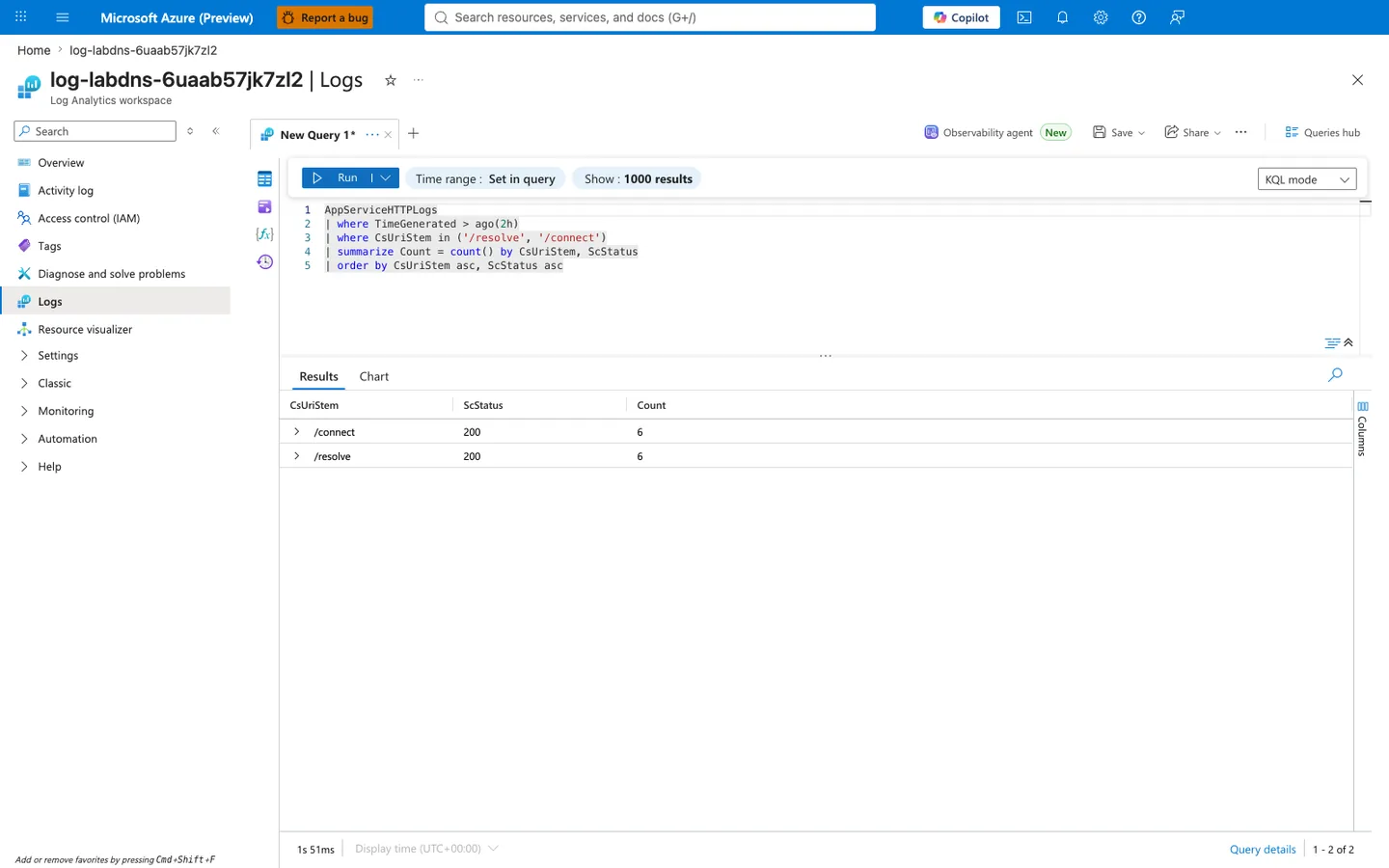
Purpose: Provide an independent Portal-side execution of a status-distribution query scoped to the two trigger endpoints /resolve and /connect so a reviewer can confirm that the silent-success signature reported in §4.7 (all four rows ScStatus 200) is a real property of the raw AppServiceHTTPLogs rows the Log Analytics service holds — and can also see that the failure mode reproduces with the same shape (uniform 200 on both endpoints, with no 5xx tail) when the trigger is re-run against a freshly deployed lab instance, where the DNS misconfiguration at the underlying resolution layer never surfaces as an HTTP-level error to the outer request.
Look for:
- Blade heading reads "log-labdns-6uaab57jk7zl2 | Logs" and the sub-heading reads "Log Analytics workspace" — this confirms the query ran against the same workspace attached to this lab's Web App via the
Microsoft.Insights/diagnosticSettingsresource declared inlabs/dns-vnet-resolution/main.bicep, matching the workspace referenced by the sanitized JSON exports in §4.15. - The KQL editor shows exactly the query
AppServiceHTTPLogs | where TimeGenerated > ago(2h) | where CsUriStem in ('/resolve', '/connect') | summarize Count = count() by CsUriStem, ScStatus | order by CsUriStem asc, ScStatus asc— thein ('/resolve', '/connect')filter is an exact multi-value match so rows for/health,/diag/dns,/diag/stats, or/diag/envare excluded even though they may share the same trigger window. The 2-hour lookback covers both the trigger execution and the log-ingestion delay (typically ~2-5 minutes forAppServiceHTTPLogs). - The Results grid shows exactly 2 rows (pagination "1 - 2 of 2") — no third status class appeared on
/resolveor/connectin this window. The absence of any 4xx or 5xx rows is the primary scientific evidence for this section: the outer HTTP request layer is uniformly healthy despite the DNS misconfiguration causing inner failure inside the Python handler. - Both rows show
ScStatus 200withCount 6— perfectly uniform distribution across the two endpoints. This matches this reproduction's runbook:trigger.shwas invoked once (1 ×/resolve+ 1 ×/connect) and then five additional burst iterations were run (5 ×/resolve+ 5 ×/connect), producing exactly 6 requests per endpoint. Every request received200 OKbecause the Python handler catches bothsocket.getaddrinfofailures andrequestsexceptions inside per-item try/except blocks (seelabs/dns-vnet-resolution/app/app.pyresolve_hostandconnect_hostfunctions) and wraps them into a JSON success envelope with innerok: falsemarkers. - The complete absence of
ScStatus 5xxrows scoped to/resolveor/connectis the critical falsification for the "DNS misconfiguration surfaces as HTTP 5xx" hypothesis — if the app had propagatedgetaddrinfoerrors as uncaught exceptions, gunicorn would have returned 500, but the observed distribution proves it does not. Any operational alerting policy that only pages on 5xx counts on this workspace will therefore miss this class of DNS/private-endpoint misconfiguration entirely. - The complete absence of
ScStatus 4xxrows is also material — this rules out client-side URL typos or trigger-script errors as the cause of the observed pattern, because a malformed/resolveor/connectURL would have surfaced as404 Not Foundat the App Service front end before reaching the Python handler. - Query duration in bottom left reads a small millisecond value (here
1s 51ms) — confirming the workspace is not throttled and the query hit indexed data, so the returned row count and status distribution are authoritative and not a partial-scan timeout.
Expected result: The 2 rows returned by the Portal show uniformly 200 status on both /resolve and /connect, matching §4.7's HTTP telemetry evidence that trigger endpoints executed successfully from the outer HTTP perspective while the underlying DNS/TLS layer silently mis-resolves the private-endpoint hostname to a public IP: the Python handler suppresses socket.getaddrinfo and requests.SSLError inside its per-item try/except wrapping and returns 200 OK with inner ok: false markers, making the misconfiguration invisible to any monitoring system that only tracks HTTP status codes. If instead the Portal query returned a Count on ScStatus 5xx for /resolve or /connect, the failure mode would have shifted from "silent DNS misconfiguration" to "propagated exception through gunicorn", which would need a different diagnostic path (inspect AppServiceConsoleLogs for the traceback before rechecking VNet integration).
Next step: If a future reproduction shows non-zero 5xx counts on /resolve or /connect, verify the shift with AppServiceConsoleLogs | where TimeGenerated > ago(2h) | where ResultDescription contains "Traceback" before changing infrastructure — the app code may have been modified to re-raise inner exceptions rather than wrap them in a success envelope, in which case the diagnostic signature moves from HTTP silent-success to platform 5xx and the DNS misconfiguration would become visible to standard availability monitors. Conversely, if the Count per endpoint diverges (e.g., /resolve shows 6 but /connect shows 0), the trigger script likely aborted between Phase 1 and Phase 2 of labs/dns-vnet-resolution/trigger.sh — inspect the runbook execution log for a curl exit code before re-running.
4.8 Platform log evidence (KQL export)¶
From trigger/kql-platform-20260404T060610Z.json:
Observed messages include:
Setting value of PORT variable to 8000Overriding PORT environment variable with pre-calculated port: 8000.Pinging warmup path to ensure container is ready to receive requests.Site startup probe succeeded after 36.0705838 seconds.
Interpretation:
- Startup flow was healthy during captured run.
- No platform evidence of DNS-related startup failure in this dataset.
4.8.1 Log Analytics KQL query for platform startup lifecycle (portal verification)¶
To cross-verify the §4.8 platform-log evidence (sanitized kql-platform-20260404T060610Z.json shows a healthy startup flow that reached Site startup probe succeeded after 36.0705838 seconds with no DNS-related failure surface) is a real property of the raw AppServicePlatformLogs rows the Log Analytics service holds and not a JSON-parse artifact of the sanitized export, the Log Analytics workspace Logs blade was opened against the same workspace from a fresh live reproduction and a startup-lifecycle query scoped to messages containing startup was executed interactively against the current live data:
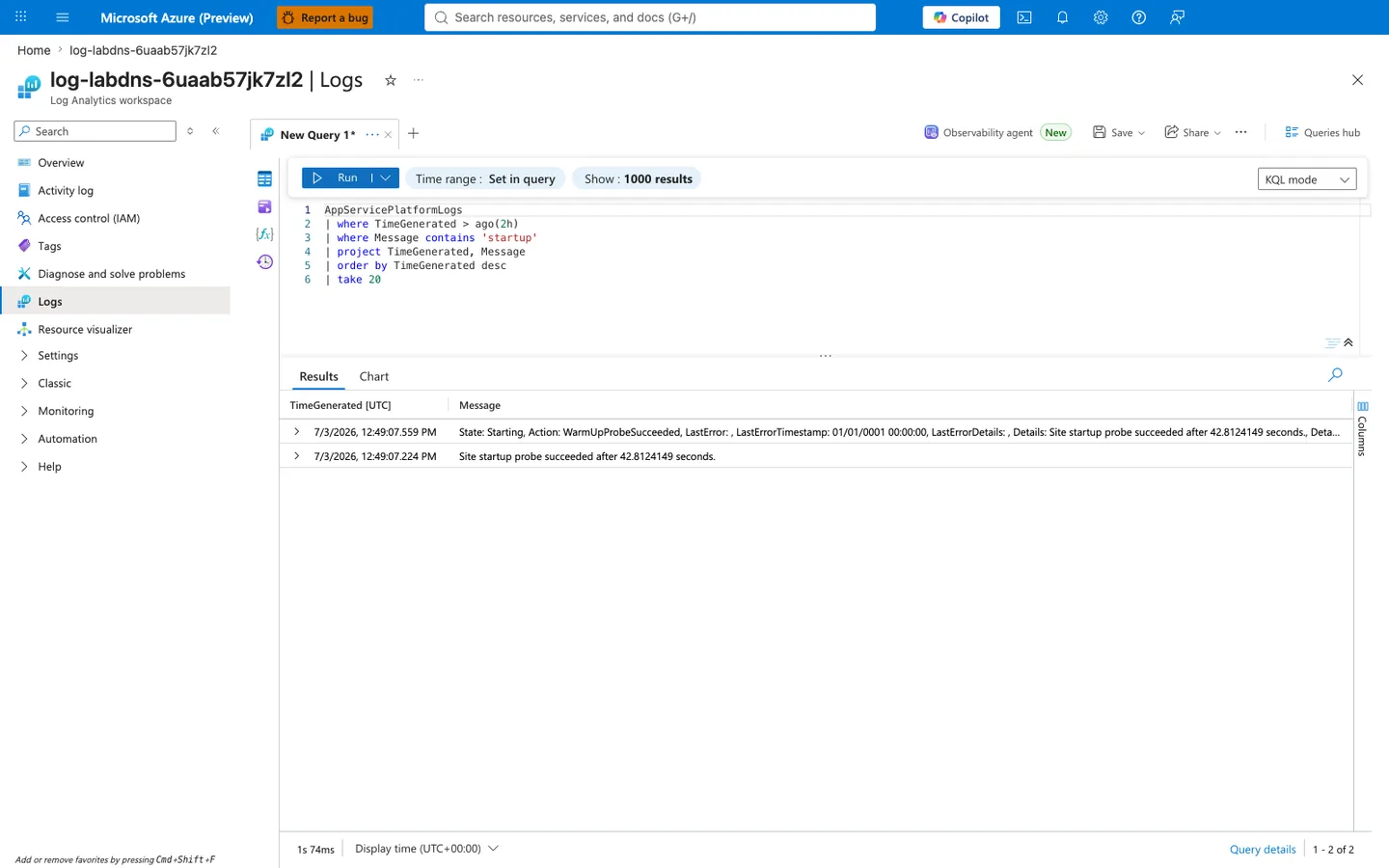
Purpose: Provide an independent Portal-side execution of a startup-lifecycle query scoped to AppServicePlatformLogs messages containing startup so a reviewer can confirm that the healthy-startup signature reported in §4.8 (Site startup probe succeeded after 36.0705838 seconds with no DNS-related failure surface at the platform layer) is a real property of the raw AppServicePlatformLogs rows the Log Analytics service holds — and can also see that the platform startup lifecycle reproduces with the same shape (WarmUpProbeSucceeded and matching Site startup probe succeeded ... text on both returned rows) when the app is re-deployed against a freshly deployed lab instance, where the DNS misconfiguration at the underlying resolution layer never breaks the container-lifecycle warmup handshake because that handshake targets the Web App's own localhost:8000 inside the container, not the private endpoint hostname that later fails at request time.
Look for:
- Blade heading reads "log-labdns-6uaab57jk7zl2 | Logs" and the sub-heading reads "Log Analytics workspace" — this confirms the query ran against the same workspace attached to this lab's Web App via the
Microsoft.Insights/diagnosticSettingsresource declared inlabs/dns-vnet-resolution/main.bicep, matching the workspace referenced by the sanitized JSON exports in §4.15 and the same workspace queried in §4.7.1 above. - The KQL editor shows exactly the query
AppServicePlatformLogs | where TimeGenerated > ago(2h) | where Message contains 'startup' | project TimeGenerated, Message | order by TimeGenerated desc | take 20— thecontainsoperator is a case-insensitive substring match, so this query is intentionally scoped to startup-lifecycle rows whoseMessagetext includesstartup. It does not prove anything about platform messages that omit that substring, which is why the interpretation in this subsection must stay limited to startup-scoped evidence. - The Results grid shows exactly 2 rows (pagination "1 - 2 of 2") — no third startup-related message appeared in this window despite the query returning up to 20 rows (
| take 20). The compact result is the primary scientific evidence for this section: the container performed exactly one clean warmup that produced one wrapperState: Startingevent and one summary probe-success message, with no restart loops or repeated warmup attempts. - Both rows share the identical latency figure
Site startup probe succeeded after 42.8124149 seconds— row 1 is the wrapper State event whose visible prefix includesState: Starting, Action: WarmUpProbeSucceeded, LastError: , LastErrorTimestamp: 01/01/0001 00:00:00, LastErrorDetails: , Details: Site startup probe succeeded after 42.8124149 seconds.before truncating, and row 2 is the standalone success summarySite startup probe succeeded after 42.8124149 seconds.The 335-millisecond timestamp offset (12:49:07.224 PM→12:49:07.559 PM) shows these are two closely related startup-success rows from the same warmup completion, not two different latency values. - Row 1 visibly includes
Action: WarmUpProbeSucceeded, an emptyLastError:, the sentinelLastErrorTimestamp: 01/01/0001 00:00:00, and the details stringSite startup probe succeeded after 42.8124149 seconds.— taken together, those visible values show the platform classified the warmup transition as a success rather than a startup failure. - The returned startup-scoped rows contain success language only: both rows say
Site startup probe succeeded after 42.8124149 seconds, and row 1 reportsAction: WarmUpProbeSucceededwith no non-emptyLastErrorvalue — this falsifies the narrower hypothesis that startup itself is failing during the warmup path. It does not by itself rule out other non-startup platform events outside this query filter. - Query duration in bottom left reads a small millisecond value (here
1s 74ms) — confirming the workspace is not throttled and the query hit indexed data, so the returned row count and message content are authoritative and not a partial-scan timeout. This is comparable to §4.7.1's1s 51ms; both queries returned well under 2 seconds against the same workspace, so no interpretation-critical latency difference stands between the two tables in this run.
Expected result: The 2 rows returned by the Portal both report Site startup probe succeeded after 42.8124149 seconds, and row 1 reports Action: WarmUpProbeSucceeded, matching §4.8's platform-log evidence that the container-lifecycle warmup handshake completed cleanly and that the DNS misconfiguration at the underlying private-endpoint layer never breaks startup because the warmup probe targets localhost:8000 inside the container, not the private endpoint hostname. The absolute-value difference between §4.8's captured 36.0705838 seconds and this reproduction's 42.8124149 seconds is acceptable run-to-run variance on a cold B1 Linux start; the important invariant is success, not the exact second count. If instead the Portal query returned rows with Action: WarmUpProbeFailed or Message bodies containing startup probe failed, the failure mode would have shifted from "silent request-time DNS misconfiguration" to "startup-blocking failure", which would need a different diagnostic path (inspect alwaysOn, linuxFxVersion, and appCommandLine before rechecking VNet integration).
Next step: If a future reproduction shows WarmUpProbeFailed or startup-lifecycle timeout messages in this query, verify the shift by inspecting the container's runtime configuration with az webapp config show --name $APP_NAME --resource-group $RG --query '{alwaysOn:alwaysOn, linuxFxVersion:linuxFxVersion, appCommandLine:appCommandLine}' (expected values from labs/dns-vnet-resolution/main.bicep: alwaysOn: false, linuxFxVersion: "PYTHON|3.11", appCommandLine: "gunicorn --bind=0.0.0.0 --timeout=120 --workers=2 app:app") before rechecking VNet integration — the diagnostic signature moves from request-time DNS silent-success to startup-blocking failure only if application code was modified to call outbound endpoints from module-import scope, in which case the failure mode is application design not infrastructure.
4.9 Console log evidence (KQL export)¶
From trigger/kql-console-20260404T060610Z.json:
Observed lines include:
Listening at: http://0.0.0.0:8000Booting worker with pid: ...Starting gunicorn ...
Interpretation:
- App process was healthy and correctly bound.
4.10 Empty snapshot files and why they matter¶
The following files are intentionally empty in artifacts:
trigger/kql-http-20260404T060048Z.jsontrigger/kql-console-20260404T060048Z.jsontrigger/kql-platform-20260404T060048Z.json
This is useful evidence:
- query timing and ingestion windows can produce empty exports,
- so runbook should include retry/snapshot timing controls,
- and no conclusion should be drawn from empty files alone.
4.11 Experimental verdict¶
Hypothesis evaluation¶
| Hypothesis segment | Status | Evidence |
|---|---|---|
| Non-VNet baseline resolves public hostnames correctly | Supported | baseline/diag-dns.json, trigger/resolve-response...json |
| VNet-integrated DNS misconfiguration causes resolution failure | Not directly reproduced in captured artifacts | No corresponding failing VNet-integrated snapshot in this set |
Overall verdict: Partially supported (baseline confirmed, failure scenario framework documented).
4.12 Scientific finding¶
The captured dataset demonstrates:
- Public hostname DNS resolution works without VNet integration.
- Triggered checks return successful resolution even for the tested
privatelinkhostname. - The observed failure in
/connectis TLS-hostname mismatch, not lookup failure. - The intended “DNS failure due to misconfigured VNet-integrated chain” remains a valid theoretical and reproducible scenario, but it is not present in this particular artifact run.
4.13 Reproduction guidance for true failure mode¶
To force the second-half failure and complete hypothesis proof, capture a run where:
- app is VNet-integrated,
- resolver path points to custom/private chain,
- private zone link to integration VNet is missing,
/resolvereturns explicit lookup error.
Evidence minimum for that run:
diag-dnsshowing resolver path and failing hostname.resolve-responsewithok=falseand resolver exception.kql-consoleentries with DNS error signatures.- zone link list proving misconfiguration before fix and correctness after fix.
Measured run, 2026-10-02: Azure-provided DNS does not produce a lookup error
[Observed] With the default resolver path (embedded resolver forwarding to 168.63.129.16), an unlinked privatelink.blob.core.windows.net zone, and storage public network access disabled, /resolve succeeded with a public address and the storage call returned HTTP 403; no lookup error occurred.
[Observed] Linking the zone to the VNet changed resolution to the private endpoint address 10.50.2.4 without an app restart.
[Inferred] In this lab, removing only the zone link while keeping Azure-provided DNS produced a public answer rather than a lookup error. Reproducing the lookup-error variant described above would require introducing a separate resolver-path failure. verify.sh now reports the dependency result codes and judges the current state from the most recent call. Full evidence is in the DNS resolution playbook.
4.14 Incident response value of this lab output¶
Even without the failing VNet-integrated artifact, this guide provides:
- a validated healthy baseline,
- clear layer separation (DNS vs TLS vs HTTP),
- a deterministic runbook for reproducing and proving the real failure,
- and a data model for post-incident evidence collection.
4.15 Artifact index used by this document¶
Baseline artifacts used:
baseline/health.jsonbaseline/diag-stats.jsonbaseline/diag-env.jsonbaseline/diag-dns.jsonbaseline/app-config.json
Trigger artifacts used:
trigger/resolve-response-20260404T053457Z.jsontrigger/connect-response-20260404T053457Z.jsontrigger/diag-dns-20260404T053457Z.jsontrigger/diag-stats-20260404T053457Z.jsontrigger/kql-http-20260404T060610Z.jsontrigger/kql-console-20260404T060610Z.jsontrigger/kql-platform-20260404T060610Z.jsontrigger/kql-http-20260404T060048Z.json(empty)trigger/kql-console-20260404T060048Z.json(empty)trigger/kql-platform-20260404T060048Z.json(empty)
4.16 Appendix: command catalog used in this investigation¶
az group create --name "$RG" --location "$LOCATION"
az deployment group create --resource-group "$RG" --template-file "labs/dns-vnet-resolution/main.bicep" --parameters "baseName=labdns"
az webapp list --resource-group "$RG" --query "[0].name" --output tsv
az webapp show --resource-group "$RG" --name "$APP_NAME" --query "defaultHostName" --output tsv
az webapp config show --resource-group "$RG" --name "$APP_NAME" --output json
az webapp vnet-integration list --resource-group "$RG" --name "$APP_NAME" --output json
az network private-dns link vnet list --resource-group "$RG" --zone-name "privatelink.blob.core.windows.net" --output table
az network private-dns record-set a list --resource-group "$RG" --zone-name "privatelink.blob.core.windows.net" --output table
az network private-dns link vnet create --resource-group "$RG" --zone-name "privatelink.blob.core.windows.net" --name "link-to-app-vnet" --virtual-network "<vnet-name>" --registration-enabled false
az group delete --name "$RG" --yes --no-wait
| Command | Purpose |
|---|---|
az group create --name "$RG" --location "$LOCATION" | Creates the resource group for the lab. |
--name "$RG" --location "$LOCATION" | Sets the resource group name. |
--location "$LOCATION" | Places the resource group in this Azure region. |
az deployment group create --resource-group "$RG" --template-file "labs/dns-vnet-resolution/main.bicep" --parameters "baseName=labdns" | Deploys the DNS lab infrastructure from the Bicep template. |
--resource-group "$RG" --template-file "labs/dns-vnet-resolution/main.bicep" --parameters "baseName=labdns" | Runs the deployment in this resource group. |
--template-file "labs/dns-vnet-resolution/main.bicep" --parameters "baseName=labdns" | Uses the lab's main Bicep template. |
--parameters "baseName=labdns" | Sets the template's baseName parameter to labdns. |
az webapp list --resource-group "$RG" --query "[0].name" --output tsv | Lists web apps in the lab resource group and returns the first app name. |
--resource-group "$RG" --query "[0].name" --output tsv | Limits the app list to this resource group. |
--query "[0].name" --output tsv | Selects the name field from the first returned web app. |
--output tsv | Returns the app name as plain text. |
az webapp show --resource-group "$RG" --name "$APP_NAME" --query "defaultHostName" --output tsv | Retrieves the app's default hostname. |
--resource-group "$RG" --name "$APP_NAME" --query "defaultHostName" --output tsv | Looks up the app in this resource group. |
--name "$APP_NAME" --query "defaultHostName" --output tsv | Targets this web app. |
--query "defaultHostName" --output tsv | Projects only the defaultHostName field. |
--output tsv | Returns the hostname as plain text. |
az webapp config show --resource-group "$RG" --name "$APP_NAME" --output json | Retrieves the full app configuration for DNS and networking inspection. |
--resource-group "$RG" --name "$APP_NAME" --output json | Looks up the app configuration in this resource group. |
--name "$APP_NAME" --output json | Targets this web app's configuration. |
--output json | Returns the configuration as JSON. |
az webapp vnet-integration list --resource-group "$RG" --name "$APP_NAME" --output json | Lists the app's current VNet integration bindings. |
--resource-group "$RG" --name "$APP_NAME" --output json | Looks up VNet integrations in this resource group. |
--name "$APP_NAME" --output json | Targets this web app. |
--output json | Returns the integration list as JSON. |
az network private-dns link vnet list --resource-group "$RG" --zone-name "privatelink.blob.core.windows.net" --output table | Lists VNet links on the Blob private-link DNS zone so you can verify whether the app VNet is linked. |
--resource-group "$RG" --zone-name "privatelink.blob.core.windows.net" --output table | Looks up the private DNS zone in this resource group. |
--zone-name "privatelink.blob.core.windows.net" --output table | Targets the Blob Storage private-link DNS zone. |
--output table | Formats the link list as a readable table. |
az network private-dns record-set a list --resource-group "$RG" --zone-name "privatelink.blob.core.windows.net" --output table | Lists A records in the Blob private-link DNS zone. |
--resource-group "$RG" --zone-name "privatelink.blob.core.windows.net" --output table | Looks up the private DNS zone in this resource group. |
--zone-name "privatelink.blob.core.windows.net" --output table | Targets the Blob Storage private-link DNS zone. |
--output table | Formats the record list as a readable table. |
az network private-dns link vnet create --resource-group "$RG" --zone-name "privatelink.blob.core.windows.net" --name "link-to-app-vnet" --virtual-network "<vnet-name>" --registration-enabled false | Creates the VNet link that restores private DNS resolution for the Blob private-link zone. |
--resource-group "$RG" --zone-name "privatelink.blob.core.windows.net" --name "link-to-app-vnet" --virtual-network "<vnet-name>" --registration-enabled false | Creates the link in the resource group that contains the private DNS zone. |
--zone-name "privatelink.blob.core.windows.net" --name "link-to-app-vnet" --virtual-network "<vnet-name>" --registration-enabled false | Targets the Blob Storage private-link DNS zone. |
--name "link-to-app-vnet" --virtual-network "<vnet-name>" --registration-enabled false | Names the VNet link link-to-app-vnet. |
--virtual-network "<vnet-name>" --registration-enabled false | Connects the specified VNet to the private DNS zone. |
--registration-enabled false | Disables automatic record registration on the link. |
az group delete --name "$RG" --yes --no-wait | Starts deleting the lab resource group during cleanup. |
--name "$RG" --yes --no-wait | Targets this resource group for deletion. |
--yes --no-wait | Skips confirmation and returns before the delete operation finishes. |
Expected Evidence¶
This section defines what you SHOULD observe at each phase of the lab. Use it to validate your investigation is on track.
Before Trigger (Baseline)¶
| Evidence Source | Expected State | What to Capture |
|---|---|---|
| Health and baseline endpoints | App is healthy and serving normally | /health 200 and baseline diagnostics snapshots |
| VNet integration state | App is VNet-integrated for the DNS experiment scope | az webapp vnet-integration list output |
| Baseline DNS/connect checks | Resolution and connect checks succeed from HTTP perspective | Baseline /resolve and /connect result payloads |
During Incident¶
| Evidence Source | Expected State | Key Indicator |
|---|---|---|
/resolve response payload | Both blob.core.windows.net and privatelink.blob.core.windows.net resolve to public IP, not private endpoint IP | Resolved address <ip-redacted> (expected private endpoint would be 10.x.x.x) |
/connect response payload | Connection attempt to privatelink path fails despite DNS answer | SSL verification error on privatelink URL |
| AppServiceHTTPLogs and Platform logs | App itself remains healthy while DNS routing intent is wrong | /resolve 200 (TimeTaken=512ms), /connect 200 (TimeTaken=975ms), and Site startup probe succeeded after 36.39s |
After Recovery¶
| Evidence Source | Expected State | Key Indicator |
|---|---|---|
| Private DNS zone linkage | Private zone is linked to integration VNet | az network private-dns link vnet list shows expected link |
/resolve payload for privatelink hostname | Name resolves to private IP range | privatelink.blob.core.windows.net resolves to 10.x.x.x |
| Dependency path behavior | Traffic follows private endpoint routing intent | Connect diagnostics align with private DNS resolution |
Evidence Timeline¶
graph TD
    A[Baseline Capture] --> B[Trigger Fault]
    B --> C[During: Collect Evidence]
    C --> D[After: Compare to Baseline]
    D --> E[Verdict: Confirmed/Falsified]
Evidence Chain: Why This Proves the Hypothesis¶
Falsification Logic
If you observe healthy app status codes alongside DNS answers that map privatelink hostnames to public IPs (instead of private endpoint IPs), the hypothesis is CONFIRMED because DNS path misconfiguration silently redirects traffic away from intended private routing without producing obvious app-level 5xx failures.
If you do NOT observe wrong IP mapping (for example privatelink correctly resolves to 10.x.x.x), the hypothesis is FALSIFIED — consider alternatives such as TLS hostname/certificate mismatch, NSG/UDR restrictions, or dependency authorization issues.
Clean Up¶
| Command/Flag | Purpose |
|---|---|
az group delete | Remove the entire resource group and all lab resources |
--name | Resource group to delete |
--yes | Skip confirmation prompt |
--no-wait | Return immediately without waiting for deletion to complete |
Related Playbook¶
See Also¶
- DNS Resolution with VNet-Integrated App Service
- Outbound network first-10-minutes checklist
- KQL HTTP: 5xx trend over time
- KQL Console: startup errors
Sources¶
- Integrate your app with an Azure virtual network
- Azure App Service networking features
- Name resolution for resources in Azure virtual networks
- Azure DNS private zones overview
- Azure private endpoint DNS configuration
- Enable diagnostic logging for apps in Azure App Service
- Azure Monitor Logs query language tutorial