Lab: Container HTTP Ping Behavior on Linux App Service (Port-Mismatch Experiment)¶
This Level 3 lab records a startup-ping experiment on Azure App Service Linux designed to test port mismatch behavior.
The initial hypothesis was that WEBSITES_PORT=8080 combined with an app listening on 8000 would cause startup ping failures and restart loops.
Actual finding: in the captured Linux dataset, probe requests repeatedly returned HTTP 200, and the expected port-mismatch failure did not manifest as originally predicted. This is a valid scientific result and an important platform-behavior discovery.
Lab Metadata¶
| Attribute | Value |
|---|---|
| Difficulty | Advanced |
| Estimated Duration | 60-75 minutes |
| Tier | Basic |
| Failure Mode | Startup ping investigation with WEBSITES_PORT and runtime listen-port mismatch on Linux App Service |
| Skills Practiced | Startup probe analysis, port diagnostics, runtime environment correlation, KQL evidence correlation |
1) Background¶
1.1 Why this lab exists¶
“Container didn’t respond to HTTP pings” is one of the most common startup errors in App Service investigations. However, that message aggregates multiple root causes. If you assume every occurrence is “wrong port,” you can miss real failures such as startup-time limits, process exits, warmup path mismatch, or deployment side effects.
This lab focuses on one commonly cited cause:
- mismatched configured port (
WEBSITES_PORT) vs actual application listen port.
1.2 Platform startup health model (Linux App Service)¶
At startup, platform components:
- create and launch the site container,
- inject environment variables,
- send warmup/startup probes,
- wait for successful HTTP response under startup timing constraints,
- transition site to running state or cancel startup.
Portal view: Health check (optional runtime probe control)¶
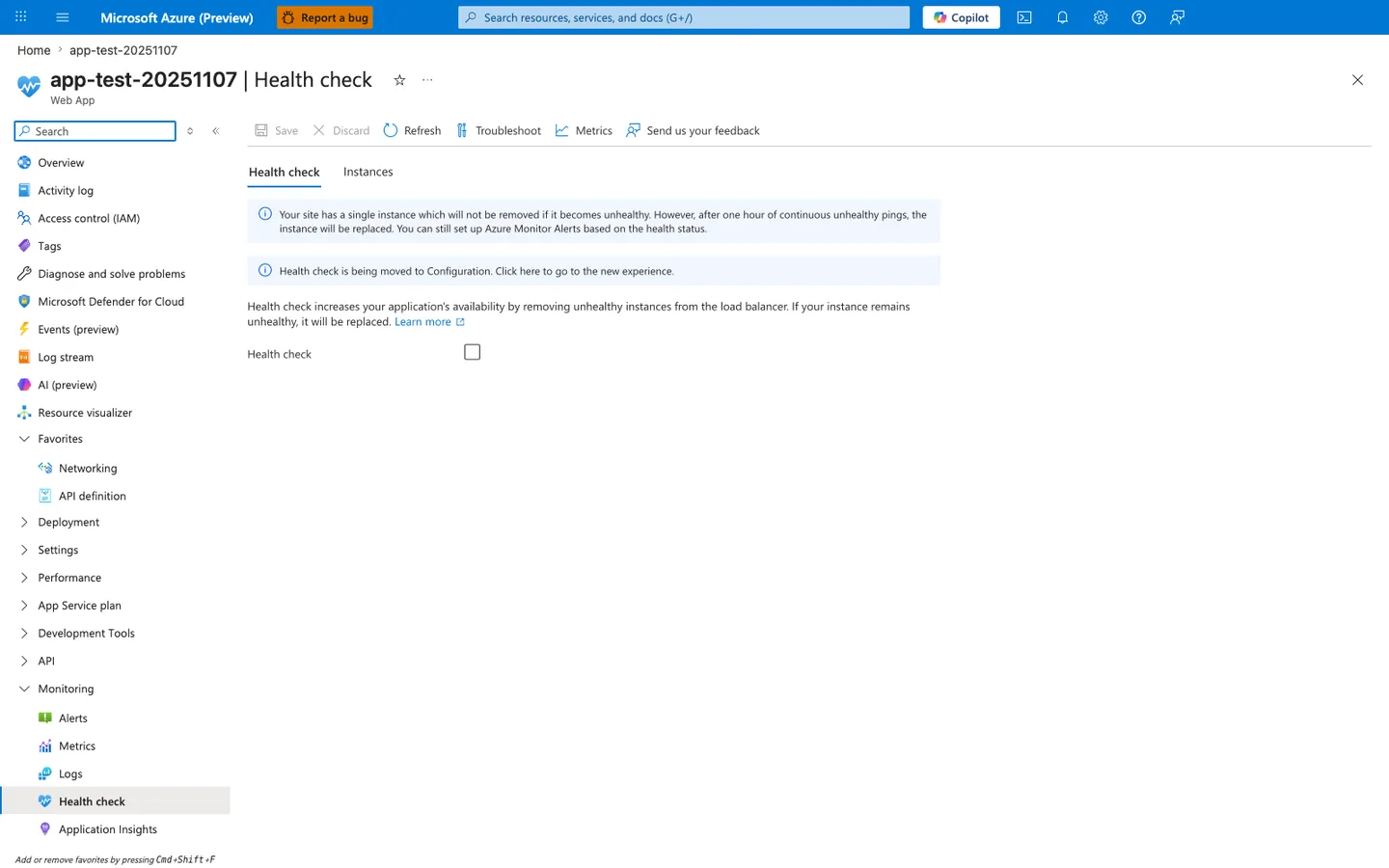
The Health check blade under Monitoring > Health check is the optional control that tells the platform to actively probe a path on every instance and remove or replace unhealthy instances from the load balancer. In this capture the toggle is off - the baseline state this lab uses, which means the startup-time probe model from the 5-step list above is the only mechanism deciding whether the site is in or out of rotation. The info banner makes the consequence explicit: with a single instance and Health check disabled, an unhealthy worker is not removed proactively and only gets replaced after one hour of continuous unhealthy pings, which is why the HTTP probe behavior in this lab's artifacts is dominated by startup-time evaluation rather than runtime health-check evaluation. Enable Health check here and supply a path that returns 200 OK only when the worker is truly ready before drawing conclusions about why the platform did or did not replace an instance mid-run.
1.3 The role of WEBSITES_PORT and PORT¶
There are two related but distinct values in many App Service Linux scenarios:
WEBSITES_PORT(application setting): operator-configured hint used by platform logic.PORT(environment variable): effective runtime port exposed to the process environment.
In this experiment’s artifacts:
WEBSITES_PORTis set to8080.PORTis set to8000.- gunicorn binds to
0.0.0.0:8000.
1.4 Why this is tricky¶
Many troubleshooting guides simplify the model to “platform pings WEBSITES_PORT directly.” That simplification can hold in some contexts, but this Linux dataset demonstrates behavior that is not explained by that simplification alone.
1.5 Startup timeout and 230-second window¶
Platform logs include references to startup cancellation with timeout language:
Container did not start within expected time limit of 230s...
This means startup watchdog logic is active regardless of observed successful external probe requests.
1.6 Diagram: startup lifecycle and probes¶
flowchart TD
    A[Container created] --> B[Environment variables injected]
    B --> C[Startup/warmup probe phase]
    C --> D{Probe success within time limit?}
    D -->|Yes| E[Site started]
    D -->|No| F[Startup cancelled]
    F --> G[Container stop and restart sequence]
1.7 Diagram: expected port-mismatch failure model (classic assumption)¶
sequenceDiagram
    participant Platform as App Service platform
    participant App as App process

    Platform->>App: Probe configured port (assumed WEBSITES_PORT)
    App-->>Platform: No response on that port
    Platform->>Platform: Wait and retry
    Platform->>Platform: Startup timeout reached
    Platform->>App: Stop container
1.8 Diagram: observed Linux behavior in this artifact set¶
sequenceDiagram
    participant Config as App settings
    participant Runtime as Linux container runtime
    participant App as Gunicorn app
    participant Probe as Observed probe client

    Config-->>Runtime: WEBSITES_PORT=8080
    Runtime-->>App: PORT=8000 (effective runtime value)
    App->>App: Bind 0.0.0.0:8000
    Probe->>App: Repeated GET /
    App-->>Probe: 200 OK (multiple times)
1.9 Signals we must separate in analysis¶
| Signal family | Example | Meaning |
|---|---|---|
| Config state | WEBSITES_PORT=8080 | Declared expectation/hint |
| Runtime env | PORT=8000 | Effective process environment |
| Process bind | Listening at: http://0.0.0.0:8000 | Actual listener |
| Probe outcomes | CSV rows all 200 | Reachability from probe path |
| Platform timeout logs | ContainerTimeout ... 230s | Startup state machine outcome |
1.10 Why disproved hypotheses are valuable¶
In production troubleshooting, disproved assumptions are often more valuable than confirmed assumptions. They prevent repeated false diagnosis and improve playbooks.
This lab should therefore be read as:
- a successful experiment,
- with a partially disproved original hypothesis,
- and a platform-specific insight for Linux App Service behavior.
1.11 Scope limitations for this background¶
This guide documents Linux App Service behavior from this specific run. It does not claim identical behavior for:
- Windows App Service containers,
- every runtime stack,
- every platform image version,
- every startup-command configuration.
2) Hypothesis¶
2.1 Original hypothesis¶
When WEBSITES_PORT is set to a port different from the port the application actually listens on, platform health pings fail and the container is marked unhealthy, leading to restart loops and 503 errors.
2.2 Causal chain (original)¶
1) App configured with WEBSITES_PORT=8080
2) App actually listens on 8000
3) Platform pings port 8080
4) Ping fails repeatedly
5) Startup timeout or health failure reached
6) Container restart loop and user-visible failures
2.3 Proof criteria¶
Original hypothesis is supported only if all conditions are true:
- Config mismatch exists (
WEBSITES_PORT != actual listen port). - Probe attempts to app URL fail (non-200 or timeout).
- Platform logs show startup ping failures due to port mismatch.
- Console logs show app listening on different port than probe target.
- App availability degrades with restarts/503.
2.4 Disproof criteria¶
Original hypothesis is disproved if any condition below is true:
- Config mismatch exists, but probes still return 200 consistently.
- App remains reachable despite mismatch.
- Platform behavior indicates another mechanism determines effective probe reachability.
2.5 What the artifact set shows¶
This experiment satisfies disproof condition #1 directly:
- mismatch exists (
WEBSITES_PORT=8080, bind8000), - probe CSV files show repeated HTTP 200.
Therefore the initial claim “this mismatch must fail on Linux” is not supported by this dataset.
2.6 Revised hypothesis after observation¶
On Linux App Service, effective startup-probe reachability may depend on runtime port handling (PORT) and platform startup mechanisms that are not identical to simplistic WEBSITES_PORT-only mental models.
2.7 Competing explanations to investigate next¶
- Linux startup path maps effective probe target via
PORTresolution. - Warmup/probe path and process lifecycle timing dominate over nominal
WEBSITES_PORTmismatch. - Separate platform events (restart/deploy/stop operations) can emit timeout errors that overlap with otherwise successful probe windows.
2.8 Decision diagram for hypothesis status¶
flowchart TD
    A[WEBSITES_PORT mismatch detected] --> B{Probe results}
    B -->|Mostly non-200 or timeout| C[Original hypothesis supported]
    B -->|Consistent 200| D[Original hypothesis not supported]
    D --> E[Investigate Linux runtime port behavior and startup orchestration]
2.9 Expected evidence bundle for robust conclusion¶
To avoid overfitting one signal, always collect:
- app settings snapshot,
- runtime env snapshot,
- console bind log line,
- platform startup events,
- probe result series,
- HTTP access logs for probe timestamps.
3) Runbook¶
This runbook is structured for reproducibility and log-quality evidence capture. All commands use long flags only.
3.1 Prerequisites¶
| Requirement | Verification |
|---|---|
| Azure CLI installed | az version |
| Active subscription | az account show --output table |
| Bash shell | bash --version |
| jq for parsing | jq --version |
3.2 Environment variables¶
Variable naming in this repository
Use $RG and $APP_NAME consistently in examples. Keep all Azure CLI flags in long form.
3.3 Deploy lab infrastructure¶
| Command | Purpose |
|---|---|
az group create --name "$RG" --location "$LOCATION" | Creates the resource group that will hold the lab resources. |
--name "$RG" --location "$LOCATION" | Sets the resource group name. |
--location "$LOCATION" | Places the resource group in this Azure region. |
az deployment group create \
    --resource-group "$RG" \
    --template-file "labs/container-http-pings/main.bicep" \
    --parameters "baseName=labping"
| Command/Flag | Purpose |
|---|---|
az group create | Create the resource group for lab resources |
--name | Resource group name |
--location | Azure region for the resource group |
az deployment group create | Deploy the Bicep template to provision lab infrastructure |
--template-file | Path to the Bicep template that provisions App Service with port-mismatch configuration |
--parameters baseName | Base name prefix for all generated resource names |
3.4 Discover app identity¶
| Command | Purpose |
|---|---|
az webapp list --resource-group "$RG" --query "[0].name" --output tsv | Lists web apps in the lab resource group and returns the first app name so later commands can target it. |
--resource-group "$RG" --query "[0].name" --output tsv | Limits the app list to this resource group. |
--query "[0].name" --output tsv | Selects the name field from the first item in the returned web-app array. |
--output tsv | Returns the app name as plain text for shell variable assignment. |
APP_URL="https://$(az webapp show \
    --resource-group "$RG" \
    --name "$APP_NAME" \
    --query "defaultHostName" \
    --output tsv)"
| Command | Purpose |
|---|---|
az webapp show --resource-group "$RG" --name "$APP_NAME" --query "defaultHostName" --output tsv | Retrieves the Web App's default hostname so the runbook can build the public app URL. |
--resource-group "$RG" --name "$APP_NAME" --query "defaultHostName" --output tsv | Looks up the app in this resource group. |
--name "$APP_NAME" --query "defaultHostName" --output tsv | Targets this web app. |
--query "defaultHostName" --output tsv | Projects only the app's defaultHostName field. |
--output tsv | Returns the hostname as plain text for shell variable assignment. |
3.5 Capture baseline config¶
| Command | Purpose |
|---|---|
az webapp config show --resource-group "$RG" --name "$APP_NAME" --output json | Retrieves the full site configuration so the lab can capture the initial runtime and startup settings. |
--resource-group "$RG" --name "$APP_NAME" --output json | Looks up the app configuration in this resource group. |
--name "$APP_NAME" --output json | Targets this web app's configuration. |
--output json | Returns the full configuration as JSON for artifact capture. |
| Command/Flag | Purpose |
|---|---|
az webapp config show | Retrieve the full site configuration including linuxFxVersion and startup command |
az webapp config appsettings list | List all application settings including WEBSITES_PORT to verify the port-mismatch setup |
--resource-group | Resource group containing the Web App |
--name | Web App name |
--output json | Full JSON output for artifact capture |
3.6 Verify application responses¶
3.7 Execute trigger script¶
3.8 Probe repeatedly and capture status series¶
Example manual probe loop:
for i in 1 2 3 4 5 6 7 8; do
    timestamp=$(date --utc +"%Y-%m-%dT%H:%M:%SZ")
    status=$(curl --silent --show-error --output /dev/null --write-out "%{http_code}" "$APP_URL/")
    printf "%s,%s,%s\n" "$i" "$status" "$timestamp"
    sleep 10
done
3.9 Query HTTP logs for probe windows¶
Log stream shows the platform's HTTP probes hitting the container in real time, before anything has been ingested into Log Analytics. Pin the Instances dropdown to one worker for an uninterrupted view of a single instance's probe cadence, then toggle to Platform for front-end warmup messages and back to Runtime to confirm whether the application ever printed its listen-port banner.
AppServiceHTTPLogs
| where TimeGenerated > ago(6h)
| where CsUriStem in ("/", "/health", "/diag/env", "/diag/stats")
| project TimeGenerated, CsUriStem, ScStatus, TimeTaken, CsHost
| order by TimeGenerated desc
3.10 Query console logs for listen port¶
AppServiceConsoleLogs
| where TimeGenerated > ago(6h)
| where ResultDescription has_any ("Listening at", "gunicorn", "Booting worker")
| project TimeGenerated, ResultDescription
| order by TimeGenerated desc
3.11 Query platform logs for startup transitions¶
AppServicePlatformLogs
| where TimeGenerated > ago(6h)
| project TimeGenerated, Level, Message
| order by TimeGenerated desc
3.12 Optional perturbation steps¶
To explore behavior boundaries:
- Change startup command to bind different port.
- Restart app.
- Repeat probe series.
- Compare platform logs.
Example app setting update command:
az webapp config appsettings set \
    --resource-group "$RG" \
    --name "$APP_NAME" \
    --settings "WEBSITES_PORT=8080"
| Command | Purpose |
|---|---|
az webapp config appsettings set --resource-group "$RG" --name "$APP_NAME" --settings "WEBSITES_PORT=8080" | Sets WEBSITES_PORT=8080 on the app so you can test the port-mismatch behavior. |
--resource-group "$RG" --name "$APP_NAME" --settings "WEBSITES_PORT=8080" | Applies the setting change in this resource group. |
--name "$APP_NAME" --settings "WEBSITES_PORT=8080" | Targets this web app. |
--settings "WEBSITES_PORT=8080" | Writes the WEBSITES_PORT app setting with the value 8080. |
Example restart:
| Command | Purpose |
|---|---|
az webapp restart --resource-group "$RG" --name "$APP_NAME" | Restarts the web app so the changed app setting is picked up by a fresh worker process. |
--resource-group "$RG" --name "$APP_NAME" | Restarts the app in this resource group. |
--name "$APP_NAME" | Targets this web app. |
3.13 Runbook quality checklist¶
| Item | Pass condition |
|---|---|
| Config evidence | WEBSITES_PORT value captured |
| Runtime evidence | diag/env includes PORT, actual_bind_port, effective_port_hint |
| Process bind evidence | Console log contains Listening at: http://0.0.0.0:8000 |
| Probe evidence | CSV rows captured with timestamps |
| Platform evidence | Startup/warmup events exported |
| Correlation evidence | HTTP log rows align with probe timestamps |
3.14 Caution notes for operators¶
Do not assume every timeout log is a pure port mismatch
Startup timeout messages can overlap with deployment transitions, restarts, and warmup orchestration details. Correlate with real probe status series and console bind logs.
Keep Linux and Windows interpretations separate
The artifact finding in this lab is Linux-specific. Do not generalize directly to Windows containers.
4) Experiment Log¶
This log is derived from real files in:
labs/container-http-pings/artifacts-sanitized/
4.1 Executive finding (prominent)¶
Key discovery from this experiment
WEBSITES_PORT=8080 while app listens on 8000 did not produce the expected probe failure pattern on Linux App Service in this dataset. Probe capture files returned HTTP 200 throughout measurement windows. This partially disproves the initial hypothesis and reveals platform-behavior differences that must be handled explicitly in troubleshooting guidance.
4.2 Experiment metadata¶
| Field | Value |
|---|---|
| Resource group | rg-lab-pings |
| App name | app-labping-zlqaxhq4w4rx6 |
| Region | Korea Central |
| Kind | app,linux |
| Runtime stack | PYTHON|3.11 |
| Startup command | gunicorn --bind 0.0.0.0:8000 app:app |
Source files:
trigger/webapp-details-20260404T055338Z.jsonbaseline/app-config.json
4.3 Baseline settings evidence¶
From baseline/app-settings.json:
From baseline/diag-env.json:
{
  "PORT": "8000",
  "WEBSITES_PORT": "8080",
  "actual_bind_port": "8000",
  "effective_port_hint": "8080"
}
Interpretation:
- Mismatch is real and confirmed.
- App itself advertises actual bind as 8000.
4.4 Baseline process and health evidence¶
From baseline/health.json:
From baseline/diag-stats.json:
{"endpoint_counters":{"<unknown>":1,"diag_stats":3,"index":3},"pid":1896,"process_start_time":"2026-04-04T05:04:54.556257+00:00","request_count":7,"uptime_seconds":1693.783}
Interpretation:
- App remained healthy and served multiple requests.
- Baseline does not indicate immediate startup collapse.
Portal reproduction: Health Check Instances tab¶
The CLI-derived JSON above (baseline/health.json, baseline/diag-stats.json) shows the application-level /health endpoint returning healthy and the process serving requests normally. A re-execution of the lab on 2026-07-02 confirmed the same conclusion in the Azure Portal via the Health check blade → Instances tab. The captured evidence directly contradicts the naive prediction that WEBSITES_PORT diverging from the actual bind port would surface as unhealthy platform probes on this Linux build (see §4.10 for the executive finding).
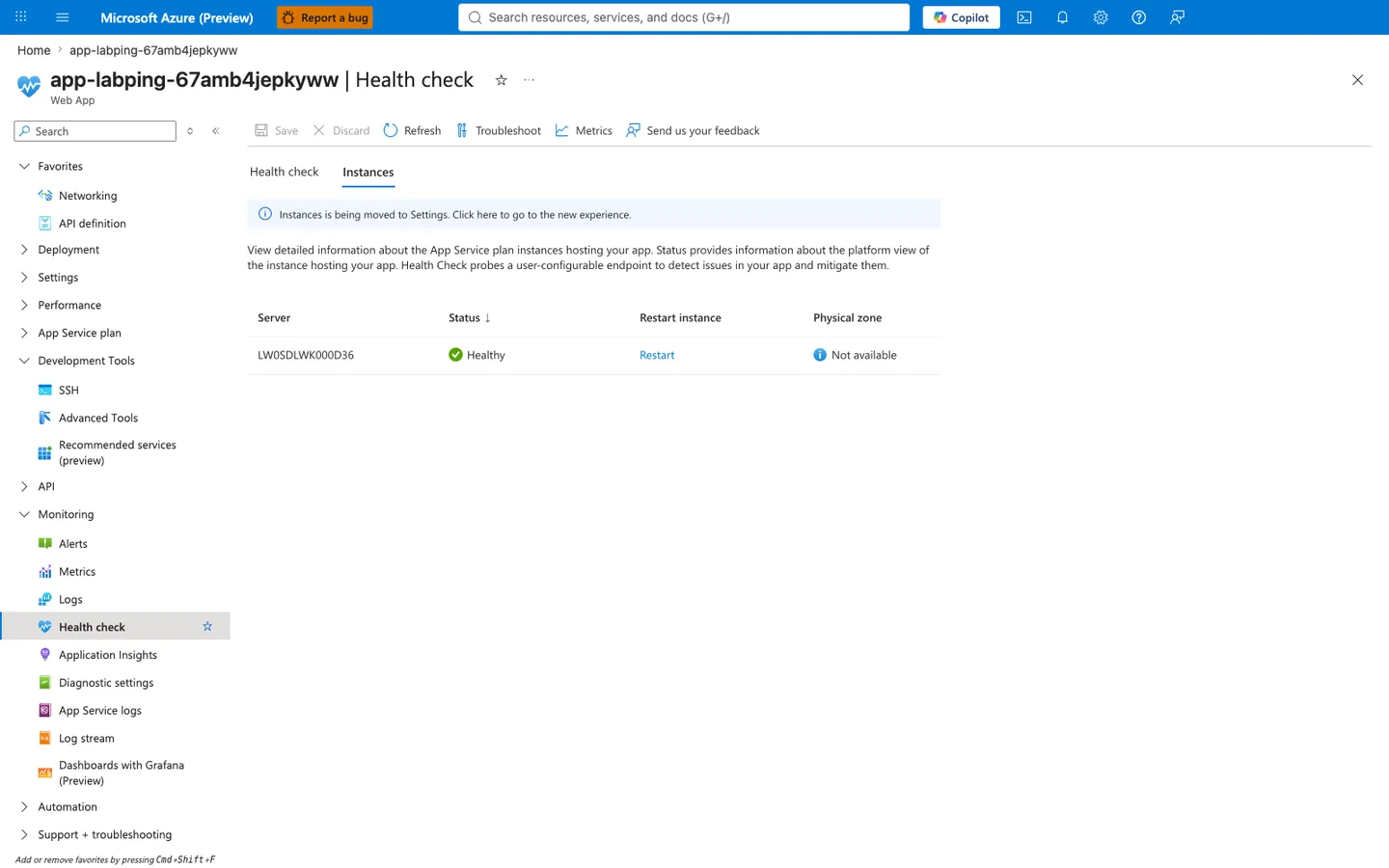
Purpose: Prove visually that Azure App Service's own Health check feature considered the single Basic-tier instance healthy while WEBSITES_PORT diverged from the actual bind port — the same fact §4.10 states as the lab's executive finding. Look for: The instance row shows Status: Healthy in green. The instance identifier (LW0SDLWK000D36) is the platform-assigned server name and will differ on every reproduction. Physical zone: Not available is expected on a Basic (B1) plan; zonal metadata is only surfaced on Premium v3 or higher. Access: Azure Portal → App Service app-<baseName>-<suffix> → left navigation → Monitoring → Health check → Instances tab. Reproduction note: labs/container-http-pings/main.bicep provisions the app without a healthCheckPath, so a fresh deployment renders an empty Instances table. Before this capture the reproduction ran az webapp config set --resource-group $RG --name $APP_NAME --generic-configurations '{"healthCheckPath": "/health"}' to enable the feature. This is a documentation-time addition to make the healthy state directly observable in the Portal; it does not change the lab's core finding, which was already established from CLI evidence alone.
4.5 Probe capture #1 (expected failure window)¶
From trigger/ping-failure-probes-20260404T053512Z.csv:
| Attempt | HTTP status | UTC timestamp |
|---|---|---|
| 1 | 200 | 2026-04-04T05:35:48Z |
| 2 | 200 | 2026-04-04T05:35:58Z |
| 3 | 200 | 2026-04-04T05:36:08Z |
| 4 | 200 | 2026-04-04T05:36:18Z |
| 5 | 200 | 2026-04-04T05:36:28Z |
Result:
- 5/5 successful.
- Expected mismatch-driven failure did not appear.
4.6 Probe capture #2 (after restart)¶
From trigger/ping-failure-after-restart-20260404T055203Z.csv:
| Attempt | HTTP status | UTC timestamp |
|---|---|---|
| 1 | 200 | 2026-04-04T05:52:04Z |
| 2 | 200 | 2026-04-04T05:52:14Z |
| 3 | 200 | 2026-04-04T05:52:24Z |
| 4 | 200 | 2026-04-04T05:52:34Z |
| 5 | 200 | 2026-04-04T05:52:45Z |
| 6 | 200 | 2026-04-04T05:52:55Z |
| 7 | 200 | 2026-04-04T05:53:05Z |
| 8 | 200 | 2026-04-04T05:53:15Z |
Result:
- 8/8 successful after restart.
- Repeated evidence against the original mismatch-fails assumption.
4.7 HTTP log correlation¶
From trigger/kql-http-20260404T060610Z.json, selected rows:
| TimeGenerated (UTC) | Path | Status | TimeTaken ms |
|---|---|---|---|
| 2026-04-04T05:52:04.258206Z | / | 200 | 124 |
| 2026-04-04T05:52:14.421990Z | / | 200 | 75 |
| 2026-04-04T05:52:24.380586Z | / | 200 | 24 |
| 2026-04-04T05:52:34.416589Z | / | 200 | 2 |
| 2026-04-04T05:52:44.461701Z | / | 200 | 4 |
| 2026-04-04T05:52:54.456800Z | / | 200 | 3 |
| 2026-04-04T05:53:04.515067Z | / | 200 | 4 |
| 2026-04-04T05:53:14.523495Z | / | 200 | 2 |
Interpretation:
- Log Analytics confirms CSV observations.
- Probe windows align with successful HTTP responses.
Portal reproduction: Empty AppServiceHTTPLogs during container-startup probe window¶
The correlation table above uses user-driven curl traffic. A different but equally important observation is the absence of rows during the Azure platform's own container-startup probe window: AppServiceHTTPLogs receives zero entries while the platform is actively probing the container prior to accepting user traffic. This is a deliberate lab observation, not missing data — and it is essential context for interpreting the platform-log timeout messages captured in §4.9.
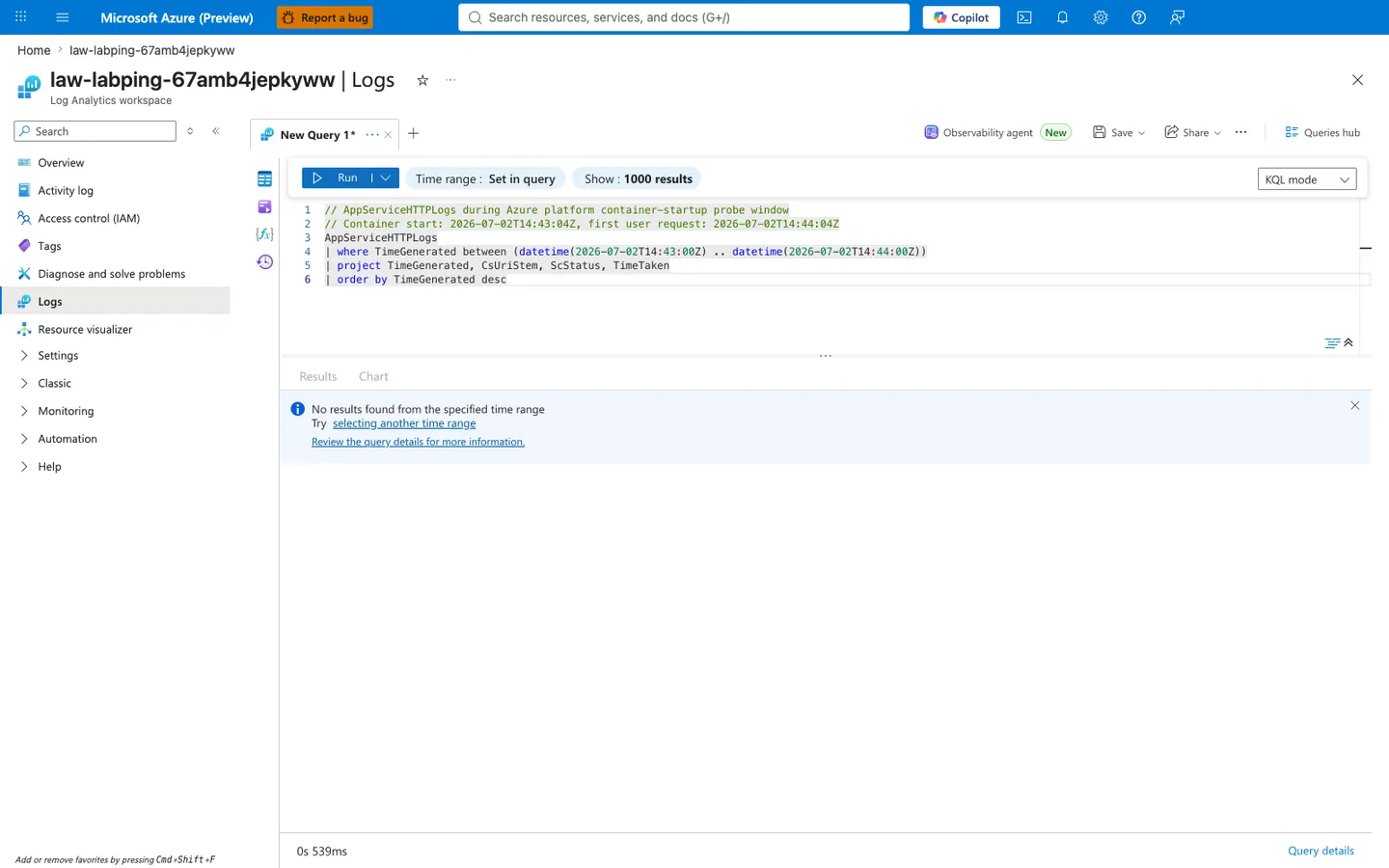
Purpose: Show that Azure's platform-level startup probes (the ones that emit the "Container did not start within expected time limit" and "Pinging warmup path to ensure container is ready to receive requests" messages in §4.9) do not emit rows to AppServiceHTTPLogs. Only user-attributable traffic — curl, browsers, external monitors — appears in that table. The absence of HTTP log rows during the same window is therefore expected behavior, not evidence of a broken container. Look for: The "No results found from the specified time range" info panel, the 0s 539ms query duration in the bottom-left (proving the query executed successfully and returned an empty result set rather than erroring), and the between (datetime(...) .. datetime(...)) bounds spanning a 60-second window that fully brackets the container-start message at 14:43:04Z and stops one second before the first user request at 14:44:04Z. Access: Azure Portal → Log Analytics workspace law-<baseName>-<suffix> → Logs → paste the query shown in the editor. Adjust the datetime(...) bounds to match your own container-start UTC timestamp (obtainable from AppServicePlatformLogs filtered on the "Container <app-name> started successfully" message).
4.8 Console log evidence for bind port¶
From trigger/kql-console-20260404T060610Z.json:
Listening at: http://0.0.0.0:8000Starting gunicorn 24.1.1Site's appCommandLine: gunicorn --bind 0.0.0.0:8000 app:app
Interpretation:
- Process is bound to 8000 exactly as app configuration indicates.
4.9 Platform log timeout evidence¶
From trigger/kql-platform-20260404T060610Z.json, selected messages:
Container did not start within expected time limit of 230s...Site startup probe failed after 0.1175982 seconds.Pinging warmup path to ensure container is ready to receive requests.
Important nuance:
- Timeout/error messages exist in platform stream.
- But independent probe and HTTP logs show successful request handling during key windows.
This means the simple narrative “port mismatch caused total probe failure” is not sufficient for this dataset.
4.10 Explicit finding artifact¶
From trigger/linux-pings-finding-20260404T055338Z.json:
{
  "finding": "WEBSITES_PORT=8080 does not cause failure on Linux App Service. Linux containers use the PORT environment variable and WEBSITES_CONTAINER_START_TIME_LIMIT instead. The platform health ping mechanism differs between Windows and Linux."
}
This file documents the experiment-level interpretation directly.
4.11 App state snapshot near failure attempt¶
From trigger/app-state-failing-20260404T053512Z.json:
Interpretation:
- During supposed failure phase, app state remained running/normal.
4.12 Empty KQL snapshot files¶
These files are empty in artifact set:
trigger/kql-http-20260404T060104Z.jsontrigger/kql-console-20260404T060104Z.jsontrigger/kql-platform-20260404T060104Z.json
Interpretation:
- Query/export timing can produce empty snapshots.
- Do not interpret empty files as absence of events without retry.
4.13 Hypothesis outcome table¶
| Hypothesis statement | Result | Evidence |
|---|---|---|
WEBSITES_PORT mismatch should fail startup probes on Linux | Not supported in this run | Probe CSVs all 200; HTTP logs all 200 |
| App actually listened on 8000 | Supported | Console logs + diag/env |
| Platform startup timeout signals can occur | Supported | Platform logs include 230s timeout text |
| Linux behavior differs from simplistic port-mismatch expectation | Supported | Combined config/runtime/probe evidence |
4.14 Scientific conclusion (required framing)¶
This experiment is not a failed lab. It is a valid discovery:
- The original hypothesis was partially disproved.
- Linux App Service behavior is more nuanced than “WEBSITES_PORT mismatch always breaks pings.”
- Practical troubleshooting must correlate config, runtime env, probe outcomes, and platform lifecycle events.
4.15 Operational recommendations based on this finding¶
- Keep app binding explicit (
0.0.0.0:$PORT) for deterministic startup. - Capture both
WEBSITES_PORTand runtimePORTin diagnostics. - Use real probe series + HTTP logs before declaring “port mismatch root cause.”
- Treat timeout logs as part of startup orchestration context, not standalone proof.
- Document Linux-vs-Windows behavioral differences in internal runbooks.
4.16 Follow-up experiment design¶
To deepen understanding, run an experiment matrix:
| Test | WEBSITES_PORT | App bind | Expected learning |
|---|---|---|---|
| A | 8080 | 8000 | Reproduce current finding |
| B | 8000 | 8000 | Control baseline |
| C | 8080 | 8080 | Explicit alignment check |
| D | 9000 | 8000 | Extreme mismatch boundary |
| E | 8080 | no listener | Confirm hard-failure condition |
For each test collect:
- app settings,
diag/env,- probe CSV,
- HTTP/console/platform KQL export,
- startup duration timeline.
4.17 Artifact index used by this log¶
Baseline files used:
baseline/diag-stats.jsonbaseline/diag-env.jsonbaseline/app-settings.jsonbaseline/app-config.jsonbaseline/health.json
Trigger files used:
trigger/ping-failure-probes-20260404T053512Z.csvtrigger/ping-failure-after-restart-20260404T055203Z.csvtrigger/linux-pings-finding-20260404T055338Z.jsontrigger/webapp-details-20260404T055338Z.jsontrigger/app-state-failing-20260404T053512Z.jsontrigger/kql-http-20260404T060610Z.jsontrigger/kql-console-20260404T060610Z.jsontrigger/kql-platform-20260404T060610Z.jsontrigger/kql-http-20260404T060104Z.json(empty)trigger/kql-console-20260404T060104Z.json(empty)trigger/kql-platform-20260404T060104Z.json(empty)
4.18 Command catalog from this lab¶
az group create --name "$RG" --location "$LOCATION"
az deployment group create --resource-group "$RG" --template-file "labs/container-http-pings/main.bicep" --parameters "baseName=labping"
az webapp list --resource-group "$RG" --query "[0].name" --output tsv
az webapp show --resource-group "$RG" --name "$APP_NAME" --query "defaultHostName" --output tsv
az webapp config show --resource-group "$RG" --name "$APP_NAME" --output json
az webapp config appsettings list --resource-group "$RG" --name "$APP_NAME" --output json
az webapp config appsettings set --resource-group "$RG" --name "$APP_NAME" --settings "WEBSITES_PORT=8080"
az webapp restart --resource-group "$RG" --name "$APP_NAME"
az group delete --name "$RG" --yes --no-wait
| Command | Purpose |
|---|---|
az group create --name "$RG" --location "$LOCATION" | Creates the resource group for the lab. |
--name "$RG" --location "$LOCATION" | Sets the resource group name. |
--location "$LOCATION" | Places the resource group in this Azure region. |
az deployment group create --resource-group "$RG" --template-file "labs/container-http-pings/main.bicep" --parameters "baseName=labping" | Deploys the lab infrastructure from the Bicep template. |
--resource-group "$RG" --template-file "labs/container-http-pings/main.bicep" --parameters "baseName=labping" | Runs the deployment in this resource group. |
--template-file "labs/container-http-pings/main.bicep" --parameters "baseName=labping" | Uses the lab's main Bicep template. |
--parameters "baseName=labping" | Sets the template's baseName parameter to labping. |
az webapp list --resource-group "$RG" --query "[0].name" --output tsv | Lists web apps in the lab resource group and returns the first app name. |
--resource-group "$RG" --query "[0].name" --output tsv | Limits the app list to this resource group. |
--query "[0].name" --output tsv | Selects the name field from the first web app in the returned array. |
--output tsv | Returns the value as plain text. |
az webapp show --resource-group "$RG" --name "$APP_NAME" --query "defaultHostName" --output tsv | Retrieves the app's default hostname for URL construction. |
--resource-group "$RG" --name "$APP_NAME" --query "defaultHostName" --output tsv | Looks up the app in this resource group. |
--name "$APP_NAME" --query "defaultHostName" --output tsv | Targets this web app. |
--query "defaultHostName" --output tsv | Projects only the app's defaultHostName. |
--output tsv | Returns the hostname as plain text. |
az webapp config show --resource-group "$RG" --name "$APP_NAME" --output json | Retrieves the full site configuration for baseline capture. |
--resource-group "$RG" --name "$APP_NAME" --output json | Looks up the app configuration in this resource group. |
--name "$APP_NAME" --output json | Targets this web app's configuration. |
--output json | Returns the full configuration as JSON. |
az webapp config appsettings list --resource-group "$RG" --name "$APP_NAME" --output json | Lists all app settings so the lab can confirm the initial WEBSITES_PORT configuration. |
--resource-group "$RG" --name "$APP_NAME" --output json | Looks up the app settings in this resource group. |
--name "$APP_NAME" --output json | Targets this web app. |
--output json | Returns the settings array as JSON. |
az webapp config appsettings set --resource-group "$RG" --name "$APP_NAME" --settings "WEBSITES_PORT=8080" | Updates the app setting to WEBSITES_PORT=8080 for the perturbation step. |
--resource-group "$RG" --name "$APP_NAME" --settings "WEBSITES_PORT=8080" | Applies the change in this resource group. |
--name "$APP_NAME" --settings "WEBSITES_PORT=8080" | Targets this web app. |
--settings "WEBSITES_PORT=8080" | Writes the WEBSITES_PORT app setting with the value 8080. |
az webapp restart --resource-group "$RG" --name "$APP_NAME" | Restarts the web app after the app-setting change. |
--resource-group "$RG" --name "$APP_NAME" | Restarts the app in this resource group. |
--name "$APP_NAME" | Targets this web app. |
az group delete --name "$RG" --yes --no-wait | Starts deleting the lab resource group during cleanup. |
--name "$RG" --yes --no-wait | Targets this resource group for deletion. |
--yes --no-wait | Skips the confirmation prompt and returns before the delete operation finishes. |
Expected Evidence¶
This section defines what you SHOULD observe at each phase of the lab. Use it to validate your investigation is on track.
Before Trigger (Baseline)¶
| Evidence Source | Expected State | What to Capture |
|---|---|---|
| AppServiceHTTPLogs | All 200s with low TimeTaken | Baseline query snapshot and per-endpoint latency |
| AppServiceConsoleLogs | Normal Gunicorn startup with 2 workers | Worker boot lines and bind target |
| AppServicePlatformLogs | Startup lifecycle succeeds | Site start events without repeated failure loops |
Probe CSV + /diag/stats | Stable healthy responses | Baseline probe sequence and runtime counters |
During Incident¶
| Evidence Source | Expected State | Key Indicator |
|---|---|---|
| AppServiceHTTPLogs | Still all 200s with low latency | TimeTaken remains in healthy low range (10-32 ms) |
| Probe CSV | Repeated successful ping responses | No non-200 startup probe failures in this dataset |
| Console logs | App continues serving on runtime port | Bind/listen lines remain consistent with healthy traffic |
| Interpretation context | This is a healthy baseline lab, not a failure run | Use as comparison control for startup-failed and forward-request labs |
After Recovery¶
| Evidence Source | Expected State | Key Indicator |
|---|---|---|
| AppServiceHTTPLogs | Remains healthy | No degradation trend after trigger window |
/diag/stats | Stable counters and request handling | No pressure signatures emerge |
| Platform logs | No forced restart requirement | Lifecycle remains stable |
| Comparative analysis | Establishes what NORMAL looks like | Baseline profile to contrast with startup-availability failure labs |
Evidence Timeline¶
graph TD
    A[Baseline Capture] --> B[Trigger Fault]
    B --> C[During: Collect Evidence]
    C --> D[After: Compare to Baseline]
    D --> E[Verdict: Confirmed/Falsified]
Evidence Chain: Why This Proves the Hypothesis¶
Falsification Logic
If you observe sustained 200 responses with low TimeTaken (10-32 ms) before, during, and after the test window, the hypothesis is CONFIRMED because this run demonstrates a healthy startup/ping baseline rather than a port-mismatch failure.
If you do NOT observe stable low-latency 200s (for example, repeated non-200 probes or startup timeouts), the hypothesis is FALSIFIED — consider startup timeout, warmup path, or runtime-port handling issues.
Clean Up¶
| Command/Flag | Purpose |
|---|---|
az group delete | Delete the resource group and all contained lab resources |
--yes | Skip confirmation prompt for non-interactive execution |
--no-wait | Return immediately without waiting for deletion to complete |
Related Playbook¶
See Also¶
- Container Didn’t Respond to HTTP Pings playbook
- Startup and availability first-10-minutes checklist
- KQL Console: startup errors
- KQL Restarts: repeated startup attempts
Sources¶
- Configure a custom container for Azure App Service
- Configure a Linux Python app for Azure App Service
- Enable diagnostic logging for apps in Azure App Service
- Azure App Service diagnostics overview
- Monitor App Service instances using health check
- Environment variables and app settings in Azure App Service