First 10 Minutes: Startup / Availability
Quick Context
Use this checklist when an Azure App Service Linux app does not come up cleanly after deployment/restart, returns startup-related 5xx, or fails health pings. In the first 10 minutes, establish whether this is a startup crash, wrong port/binding, startup timeout, or recent image/config regression.
graph TD
    A[Symptom: Startup failures or health ping errors] --> B{Startup logs present?}
    B -- No --> C[Telemetry inconclusive: verify logging and process state]
    B -- Yes --> D{Start-fail-restart loop?}
    D -- Yes --> E[Platform restart-loop hypothesis]
    D -- No --> F{Linux port config consistent with listener?}
    F -- No --> G[Port mismatch hypothesis]
    F -- Yes --> H{Binding is 0.0.0.0?}
    H -- No --> I[Binding mismatch hypothesis]
    H -- Yes --> J{Startup exceeds time limit?}
    J -- Yes --> K[Startup timeout hypothesis]
    J -- No --> L[Check recent image/config regression]
Step 1: Check AppServiceConsoleLogs for startup output
First question: is the containerized app producing any startup logs at all?
Portal view: Web App Down detector confirms the availability symptom
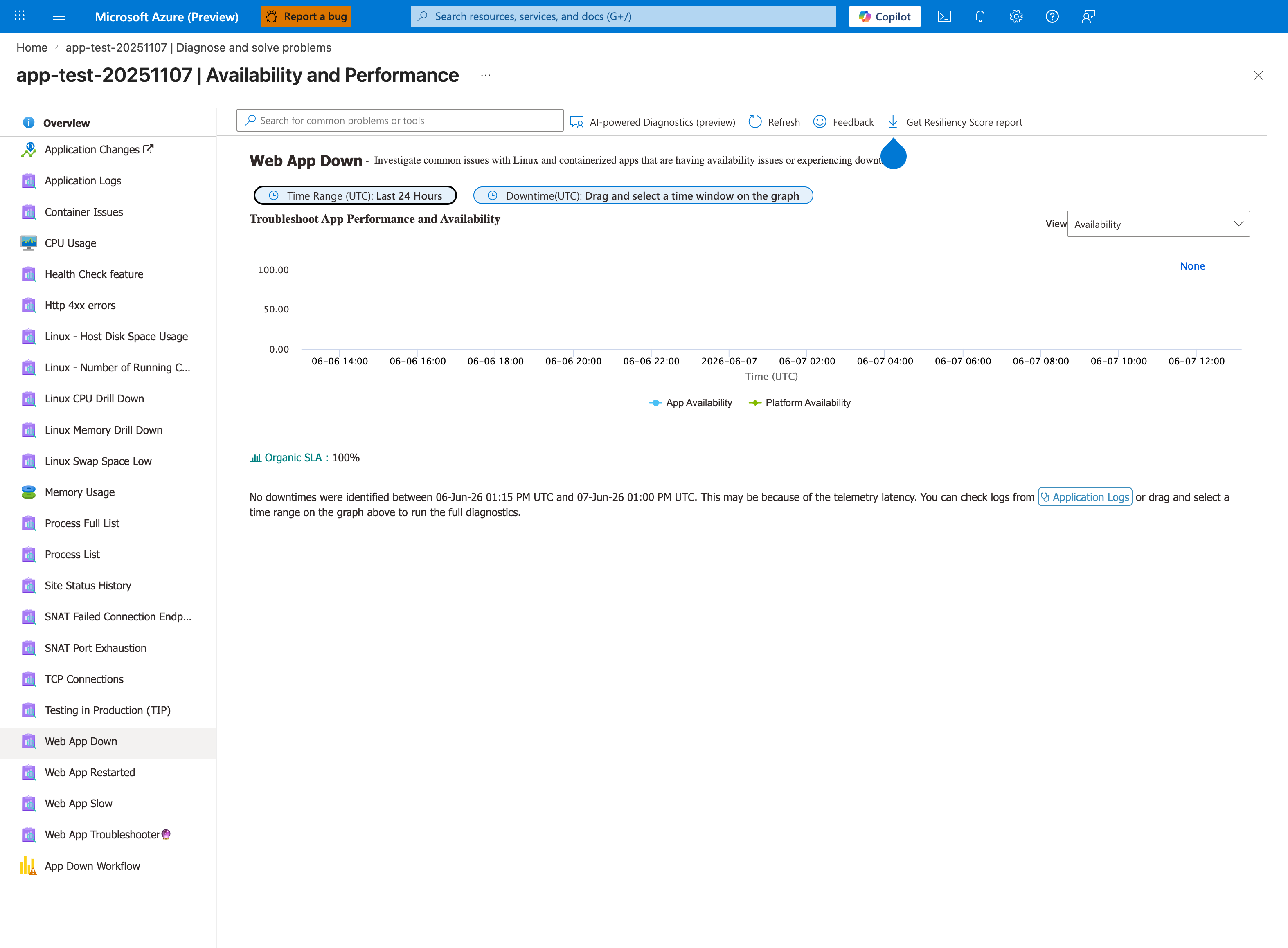
Purpose: Show a healthy baseline of the Web App Down detector.
Look for: The availability chart, Organic SLA, and the downtime message below it.
Expected result: A healthy app shows flat 100 percent availability and no downtime; during an outage the chart dips and a downtime window can be selected.
Before running the KQL query below, check whether the Web App Down detector observed the symptom in the incident window. [Observed] A lower App Availability line with a healthy Platform Availability line scopes the detector's result; it makes application or container hypotheses useful next checks. [Not Proven] A healthy platform line does not exclude every platform contribution, downstream side effect, or problem outside the detector's scope. Select the incident window to review the correlated detector results, then compare them with platform events, HTTP logs, and per-instance process state. If the detector has no matching window or is unavailable, record Unknown rather than assigning a layer.
- KQL:
AppServiceConsoleLogs
| where TimeGenerated > ago(1h)
| project TimeGenerated, ResultDescription
| order by TimeGenerated desc
Log stream is the real-time complement to the historical query above. The Runtime radio can show application stdout/stderr, including Python tracebacks, Node.js Error: listen EADDRINUSE, and Java BindException; the Platform radio shows container lifecycle and health-probe messages. [Observed] A silent stream means only that this collection path returned no lines. [Not Proven] It does not prove that the process failed before logging initialized. Verify that the intended log type is enabled, the application writes to console or /home/LogFiles, the correct instance is selected, and the stream has not stalled. Also allow for collection delay and query-window mismatch. Then compare the platform-event query with SSH/process and listener checks. If logging configuration, stream health, or telemetry availability cannot be established, record INCONCLUSIVE.
Step 2: Check platform events for container start/fail loop
Platform logs confirm if App Service can start and keep the container alive. - KQL:
AppServicePlatformLogs
| where TimeGenerated > ago(6h)
| where OperationName has_any ("Container", "start", "Start", "fail", "Fail", "restart", "Restart")
| project TimeGenerated, OperationName, ContainerId
| order by TimeGenerated desc
- Good signal: normal start with no immediate fail/restart cycle.
- Bad signal: rapid start-fail-restart patterns.
Step 3: Verify Linux port configuration against the actual listener
For Linux custom containers, startup reachability is more nuanced than a simple WEBSITES_PORT mismatch model. Check the actual listener together with both WEBSITES_PORT and the runtime-injected PORT value. See Container HTTP Pings Lab for experimental evidence on Linux port behavior. - Portal path: App Service -> Configuration -> Application settings -> WEBSITES_PORT - CLI:
| Command | Purpose |
|---|---|
az webapp config appsettings list --resource-group "$RG" --name "$APP_NAME" | Lists the app settings currently applied to this web app so you can inspect runtime or deployment configuration. |
--resource-group "$RG" --name "$APP_NAME" | Looks up the resource in this resource group. |
--name "$APP_NAME" | Targets this web app. |
- Good signal: the app binds to
0.0.0.0on the port App Service exposes throughPORT, and any configuredWEBSITES_PORTdoes not contradict that listener. - Bad signal: logs show a different port or localhost-only binding than the effective Linux startup path can reach.
Step 4: Verify binding address is 0.0.0.0 (not 127.0.0.1)
Binding to loopback prevents App Service front-end probe from reaching the process. - Check startup logs for bind/listen line. - Common bad pattern: Listening on 127.0.0.1:<port>. - Good signal: 0.0.0.0:<port> listener. - Bad signal: loopback-only bind.
Step 5: Check WEBSITES_CONTAINER_START_TIME_LIMIT
Large images, migrations, or cold startup overhead can exceed default timeout. - Portal path: App Service -> Configuration -> Application settings -> WEBSITES_CONTAINER_START_TIME_LIMIT - CLI:
az webapp config appsettings list --resource-group "$RG" --name "$APP_NAME" --query "[?name=='WEBSITES_CONTAINER_START_TIME_LIMIT']"
| Command | Purpose |
|---|---|
az webapp config appsettings list --resource-group "$RG" --name "$APP_NAME" --query "[?name=='WEBSITES_CONTAINER_START_TIME_LIMIT']" | Lists only the WEBSITES_CONTAINER_START_TIME_LIMIT app setting so you can compare startup tolerance with observed startup time. |
--resource-group "$RG" --name "$APP_NAME" --query "[?name=='WEBSITES_CONTAINER_START_TIME_LIMIT']" | Looks up the resource in this resource group. |
--name "$APP_NAME" --query "[?name=='WEBSITES_CONTAINER_START_TIME_LIMIT']" | Targets this web app. |
--query "[?name=='WEBSITES_CONTAINER_START_TIME_LIMIT']" | Filters the app-settings list to the WEBSITES_CONTAINER_START_TIME_LIMIT entry only. |
- Good signal: timeout value fits startup profile.
- Bad signal: container initialization consistently exceeds limit.
Step 6: Check recent image/config changes
Confirm if failure started after deployment, base image update, or setting change. - Portal path: Deployment Center -> Logs and Configuration -> Last modified - CLI examples:
az webapp config container show --resource-group "$RG" --name "$APP_NAME"
az webapp deployment source show --resource-group "$RG" --name "$APP_NAME"
| Command | Purpose |
|---|---|
az webapp config container show --resource-group "$RG" --name "$APP_NAME" | Shows the current container image configuration so you can verify image/tag/source details involved in startup behavior. |
--resource-group "$RG" --name "$APP_NAME" | Looks up the resource in this resource group. |
--name "$APP_NAME" | Targets this web app. |
az webapp deployment source show --resource-group "$RG" --name "$APP_NAME" | Shows the configured deployment source so you can confirm how this app is being deployed. |
--resource-group "$RG" --name "$APP_NAME" | Looks up the resource in this resource group. |
--name "$APP_NAME" | Targets this web app. |
- Good signal: no risky change near first failure timestamp.
- Bad signal: issue starts immediately after image tag/config update.
Step 7: SSH into container and verify process state
Direct process check quickly distinguishes crash-loop from healthy process with routing issue. - Portal path: App Service -> Development Tools -> SSH - Commands inside container:
- Good signal: expected app process running and listening on configured port/address.
- Bad signal: no app process, repeated exits, or wrong listen socket.
Step 8: Pull startup error signatures from console logs
Extract concrete crash reasons to choose the next deep-dive playbook. - KQL:
AppServiceConsoleLogs
| where TimeGenerated > ago(1h)
| where ResultDescription has_any ("error", "exception", "failed", "traceback", "EADDRINUSE", "address already in use")
| project TimeGenerated, ResultDescription
| order by TimeGenerated desc
- Good signal: no repeated fatal startup signatures.
- Bad signal: repeatable stack traces or bind errors explaining startup failure.
Decision Points
After these checks, you should be able to: - Narrow to 1-2 hypotheses: - Port/listener contract issue -> verify PORT, WEBSITES_PORT, and actual bind behavior together - Binding mismatch -> bind to 0.0.0.0 - Startup timeout -> increase time limit and reduce startup work - Crash on boot -> investigate stack trace/runtime dependency error - Unknown / unavailable telemetry -> preserve INCONCLUSIVE, repair collection, and repeat the process/listener checks before attributing a cause - Select immediate corrective path before full deep dive.