Evidence Map for App Service Troubleshooting
This page maps common investigation questions to the best evidence source, the CLI command to run, and the KQL table/query to use.
Use it when you know what you need to answer but not where to collect proof.
flowchart TD
    Q[Investigation Question] --> S[Evidence Source]
    S --> CLI[CLI Command]
    S --> KQL[KQL Query]
    CLI --> P[Proof Artifact]
    KQL --> P
    P --> H[Hypothesis Validation]
Why an evidence map
During incidents, teams lose time by checking the wrong signal first.
- HTTP errors are checked in CPU charts
- startup issues are checked only in app code
- DNS/SNAT issues are diagnosed without outbound evidence
An evidence map reduces this by pairing each question with a reproducible command and query.
Use CLI and query artifacts for reproducible investigations
Since log result capture from the browser is awkward and difficult to maintain, use CLI queries and example outputs. This makes investigation reproducible, easier to copy, and easier to interpret.
Set the blade-level Time range to match each query's | where TimeGenerated > ago(...) clause, otherwise a stale time filter returns empty results. All queries on this page assume KQL mode rather than Simple mode, and the Query history pane is worth preserving in the incident ticket alongside CLI output.
Quick Map (Question → Source → Command → Table)
| Question | Best Source | CLI Command | KQL Table |
|---|---|---|---|
| Was the app restarting? | Platform logs + Activity Log | az monitor activity-log list --resource-group <resource-group> --offset 24h | AppServicePlatformLogs |
| Were requests failing? | HTTP logs | az monitor metrics list --resource <app-resource-id> --metric "Http5xx,Requests" --interval PT1M | AppServiceHTTPLogs |
| Was startup failing? | Console logs plus process/listener and platform events | az webapp log tail --resource-group <resource-group> --name <app-name> | AppServiceConsoleLogs + AppServicePlatformLogs |
| Was a dependency slow? | App logs + latency trend | az monitor metrics list --resource <app-resource-id> --metric "AverageResponseTime" --interval PT1M | AppServiceAppLogs |
| Was DNS failing? | Console/app logs + runtime test output | az webapp ssh --resource-group <resource-group> --name <app-name> | AppServiceConsoleLogs |
| Was scale involved? | Metrics + platform events | az monitor metrics list --resource <app-resource-id> --metric "CpuPercentage,MemoryWorkingSet" --interval PT1M | AppServicePlatformLogs |
| Was disk full? | Console logs + filesystem command output | az webapp log tail --resource-group <resource-group> --name <app-name> | AppServiceConsoleLogs |
| Was memory exhausted? | Process/platform signals | az monitor metrics list --resource <app-resource-id> --metric "MemoryWorkingSet" --interval PT1M | AppServicePlatformLogs |
| Was SNAT exhausted? | SNAT detector pressure in the incident window plus per-target outbound errors | az monitor metrics list --resource <app-resource-id> --metric "Http5xx,Requests" --interval PT1M | AppServiceConsoleLogs (supporting evidence only) |
| Was there a deployment? | Activity Log | az monitor activity-log list --resource-group <resource-group> --offset 24h --status Succeeded | AppServicePlatformLogs |
| Was health check failing? | Platform health signals | az webapp show --resource-group <resource-group> --name <app-name> | AppServicePlatformLogs |
| Was slot swap involved? | Activity Log + swap events | az webapp deployment slot list --resource-group <resource-group> --name <app-name> | AppServicePlatformLogs |
| Was there a config change? | Activity Log + app settings snapshot | az webapp config appsettings list --resource-group <resource-group> --name <app-name> | AppServicePlatformLogs |
| Was the container killed? | Platform + console kill messages | az webapp log tail --resource-group <resource-group> --name <app-name> | AppServicePlatformLogs |
| Were there network errors? | Console logs | az webapp log tail --resource-group <resource-group> --name <app-name> | AppServiceConsoleLogs |
| Did warm-up fail during swap? | swap diagnostics + startup logs | az monitor activity-log list --resource-group <resource-group> --offset 6h | AppServicePlatformLogs |
Detailed Evidence Recipes
1) Was the app restarting?
CLI
| Command | Purpose |
|---|---|
az monitor activity-log list --resource-group <resource-group> --offset 24h | Lists recent control-plane operations in the resource group so you can correlate symptoms with restarts, deployments, or configuration changes. |
--resource-group <resource-group> --offset 24h | Scopes the activity-log search to this resource group. |
--offset 24h | Limits the activity-log query to this recent time window. |
KQL
AppServicePlatformLogs
| where TimeGenerated > ago(24h)
| where ResultDescription has_any ("restart", "recycle", "container", "stopped", "started")
| project TimeGenerated, OperationName, ResultDescription, Host
| order by TimeGenerated desc
2) Were requests failing?
CLI
| Command | Purpose |
|---|---|
az monitor metrics list --resource <app-resource-id> --metric "Http5xx,Requests" --interval PT1M | Fetches 5xx and request-count metrics together so you can compare failure rate with incoming traffic. |
--resource <app-resource-id> | Scopes the metric query to this specific Azure resource. |
--metric "Http5xx,Requests" | Requests exactly these metrics from Azure Monitor for this check. |
--interval PT1M | Samples the metrics at this time granularity. |
KQL
AppServiceHTTPLogs
| where TimeGenerated > ago(6h)
| summarize total=count(), err5xx=countif(ScStatus >= 500 and ScStatus < 600) by bin(TimeGenerated, 5m)
| extend errPct=todouble(err5xx)*100.0/iif(total==0,1,total)
| order by TimeGenerated asc
3) Was startup failing?
Log stream can reveal startup errors in real time, but an empty stream is not a negative observation about the process. [Observed] Record whether the selected instance and enabled log type produced lines. [Inferred] Matching tracebacks or bind errors can prioritize a crash or listener hypothesis. [Not Proven] No lines do not show that startup failed before logging initialized. Verify log configuration, application output destination, query window, collection delay, selected instance, and stream health; then compare platform events with process/listener state. If those checks or the telemetry source are unavailable, record INCONCLUSIVE.
CLI
| Command | Purpose |
|---|---|
az webapp log tail --resource-group <resource-group> --name <app-name> | Streams live web app logs so you can watch startup, runtime, or dependency errors as they happen. |
--resource-group <resource-group> --name <app-name> | Looks up the web app in this resource group. |
--name <app-name> | Targets this web app. |
KQL
AppServiceConsoleLogs
| where TimeGenerated > ago(6h)
| where ResultDescription has_any ("failed to start", "could not bind", "listen", "startup", "didn't respond")
| project TimeGenerated, ResultDescription, Host
| order by TimeGenerated desc
4) Was a dependency slow?
Portal view: Application Insights Overview dashboard
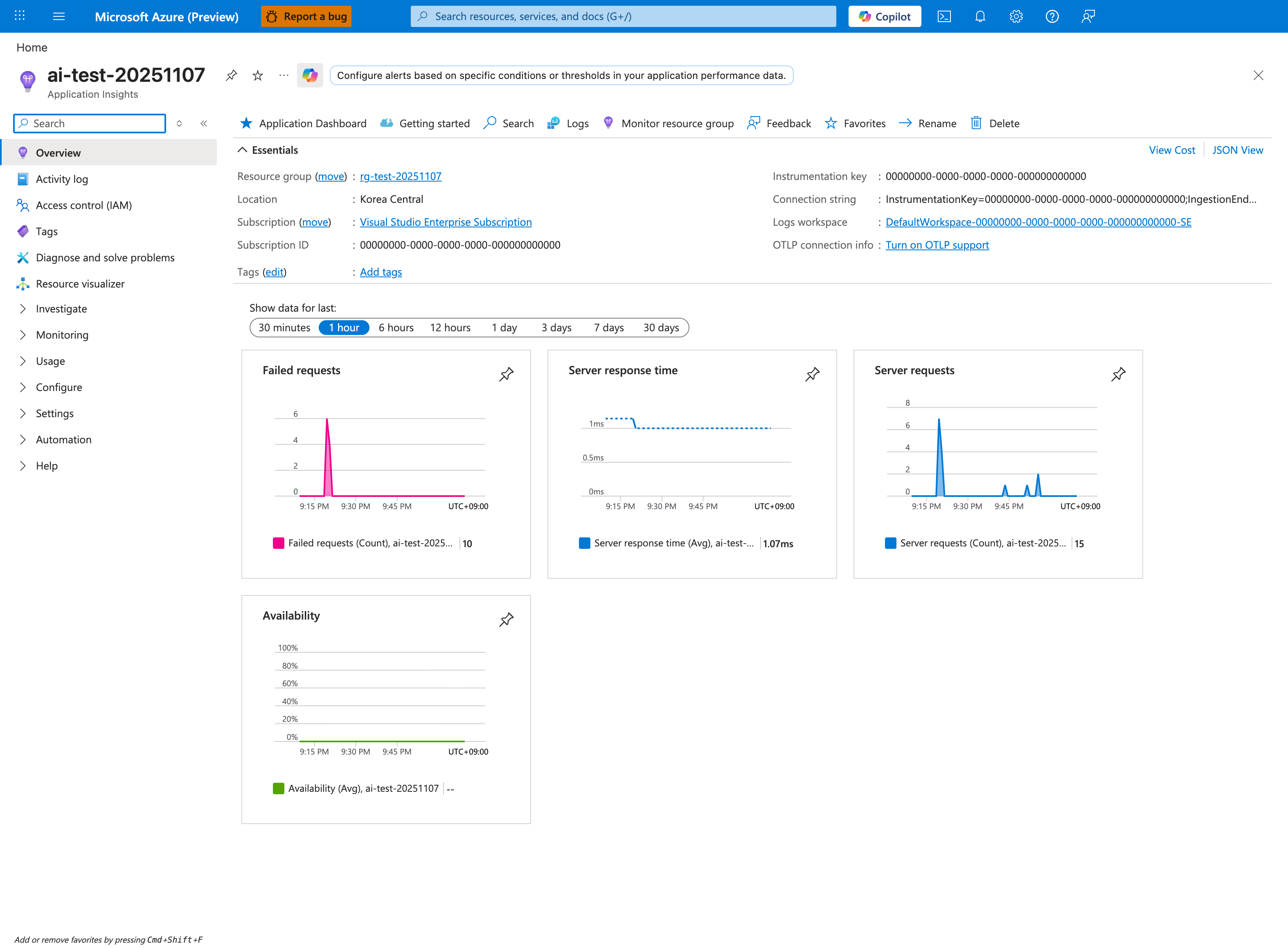
Purpose: Show that request telemetry is reaching Application Insights.
Look for: The Failed requests, Server response time, and Server requests charts.
Expected result: Charts with data confirm the app is sending telemetry; charts that stay empty after traffic point to instrumentation or connection-string problems.
The Application Insights Overview can establish that response time changed, but a value above baseline does not identify downstream latency. Treat dependency slowness as a hypothesis until same-window AppDependencies duration and failure data isolate the affected target and operation; compare those rows with request timing and worker pressure. The Logs button in the command bar opens the KQL editor used for that correlation, while Application Dashboard provides a curated dependency view. Use the incident window first, then widen it only to test whether the pattern recurs. Logs workspace identifies a workspace-based Application Insights resource where the AppDependencies and AppRequests tables can be queried.
CLI
| Command | Purpose |
|---|---|
az monitor metrics list --resource <app-resource-id> --metric "AverageResponseTime" --interval PT1M | Fetches average response-time metrics so you can see whether latency is rising even when requests still succeed. |
--resource <app-resource-id> | Scopes the metric query to this specific Azure resource. |
--metric "AverageResponseTime" | Requests exactly these metrics from Azure Monitor for this check. |
--interval PT1M | Samples the metrics at this time granularity. |
KQL
AppServiceAppLogs
| where TimeGenerated > ago(6h)
| where ResultDescription has_any ("timeout", "dependency", "upstream", "database", "redis", "key vault")
| summarize hits=count() by bin(TimeGenerated, 5m)
| order by TimeGenerated asc
5) Was DNS failing?
CLI
| Command | Purpose |
|---|---|
az webapp ssh --resource-group <resource-group> --name <app-name> | Opens an SSH session into the running app container so you can test DNS, routes, and process state from app context. |
--resource-group <resource-group> --name <app-name> | Looks up the resource in this resource group. |
--name <app-name> | Targets this web app. |
Inside the session, run:
KQL
AppServiceConsoleLogs
| where TimeGenerated > ago(6h)
| where ResultDescription has_any ("Name or service not known", "Temporary failure in name resolution", "getaddrinfo", "DNS")
| project TimeGenerated, ResultDescription
| order by TimeGenerated desc
6) Was scale involved?
Portal view: Metrics blade empty state with metric selector
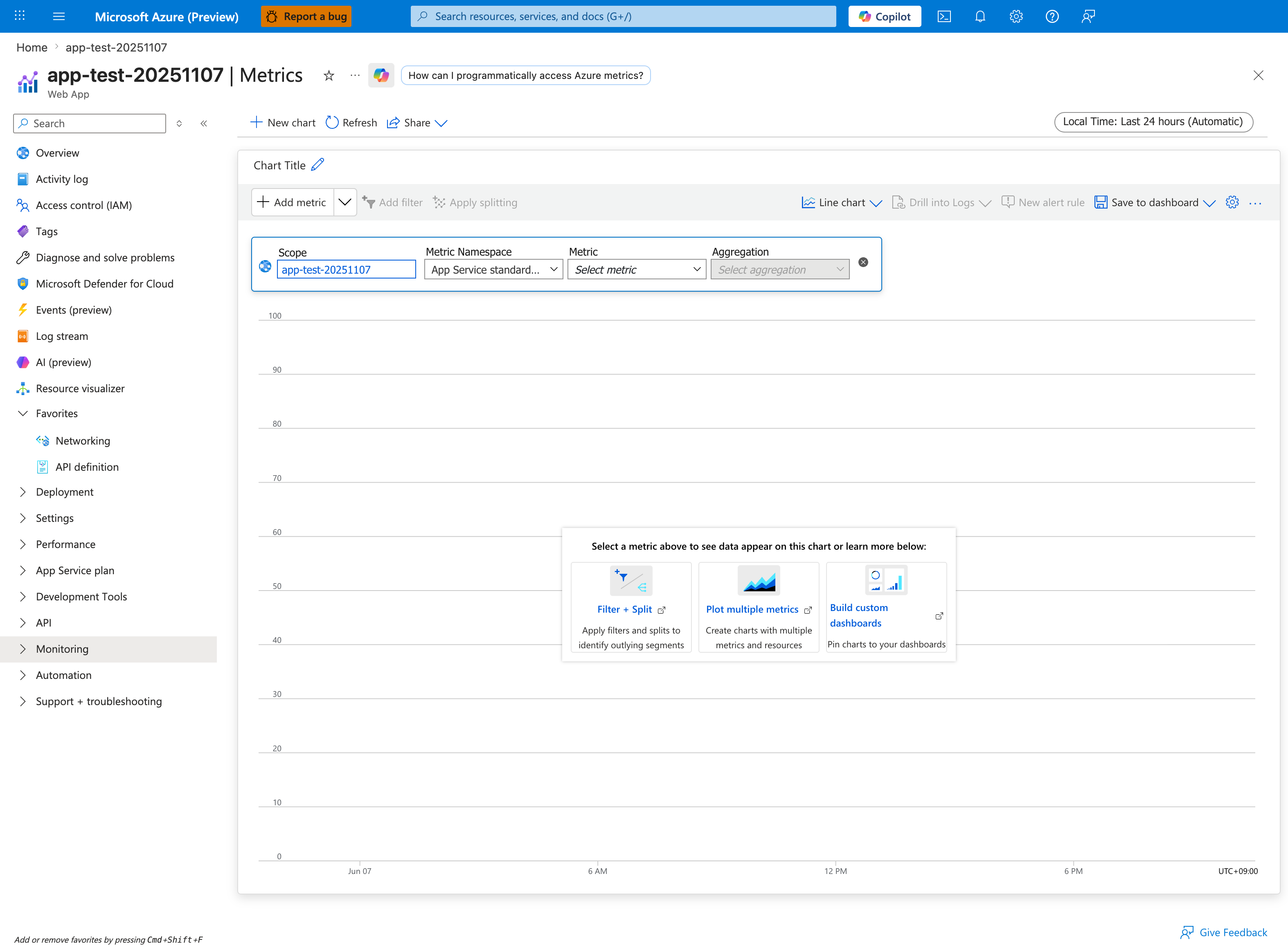
Purpose: Show the Metrics starting point before a metric is chosen.
Look for: Scope, Metric Namespace, Metric, and Aggregation.
Expected result: The chart stays empty until you select a metric and an aggregation.
The Metrics blade is the visual companion to the az monitor metrics list CLI command below. The required fields are the same: Scope (the App Service resource), Metric Namespace (App Service standard metrics), Metric (for example, CpuPercentage, MemoryWorkingSet, or Http5xx), and Aggregation (Avg, Max, Sum, or Count). A CPU spike before a request drop makes capacity or scaling delay a hypothesis, not a conclusion. Test it against autoscale events, instance-count and configured-capacity changes, queueing or request-start delay, and per-instance utilization in the same window. Use Apply splitting by Instance to determine whether pressure is broad or isolated, and use Drill into Logs to correlate the chart with platform events and request evidence.
CLI
az monitor metrics list --resource <app-resource-id> --metric "CpuPercentage,MemoryWorkingSet,Http5xx,AverageResponseTime" --interval PT1M
| Command | Purpose |
|---|---|
az monitor metrics list --resource <app-resource-id> --metric "CpuPercentage,MemoryWorkingSet,Http5xx,AverageResponseTime" --interval PT1M | Fetches CPU, memory working set, 5xx, and latency together to test whether scaling or worker churn drove the incident. |
--resource <app-resource-id> | Scopes the metric query to this specific Azure resource. |
--metric "CpuPercentage,MemoryWorkingSet,Http5xx,AverageResponseTime" | Requests exactly these metrics from Azure Monitor for this check. |
--interval PT1M | Samples the metrics at this time granularity. |
KQL
AppServicePlatformLogs
| where TimeGenerated > ago(24h)
| where ResultDescription has_any ("scale", "instance", "restart", "recycle")
| project TimeGenerated, OperationName, ResultDescription
| order by TimeGenerated asc
7) Was disk full?
CLI
| Command | Purpose |
|---|---|
az webapp log tail --resource-group <resource-group> --name <app-name> | Streams live web app logs so you can watch startup, runtime, or dependency errors as they happen. |
--resource-group <resource-group> --name <app-name> | Looks up the web app in this resource group. |
--name <app-name> | Targets this web app. |
Use SSH to confirm with:
KQL
AppServiceConsoleLogs
| where TimeGenerated > ago(24h)
| where ResultDescription has_any ("No space left on device", "ENOSPC", "disk full")
| project TimeGenerated, ResultDescription
| order by TimeGenerated desc
8) Was memory exhausted?
CLI
| Command | Purpose |
|---|---|
az monitor metrics list --resource <app-resource-id> --metric "MemoryWorkingSet" --interval PT1M | Fetches memory working set so you can see whether memory pressure is building during the incident. |
--resource <app-resource-id> | Scopes the metric query to this specific Azure resource. |
--metric "MemoryWorkingSet" | Requests exactly these metrics from Azure Monitor for this check. |
--interval PT1M | Samples the metrics at this time granularity. |
KQL
AppServicePlatformLogs
| where TimeGenerated > ago(24h)
| where ResultDescription has_any ("OOM", "killed", "memory", "SIGKILL")
| project TimeGenerated, OperationName, ResultDescription, Host
| order by TimeGenerated desc
9) Was SNAT exhausted?
Inbound 499/503 status and repeated duration boundaries are routing clues, not SNAT measurements. Compare client cancellation timestamps, worker queue depth or saturation, per-target dependency failures, and the SNAT Port Exhaustion detector for the same instance and window. [Inferred] SNAT pressure becomes the leading hypothesis only when outbound failures align with measured detector pressure. [Not Proven] If the detector or dependency telemetry is unavailable, keep the result Unknown; do not infer exhaustion from HTTP timing alone.
CLI
az monitor metrics list --resource <app-resource-id> --metric "Http5xx,Requests,AverageResponseTime" --interval PT1M
| Command | Purpose |
|---|---|
az monitor metrics list --resource <app-resource-id> --metric "Http5xx,Requests,AverageResponseTime" --interval PT1M | Fetches 5xx, request volume, and latency together so you can judge whether outbound failures line up with request demand. |
--resource <app-resource-id> | Scopes the metric query to this specific Azure resource. |
--metric "Http5xx,Requests,AverageResponseTime" | Requests exactly these metrics from Azure Monitor for this check. |
--interval PT1M | Samples the metrics at this time granularity. |
KQL
AppServiceConsoleLogs
| where TimeGenerated > ago(6h)
| where ResultDescription has_any ("connect timed out", "ReadTimeout", "ConnectTimeout", "socket", "ECONNRESET")
| summarize errors=count() by bin(TimeGenerated, 5m)
| order by TimeGenerated asc
10) Was there a deployment?
Portal view: Activity log blade for the Web App
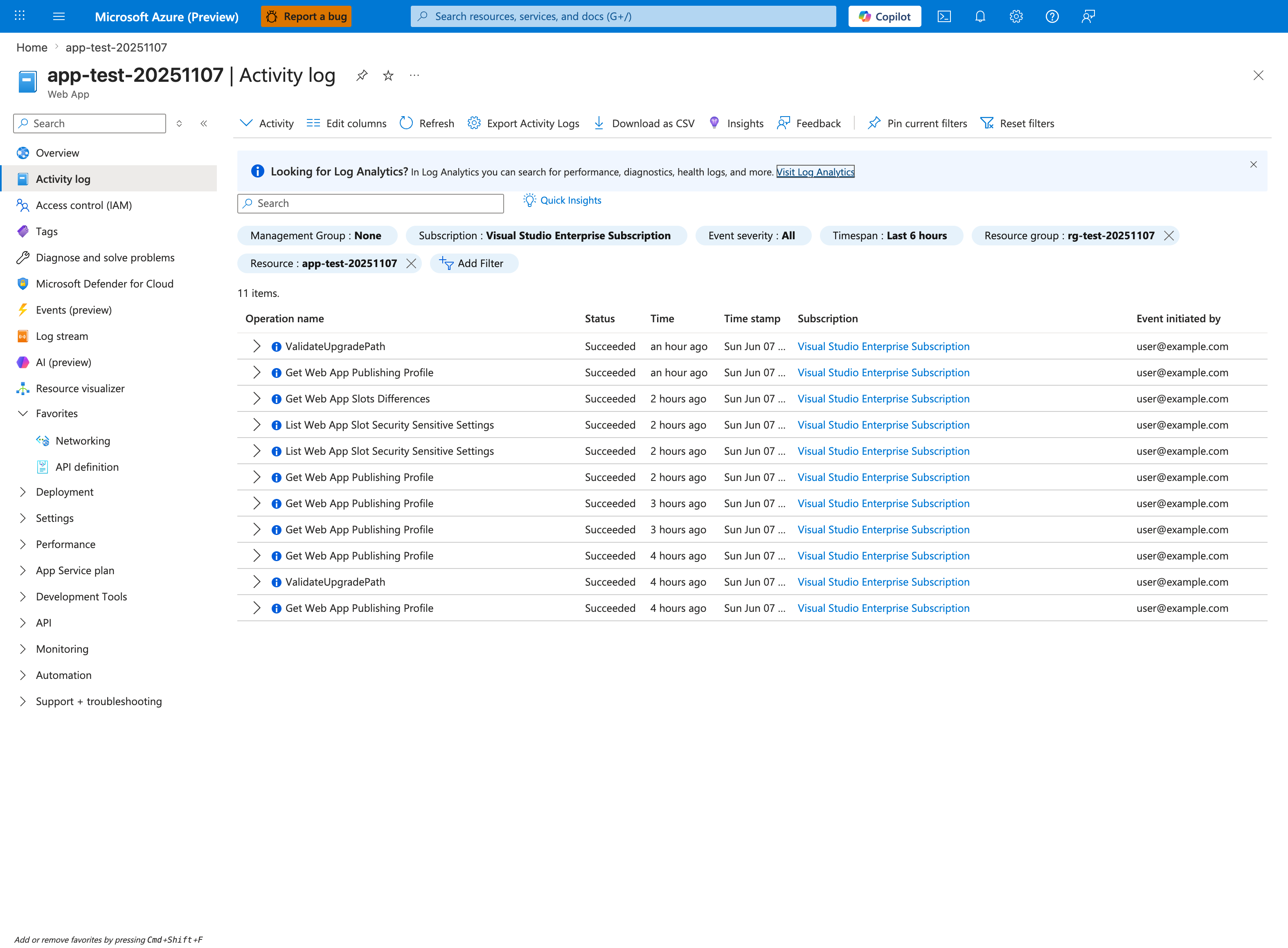
Purpose: Show where control-plane operations on the app are audited.
Look for: The Timespan and Resource filters and the Operation name, Status, and Event initiated by columns.
Expected result: Each management operation appears with its status and who started it; widen the timespan to cover the incident window.
The Activity log is the authoritative record of every control-plane operation against this Web App — deployments, configuration changes, slot swaps, and scale operations all appear as discrete Operation name entries with the initiating principal. For "was there a deployment?" the operations to grep are Microsoft.Web/sites/publish/Action, Update Site, Update Configuration, and Update App Settings. The Event initiated by column distinguishes user-driven deployments from automated CI/CD service principals — critical for separating intentional deploys from third-party automation. The Timespan: Last 6 hours chip should match the incident window; the Add Filter button lets you scope further by operation name. Use Export Activity Logs to set up continuous export to Log Analytics so the same data is available as the KQL query below.
CLI
| Command | Purpose |
|---|---|
az monitor activity-log list --resource-group <resource-group> --offset 24h --status Succeeded | Lists recent succeeded control-plane operations in the resource group so you can confirm deployments or config changes in the incident window. |
--resource-group <resource-group> --offset 24h --status Succeeded | Scopes the activity-log search to this resource group. |
--offset 24h --status Succeeded | Limits the activity-log query to this recent time window. |
--status Succeeded | Keeps only activity-log entries with this operation status. |
KQL
AppServicePlatformLogs
| where TimeGenerated > ago(24h)
| where OperationName has_any ("Deploy", "Publish", "SiteConfig", "Container")
| project TimeGenerated, OperationName, ResultDescription
| order by TimeGenerated desc
11) Was health check failing?
CLI
| Command | Purpose |
|---|---|
az webapp show --resource-group <resource-group> --name <app-name> | Shows the web app resource so you can inspect the current control-plane configuration and state. |
--resource-group <resource-group> --name <app-name> | Looks up the resource in this resource group. |
--name <app-name> | Targets this web app. |
KQL
AppServicePlatformLogs
| where TimeGenerated > ago(24h)
| where ResultDescription has_any ("health check", "unhealthy", "warmup", "probe")
| project TimeGenerated, OperationName, ResultDescription, Host
| order by TimeGenerated desc
12) Was slot swap involved?
CLI
| Command | Purpose |
|---|---|
az webapp deployment slot list --resource-group <resource-group> --name <app-name> | Lists the app's deployment slots so you can confirm whether slot topology or swap context is involved. |
--resource-group <resource-group> --name <app-name> | Looks up the resource in this resource group. |
--name <app-name> | Targets this web app. |
KQL
AppServicePlatformLogs
| where TimeGenerated > ago(24h)
| where ResultDescription has_any ("swap", "slot", "warm-up", "warmed up")
| project TimeGenerated, OperationName, ResultDescription
| order by TimeGenerated desc
13) Was there a config change?
CLI
az webapp config appsettings list --resource-group <resource-group> --name <app-name>
az monitor activity-log list --resource-group <resource-group> --offset 24h
| Command | Purpose |
|---|---|
az webapp config appsettings list --resource-group <resource-group> --name <app-name> | Lists the app settings currently applied to this web app so you can inspect runtime or deployment configuration. |
--resource-group <resource-group> --name <app-name> | Looks up the resource in this resource group. |
--name <app-name> | Targets this web app. |
az monitor activity-log list --resource-group <resource-group> --offset 24h | Lists recent control-plane operations in the resource group so you can correlate symptoms with restarts, deployments, or configuration changes. |
--resource-group <resource-group> --offset 24h | Scopes the activity-log search to this resource group. |
--offset 24h | Limits the activity-log query to this recent time window. |
KQL
AppServicePlatformLogs
| where TimeGenerated > ago(24h)
| where OperationName has_any ("Update Site", "Update App Settings", "Update Configuration")
| project TimeGenerated, OperationName, ResultDescription
| order by TimeGenerated desc
14) Was the container killed?
CLI
| Command | Purpose |
|---|---|
az webapp log tail --resource-group <resource-group> --name <app-name> | Streams live web app logs so you can watch startup, runtime, or dependency errors as they happen. |
--resource-group <resource-group> --name <app-name> | Looks up the web app in this resource group. |
--name <app-name> | Targets this web app. |
KQL
AppServicePlatformLogs
| where TimeGenerated > ago(24h)
| where ResultDescription has_any ("killed", "SIGKILL", "exit code", "container stopped", "OOM")
| project TimeGenerated, OperationName, ResultDescription, Host
| order by TimeGenerated desc
15) Were there network errors?
CLI
| Command | Purpose |
|---|---|
az webapp log tail --resource-group <resource-group> --name <app-name> | Streams live web app logs so you can watch startup, runtime, or dependency errors as they happen. |
--resource-group <resource-group> --name <app-name> | Looks up the web app in this resource group. |
--name <app-name> | Targets this web app. |
KQL
AppServiceConsoleLogs
| where TimeGenerated > ago(6h)
| where ResultDescription has_any ("connection refused", "connection reset", "ENETUNREACH", "EHOSTUNREACH", "timed out")
| project TimeGenerated, ResultDescription
| order by TimeGenerated desc
16) Did warm-up fail during slot swap?
CLI
| Command | Purpose |
|---|---|
az monitor activity-log list --resource-group <resource-group> --offset 6h | Lists recent control-plane operations from the last 6 hours so you can correlate swap warm-up failures with change activity. |
--resource-group <resource-group> --offset 6h | Scopes the activity-log search to this resource group. |
--offset 6h | Limits the activity-log query to this recent time window. |
KQL
AppServicePlatformLogs
| where TimeGenerated > ago(6h)
| where ResultDescription has_any ("swap", "warm-up", "did not respond", "health check")
| project TimeGenerated, OperationName, ResultDescription
| order by TimeGenerated desc
Evidence Quality Checklist
- Keep all evidence in one incident time window.
- Correlate HTTP, console, and platform signals before selecting a root cause.
- Preserve query text used during the incident for post-incident review.
- Capture command outputs in ticket notes with sensitive identifiers removed.
See Also
- Troubleshooting Method
- Detector Map
- Architecture Overview
- Decision Tree
- Troubleshooting Mental Model
- 5xx Trend Over Time
- Restart Timing Correlation
- Startup Errors