App Service Troubleshooting
A hypothesis-driven troubleshooting guide for Azure App Service workloads on Windows and Linux.
What This Is
A practical field guide for troubleshooting real-world issues on Azure App Service across its supported hosting modes.
This is not a general Azure tutorial. It is designed to help engineers move from symptom to validated interpretation faster.
How It Works
graph TD
    A[Observe Symptom] --> B[List Hypotheses]
    B --> C[Collect Evidence]
    C --> D[Validate / Disprove]
    D --> E[Identify Root Cause]
    E --> F[Mitigate]
Every playbook follows this flow:
- Start from the symptom — what the engineer actually observes
- List competing hypotheses — multiple plausible causes
- Collect evidence — metrics, logs, detectors, configuration
- Validate or disprove each hypothesis with specific signals
- Identify the most likely root cause pattern
- Apply mitigations — immediate and long-term
Start Here
| Your Situation | Go To |
|---|---|
| First incident, no idea where to start | Architecture Overview |
| Need to identify the failure category | Decision Tree |
| Want 60-second symptom-to-playbook cards | Quick Diagnosis Cards |
| Want to understand what evidence to collect | Evidence Map |
| Need a mental framework for diagnosis | Mental Model |
| Already know the symptom category | Jump to Playbooks below |
| Need KQL queries to investigate | KQL Query Library |
| Want hands-on practice | Labs below |
Inbound Access and Slow-Request Symptom Routes
Choose the observed symptom rather than a presumed cause. These links lead to investigation steps, evidence collection, competing hypotheses, mitigation and prevention. They are not customer RCA records or new lab execution results; check each destination's verification boundary before treating an example as evidence.
| Observed symptom | First discriminating check | Investigation |
|---|---|---|
| Browser cannot resolve the app or SCM name | Record the same client's target, resolver/proxy path and final DNS answer; keep separate attempts separate. | SCM Client DNS and HTTP Failures |
| Main app works, but Kudu or deployment fails | Test the actual operator/agent SCM path and its DNS, rule inheritance and authentication separately. | SCM Client DNS and HTTP Failures |
| Private endpoint is Approved, but the intended client cannot connect | Compare approval with actual client DNS, route and TCP/TLS observations. | Private Endpoint and Access Restriction Decisions |
| HTTP 403 despite an Allow rule | Identify the response origin, actual ingress path and applicable app/main/SCM policy before assigning a cause. | Private Endpoint and Access Restriction Decisions |
| Adding one Allow rule excludes other clients | Compare the effective unmatched action and ordered rules before/after the change. | Private Endpoint and Access Restriction Decisions |
| Private-only cutover breaks operator access | Check the intended private operator/agent path and approved rollback criteria; do not broadly reopen SCM to test a theory. | Private Endpoint and Access Restriction Decisions |
| Users report long delays while the average changes little | Compare matched windows, retained counts, tail percentiles and slow-request share before investigating cause. | Tail Latency and Matched Baselines |
For app-to-dependency failures, use Outbound / Network instead. The client-to-app/SCM path is a different investigation. Unavailable observations leave the cause inconclusive; a configuration screenshot alone cannot complete the diagnostic steps.
Quick Decision Tree
Use this to route to the right playbook in under 60 seconds:
graph TD
    A[Symptom Observed] --> B{App returns HTTP errors?}
    B -->|503 on all requests| C[Startup Failure]
    B -->|Intermittent 5xx| D[Performance / Load]
    B -->|200 but slow| E[Performance / Cold Start]
    B -->|No errors but wrong behavior| F[Config / Routing]

    C --> C1[Startup Probe Failed?]
    C1 -->|Yes, logs unavailable or empty| C2[Telemetry inconclusive → verify logging and process state]
    C1 -->|Yes, app listening on 127.0.0.1| C3[Wrong bind address → Failed to Forward Request]
    C1 -->|Yes, timeout on port| C4[Port mismatch → Container HTTP Pings]

    D --> D1{Outbound connections involved?}
    D1 -->|Yes, connection timeouts| D2[Measure SNAT, dependency, and worker pressure]
    D1 -->|No, sync worker blocking| D3[Intermittent 5xx Under Load]

    E --> E1{First request after deploy?}
    E1 -->|Yes| E2[Cold Start / Slow Start]
    E1 -->|No, always slow| E3[Memory Pressure or CPU]

    F --> F1{After slot swap?}
    F1 -->|Yes| F2[Slot Swap Config Drift]
    F1 -->|No, DNS/network| F3[DNS VNet Resolution]

    style C fill:#c62828,color:#fff
    style D fill:#ef6c00,color:#fff
    style E fill:#f9a825,color:#000
    style F fill:#1565c0,color:#fff
Hosting Mode: Where to Look First
Choose the entry path that matches the app before applying runtime-specific advice:
| Hosting mode | Start here |
|---|---|
| Windows code | Use the Windows symptom routes for IIS, web.config, Kudu, worker recycling, filesystem quotas, and Java timeout evidence. |
| Windows custom container | Start with Windows Container Health Probes, then use the other Windows routes only when their IIS or worker-process model matches the symptom. |
| Linux code or custom container | Use the representative log patterns, Linux-oriented playbooks under Topics, and the Linux Kudu guide. |
Different hosting modes have different observation points. Use this table to prioritize your investigation without carrying Windows settings into Linux advice:
| Symptom | Linux code | Linux custom container | Windows code | Windows custom container |
|---|---|---|---|---|
| Startup fails | AppServiceConsoleLogs — Oryx build output, runtime startup | AppServiceConsoleLogs — Docker logs, ENTRYPOINT/CMD output | Application Event Logs, WEBSITE_RUN_FROM_PACKAGE mount or package-selection issues | Container logs and the Windows health-probe path |
| Wrong port/binding | Check --bind in startup command (Gunicorn, etc.) | Check WEBSITES_PORT, PORT environment variable, and EXPOSE in the Dockerfile | Check the deployed web.config and IIS handler settings | Check the image's listening port and App Service container configuration |
| Missing dependencies | Oryx build logs, requirements.txt / package.json | Image build logs; dependencies baked into image | NuGet restore logs, MSBuild output | Image build logs; dependencies baked into image |
| Slow cold start | Module import time, lazy loading patterns | Image pull time and container initialization | Assembly loading, JIT compilation | Image pull time and container initialization |
| Memory pressure | MemoryWorkingSet metric, OOM in platform logs | MemoryWorkingSet, container memory limits | MemoryWorkingSet, w3wp process memory | MemoryWorkingSet and container process memory |
| Outbound timeouts | SNAT metrics, AppServiceConsoleLogs connection errors | Same evidence as Linux code | SNAT metrics and outbound connection tracking | SNAT metrics and container logs |
| Config drift after swap | App Settings sticky slot configuration | Same controls as Linux code | web.config transforms and connection strings | App Settings and image configuration |
| Filesystem issues | /home (persistent) vs /tmp (ephemeral), df -h via SSH | Container filesystem and mounted volumes | D:\home (persistent) vs D:\local (ephemeral) | Container filesystem and mounted Windows storage |
Hosting Mode Detection
Use az webapp show --query "kind" to check hosting mode:
app,linux→ Linux Codeapp,linux,container→ Linux custom containerapp→ Windows Code- A Windows app configured with a container image → Windows custom container
Windows Symptom Routes
| Symptom or task | Existing guide |
|---|---|
IIS startup, handler, or deployed web.config failure | Windows IIS and web.config Startup |
| Windows custom container never becomes healthy | Windows Container Health Probes |
| Need Windows Kudu tool selection or a platform tour | Windows Kudu Diagnostics and Kudu on Windows |
w3wp memory growth, recycle, or worker degradation | Windows Memory Pressure and Worker Recycling |
D:\home or D:\local quota and filesystem symptoms | Windows Filesystem Quotas |
Windows Java SE 500.121 or httpPlatformHandler timeout | Windows httpPlatformHandler KQL Pack and Windows Java httpPlatformHandler Timeout Lab |
Coverage and limitations
The guide has dedicated Windows coverage for the routes above and cross-platform deployment coverage for Deployment Failures, Missing wwwroot Files and 404, the Missing wwwroot Content Lab, and the ZIP Deploy File Lock Lab. Most remaining symptom playbooks and labs use Linux examples. Treat their general diagnostic method as reusable, but use Windows-specific paths, process names, settings, and evidence only from a Windows guide.
Representative Log Patterns
Quick reference for recognizing common failure signatures:
| Pattern | Indicates | Playbook |
|---|---|---|
503 + high TimeTaken + no console rows | The request failed slowly; startup failure is one hypothesis, but absent rows are inconclusive. Verify log configuration, collection delay, query window, scope, instance, and stream health before comparing platform events with process and listener state. | Deployment Succeeded Startup Failed |
Console: Listening at: http://127.0.0.1:8000 | Wrong bind address | Failed to Forward Request |
499 + TimeTaken near five seconds on /slow endpoints | Deadline-bound request termination. Compare client and proxy timestamps with configured deadlines; distinguish that path from worker blocking by checking per-worker concurrency, queue delay, and request-start evidence. | Intermittent 5xx Under Load |
499 or 503 near a repeated time boundary on /outbound | A request ended near a timeout boundary; SNAT exhaustion is only one hypothesis. Compare client cancellation, worker queueing, and dependency failures; raise SNAT confidence only when the detector shows port pressure for the same instance and window. | SNAT or Application Issue |
/resolve returns public IP for privatelink FQDN | DNS misconfiguration (Private DNS Zone not linked) | DNS Resolution VNet |
startup_duration > 30s in platform logs | Cold start / slow start | Slow Start / Cold Start |
/disk-status shows /tmp > 50% | Disk pressure | No Space Left on Device |
/config returns wrong environment values after swap | Slot swap config drift (sticky settings missing) | Slot Swap Config Drift |
Topics
Performance
- Tail Latency and Matched Baselines
- Slow Response but Low CPU
- Memory Pressure & Worker Degradation
- Intermittent 5xx Under Load
- No Space Left on Device
- Slow Start / Cold Start
- CORS and Token Errors
Inbound Access / SCM
Outbound / Network
Startup / Availability
- Container Didn't Respond to HTTP Pings
- Warm-up vs Health Check
- Slot Swap Failed During Warm-up
- Deployment Succeeded but Startup Failed
- Failed to Forward Request
- Slot Swap Config Drift
- Auth Redirect Loop
Quick Start
| Need | Start Here |
|---|---|
| First 10 minutes of a performance issue | Performance Checklist |
| Browser or deployment-agent inbound access issue | Inbound symptom routes |
| First 10 minutes of an app-to-dependency outbound issue | Network Checklist |
| First 10 minutes of a startup failure | Startup Checklist |
| Reusable KQL queries | Query Library |
Hands-on Labs
Deploy reproduction environments to your Azure subscription and observe real symptoms:
- Memory Pressure
- Intermittent 5xx Under Load
- Container HTTP Pings
- SNAT Exhaustion
- DNS Resolution (VNet)
- Private Endpoint Route Fault
- No Space Left on Device
- Deployment Succeeded but Startup Failed
- Failed to Forward Request
- Slot Swap Config Drift
- Slow Start / Cold Start
Architecture & Methodology
Portal view: Diagnose and solve problems landing page
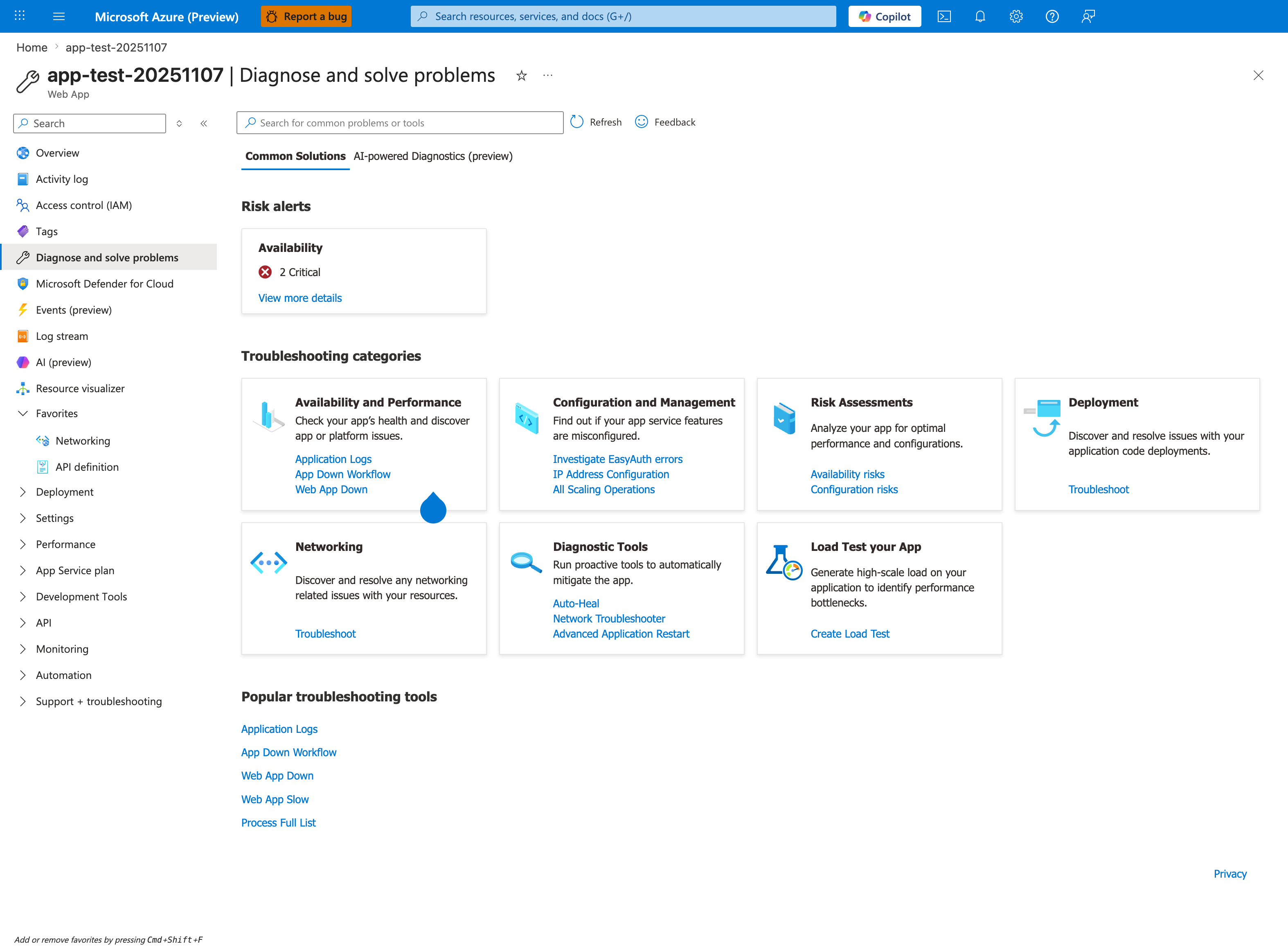
Purpose: Show the Portal entry point to the App Service detectors.
Look for: The Troubleshooting categories cards, such as Availability and Performance, and the search box.
Expected result: Choose the category that matches the symptom to open its detectors.
The Portal's built-in Diagnose and solve problems blade is the operational entry point that complements the architecture and methodology pages below. Treat it as the first stop during an active incident — Risk alerts surfaces pre-detected critical issues, the seven Troubleshooting categories map directly to the failure classifications in the Mental Model, and the Popular troubleshooting tools (App Down Workflow, Web App Slow) run guided diagnostic flows that consolidate many manual KQL queries.
- Architecture Overview — How App Service components interact during failures
- Decision Tree — Route from symptom to playbook in 60 seconds
- Evidence Map — What evidence to collect for each failure type
- Mental Model — Framework for hypothesis-driven diagnosis
- Troubleshooting Method — Full methodology deep-dive
- Detector Map — Platform diagnostic detectors and what they check