Platform Limits & Quotas
Quick reference for common Azure App Service platform limits and quota-related behaviors.
Overview
graph TD
    A[Subscription Quota] --> B[App Service Plan]
    B --> C[Web Apps]
    C --> D[Instance Scale]
    C --> E[Storage Quota]
    C --> F[Networking Limits]
    C --> G[Request Limits]
How to Read This Page
Each figure carries one of three classes, because they do not carry the same authority.
- [Documented]: stated by Microsoft Learn for App Service, with the source in the row. Still source-reviewed only (see the review note at the end), not tested against Azure by this guide.
- [Application or framework]: set by your runtime, web server or framework, not by an App Service platform limit. This page publishes no number for these; see Values this guide does not publish.
- [Measured]: a value observed in a lab. Lab measurements live with their lab and evidence, never in this table.
Request Limits
| Limit | Value | Class | Notes | Source |
|---|---|---|---|---|
| Frontend HTTP timeout | 230 seconds on Windows apps; approximately 240 seconds on Linux apps | [Documented] | App Service returns a timeout to the client when the application does not respond within this window. Use background processing (for example WebJobs) for longer work. | Web request times out in App Service |
Values this guide does not publish
The sources reviewed for this page do not document an App Service-wide value for the first three, so a number here would be an invention. They are [Application or framework] concerns and depend on the runtime, web server and request path.
- Maximum request body size. Request-body limits vary by runtime and web server (for example IIS request filtering on Windows); see Request Limits
requestLimits(IIS) for the IIS behavior. - Maximum URL length. URL limits vary by stack and by front-end and server behavior; the same IIS reference covers the Windows web server.
- Maximum number of app settings. No hard App Service limit is documented; environment-block and runtime constraints can be stack-specific. See Configure an App Service app.
- Filesystem log retention. This one is an App Service logging setting, not an application or framework concern: you choose the number of days, so there is no platform default to publish (see Diagnostics and Retention).
Earlier revisions of this page showed 128 MB, 8192 characters, 10,000 settings and 30-90 days as "typical" values. They were removed because no primary source supports them as App Service limits.
Scale and Plan Limits
| Tier | Max instances | Staging slots per app | Always On | Class | Source |
|---|---|---|---|---|---|
| Free (F1) | 1 (shared) | 0 | No | [Documented] | Azure App Service limits |
| Basic (B1) | 3 (dedicated) | 0 | Yes | [Documented] | Azure App Service limits |
| Standard (S1) | 10 (dedicated) | 5 | Yes | [Documented] | Azure App Service limits |
| Premium v2, v3 and v4 | 30 (dedicated; 20 for Premium v1) | 20 | Yes | [Documented] | Azure App Service limits |
Always On. The Microsoft Learn limits table marks Always On as supported on Basic, Standard, Premium, and Isolated plans, and not on Free or Shared. Basic therefore supports Always On even though it does not support deployment slots; the two columns above are independent capabilities. [Documented] from the source linked in each row, reviewed 2026-10-24. [Not Proven] by a run on each SKU: this page's values are source-reviewed and were not exercised against Azure.
Regional and SKU variation
The values above are the maxima Microsoft Learn documents per tier. The effective limit for your subscription can be lower because of region, subscription quota and SKU generation. Validate current values in Microsoft Learn and in your subscription quotas.
Storage and File System
There is no single persistence rule for /home. What survives a restart depends on the hosting model, so read the row for your model. Each row is [Documented] from the source shown; this guide did not exercise these behaviors against Azure.
| Hosting model | Durable location | Temporary or not durable | Notes | Source |
|---|---|---|---|---|
| Windows, code (built-in) | %HOME% (typically D:\home; use the variable, not the drive letter) maps to an Azure Storage content share dedicated to the app; its size is set by the pricing tier. Files persist across restarts and are shared by all instances. | %SystemDrive%\local is app-specific temporary local storage; changes are not persistent across restarts. | The temporary local storage is not intended for direct use by application code. | Operating system functionality on App Service |
| Linux, built-in runtime | Files under /home. | Changes made outside /home are stored in the container itself and do not persist beyond an app restart. | For Python apps deployed with build automation, content is served from /tmp/<uid>, not /home/site/wwwroot, so write runtime-created files under /home or to Bring Your Own Storage. | Configure a PHP app (built-in Linux containers use /home as persisted shared storage), Configure a Python app (outside /home, and /tmp/<uid>) |
| Windows custom container | C:\home is persistent storage and is enabled by default. | The container writable layer. | Set WEBSITES_ENABLE_APP_SERVICE_STORAGE to false to disable the persistent share. C:\home\LogFiles is the documented exception (see below). See the container platform guide. | Configure a custom container |
| Linux custom container | /home only when WEBSITES_ENABLE_APP_SERVICE_STORAGE is true; persistence is disabled by default. When enabled, files persist across restarts, are shared across instances and count toward the plan's storage quota. | With the setting unspecified or false, /home is not shared across scale instances and written files do not persist across restarts. | The setting changes whether the mount exists, so check it before relying on /home. /home/LogFiles is the documented exception (see below). See the container platform guide and container deployment. | Configure a custom container, Linux FAQ |
| Run From Package | Not applicable: WEBSITE_RUN_FROM_PACKAGE mounts the ZIP as the read-only wwwroot. | Writes to wwwroot fail with an error. | A read-only content mount, not a place for application state and not a durability guarantee. See Run From Package. | Run your app from a ZIP package |
| Mounted Azure Storage (BYOS) | The Azure Files share (or, on Linux, Blob container) you mount. It is separate storage with its own retention. Windows code apps support Azure Files (read/write) only and mount at /mounts/<pathname>; on Linux, Azure Blob mounts are read-only, so use Azure Files for writable state. | Not applicable. | Do not mount at / or /home. Storage mounts are not backed up with the app, and FTP/FTPS access to them is not supported. See the Python and Node.js recipes. | Mount Azure Storage as a local share |
Restarts and redeployments are not a retention guarantee. The rows above describe what survives a restart (and, for shared storage, what instances share). They do not promise backup, retention, recovery or an uptime SLA for the files, and this page makes no such claim. Keep application state in a service built for it and do not rely on temporary paths or the container layer.
/home/LogFiles is the documented exception for custom containers (C:\home\LogFiles on Windows): with application logging's File System option enabled, that folder persists across restarts whether or not persistent storage is enabled. Where logs persist they use storage and count against the plan's quota, so large log volume can fill it; this is persistence across restarts, not a retention or backup guarantee.
Proof condition for your own app
Treat the table as the documented expectation, not as proof for a particular app. To confirm, check the one setting that decides the Linux custom-container case:
az webapp config appsettings list \
  --resource-group $RG \
  --name $APP_NAME \
  --query "[?name=='WEBSITES_ENABLE_APP_SERVICE_STORAGE'].{name:name,value:value}" \
  --output table
| Command/Parameter | Purpose |
|---|---|
az webapp config appsettings list | Reads the app settings of the selected app without changing them. |
--resource-group $RG | Targets the resource group that contains the app. |
--name $APP_NAME | Selects the web app to inspect. |
--query "[?name=='WEBSITES_ENABLE_APP_SERVICE_STORAGE'].{name:name,value:value}" | Keeps only this setting's name and value; an empty result means the setting is unspecified, which is not the same as true. |
--output table | Prints the result as a short table. |
Then verify behavior with an operator-approved test: write a marker file under the path you care about, restart the app, confirm the marker is still there, and, if you run several instances, confirm that a different instance sees it. [Not Proven]: this guide has not run that test for this page, so no observed result is claimed. Record the date, hosting model, runtime, region, SKU and the exact path if you do run it, and keep the observation separate from the documented rows above.
Deployment and Configuration Limits
| Limit | Value | Class | Notes | Source |
|---|---|---|---|---|
| ZIP deploy package size | 2,048 MB | [Documented] | Package size limit for ZIP deploy. | Deploy files to Azure App Service |
| Slot settings scope | Per-slot | [Documented] | A setting marked as a deployment slot setting stays with its slot during a swap. Mark sensitive values accordingly. | Configure an App Service app |
The number of app settings is not listed here; see Values this guide does not publish.
Networking and Connections
| Limit/Behavior | Value / Pattern | Class | Notes | Source |
|---|---|---|---|---|
| SNAT ports per instance (multitenant App Service, platform public outbound) | 128 preallocated | [Documented] | Each instance starts with 128 preallocated SNAT ports; more can be allocated dynamically or freed by connection reuse. The limit applies to connections to the same address and port combination. It does not describe App Service Environments, which allocate differently, nor traffic that avoids platform SNAT (a NAT gateway provides its own port pool; services reached over private endpoints or service endpoints are not subject to the restriction). See the source for those exceptions. | Troubleshoot intermittent outbound connection errors |
| Outbound IPs | Multiple, can change | [Documented] | Use possibleOutboundIpAddresses for allowlists on plans that return it. Premium v4 returns empty strings for outboundIpAddresses and possibleOutboundIpAddresses; use a solution such as Azure NAT Gateway when you need a predictable outbound address. | Inbound and outbound IP addresses in Azure App Service |
| WebSocket and long-lived connections | Tier-dependent | [Documented] | Per-instance WebSocket limits differ by tier and by Windows or Linux; see the WebSockets rows of the limits table. | Azure App Service limits |
Diagnostics and Retention
| Area | Value | Class | Notes | Source |
|---|---|---|---|---|
| Application logging (Filesystem), Windows apps | Turns itself off after 12 hours | [Documented] | Documented for the Windows application-logging setting and intended for temporary debugging. The long-term option, Application logging (Blob), needs a blob storage container; the article supports it without code changes for .NET only. | Enable diagnostic logging for apps in Azure App Service |
| Filesystem log retention | Configurable (days) | [Documented] | The portal exposes a Retention Period (Days) setting for web server logging on Windows apps and for application logging on Linux and container apps (the latter also has a Quota (MB) setting). No platform default range is documented, so none is shown here. | Enable diagnostic logging for apps in Azure App Service |
| Live log streaming inactivity timeout, Windows apps | 1800 seconds default | [Documented] | The SCM_LOGSTREAM_TIMEOUT app setting is the inactivity timeout, in seconds, before log streaming stops. | Environment variables and app settings reference |
| Application Insights retention | Configurable | [Documented] | Affects cost and forensic depth. | Manage usage and costs for Application Insights |
Limit-Driven Symptoms
- Intermittent outbound failures under load (possible SNAT pressure)
- Sudden 5xx spikes with no code change (plan/resource saturation)
- Failed uploads or deployments due to artifact size
- Missing files due to writing into ephemeral paths
- Slow or dropped long-running HTTP requests over frontend timeout
Run It in the Portal
Portal view: Scale up (App Service plan) blade
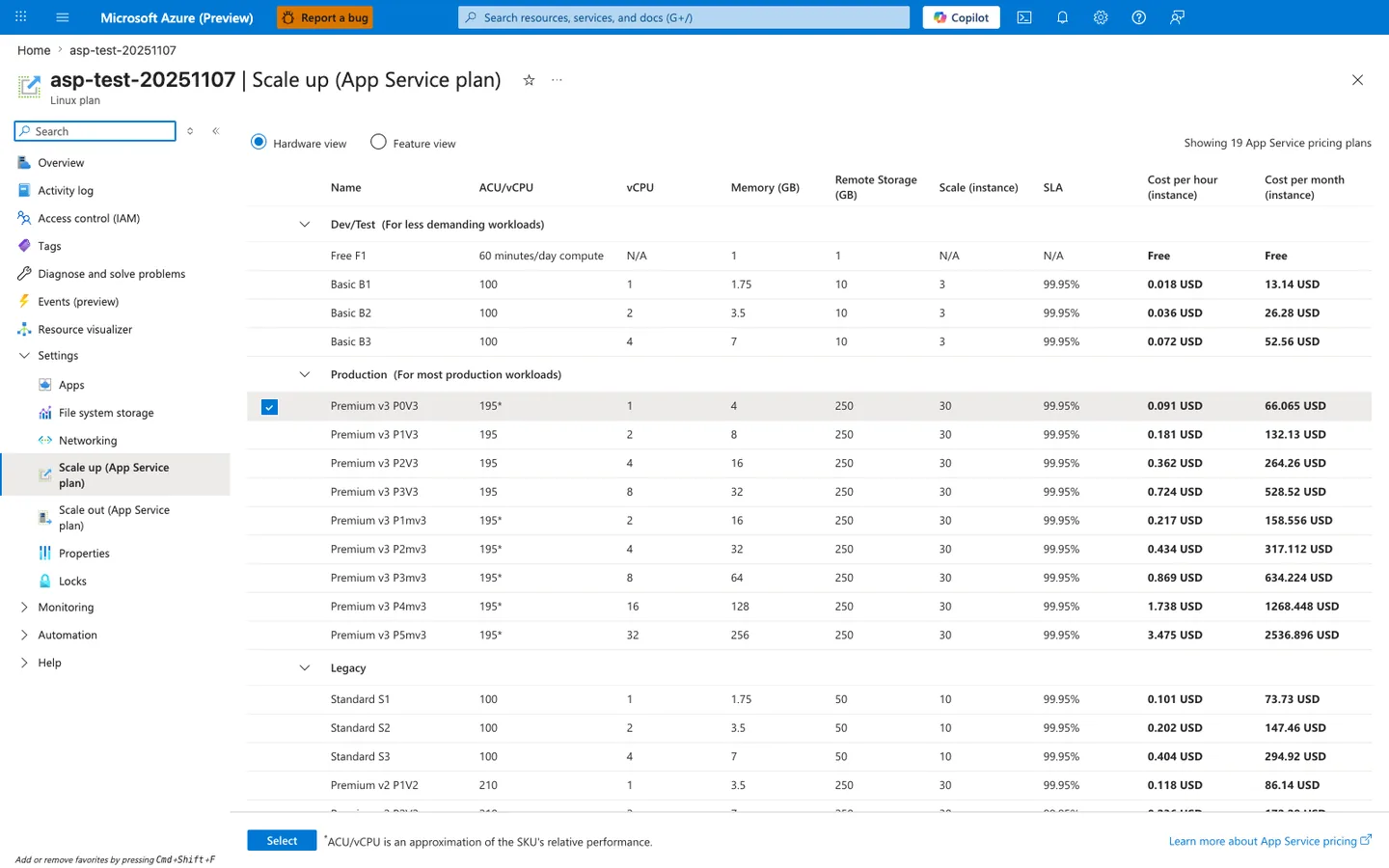
The Scale up (App Service plan) blade is where you compare the plan SKUs that drive most of the limits in the Scale and Plan Limits table above. This capture shows the Hardware view table grouped into Dev/Test, Production, and Legacy, with the selected Premium v3 P0V3 row exposing the per-plan fields that matter operationally: vCPU, Memory (GB), Remote Storage (GB), Scale (instance), and SLA. Because the blade is scoped to the App Service plan rather than the individual web app, it is the right place to confirm whether plan tier and per-instance capacity are part of a saturation or quota problem. Use this view to verify the current plan family and worker size before concluding that a symptom is application-only.
Review Status
[Documented] figures were checked against the Microsoft Learn sources in each row on 2026-10-24. That is a source review: this guide did not run these limits against Azure, and a lab measurement would be a separate [Measured] claim recorded with its own evidence. [Not Proven]: any figure not listed here.
See Also
Sources
- Azure App Service Limits (Microsoft Learn)
- App Service Plan Overview (Microsoft Learn)
- Best Practices for App Service (Microsoft Learn)
Language-Specific Details
Language/runtime behavior (for example, worker model, memory profile, and startup semantics) can change how these limits are experienced in practice. See: