Azure CLI App Service Cheatsheet
Language-agnostic quick reference for Azure App Service operations with long flags only.
Overview
flowchart TD
    A[Azure CLI Cheatsheet] --> B[Lifecycle]
    A --> C[Configuration]
    A --> D[Deployment]
    A --> E[Monitoring]
    A --> F[Networking]
    A --> G[Identity & Slots]
Prerequisites
az login
az account set --subscription <subscription-id>

RG="rg-myapp"
APP_NAME="app-myapp-prod"
PLAN_NAME="plan-myapp"
LOCATION="koreacentral"
| Command | Description |
az login | Authenticates the local Azure CLI session against your Azure account. |
az account set --subscription <subscription-id> | Switches subsequent CLI operations to the target subscription. |
RG="rg-myapp" | Defines the resource group shell variable reused by later commands. |
APP_NAME="app-myapp-prod" | Defines the web app name shell variable. |
PLAN_NAME="plan-myapp" | Defines the App Service plan name shell variable. |
LOCATION="koreacentral" | Defines the Azure region shell variable for resource creation commands. |
App Service Lifecycle
az group create --name $RG --location $LOCATION --output json
az appservice plan create --resource-group $RG --name $PLAN_NAME --location $LOCATION --sku P1V3 --is-linux --output json
az webapp create --resource-group $RG --plan $PLAN_NAME --name $APP_NAME --output json
az webapp show --resource-group $RG --name $APP_NAME --output json
az webapp stop --resource-group $RG --name $APP_NAME --output json
az webapp start --resource-group $RG --name $APP_NAME --output json
az webapp restart --resource-group $RG --name $APP_NAME --output json
az webapp delete --resource-group $RG --name $APP_NAME --output json
| Command | Description |
az group create --name $RG --location $LOCATION --output json | Creates the resource group that will hold the App Service resources. |
az appservice plan create --resource-group $RG --name $PLAN_NAME --location $LOCATION --sku P1V3 --is-linux --output json | Creates a Linux App Service plan in the chosen region and SKU. |
az webapp create --resource-group $RG --plan $PLAN_NAME --name $APP_NAME --output json | Creates the web app in that App Service plan. |
az webapp show --resource-group $RG --name $APP_NAME --output json | Returns the current web app resource details. |
az webapp stop --resource-group $RG --name $APP_NAME --output json | Stops the running app so it no longer serves traffic. |
az webapp start --resource-group $RG --name $APP_NAME --output json | Starts a stopped web app. |
az webapp restart --resource-group $RG --name $APP_NAME --output json | Restarts the app process on the existing site. |
az webapp delete --resource-group $RG --name $APP_NAME --output json | Deletes the web app resource from the resource group. |
Masked output example:
{
  "id": "/subscriptions/<subscription-id>/resourceGroups/rg-myapp/providers/Microsoft.Web/sites/app-myapp-prod",
  "name": "app-myapp-prod",
  "defaultHostName": "app-myapp-prod.azurewebsites.net",
  "identity": {
    "tenantId": "<tenant-id>",
    "principalId": "xxxxxxxx-xxxx-xxxx-xxxx-xxxxxxxxxxxx"
  }
}
Configuration
az webapp config appsettings list --resource-group $RG --name $APP_NAME --output table
az webapp config appsettings set --resource-group $RG --name $APP_NAME --settings KEY1=VALUE1 KEY2=VALUE2 --output json
az webapp config appsettings delete --resource-group $RG --name $APP_NAME --setting-names KEY1 KEY2 --output json

az webapp config connection-string list --resource-group $RG --name $APP_NAME --output table
az webapp config connection-string set --resource-group $RG --name $APP_NAME --settings MainDb="Server=tcp:<server>.database.windows.net;Database=<db>;" --connection-string-type SQLAzure --output json
az webapp config connection-string delete --resource-group $RG --name $APP_NAME --setting-names MainDb --output json

az webapp config set --resource-group $RG --name $APP_NAME --always-on true --http20-enabled true --output json
| Command | Description |
az webapp config appsettings list --resource-group $RG --name $APP_NAME --output table | Lists the app settings currently stored on the web app. |
az webapp config appsettings set --resource-group $RG --name $APP_NAME --settings KEY1=VALUE1 KEY2=VALUE2 --output json | Writes or updates the specified app settings on the web app. |
az webapp config appsettings delete --resource-group $RG --name $APP_NAME --setting-names KEY1 KEY2 --output json | Removes the named app settings from the web app configuration. |
az webapp config connection-string list --resource-group $RG --name $APP_NAME --output table | Lists the connection strings configured for the app. |
az webapp config connection-string set --resource-group $RG --name $APP_NAME --settings MainDb="Server=tcp:<server>.database.windows.net;Database=<db>;" --connection-string-type SQLAzure --output json | Stores the MainDb connection string and marks it as an Azure SQL connection string. |
az webapp config connection-string delete --resource-group $RG --name $APP_NAME --setting-names MainDb --output json | Deletes the MainDb connection string from the app configuration. |
az webapp config set --resource-group $RG --name $APP_NAME --always-on true --http20-enabled true --output json | Enables Always On and HTTP/2 at the site configuration level. |
Deployment
az webapp deploy --resource-group $RG --name $APP_NAME --src-path ./deploy.zip --type zip --output json
az webapp deployment source config-local-git --resource-group $RG --name $APP_NAME --output json
az webapp deployment source show --resource-group $RG --name $APP_NAME --output json
az webapp log deployment list --resource-group $RG --name $APP_NAME --output table
az webapp deployment list-publishing-profiles --resource-group $RG --name $APP_NAME --xml --output json
| Command | Description |
az webapp deploy --resource-group $RG --name $APP_NAME --src-path ./deploy.zip --type zip --output json | Pushes the local ZIP package to the web app for deployment. |
az webapp deployment source config-local-git --resource-group $RG --name $APP_NAME --output json | Enables a local Git deployment endpoint for the web app. |
az webapp deployment source show --resource-group $RG --name $APP_NAME --output json | Shows the current deployment source configuration for the app. |
az webapp log deployment list --resource-group $RG --name $APP_NAME --output table | Lists recorded deployment runs and their status. |
az webapp deployment list-publishing-profiles --resource-group $RG --name $APP_NAME --xml --output json | Retrieves the publishing profiles, including deployment endpoints and credentials, in XML form. |
Monitoring
az webapp log config --resource-group $RG --name $APP_NAME --application-logging filesystem --detailed-error-messages true --failed-request-tracing true --web-server-logging filesystem --output json
az webapp log tail --resource-group $RG --name $APP_NAME
az webapp log download --resource-group $RG --name $APP_NAME --output json

WEBAPP_RESOURCE_ID=$(az webapp show --resource-group $RG --name $APP_NAME --query id --output tsv)
az monitor metrics list --resource $WEBAPP_RESOURCE_ID --metric "Requests" "Http5xx" "AverageResponseTime" --interval PT5M --aggregation Total Average --output table
| Command | Description |
az webapp log config --resource-group $RG --name $APP_NAME --application-logging filesystem --detailed-error-messages true --failed-request-tracing true --web-server-logging filesystem --output json | Enables filesystem-based application and web server logging plus detailed error and failed-request traces. |
az webapp log tail --resource-group $RG --name $APP_NAME | Streams live web app logs to the current terminal session. |
az webapp log download --resource-group $RG --name $APP_NAME --output json | Downloads the available diagnostic log package for the app. |
WEBAPP_RESOURCE_ID=$(az webapp show --resource-group $RG --name $APP_NAME --query id --output tsv) | Reads the web app ARM resource ID into a shell variable for the metrics query. |
az monitor metrics list --resource $WEBAPP_RESOURCE_ID --metric "Requests" "Http5xx" "AverageResponseTime" --interval PT5M --aggregation Total Average --output table | Queries Azure Monitor metrics for request volume, HTTP 5xx count, and average response time over 5-minute buckets. |
Linux caveat for log download
az webapp log download may not work with web apps running on Linux. For Linux apps, use log streaming (az webapp log tail), the Diagnose and Solve Problems portal blade, or access logs via /home/LogFiles.
Networking
az webapp vnet-integration add --resource-group $RG --name $APP_NAME --vnet <vnet-name> --subnet <subnet-name> --output json
az webapp vnet-integration list --resource-group $RG --name $APP_NAME --output table
az webapp vnet-integration remove --resource-group $RG --name $APP_NAME --vnet <vnet-name> --subnet <subnet-name> --output json

az webapp config access-restriction add --resource-group $RG --name $APP_NAME --rule-name AllowCorp --action Allow --ip-address <corp-cidr> --priority 100 --output json
az webapp config access-restriction show --resource-group $RG --name $APP_NAME --output json
az webapp config access-restriction remove --resource-group $RG --name $APP_NAME --rule-name AllowCorp --output json
| Command | Description |
az webapp vnet-integration add --resource-group $RG --name $APP_NAME --vnet <vnet-name> --subnet <subnet-name> --output json | Attaches the web app to the specified VNet integration subnet for outbound private connectivity. |
az webapp vnet-integration list --resource-group $RG --name $APP_NAME --output table | Lists the VNet integration configuration currently attached to the app. |
az webapp vnet-integration remove --resource-group $RG --name $APP_NAME --vnet <vnet-name> --subnet <subnet-name> --output json | Detaches the web app from the specified VNet integration subnet. |
az webapp config access-restriction add --resource-group $RG --name $APP_NAME --rule-name AllowCorp --action Allow --ip-address <corp-cidr> --priority 100 --output json | Adds an allow rule so only the specified corporate CIDR can reach the app through that rule. |
az webapp config access-restriction show --resource-group $RG --name $APP_NAME --output json | Shows the current access restriction rule set for the app. |
az webapp config access-restriction remove --resource-group $RG --name $APP_NAME --rule-name AllowCorp --output json | Removes the named access restriction rule from the app. |
Managed Identity
az webapp identity assign --resource-group $RG --name $APP_NAME --output json
az webapp identity show --resource-group $RG --name $APP_NAME --output json
| Command | Description |
az webapp identity assign --resource-group $RG --name $APP_NAME --output json | Enables a system-assigned managed identity on the web app. |
az webapp identity show --resource-group $RG --name $APP_NAME --output json | Returns the current managed identity configuration for the web app. |
Masked output example:
{
  "type": "SystemAssigned",
  "principalId": "xxxxxxxx-xxxx-xxxx-xxxx-xxxxxxxxxxxx",
  "tenantId": "<tenant-id>",
  "userAssignedIdentities": null
}
Deployment Slots
az webapp deployment slot create --resource-group $RG --name $APP_NAME --slot staging --configuration-source $APP_NAME --output json
az webapp deployment slot list --resource-group $RG --name $APP_NAME --output table
az webapp deployment slot swap --resource-group $RG --name $APP_NAME --slot staging --target-slot production --action swap --output json
az webapp traffic-routing set --resource-group $RG --name $APP_NAME --distribution staging=20 --output json
az webapp traffic-routing clear --resource-group $RG --name $APP_NAME --output json
az webapp deployment slot delete --resource-group $RG --name $APP_NAME --slot staging --output json
| Command | Description |
az webapp deployment slot create --resource-group $RG --name $APP_NAME --slot staging --configuration-source $APP_NAME --output json | Creates a staging deployment slot and copies configuration from the production app. |
az webapp deployment slot list --resource-group $RG --name $APP_NAME --output table | Lists the deployment slots defined for the app. |
az webapp deployment slot swap --resource-group $RG --name $APP_NAME --slot staging --target-slot production --action swap --output json | Swaps the staging slot content into the production slot. |
az webapp traffic-routing set --resource-group $RG --name $APP_NAME --distribution staging=20 --output json | Sends 20 percent of incoming traffic to the staging slot. |
az webapp traffic-routing clear --resource-group $RG --name $APP_NAME --output json | Removes any custom traffic split so all traffic returns to the default routing behavior. |
az webapp deployment slot delete --resource-group $RG --name $APP_NAME --slot staging --output json | Deletes the staging slot from the app. |
Traffic not explicitly assigned to a non-production slot continues to go to production automatically.
Cleanup
az group delete --name $RG --yes --no-wait
| Flag | Description |
--name $RG | Deletes the resource group named by $RG. |
--yes | Skips the interactive confirmation prompt. |
--no-wait | Returns immediately without waiting for the asynchronous deletion to finish. |
Run It in the Portal
Portal view: Web App Overview blade (CLI command Portal counterparts)
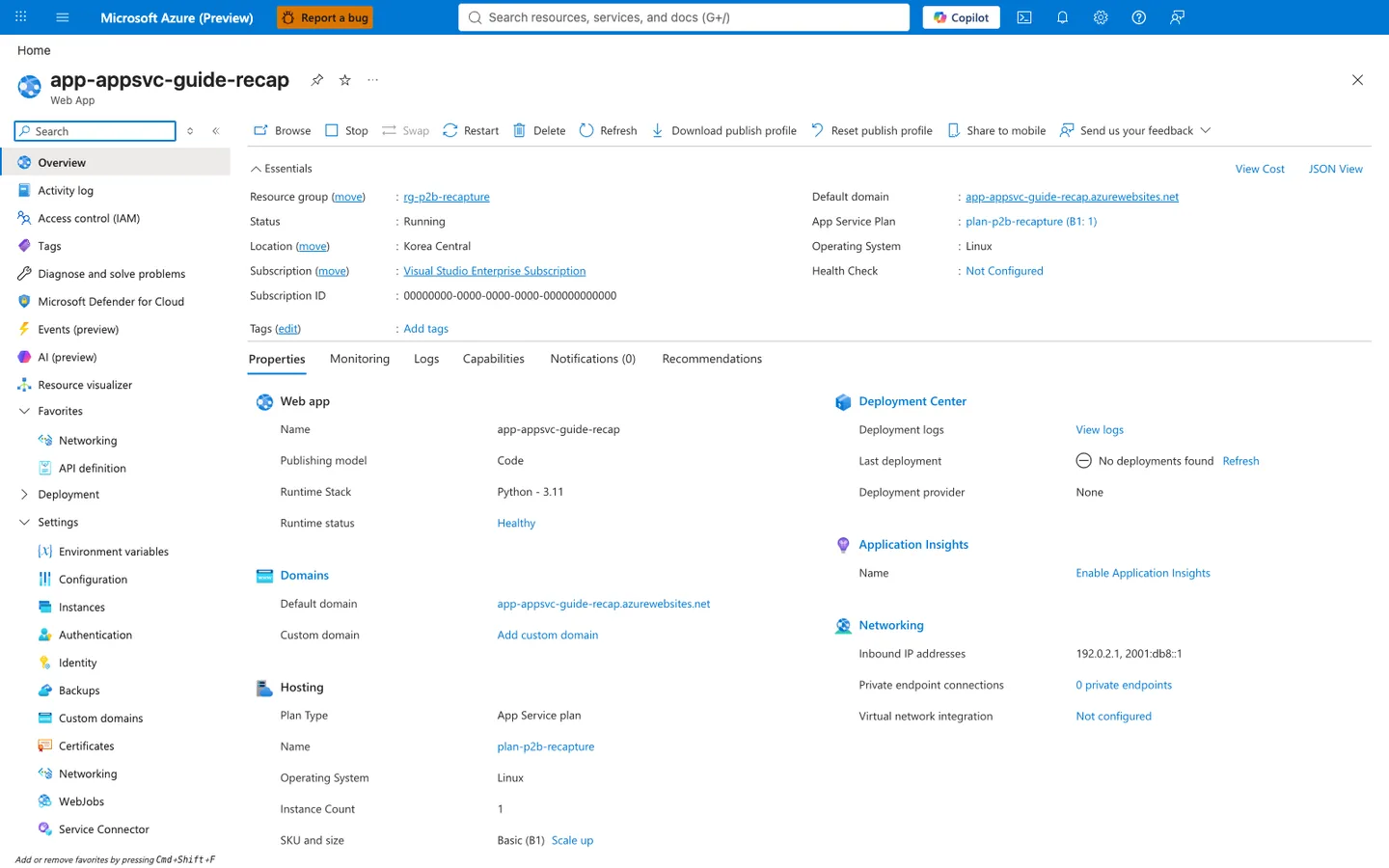
Most CLI verbs in this cheatsheet have a direct visual counterpart on this blade. The command bar Stop, Restart, and Delete map to az webapp stop, az webapp restart, and az webapp delete, while Browse aligns with the Default domain shown in Essentials and Download publish profile aligns with az webapp deployment list-publishing-profiles. The visible Essentials and Properties fields (Status: Running, Operating System: Linux, App Service Plan, Runtime status: Healthy, Last deployment) make this a practical post-command verification view after create, deploy, restart, or plan-change operations. Use this blade to confirm that the app is running on the expected plan and that the most recent deployment succeeded.
See Also
Sources