App Service to Azure Storage connectivity
When an App Service app cannot reach an Azure Storage account, the cause is almost always in one of four independent layers: DNS resolution, network routing, the Storage firewall, or data authorization. Each layer can pass while another fails, so a single "connection refused" or 403 can have very different root causes. This page gives you a mental model to localize the failure and pick the right fix.
Main Content
The four-layer mental model
A request from your app to https://<account>.blob.core.windows.net passes through four checks, in order. All four must succeed.
%% diagram-id: storage-connectivity-four-layers
flowchart TD
    App[App Service app] --> L1
    L1[Layer 1 - DNS<br/>Resolve account FQDN] -->|Public IP or Private Endpoint IP| L2
    L2[Layer 2 - Routing<br/>Which path leaves the app] -->|Internet, service endpoint, or private endpoint| L3
    L3[Layer 3 - Storage firewall<br/>Is the source allowed] -->|Allowed source| L4
    L4[Layer 4 - Authorization<br/>Key, SAS, or Entra ID role] -->|Authorized| OK[Read/write succeeds]
    L1 -->|Wrong resolution| F1[Fails: connects to wrong endpoint]
    L3 -->|Blocked source| F3[Fails: HTTP 403 AuthorizationFailure - firewall]
L4 -->|Missing role/permission| F4[Fails: HTTP 403 - authorization]| Layer | Question it answers | Typical failure signal |
|---|---|---|
| 1. DNS | Does the account FQDN resolve to a public IP or a private endpoint IP? | Connects to the public endpoint when you expected private (or vice versa) |
| 2. Routing | Which path does traffic take out of the app — internet, service endpoint, or private endpoint? | Traffic falls back to the internet route and is blocked by the firewall |
| 3. Storage firewall | Is the request's source (public IP, subnet, or private endpoint) on the allow list? | 403 with an AuthorizationFailure network reason |
| 4. Authorization | Does the caller present a valid key, SAS, or Microsoft Entra role? | 403 even though the network path is correct |
Network access and data authorization are independent
Per Microsoft Learn, clients that make requests from allowed network sources must also meet the storage account's authorization requirements. Opening the firewall does not grant data access, and granting a role does not bypass the firewall. Treat Layer 3 and Layer 4 as separate problems.
Layer 1 — DNS
The account FQDN (<account>.blob.core.windows.net) resolves differently depending on whether a private endpoint exists:
- No private endpoint: the FQDN resolves to the Storage service's public IP. This is expected and normal — even when you use a service endpoint (a service endpoint changes routing, not DNS).
- Private endpoint present: the public FQDN is a CNAME to
privatelink.blob.core.windows.net, which a linked Private DNS zone resolves to the private endpoint's private IP.
Do not hardcode the privatelink FQDN
Your application code and app settings should always use the standard FQDN (<account>.blob.core.windows.net). Let the Private DNS zone resolve it to the private IP. Hardcoding <account>.privatelink.blob.core.windows.net bypasses the intended resolution flow and breaks portability.
Layer 2 — Routing
Routing decides which path a request takes out of the app:
- No VNet Integration: traffic leaves over the internet from the app's platform outbound IPs.
- VNet Integration, private traffic only (Route All disabled): only RFC1918 traffic and service-endpoint traffic enter the VNet; internet-destined traffic (including public Storage endpoints) still exits directly.
- VNet Integration + routing of all outbound internet traffic (application routing:
outboundVnetRouting.applicationTrafficor the legacyWEBSITE_VNET_ROUTE_ALL=1, which Learn still supports; "Route All"): traffic is routed into the integration subnet and subject to its NSGs and route tables. Content share access over the VNet is separate configuration routing,outboundVnetRouting.contentShareTraffic, whichoutboundVnetRouting.allTrafficalso covers and the legacy route-all flag alone does not. See Outbound VNet routing properties.
Route All + firewalled global Storage is a common outage
Per Microsoft Learn, connectivity to global Azure Storage can fail for VNet-integrated apps when Route All is enabled and the app does not use service endpoints, private endpoints, or UDRs — the traffic is expected to route via the default internet route, which a Storage firewall then blocks. This is especially common when the storage account is in a different region than the virtual network. Fix it by adding a service endpoint (Microsoft.Storage.Global for cross-region), a private endpoint, or a UDR — not by widening the firewall.
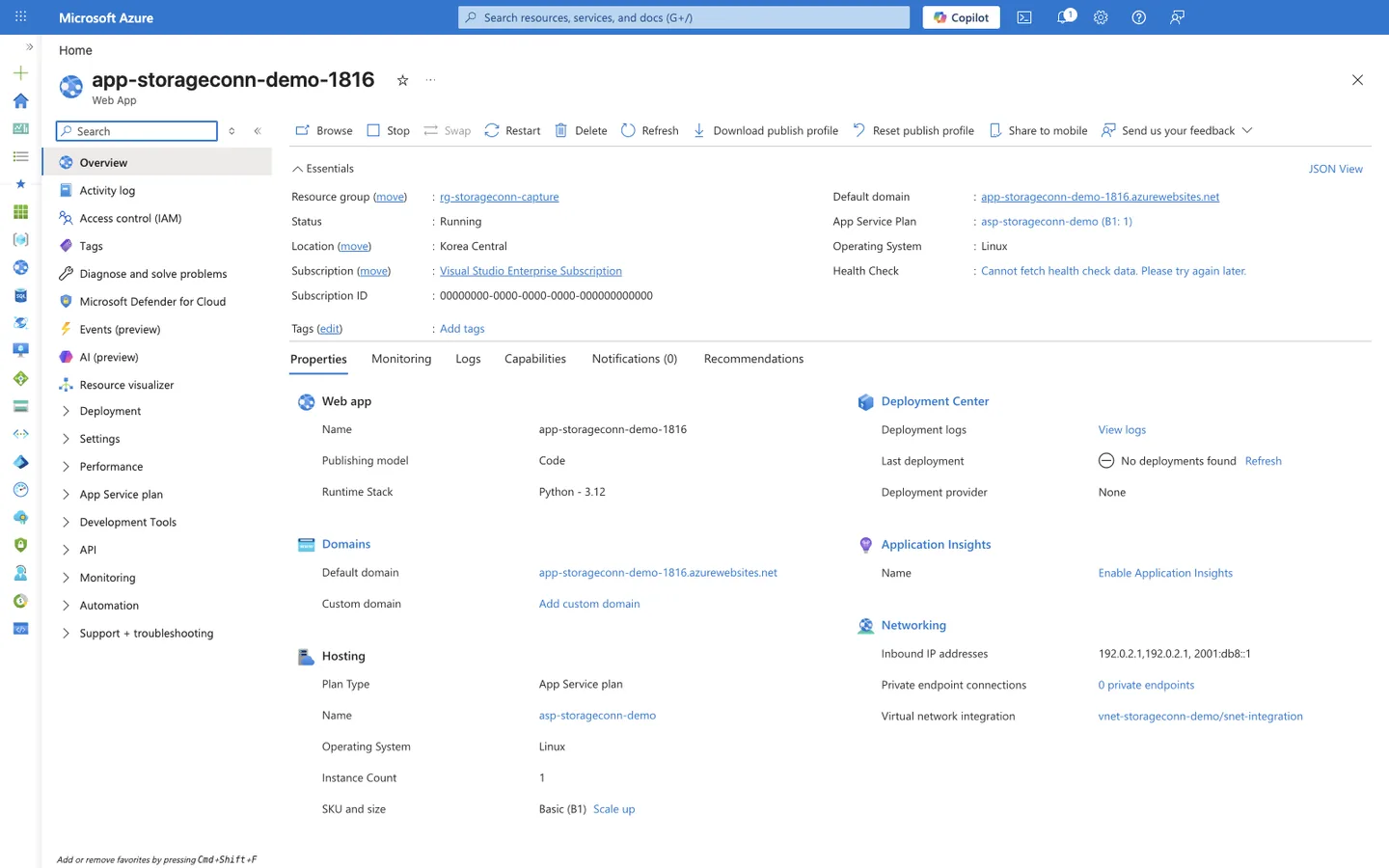
Purpose: Confirm the app has VNet Integration in place, which is the prerequisite for the private routing paths in this layer.
Look for: The Networking section's Virtual network integration value (vnet-storageconn-demo/snet-integration) and Private endpoint connections count.
Expected result: A named vnet/subnet next to Virtual network integration means the app can route outbound traffic through that integration subnet; an empty value means the app has no VNet path and only the internet route is available.
Layer 3 — Storage firewall
The Storage account's Networking blade has three public-network-access modes and four rule types.
Public network access modes:
| Mode | Behavior |
|---|---|
| Enabled from all networks | Any source may reach the public endpoint (subject to Layer 4). |
| Enabled from selected virtual networks and IP addresses | Only the configured VNet rules, IP rules, resource-instance rules, and trusted-service exceptions are allowed; everything else gets 403. |
| Disabled | The public endpoint is off entirely; only private endpoints can reach the account. |
The three modes appear on the Storage account's Networking → Public access tab:
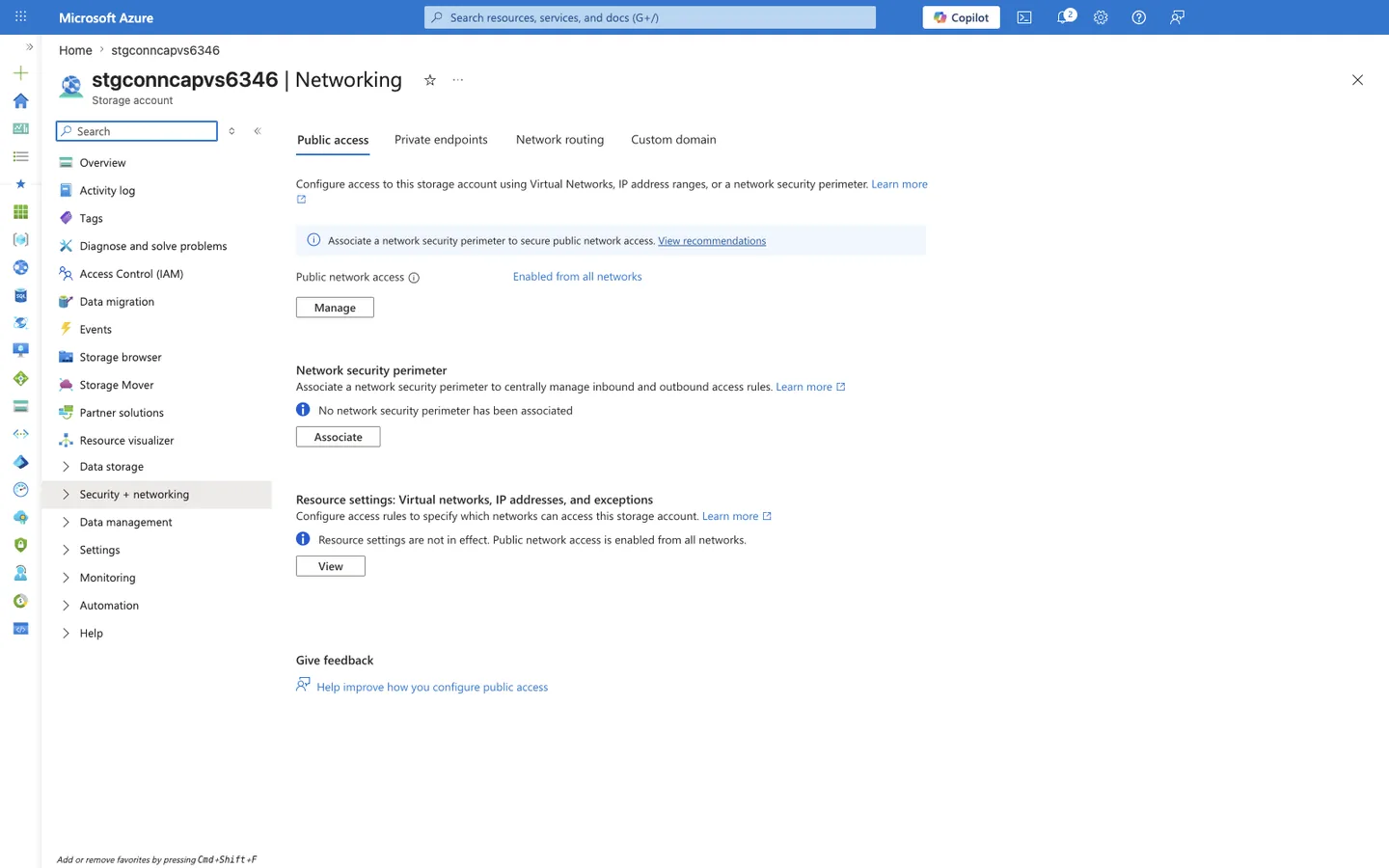
Purpose: Show the least-restrictive mode, where any source may reach the public endpoint.
Look for: Public network access set to Enabled from all networks. No virtual network or IP allow list is required in this mode.
Expected result: Any client can open a TCP connection to the public endpoint; access is then gated solely by Layer 4 authorization.
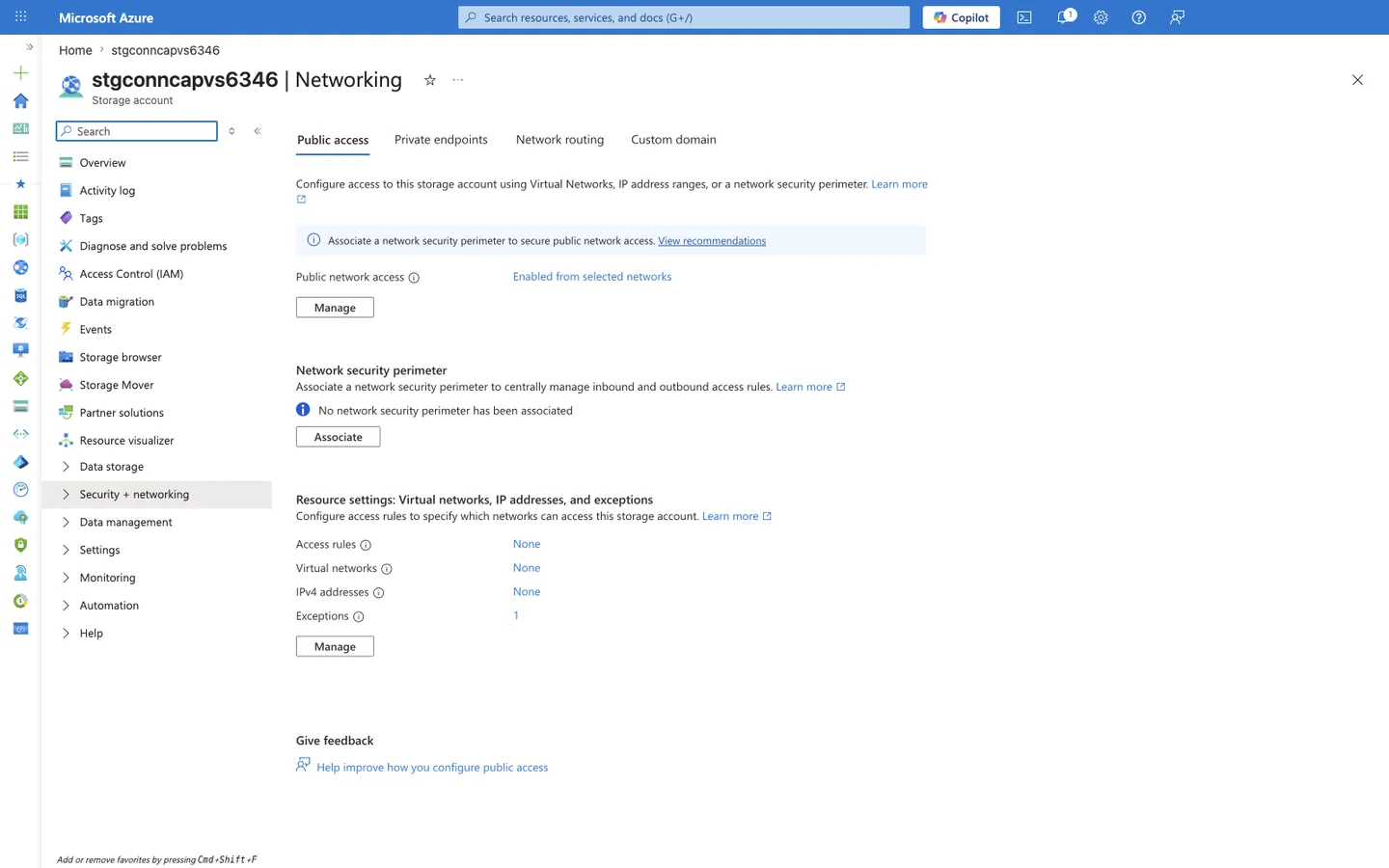
Purpose: Show the mode that enforces an explicit allow list of virtual networks and IP ranges.
Look for: Public network access set to Enabled from selected virtual networks and IP addresses, and the Virtual networks, Firewall, and Exceptions sections that define the allowed sources.
Expected result: Only sources matching a configured VNet rule, IP rule, resource-instance rule, or trusted-service exception are allowed; every other source receives 403.
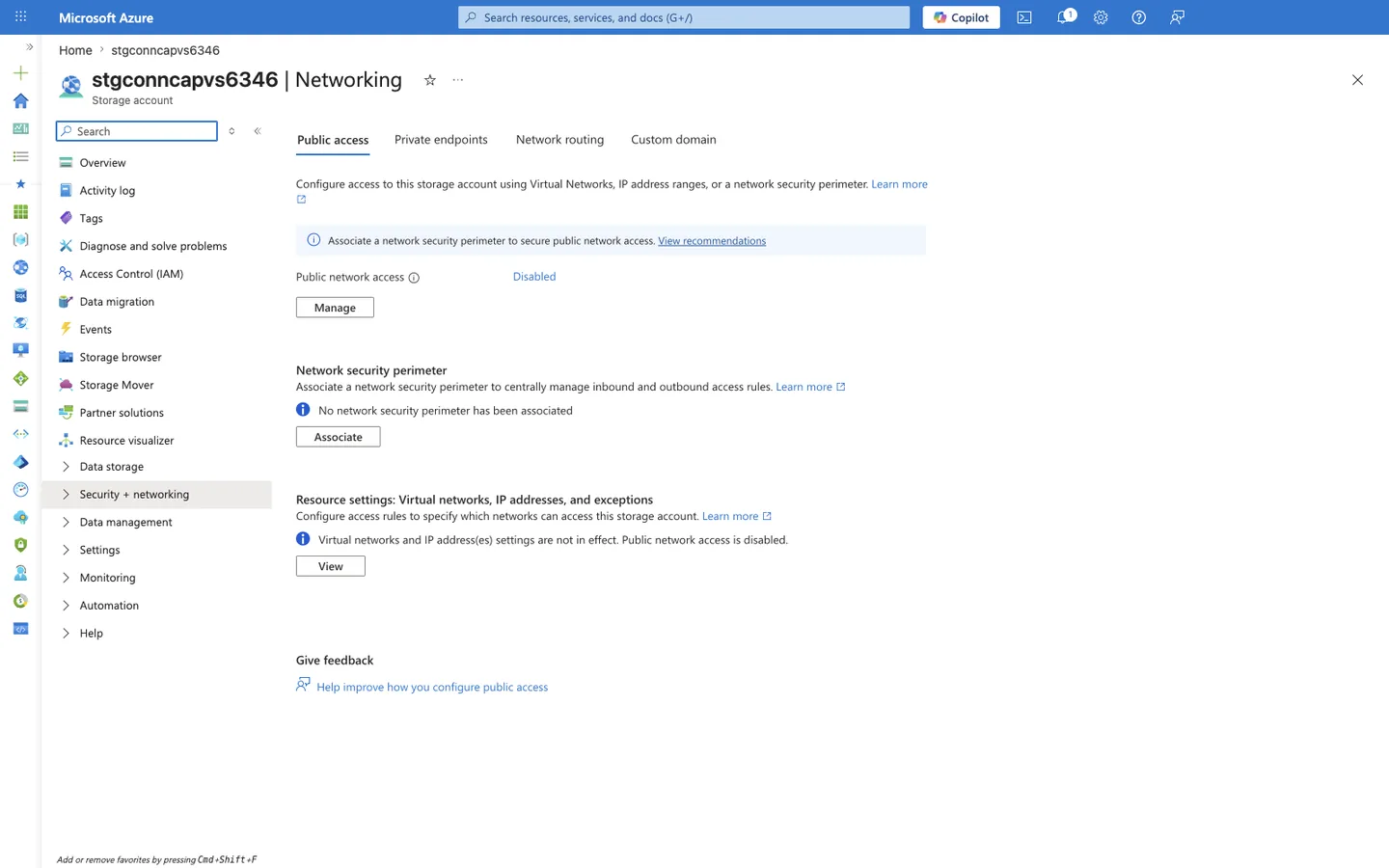
Purpose: Show the most-restrictive mode, where the public endpoint is turned off.
Look for: Public network access set to Disabled and the note that virtual networks and IP address settings are not in effect.
Expected result: The public endpoint rejects all traffic; only a private endpoint can reach the account. Any VNet or IP rules are inert until public access is re-enabled.
Rule types (used by "Selected networks"):
| Rule type | Use when | Requires |
|---|---|---|
| Virtual network rule | The app reaches Storage from a subnet | A service endpoint on the subnet (Microsoft.Storage same-region, Microsoft.Storage.Global cross-region) |
| IP network rule | A fixed public IP (e.g., on-premises, NAT Gateway) in a different region from the Storage account | The public IP range on the allow list (not honored for same-region Azure service traffic) |
| Resource instance rule | An Azure resource that cannot be isolated by VNet/IP | The resource instance identity |
| Trusted service exception | An Azure service (logging, metrics) outside your network boundary | The trusted-services toggle |
Service endpoint changes the source IP
When a subnet has a Storage service endpoint enabled, its traffic uses a private IP as the source. As a result, IP network rules that permitted that subnet's former public IP no longer apply — you must use a virtual network rule instead.
IP network rules are ignored for same-region Azure traffic
Storage IP network rules match only public internet source addresses. When App Service and the Storage account are in the same region, requests travel over the Azure backbone with an internal source address, so an IP rule listing the app's public outbound IP is silently ignored. For same-region access, use a service endpoint + virtual network rule or a private endpoint.
Layer 4 — Authorization
Even with a correct network path, the caller must be authorized to the data:
- Account key — full access; avoid in application code.
- SAS token — scoped, time-limited. A SAS that binds to an IP does not grant access beyond the configured network rules.
- Microsoft Entra ID (recommended) — the app's managed identity holds a data-plane RBAC role such as Storage Blob Data Contributor. This is a
403source that has nothing to do with the firewall.
Setting-combination reference
The reachability of a firewalled account depends on the routing you configure and the firewall mode. Assumes correct Layer 4 authorization.
| Routing from app | Storage firewall = All networks | Storage firewall = Selected networks | Storage firewall = Disabled |
|---|---|---|---|
| No VNet Integration | Reachable (public IP) | Blocked — an IP network rule for the app's public outbound IP only helps when the app and Storage are in different regions; same-region IP rules are not honored (see caveat below) | Blocked (no private path) |
| VNet Integration, service endpoint on subnet | Reachable | Reachable if a matching VNet rule + Microsoft.Storage[.Global] endpoint exists | Blocked (service endpoint still uses the public endpoint) |
| VNet Integration + Private Endpoint + Private DNS | Reachable (private IP) | Reachable (private endpoints bypass firewall rules) | Reachable (private endpoint is the only allowed path) |
| VNet Integration + Route All, no endpoints | Reachable (internet fallback) | Blocked (internet source not allowed) | Blocked |
Same-region IP network rules are not honored
Azure Storage IP network rules apply only to requests that arrive from public internet source addresses. Traffic from an Azure service (including App Service) to a Storage account in the same region is routed over the Azure backbone with an internal source address, so an IP network rule listing the app's public outbound IP is silently ignored for same-region traffic. Use a service endpoint with a virtual network rule or a private endpoint instead. Public IP rules are only useful for cross-region or on-premises callers.
Failure decision model
%% diagram-id: storage-connectivity-decision
flowchart TD
    Start[Storage call fails] --> Q1{Name resolves to<br/>expected IP?}
    Q1 -->|No| Fix1[Fix DNS: link Private DNS zone<br/>or stop hardcoding privatelink FQDN]
    Q1 -->|Yes| Q2{Firewall = Selected<br/>or Disabled?}
    Q2 -->|All networks| Q4
    Q2 -->|Selected/Disabled| Q3{Private endpoint<br/>or matching VNet/IP rule?}
    Q3 -->|No| Fix3[Add private endpoint, or VNet rule<br/>with service endpoint, or IP rule]
    Q3 -->|Yes| Q4{Caller has valid<br/>key/SAS/Entra role?}
    Q4 -->|No| Fix4[Grant data-plane role<br/>e.g. Storage Blob Data Contributor]
    Q4 -->|Yes| Done[Connectivity restored]
See Also
Sources
- Azure Storage firewall rules and network access (Microsoft Learn)
- Restrictions for IP network rules (Microsoft Learn)
- Integrate your app with an Azure virtual network (Microsoft Learn)
- Use private endpoints for App Service (Microsoft Learn)
- Authorize access to data in Azure Storage (Microsoft Learn)