Networking
Azure App Service networking controls define who can reach your application and how your application reaches downstream services. Correct networking design is fundamental for security, compliance, and predictable performance.
Prerequisites
- Familiarity with virtual networks, subnets, DNS, and private IP ranges
- Understanding of ingress vs egress traffic
- Access to configure App Service networking features
Main Content
Networking model overview
graph TD
    Internet[Internet Clients] --> Ingress{Inbound Path}
    Ingress --> Public[Public Endpoint + Access Rules]
    Ingress --> Private[Private Endpoint]

    App[App Service App] --> Egress{Outbound Path}
    Egress --> Default[Platform Outbound]
    Egress --> VNet[VNet Integration]
    VNet --> PrivateResources[Private Resources in VNet]
Portal view: Networking blade
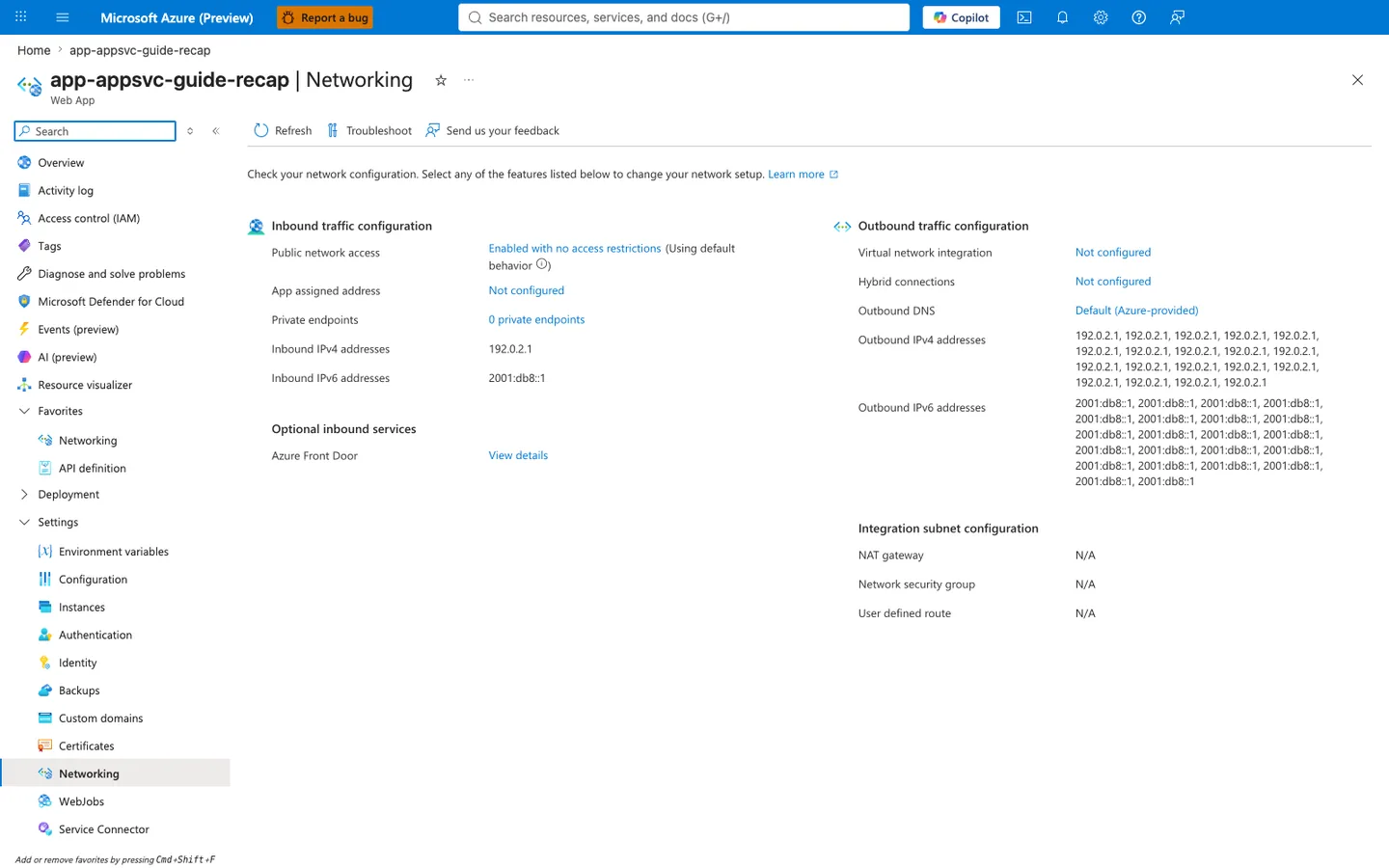
The Networking blade separates App Service networking into the two planes operators actually manage: ingress and egress. On the inbound side, Public network access, Access restriction status, and Private endpoints display the configured inbound posture: an open public edge, a rule-filtered access path, or Private Link. Configuration alone does not establish which path a particular request actually used. On the outbound side, Virtual network integration shows whether outbound VNet routing is configured, and the listed Outbound addresses are the platform's potential outbound address pool rather than a measured egress address; an observed egress address needs evidence from the app itself. This is the core distinction behind VNet integration versus private inbound publishing.
Inbound traffic controls
By default, an app has a public endpoint. You can tighten inbound access using:
- Access restrictions (IP, service tags, priority rules)
- Private endpoint (private ingress over Private Link)
- Authentication/authorization policy at the edge
Access restrictions
Access restrictions provide allow/deny controls evaluated before traffic reaches your app process.
graph TD
    Client[Client] --> FE[App Service Frontend]
    FE --> Rules[Access Restriction Rules]
    Rules -->|Allow| App[Application]
    Rules -->|Deny| Reject[403 Response]
Best practices:
- Use explicit allowlist rules
- Keep rule priorities documented
- Apply equivalent restrictions to SCM site where needed
Note
Misconfigured access rules are a common cause of "app is up but unreachable" incidents.
Private endpoint for inbound isolation
A private endpoint assigns a private IP for app access within your network boundary.
graph TD
    Internet[Public Internet] -- blocked or restricted --> App[App Service]
    subgraph VNet[Virtual Network]
        Client[VNet Client] --> PE[Private Endpoint]
    end
    PE --> App
Benefits:
- Reduces internet exposure
- Enables private-only ingress architectures
- Supports strict network segmentation requirements
Outbound traffic controls
Outbound traffic covers calls from your app to databases, APIs, and service dependencies.
VNet integration for outbound connectivity
VNet integration lets app outbound traffic reach private resources.
graph TD
    App[App Service App] --> Integration[VNet Integration Subnet]
    Integration --> Database[(Private Database)]
    Integration --> Api[Private API]
    Integration --> Vault[Private Secret Store]
Key requirements:
- Dedicated integration subnet
- Proper subnet delegation (
Microsoft.Web/serverFarms) - Sufficient subnet address space (minimum sizing guidance applies)
Ingress vs egress
VNet integration controls outbound connectivity. It does not make your app privately reachable from clients. Use private endpoint for private inbound access.
Combining inbound and outbound private patterns
High-security architecture commonly combines:
- Private endpoint for inbound
- VNet integration for outbound
- Private DNS zones for name resolution
- Strict NSG and route governance
graph TD
    subgraph VNet[Virtual Network]
        Client[VNet Client] --> PE[Private Endpoint]
        Subnet[Integration Subnet] --> DB[(Private Data Service)]
    end
    PE --> App[App Service]
    App --> Subnet
DNS behavior with private endpoint
Private endpoint access typically relies on a CNAME chain and private DNS zone mapping.
sequenceDiagram
    participant Client as VNet Client
    participant DNS as DNS Resolver
    participant Zone as Private DNS Zone
    participant PE as Private Endpoint
    participant App as App Service

    Client->>DNS: Resolve app.azurewebsites.net
    DNS-->>Client: CNAME app.privatelink.azurewebsites.net
    Client->>Zone: Resolve app.privatelink.azurewebsites.net
    Zone-->>Client: A record 10.x.x.x
    Client->>PE: Connect to private IP
    PE->>App: Forward over Azure backbone
Outbound SNAT and connection planning
Outbound connections consume SNAT ports. High churn or poor connection reuse can cause intermittent failures.
Common symptoms:
- Sporadic outbound timeout spikes
- Dependency connection resets under burst load
- Recovery after traffic drop
Mitigations:
- Reuse outbound connections
- Use connection pooling in dependency clients
- Consider NAT Gateway with VNet integration for larger outbound capacity
Hybrid connectivity
To reach on-premises or cross-network systems:
- VNet integration + VPN/ExpressRoute for full network extension
- Hybrid connections for simpler TCP scenarios
Choose based on latency, throughput, protocol support, and operational ownership.
CLI examples for networking configuration
Show current network-related app configuration:
az webapp show \
    --resource-group "$RG" \
    --name "$APP_NAME" \
    --query "{defaultHostName:defaultHostName, httpsOnly:httpsOnly, hostNames:hostNames}" \
    --output json
| Flag | Description |
|---|---|
--resource-group "$RG" | Reads the web app from the specified resource group. |
--name "$APP_NAME" | Selects the app whose current hostname and HTTPS settings you want to inspect. |
--query "{defaultHostName:defaultHostName, httpsOnly:httpsOnly, hostNames:hostNames}" | Returns the default Azure hostname, the HTTPS-only toggle, and the full hostname bindings list. |
--output json | Formats the selected networking-related properties as JSON. |
Add access restriction rule:
az webapp config access-restriction add \
    --resource-group "$RG" \
    --name "$APP_NAME" \
    --rule-name "allow-corp" \
    --action Allow \
    --ip-address "203.0.113.0/24" \
    --priority 100
| Flag | Description |
|---|---|
--resource-group "$RG" | Applies the new rule to the app in the target resource group. |
--name "$APP_NAME" | Chooses the web app whose inbound access policy will change. |
--rule-name "allow-corp" | Assigns a readable name to the access restriction entry. |
--action Allow | Makes the rule permit matching traffic instead of denying it. |
--ip-address "203.0.113.0/24" | Matches requests originating from that public CIDR range. |
--priority 100 | Evaluates this rule before any lower-precedence rules with larger priority numbers. |
List access restriction rules:
az webapp config access-restriction show \
    --resource-group "$RG" \
    --name "$APP_NAME" \
    --output table
| Flag | Description |
|---|---|
--resource-group "$RG" | Reads the app's access restriction document from the target resource group. |
--name "$APP_NAME" | Selects the app whose allow and deny rules you want to review. |
--output table | Renders the restriction settings in a compact human-readable table for quick checks. |
Create private endpoint (conceptual example):
az network private-endpoint create \
    --resource-group "$RG" \
    --name "$PE_NAME" \
    --vnet-name "$VNET_NAME" \
    --subnet "$SUBNET_NAME" \
    --private-connection-resource-id "$APP_RESOURCE_ID" \
    --group-id "sites" \
    --connection-name "$PE_CONNECTION_NAME"
| Flag | Description |
|---|---|
--resource-group "$RG" | Creates the private endpoint resource in the specified resource group. |
--name "$PE_NAME" | Names the private endpoint ARM resource being created. |
--vnet-name "$VNET_NAME" | Places the endpoint inside the chosen virtual network. |
--subnet "$SUBNET_NAME" | Uses the specific subnet that will supply the endpoint's private IP. |
--private-connection-resource-id "$APP_RESOURCE_ID" | Connects the endpoint to the target App Service resource by its ARM resource ID. |
--group-id "sites" | Targets the App Service sites subresource so the private endpoint fronts the app site. |
--connection-name "$PE_CONNECTION_NAME" | Sets the name of the private link connection object shown on both sides of the approval flow. |
Example output snippet (PII masked):
{
  "customDnsConfigs": [
    {
      "fqdn": "app-<masked>.azurewebsites.net",
      "ipAddresses": [
        "192.0.2.4"
      ]
    },
    {
      "fqdn": "app-<masked>.scm.azurewebsites.net",
      "ipAddresses": [
        "192.0.2.4"
      ]
    }
  ],
  "id": "/subscriptions/<subscription-id>/resourceGroups/rg-<masked>/providers/Microsoft.Network/privateEndpoints/pe-<masked>",
  "name": "pe-<masked>",
  "provisioningState": "Succeeded"
}
IP address behavior and lifecycle
Understanding when and why IP addresses change is critical for firewall allowlists, DNS records, and downstream dependency configurations.
Outbound IP addresses
App Service assigns a set of outbound IPs shared within the scale unit. Two fields are relevant:
| Field | Description | When to use |
|---|---|---|
outboundIpAddresses | Currently active outbound IPs | Current state only — not safe for allowlists |
possibleOutboundIpAddresses | All IPs the app could ever use on this plan | Always use this for firewall allowlists |
Query both fields:
az webapp show \
    --resource-group "$RG" \
    --name "$APP_NAME" \
    --query "{active:outboundIpAddresses, possible:possibleOutboundIpAddresses}" \
    --output json
Example output (PII masked):
| Output field | Meaning | Operational use |
|---|---|---|
active | Currently in-use outbound IPs on this plan | Diagnostic snapshot only — do not allowlist |
possible | Full candidate set the plan could rotate through | Union of active+possible is the correct allowlist |
{
  "active": "<13 outbound IPv4 addresses; run the command above to retrieve current values>",
  "possible": "<31 additional outbound IPv4 addresses; the union of active + possible is the full allowlist candidate set>"
}
Outbound IPs change under these conditions
- Scale up or scale down (App Service Plan SKU change)
- App Service Plan migration to a different scale unit or region
- Enabling or disabling VNet Integration
- Platform-side infrastructure updates
Always allowlist all addresses from possibleOutboundIpAddresses, not just the currently active set.
Outbound VNet routing properties
Which outbound traffic enters the integration subnet is controlled by routing properties on the site resource, not only by an app setting. [Documented] Microsoft Learn recommends outboundVnetRouting.allTraffic for routing all traffic, because it can be audited with a built-in policy. The legacy vnetRouteAllEnabled site setting and the WEBSITE_VNET_ROUTE_ALL app setting (which configure application routing) are still supported for backward compatibility, so existing configurations that use them are not wrong.
Property (properties.outboundVnetRouting.*) | Routes through the integration | Legacy equivalent that is still supported |
|---|---|---|
allTraffic (recommended) | All outbound traffic: application traffic and configuration traffic (image pulls, content share, backups, managed identity token acquisition). | none as a single setting: the legacy route-all flags configure application routing only, and configuration routing had its own legacy settings (rows below) |
applicationTraffic | Only traffic your app generates after it starts; configuration traffic keeps using the public route unless set individually. The portal's Outbound internet traffic checkbox sets this property. | vnetRouteAllEnabled, WEBSITE_VNET_ROUTE_ALL (Learn describes the app setting as the way to configure application routing; the ARM reference says the property was previously called VnetRouteAllEnabled) |
imagePullTraffic | Container image pulls. | vnetImagePullEnabled, WEBSITE_PULL_IMAGE_OVER_VNET=true |
contentShareTraffic | Content share access. Firewalls and NSGs on the subnet must allow ports 443 and 445. | vnetContentShareEnabled, WEBSITE_CONTENTOVERVNET=1 |
backupRestoreTraffic | Backup and restore traffic. Database backup is not supported over the integration. | vnetBackupRestoreEnabled |
managedIdentityTraffic | Requests to acquire Microsoft Entra tokens for managed identities. | none documented |
allTraffic=true already routes all configuration traffic, so the individual configuration properties are needed only when you want application traffic plus selected configuration components. The legacy route-all flags alone do not route configuration traffic. When both a site property and an app setting exist, the site property overrides the app setting. The portal cannot set allTraffic; use the Azure CLI or an ARM/Bicep template. For a Linux app that pulls its image or reads its content share over the VNet, set the matching property or allTraffic; the storage-specific consequences are in Storage connectivity, and the operational procedure is in Networking operations.
To inspect what a site declares, read the unprojected resource at an API version that includes the properties (the ARM reference lists them under 2025-03-01) and look at properties.outboundVnetRouting and the legacy vnetRouteAllEnabled:
| Command/Parameter | Purpose |
|---|---|
az resource show | Reads the site resource without changing it. |
--ids "$APP_RESOURCE_ID" | Selects the exact production site or slot resource ID. |
--api-version 2025-03-01 | Pins an API version that defines outboundVnetRouting, and records which version produced the answer. |
--output json | Returns the full structure so an absent property is visible as absent. |
An absent property is UNKNOWN, not false: an older API version, or a property that was never set, returns no value, and a projection can invent a null.
What the property proves. It states the routing the site is configured to apply. It does not prove that a name resolves to the expected address, that a Network Security Group, route table or firewall allows the destination, which source IP a destination sees (see below), or that a private endpoint is reachable. Prove those separately: the DNS answer as the app resolves it, the effective routes and policies on the integration subnet, and a connection test from the app. The existing playbooks cover them: SNAT or application issue, DNS resolution for VNet-integrated apps and private endpoint custom DNS and route confusion.
Evidence that contradicts a naive reading. With all-traffic routing off, private (RFC 1918) traffic and traffic to service endpoints configured on the integration subnet still enter the virtual network, so a private destination can work while the property is false. With it on, traffic is subject to network routing only if it is actually sent through the integration, and for public internet egress the source IP does not change unless a NAT gateway or firewall performs it (next section). Inbound private endpoints, VNet egress, a NAT gateway or firewall path and service endpoints are four different mechanisms: enabling one does not establish another.
Outbound IP behavior with VNet Integration
When routing of all outbound internet traffic is enabled (application routing: outboundVnetRouting.applicationTraffic or the legacy WEBSITE_VNET_ROUTE_ALL=1 that Learn still supports, or outboundVnetRouting.allTraffic, which also routes configuration traffic; "Route All"), outbound traffic is routed into the delegated integration subnet, where it becomes subject to the subnet's NSGs and route tables. Routing alone does not change your app's source IP for public internet egress (a private destination can see an integration-subnet address). Per Microsoft Learn, when outbound internet traffic routing is enabled, the source address of outbound traffic is still one of the IPs listed in the app's properties (possibleOutboundIpAddresses) — unless a service that performs SNAT sits in the path:
| Egress configuration | Effective source IP seen by the destination |
|---|---|
| VNet Integration + Route All, no NAT Gateway or firewall | Still one of the app's platform outbound IPs (possibleOutboundIpAddresses) |
| VNet Integration + NAT Gateway on the integration subnet | The NAT Gateway's public IP |
| VNet Integration + route table (UDR) forcing traffic through a firewall/NVA | The firewall/NVA outbound IP |
Route All does not, by itself, give you a dedicated egress IP
A common misconception is that enabling Route All makes traffic exit from a single "subnet NAT IP". It does not. The subnet has no NAT IP unless you explicitly attach a NAT Gateway. Without a NAT Gateway or firewall, the destination still sees one of the app's possibleOutboundIpAddresses.
Portal view: NAT Gateway configuration
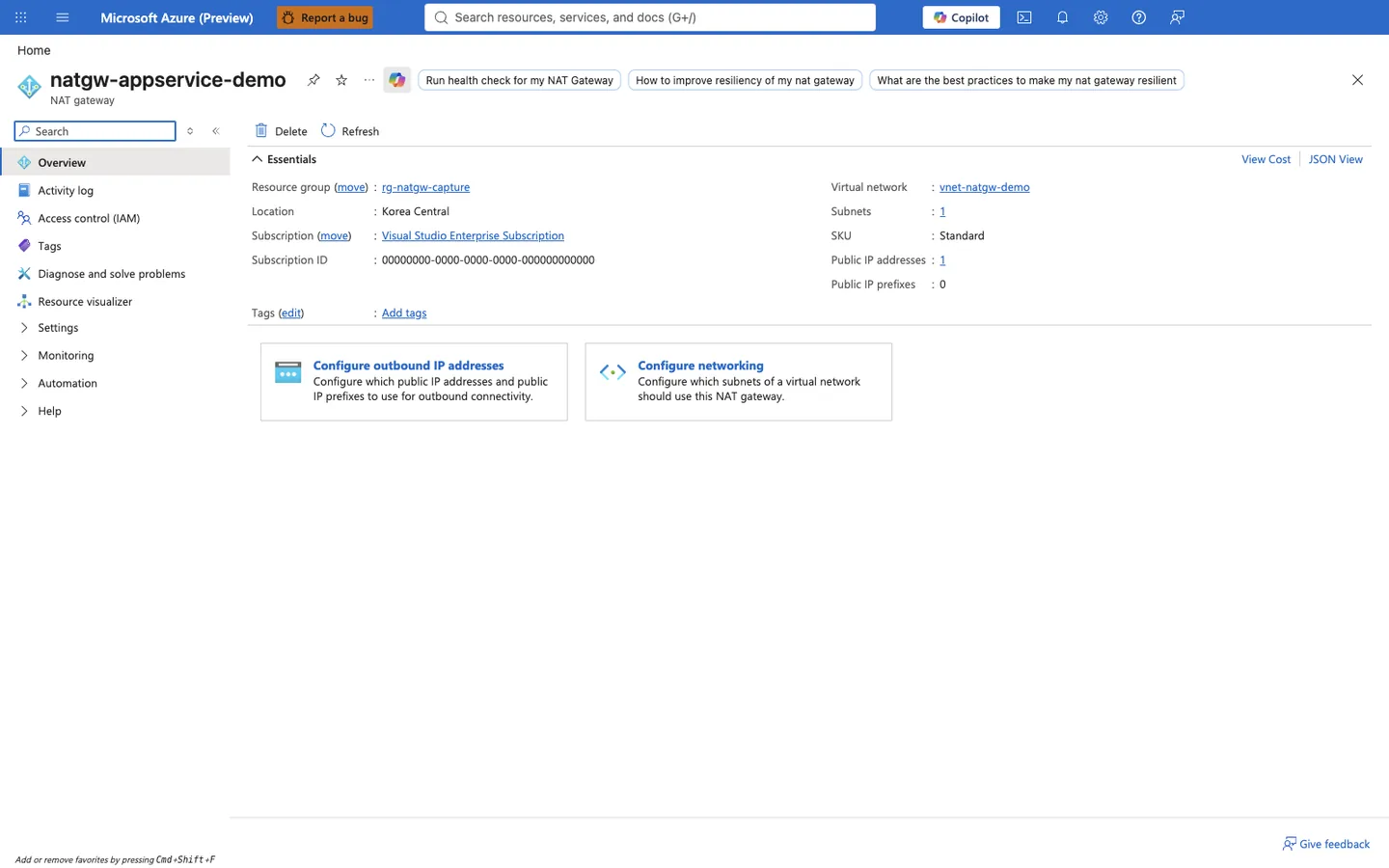
A NAT Gateway is the managed Azure egress option for giving a VNet-integrated app a deterministic outbound IP (a firewall/NVA reached via a UDR — the third row of the table above — is another). The Public IP addresses count in the Essentials panel is the pool that outbound traffic is SNATed through — those addresses (not possibleOutboundIpAddresses) are what a downstream firewall sees once the integration Subnets are associated to the gateway via Configure networking. Confirm both the associated subnet and the attached public IP address (or addresses) here before allowlisting the NAT Gateway's IP downstream.
# Check current VNet integration state
az webapp vnet-integration list \
    --resource-group "$RG" \
    --name "$APP_NAME" \
    --output json
| Flag | Description |
|---|---|
--resource-group "$RG" | Reads VNet integration bindings for apps in the specified resource group. |
--name "$APP_NAME" | Selects the app whose current integration subnet attachments you want to inspect. |
--output json | Returns the full integration objects, including subnet resource IDs, in JSON. |
Example output:
[
  {
    "name": "snet-integration",
    "vnetResourceId": "/subscriptions/<subscription-id>/resourceGroups/rg-<masked>/providers/Microsoft.Network/virtualNetworks/vnet-net-test/subnets/snet-integration",
    "isSwift": null
  }
]
Because Route All by itself does not change the source IP, downstream firewalls that already allowlist the app's possibleOutboundIpAddresses keep working after you enable integration. You only need to change an allowlist when you add a NAT Gateway or route through a firewall — in that case, allowlist that service's outbound IP instead.
Reaching a firewalled Azure Storage account
Route All plus a Storage firewall is a frequent failure mode: per Microsoft Learn, connectivity to global Azure Storage can fail for VNet-integrated apps when Route All is enabled and the app does not use service endpoints, private endpoints, or UDRs — traffic falls back to the default internet route, which the Storage firewall then blocks. Prefer a private endpoint (or a service endpoint on the integration subnet) over IP allowlisting. See App Service to Azure Storage connectivity for the full decision model.
Inbound IP addresses and Private Endpoint
By default, the app's inbound IP is shared and public. When a Private Endpoint is created, the app is assigned a private IP from the endpoint subnet. The public endpoint continues to exist but can be blocked via access restrictions.
Query the inbound IP:
az webapp show \
    --resource-group "$RG" \
    --name "$APP_NAME" \
    --query "inboundIpAddress" \
    --output tsv
| Flag | Description |
|---|---|
--resource-group "$RG" | Queries the web app from the specified resource group. |
--name "$APP_NAME" | Selects the app whose currently assigned public inbound IP you want to print. |
--query "inboundIpAddress" | Extracts only the top-level inboundIpAddress property from the web app resource. |
--output tsv | Prints just the IP value with no JSON wrapper so it is easy to paste into diagnostics or scripts. |
Query Private Endpoint assigned IP:
az network private-endpoint show \
    --resource-group "$RG" \
    --name "pe-$APP_NAME" \
    --query "customDnsConfigs[0].ipAddresses" \
    --output json
| Flag | Description |
|---|---|
--resource-group "$RG" | Reads the private endpoint resource from the selected resource group. |
--name "pe-$APP_NAME" | Targets the named private endpoint associated with the app. |
--query "customDnsConfigs[0].ipAddresses" | Returns the ipAddresses array from the first customDnsConfigs entry so you can see the private IPs exposed by that DNS config block. |
--output json | Keeps the returned IP list in JSON array form. |
Example output:
A Private Endpoint and public access are separate settings
A Private Endpoint adds a private inbound path. Whether the default endpoint is still reachable depends on the raw publicNetworkAccess value, whether a private endpoint exists, and the main and SCM access restrictions. When the property is unset and a private endpoint exists, the documented default is disabled; an explicit Enabled value keeps default-endpoint access on. To intend private-only access:
- Create the Private Endpoint and validate DNS, route and TLS from the actual private clients.
- Record the raw
publicNetworkAccessvalue, then set it deliberately through your change process. ADeny Allaccess restriction rule is a different mechanism: it applies only to default-endpoint traffic, because site rules are not evaluated for private endpoint traffic. - Verify main and SCM separately, including a negative control against the default endpoint.
See Private Endpoint and Access Restriction Decisions for the decision matrix and a staged cutover.
Troubleshooting matrix
| Symptom | Likely Cause | Validation Path |
|---|---|---|
| Public clients blocked unexpectedly | Restriction rule precedence | Review priorities/actions |
| Private endpoint unreachable | DNS zone/link issue | Verify CNAME/A resolution in VNet |
| App cannot reach private DB | Missing VNet integration route | Validate subnet/delegation/NSG |
| Intermittent outbound timeouts | SNAT exhaustion | Inspect connection reuse + outbound metrics |
Advanced Topics
Zero-trust ingress pattern
Use private endpoint + strict access restrictions + identity-aware upstream gateway for layered controls.
Route-all outbound strategy
In some designs, all outbound flows through controlled network paths for inspection and policy enforcement. Validate latency impact before broad rollout.
Multi-environment DNS governance
Separate private DNS zones by environment when strict isolation is required, and document naming conventions to prevent resolution drift.
Networking readiness checklist
- Inbound path explicitly documented (public/private)
- Access restrictions tested from allowed/denied sources
- Private DNS resolution validated in each subnet
- Outbound dependency inventory mapped to route path
- Alerting enabled for connectivity failures
Language-Specific Details
For language-specific implementation details, see: - Node.js Guide - Python Guide - Java Guide - .NET Guide
See Also
- How App Service Works
- Request Lifecycle
- Scaling
- Resource Relationships
- App Service to Azure Storage connectivity