Concepts
This section explains Azure App Service platform behavior in a language-agnostic way. Use these documents to understand architecture, scaling, networking, and dependency relationships before diving into language-specific implementation details.
Main Content
Documents
| Document | Description |
|---|---|
| How App Service Works | Platform architecture, sandbox model, filesystem, runtime contracts |
| Hosting Models | Plan tiers, OS choices, code vs container deployment models |
| Request Lifecycle | End-to-end request path, routing, timeouts, health checks |
| Process Lifecycle and In-Flight Work | Maintenance replacement, recycle evidence, and interruption-safe work design |
| Scaling | Scale up/out strategies, autoscale rules, stateless design |
| Networking | Inbound and outbound controls, private networking, DNS patterns |
| Mutual TLS Architecture | Inbound client certificates, outbound certificate loading, and ASE trust boundaries |
| Resource Relationships | Identity, data, storage, secrets, monitoring integration map |
| Authentication Architecture | EasyAuth flow, token handling, identity provider integration |
| Security Architecture | Network perimeter, TLS, managed identity, secret management |
graph TD
    A[How App Service Works] --> B[Hosting Models]
    B --> C[Request Lifecycle]
    C --> D[Scaling]
    D --> E[Networking]
    E --> F[Mutual TLS Architecture]
    F --> G[Resource Relationships]
    G --> H[Authentication Architecture]
    H --> I[Security Architecture]
Recommended reading order
- Start with platform internals
- Choose hosting and plan strategy
- Learn request flow and timeouts
- Design scaling envelope
- Finalize networking controls
- Validate resource relationships and permissions
Verify platform surfaces in Azure Portal
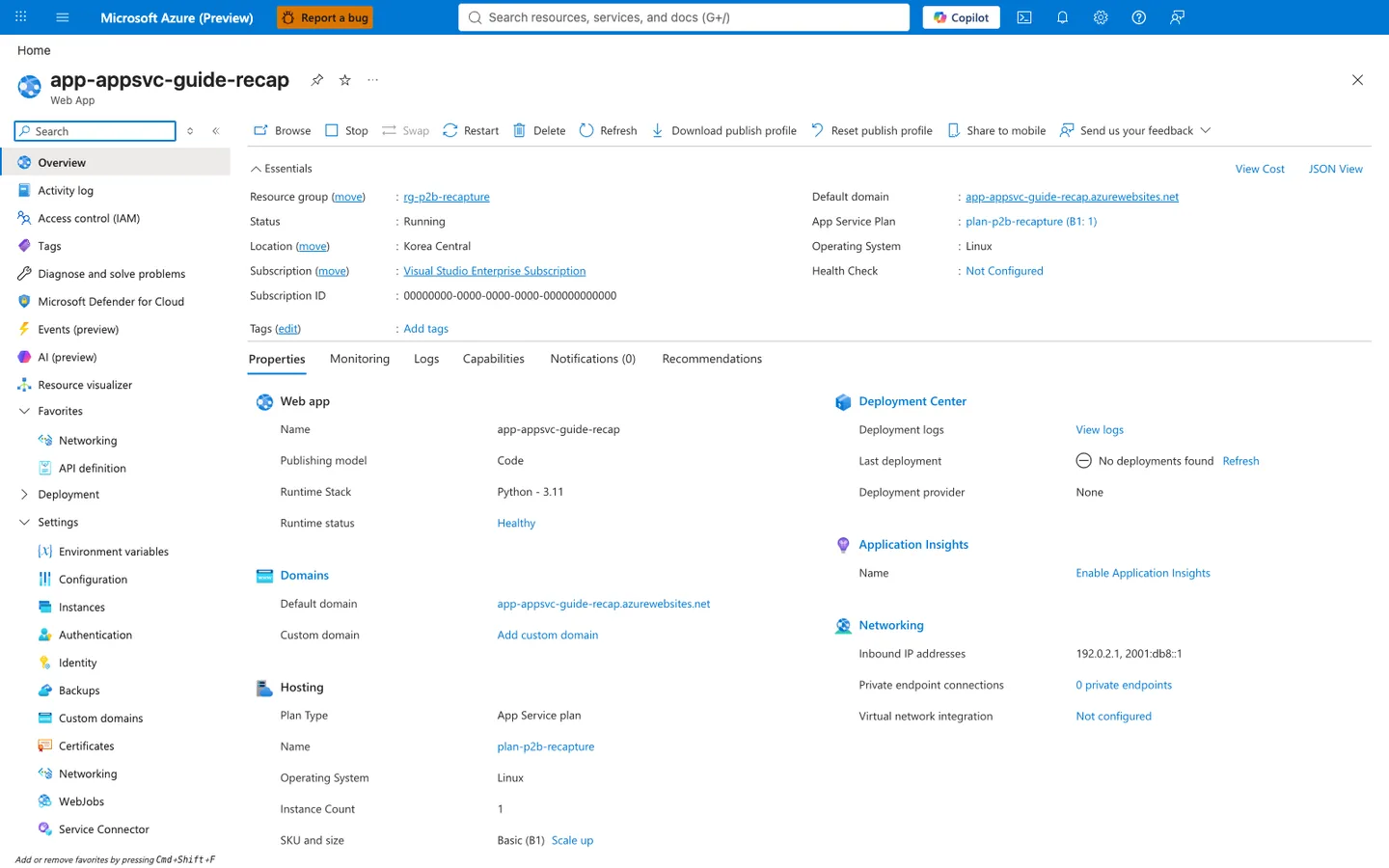
[Observed] app-test-20251107 Web App Browse Stop Swap Restart Delete Refresh Download publish profile Reset publish profile Share to mobile Send us your feedback Essentials View Cost JSON View Resource group (move) rg-test-20251107 Status Running Location (move) Korea Central Subscription (move) Visual Studio Enterprise Subscription Subscription ID 00000000-0000-0000-0000-000000000000 Tags (edit) Add tags Default domain app-test-20251107.azurewebsites.net App Service Plan asp-test-20251107 (P0v3: 1) Operating System Linux Health Check Not Configured Properties Monitoring Logs Capabilities Notifications (1) Recommendations Web app Name Publishing model Code Runtime Stack Python - 3.11 Runtime status Healthy Domains Custom domain 2 Domains View all Hosting Plan Type App Service plan Instance Count 1 SKU and size Premium0V3 (P0v3) Scale up Deployment Center Deployment logs View logs Last deployment Deployment provider None Application Insights Name ai-test-20251107 Region Korea Central Networking Inbound IP addresses <ip-redacted>, <ipv6-redacted> Private endpoint connections 0 private endpoints Virtual network integration Not configured.
[Inferred] The Plan Type value App Service plan and the SKU and size value Premium0V3 (P0v3) appearing in the Hosting section are consistent with the hosting-tier topics referenced in the Hosting Models row of the Documents table above. The Inbound IP addresses, Private endpoint connections, and Virtual network integration rows of the Networking section are consistent with the inbound and outbound topics referenced in the Networking row of the Documents table. The Application Insights section listing ai-test-20251107 is consistent with the monitoring-integration topic referenced in the Resource Relationships row.
[Not Proven] Additional configuration detail, historical detail, and linked-resource detail are not visible on this view.
Advanced Topics
- Build architecture decision records (ADRs) per environment
- Standardize plan tier baselines by workload class
- Define SLO-driven scaling and networking review checkpoints
Language-Specific Details
For language-specific implementation details, see: - Node.js Guide - Python Guide - Java Guide - .NET Guide