Networking Operations
Operate Azure App Service networking by treating inbound and outbound paths separately: use access restrictions or private endpoints for inbound reachability, and use virtual network integration for outbound access to private dependencies.
Prerequisites
- Existing Web App and App Service Plan in a supported dedicated tier
- Existing virtual network with separate subnets for:
- private endpoint
- VNet integration
- client test host (recommended)
- RBAC permissions for App Service, Virtual Network, Private Endpoint, and Private DNS resources
- Variables set:
RGAPP_NAMEVNET_NAMEINTEGRATION_SUBNET_NAMEPRIVATE_ENDPOINT_SUBNET_NAMECLIENT_SUBNET_NAMELOCATION
When to Use
Use this guide when you need one or more of these patterns:
- Restrict public inbound traffic to specific source ranges.
- Expose the app privately over Azure Private Link.
- Let the app reach private resources through a delegated integration subnet.
- Validate DNS, routing, and reachability after networking changes.
Procedure
flowchart TD
    Client[Client] --> Inbound{Inbound path}
    Inbound --> Access[Access restrictions]
    Inbound --> PrivateEndpoint[Private endpoint]
    Access --> App[App Service app]
    PrivateEndpoint --> App
    App --> Outbound{Outbound path}
    Outbound --> VNetIntegration[VNet integration]
    VNetIntegration --> PrivateDeps[Private dependencies]
    VNetIntegration --> NatOrFirewall[NAT gateway or firewall optional]
Combined Architecture (Private Inbound + Private Outbound)
flowchart TD
    InternalClient[Client in connected network] --> PublicDns[Public DNS for app hostname]
    PublicDns --> PrivateDns[Private DNS zone for privatelink.azurewebsites.net]
    PrivateDns --> PrivateEndpoint[Private endpoint in dedicated subnet]
    PrivateEndpoint --> App[App Service app]
    App --> VNetIntegration[Delegated integration subnet]
    VNetIntegration --> PrivateResource[Private dependency]
    VNetIntegration --> OptionalNat[Optional NAT gateway or firewall]
Portal view: Networking blade
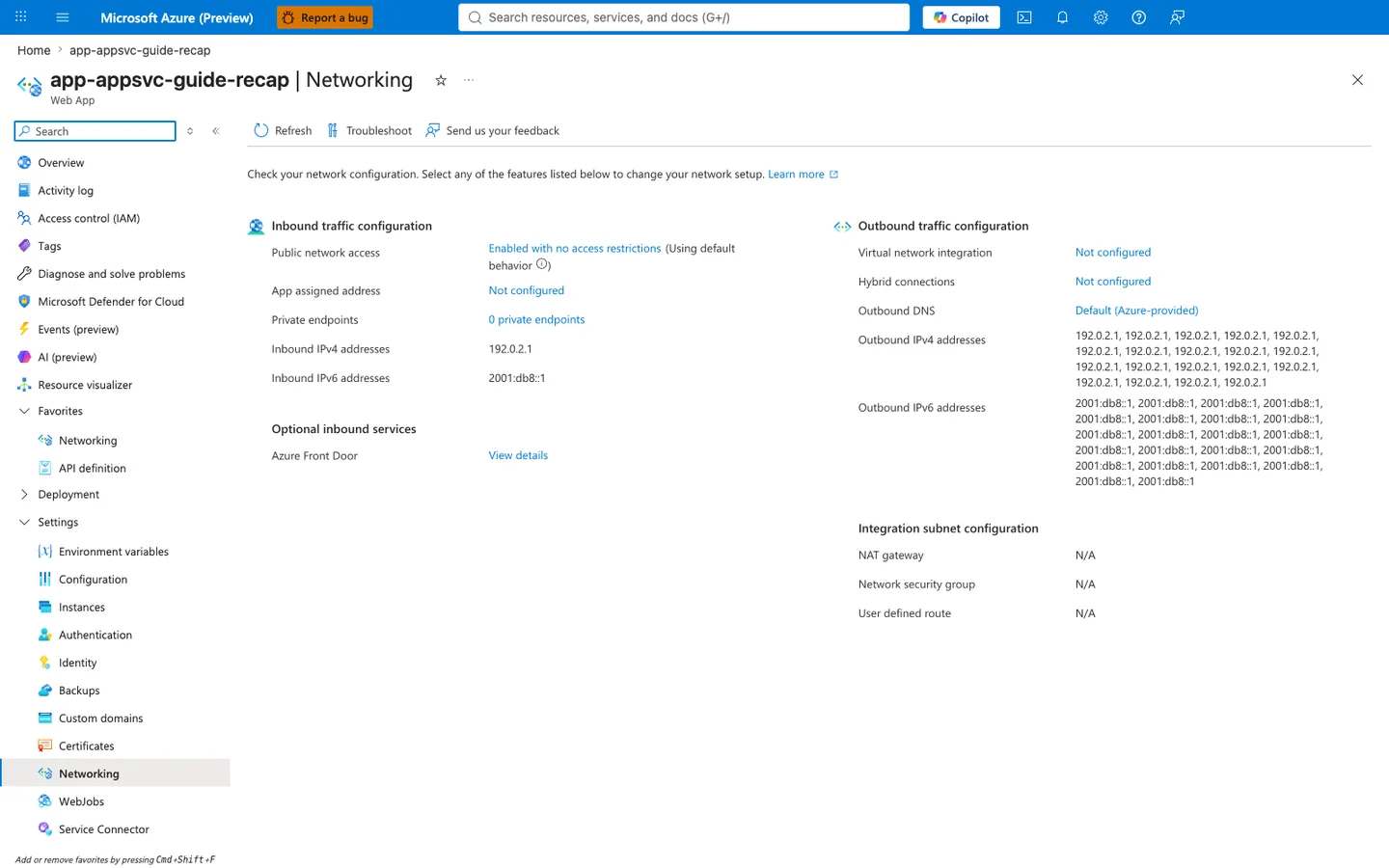
Purpose: Show the app's inbound and outbound network configuration on one page.
Look for: Public network access and Private endpoints under inbound traffic, and Virtual network integration, Outbound DNS, and the outbound address lists under outbound traffic.
Expected result: The capture records public network access enabled without site restrictions and VNet integration not configured at capture time. It does not measure client reachability or actual outbound egress.
The Networking blade summarizes configuration, not end-to-end connectivity. Public network access: Enabled with no access restrictions records the displayed default-endpoint policy; it does not prove that any particular internet client resolves, connects, authenticates or completes a request. Private endpoints: 0 and Virtual network integration: Not configured describe separate inbound and outbound configuration. Worker outbound DNS is distinct from the client resolver used for app and SCM access. Listed outbound addresses are potential platform egress addresses, not measurements of a particular connection. After each approved change, inspect configuration and separately repeat scoped client DNS, TCP/TLS and application checks. See Private Endpoint and Access Restriction Decisions.
1. Configure Inbound Access Restrictions
Allow approved public sources first, then add a deny fallback.
az webapp config access-restriction add \
  --resource-group "$RG" \
  --name "$APP_NAME" \
  --rule-name "AllowCorp" \
  --action Allow \
  --ip-address "203.0.113.0/24" \
  --priority 100 \
  --output json

az webapp config access-restriction add \
  --resource-group "$RG" \
  --name "$APP_NAME" \
  --rule-name "DenyAll" \
  --action Deny \
  --ip-address "0.0.0.0/0" \
  --priority 2147483647 \
  --output json

az webapp config access-restriction show \
  --resource-group "$RG" \
  --name "$APP_NAME" \
  --query "ipSecurityRestrictions[].{name:name,action:action,ip:ipAddress,priority:priority}" \
  --output table
| Command/Parameter | Purpose |
|---|---|
az webapp config access-restriction add | Adds ordered allow or deny rules on the App Service front end. |
--ip-address "203.0.113.0/24" | Uses a documentation-only example CIDR for allowed corporate ingress. |
--priority 2147483647 | Places the deny rule at the lowest precedence so explicit allows are evaluated first. |
az webapp config access-restriction show | Displays selected main-site rule values. This projection omits unmatched defaults, SCM policy and inheritance; it is not a complete effective-policy or request-admission check. |
2. Enable VNet Integration for Outbound Traffic
Use a dedicated delegated subnet for outbound connectivity. Private endpoint and VNet integration must use different subnets.
az webapp vnet-integration add \
  --resource-group "$RG" \
  --name "$APP_NAME" \
  --vnet "$VNET_NAME" \
  --subnet "$INTEGRATION_SUBNET_NAME" \
  --output json

az resource update \
  --resource-group "$RG" \
  --name "$APP_NAME" \
  --resource-type "Microsoft.Web/sites" \
  --set properties.outboundVnetRouting.allTraffic=true \
  --query "properties.outboundVnetRouting" \
  --output json

az webapp vnet-integration list \
  --resource-group "$RG" \
  --name "$APP_NAME" \
  --output table
| Command/Parameter | Purpose |
|---|---|
az webapp vnet-integration add | Connects the app to the delegated subnet for outbound private connectivity. |
--resource-group "$RG" | Targets the resource group that contains the app, for each command in this block. |
--name "$APP_NAME" | Selects the web app, for each command in this block. |
--vnet "$VNET_NAME" | Names the virtual network that contains the integration subnet. |
--subnet "$INTEGRATION_SUBNET_NAME" | Uses the integration subnet only; do not reuse the private endpoint subnet. |
az resource update | Updates the site resource's routing property. |
--resource-type "Microsoft.Web/sites" | Targets the web app resource type. |
--set properties.outboundVnetRouting.allTraffic=true | Routes all outbound traffic (application and configuration) through the VNet integration. Microsoft Learn recommends this property; the legacy WEBSITE_VNET_ROUTE_ALL=1 app setting, which configures application routing only, is still supported. |
--query "properties.outboundVnetRouting" | Shows only the routing object, so the command does not print the whole site resource (which can contain resource IDs, hostnames and outbound addresses). |
--output | Selects the output format: json for the routing object, table for the integration list. |
az webapp vnet-integration list | Confirms the app is attached to the expected VNet and subnet. |
Which routing setting
The property is a configured intent, not proof of the path. It is broader than the legacy route-all app setting: allTraffic also moves configuration traffic (image pulls, content share, backups, managed identity token acquisition) into the VNet, so make sure the integration subnet's NSGs, routes and DNS allow those dependencies first. When a site property and an app setting both exist, the site property wins. Whether DNS, the integration subnet's routes and policies, and the destination agree is verified separately; see Outbound VNet routing properties for the full property list, the legacy equivalents and what still needs DNS and network evidence.
Subnet sizing
Microsoft Learn recommends planning enough IP space for scale operations and platform upgrades. For a single multitenant App Service plan, /26 gives the safest headroom; /28 is the minimum supported size when the subnet already exists.
3. Create a Private Endpoint for Inbound Private Access
The private endpoint handles inbound traffic only. It doesn't replace VNet integration for outbound traffic.
APP_ID="$(az webapp show \
  --resource-group "$RG" \
  --name "$APP_NAME" \
  --query id \
  --output tsv)"

az network private-endpoint create \
  --resource-group "$RG" \
  --name "pe-$APP_NAME" \
  --vnet-name "$VNET_NAME" \
  --subnet "$PRIVATE_ENDPOINT_SUBNET_NAME" \
  --private-connection-resource-id "$APP_ID" \
  --group-id "sites" \
  --connection-name "pec-$APP_NAME" \
  --output json

az network private-endpoint show \
  --resource-group "$RG" \
  --name "pe-$APP_NAME" \
  --query "{state:provisioningState,connections:privateLinkServiceConnections[].privateLinkServiceConnectionState.status}" \
  --output json
| Command/Parameter | Purpose |
|---|---|
az webapp show --query id | Retrieves the App Service resource ID required by the private endpoint create command. |
az network private-endpoint create | Creates the App Service private endpoint in the selected subnet. |
--group-id "sites" | Uses the correct App Service subresource for the production slot. |
az network private-endpoint show | Verifies provisioning state and private link connection approval status. |
Private endpoint scope
Access restriction rules are not evaluated for traffic that arrives through the private endpoint. If you want a true private-only pattern, disable public network access separately and validate private DNS resolution.
4. Configure Private DNS Resolution
For App Service private endpoints, clients should resolve app-name.azurewebsites.net through the privatelink.azurewebsites.net private DNS zone. Use a private DNS zone group so the required records are created automatically.
az network private-dns zone create \
  --resource-group "$RG" \
  --name "privatelink.azurewebsites.net" \
  --output json

az network private-dns link vnet create \
  --resource-group "$RG" \
  --zone-name "privatelink.azurewebsites.net" \
  --name "link-$VNET_NAME" \
  --virtual-network "$VNET_NAME" \
  --registration-enabled false \
  --output json

az network private-endpoint dns-zone-group create \
  --resource-group "$RG" \
  --endpoint-name "pe-$APP_NAME" \
  --name "default" \
  --private-dns-zone "privatelink.azurewebsites.net" \
  --zone-name "privatelink.azurewebsites.net" \
  --output json
| Command/Parameter | Purpose |
|---|---|
az network private-dns zone create | Creates the App Service private DNS zone. |
az network private-dns link vnet create | Links the zone to the client VNet so clients can resolve the private endpoint path. |
az network private-endpoint dns-zone-group create | Automatically creates the app and SCM DNS records for the private endpoint. |
--registration-enabled false | Prevents VM autoregistration, which isn't needed for this zone. |
DNS is the usual failure point
Resolve the bound app and SCM hostnames from each intended client to the expected PE address. Correct DNS is necessary but insufficient: separately validate route, TCP/TLS, response origin and authorized application/deployment behavior.
5. Review Outbound Egress Expectations
App Service outbound IP lists are potential addresses. When you use route-all with a NAT gateway or firewall, validate the actual egress path from the integrated subnet.
az webapp show \
  --resource-group "$RG" \
  --name "$APP_NAME" \
  --query "{outbound:outboundIpAddresses,possible:possibleOutboundIpAddresses}" \
  --output json

az network vnet subnet show \
  --resource-group "$RG" \
  --vnet-name "$VNET_NAME" \
  --name "$INTEGRATION_SUBNET_NAME" \
  --query "natGateway.id" \
  --output tsv
| Command/Parameter | Purpose |
|---|---|
az webapp show | Displays documented outbound and possible outbound IP sets for the app. |
az network vnet subnet show | Confirms whether the integration subnet is attached to a NAT gateway. |
natGateway.id | Returns the NAT gateway resource ID when deterministic outbound egress is configured. |
Verification
Verify Public Access Restriction Behavior
Run from an allowed and then a blocked public source.
curl --silent --output /dev/null --write-out "%{http_code}" \
  "https://$APP_NAME.azurewebsites.net/health"
| Command/Parameter | Purpose |
|---|---|
curl --write-out "%{http_code}" | Confirms whether the app returns the expected status code without printing the full body. |
https://$APP_NAME.azurewebsites.net/health | Uses a simple health endpoint for reachability validation. |
Expected policy results: an approved default-path source is admitted by the applicable rule; an unapproved source is rejected when the effective policy denies it. An admitted request returns 200 only if this app implements /health and its authentication and application behavior permit that response. Attribute a 403 to access restrictions only with correlated policy and response-origin evidence.
Verify Private Endpoint Reachability from a Connected Network
You need a client inside the linked VNet or a connected network. A VM is the most common test client. Azure Bastion is only an access method to that VM; it doesn't replace the VM or other in-network client.
Supported client patterns:
- VM in the VNet, accessed through Azure Bastion
- VM in the VNet, accessed through VPN or ExpressRoute
- Existing workstation in a connected network with DNS forwarding to Azure private DNS
Option A: Create a Temporary Test VM and Access It with Bastion
Use a client subnet, not the private endpoint subnet, for the VM. If you need to create AzureBastionSubnet, choose an unused /26 or larger prefix from the existing VNet address space.
az network vnet subnet create \
  --resource-group "$RG" \
  --vnet-name "$VNET_NAME" \
  --name "AzureBastionSubnet" \
  --address-prefixes "<unused-vnet-prefix-for-bastion-subnet>"

az network public-ip create \
  --resource-group "$RG" \
  --name "pip-bastion" \
  --sku "Standard" \
  --location "$LOCATION"

az network bastion create \
  --resource-group "$RG" \
  --name "bastion-$APP_NAME" \
  --vnet-name "$VNET_NAME" \
  --public-ip-address "pip-bastion" \
  --location "$LOCATION" \
  --sku "Standard"

az vm create \
  --resource-group "$RG" \
  --name "vm-jumpbox" \
  --image "Ubuntu2404" \
  --size "Standard_B1s" \
  --vnet-name "$VNET_NAME" \
  --subnet "$CLIENT_SUBNET_NAME" \
  --admin-username "azureuser" \
  --generate-ssh-keys \
  --public-ip-address ""
| Command/Parameter | Purpose |
|---|---|
AzureBastionSubnet | Required subnet name for Azure Bastion. |
--address-prefixes "<unused-vnet-prefix-for-bastion-subnet>" | Placeholder for an unused /26 or larger prefix from the existing VNet address space. |
az network bastion create | Provisions Bastion so you can reach the test VM without giving it a public IP. |
--sku "Standard" | Uses the SKU required for native-client SSH with az network bastion ssh. |
--subnet "$CLIENT_SUBNET_NAME" | Places the VM in a dedicated client subnet instead of the private endpoint subnet. |
--public-ip-address "" | Creates the VM without a public IP. |
Connect to the VM:
az network bastion ssh \
  --resource-group "$RG" \
  --name "bastion-$APP_NAME" \
  --target-resource-id "$(az vm show --resource-group "$RG" --name "vm-jumpbox" --query id --output tsv)" \
  --auth-type "ssh-key" \
  --username "azureuser" \
  --ssh-key "$HOME/.ssh/id_rsa"
| Command/Parameter | Purpose |
|---|---|
az network bastion ssh | Opens an SSH session to the VM through Bastion. |
--target-resource-id | Resolves the VM resource ID inline so the session targets the correct VM. |
--ssh-key "$HOME/.ssh/id_rsa" | Uses an explicit home-directory path so shell expansion is unambiguous. |
Once connected to the VM, validate DNS and HTTP reachability:
nslookup "$APP_NAME.azurewebsites.net"
curl --silent --output /dev/null --write-out "%{http_code}" \
  "https://$APP_NAME.azurewebsites.net/health"
| Command/Parameter | Purpose |
|---|---|
nslookup "$APP_NAME.azurewebsites.net" | Records this client's DNS chain and final address for comparison with the intended PE. |
curl --write-out "%{http_code}" | Records an HTTP status on this client path; status alone does not establish PE routing or business success. |
Expected results: the final DNS address matches the intended PE, connection/TLS evidence establishes the intended endpoint, and the application returns its predeclared expected response. A privatelink CNAME alone is insufficient; HTTP 200 is not a generic PE requirement.
Option B: Use an Existing Connected Client Instead of Creating a VM
If you already have a client in the linked VNet, a peered VNet, or an on-premises network connected through VPN or ExpressRoute, run the same nslookup and curl checks there. This is often preferable to creating temporary infrastructure.
Cleanup temporary test resources
Delete short-lived validation resources after testing.
az vm delete --resource-group "$RG" --name "vm-jumpbox" --yes
az network bastion delete --resource-group "$RG" --name "bastion-$APP_NAME"
az network public-ip delete --resource-group "$RG" --name "pip-bastion"
| Command/Parameter | Purpose |
|---|---|
az vm delete | Removes the temporary test VM. |
az network bastion delete | Removes the Bastion host when you no longer need private access testing. |
az network public-ip delete | Removes the public IP reserved for Bastion. |
Verify Outbound Private Dependency Reachability
From the Kudu or SSH console of the app, validate DNS and port reachability to the private dependency.
nameresolver "your-private-resource.contoso.local"
tcpping "your-private-resource.contoso.local" 443
| Command/Parameter | Purpose |
|---|---|
nameresolver | Resolves the dependency hostname from the App Service worker context. |
tcpping | Tests TCP connectivity from the app worker to the dependency endpoint and port. |
Network Debugging Checklist
flowchart TD
    Start[Connectivity issue] --> DNS[1. Validate DNS]
    DNS -->|Public path or NXDOMAIN| DNSFix[Fix private DNS zone, records, or VNet link]
    DNS -->|Private path resolves| TCP[2. Validate TCP reachability]
    TCP -->|Timeout| RouteFix[Check NSG, UDR, firewall, peering, or VPN path]
    TCP -->|Port reachable| HTTP[3. Validate application response]
    HTTP -->|403 or 5xx| AppFix[Check app auth, access policy, or app health]
    HTTP -->|Predeclared expected response| Done[Expected response observed on this path]
Layered checks:
- DNS resolution path
- TCP reachability
- Application response
Common Failures and Fixes
| Symptom | Likely Cause | Fix |
|---|---|---|
NXDOMAIN or public resolution path | Private DNS zone missing, unlinked, or not forwarded | Link the VNet to privatelink.azurewebsites.net and validate DNS forwarding. |
| HTTP 403 from a public client after PE rollout | Default-endpoint app access, site rules, Microsoft.Web service-endpoint incompatibility, proxy, authentication or application rejection remain alternatives | Establish the actual path and response origin; inspect raw publicNetworkAccess, applicable main/SCM policy and source context before changing configuration. |
| Private endpoint works but app can't reach backend | VNet integration missing or routed incorrectly | Validate integration subnet, route-all setting, and NSG or UDR behavior. |
| Intermittent outbound failures | NAT/SNAT assumptions don't match actual egress path | Validate NAT gateway or firewall path on the integration subnet. |
| Kudu or SCM hostname doesn't resolve privately | DNS zone group or SCM record missing | Recreate or validate the private endpoint DNS zone group. |
Rollback / Troubleshooting
Removing a PE is an approved topology change, not a neutral connectivity test. First record app access, DNS and operator access dependencies; a null publicNetworkAccess setting defaults to enabled when no PE exists. Validate the resulting main/SCM positive and negative controls after removal.
To remove private inbound access:
| Command/Parameter | Purpose |
|---|---|
az network private-endpoint delete | Removes the App Service private endpoint resource. |
To remove outbound VNet integration:
az webapp vnet-integration remove \
  --resource-group "$RG" \
  --name "$APP_NAME" \
  --vnet "$VNET_NAME"
| Command/Parameter | Purpose |
|---|---|
az webapp vnet-integration remove | Disconnects the app from the virtual network integration path. |
Advanced Topics
Zero Public Ingress Pattern
Use this combination for private-only access:
- Private endpoint for inbound traffic
- Public network access disabled after validation
- Private DNS for app and SCM hostnames
- VNet integration for outbound private dependencies
Hub-and-Spoke Governance
For larger estates:
- centralize DNS forwarding and private DNS ownership
- document which team owns NSGs, UDRs, and firewall policy
- standardize subnet sizing for integration and private endpoint patterns
Change Management
- validate DNS before changing traffic policy
- stage NSG and route updates separately from app changes
- keep a repeatable in-network test path for post-change verification
Operational reality
DNS, route ownership and subnet design drift are frequently worth checking before assuming the App Service resource itself is at fault; confirm with evidence from the actual client path.
Language-Specific Details
For language-specific operational guidance, see:
See Also
- Operations Index
- Security
- Health and Recovery
- App Service networking features (Microsoft Learn)
- Use private endpoints for apps (Microsoft Learn)
- Integrate your app with an Azure virtual network (Microsoft Learn)
- Configure Bastion for native client connections (Microsoft Learn)
- About Azure Bastion configuration settings (Microsoft Learn)