Deployment Slots Operations
Use deployment slots to deliver releases with minimal risk, perform validation before production exposure, and roll back quickly when needed. This guide covers slot lifecycle, swap patterns, and operational safeguards.
sequenceDiagram
    participant Dev as Release Engineer
    participant CI as CI/CD Pipeline
    participant Staging as Staging Slot
    participant Prod as Production Slot

    Dev->>CI: Trigger release
    CI->>Staging: Deploy package
    Staging->>Staging: Warm up
    Dev->>Staging: Validate health checks
    Dev->>CI: Approve promotion
    CI->>Prod: Swap staging to production
    Note over Staging,Prod: Near zero-downtime cutover
Prod->>Dev: ✅ New version livePrerequisites
- App Service Plan tier Standard or higher
- Existing Web App and production slot
- Health endpoint for smoke checks (for example
/health) - Variables set:
RGAPP_NAMEPLAN_NAME
When to Use
Procedure
Verify Tier Supports Slots
az appservice plan show \
  --resource-group $RG \
  --name $PLAN_NAME \
  --query "{sku:sku.name,tier:sku.tier}" \
  --output json
| Flag | Description |
|---|---|
--resource-group $RG | Targets the resource group that contains the App Service plan. |
--name $PLAN_NAME | Selects the plan whose tier support for deployment slots you want to verify. |
--query "{sku:sku.name,tier:sku.tier}" | Returns only the current SKU name and pricing tier from the plan response. |
--output json | Formats the filtered tier details as JSON. |
If needed, upgrade plan tier:
| Flag | Description |
|---|---|
--resource-group $RG | Targets the resource group that contains the plan. |
--name $PLAN_NAME | Selects the plan to upgrade for slot support. |
--sku S1 | Moves the plan to the S1 tier so deployment slots become available. |
--output json | Returns the updated plan definition as JSON. |
Create a Staging Slot
Clone configuration from production to reduce drift:
az webapp deployment slot create \
  --resource-group $RG \
  --name $APP_NAME \
  --slot staging \
  --configuration-source $APP_NAME \
  --output json
| Flag | Description |
|---|---|
--resource-group $RG | Targets the resource group that contains the web app. |
--name $APP_NAME | Selects the parent web app that will own the new slot. |
--slot staging | Creates a slot named staging. |
--configuration-source $APP_NAME | Clones configuration from the production slot of the same app to reduce drift at creation time. |
--output json | Returns the created slot resource as JSON. |
List slots:
az webapp deployment slot list \
  --resource-group $RG \
  --name $APP_NAME \
  --query "[].{name:name,state:state,host:defaultHostName}" \
  --output table
| Flag | Description |
|---|---|
--resource-group $RG | Targets the resource group that contains the app. |
--name $APP_NAME | Selects the app whose slot inventory you want to inspect. |
--query "[].{name:name,state:state,host:defaultHostName}" | Projects each slot to its name, runtime state, and default hostname. |
--output table | Prints the filtered slot list in a readable table. |
Portal view: Deployment slots blade
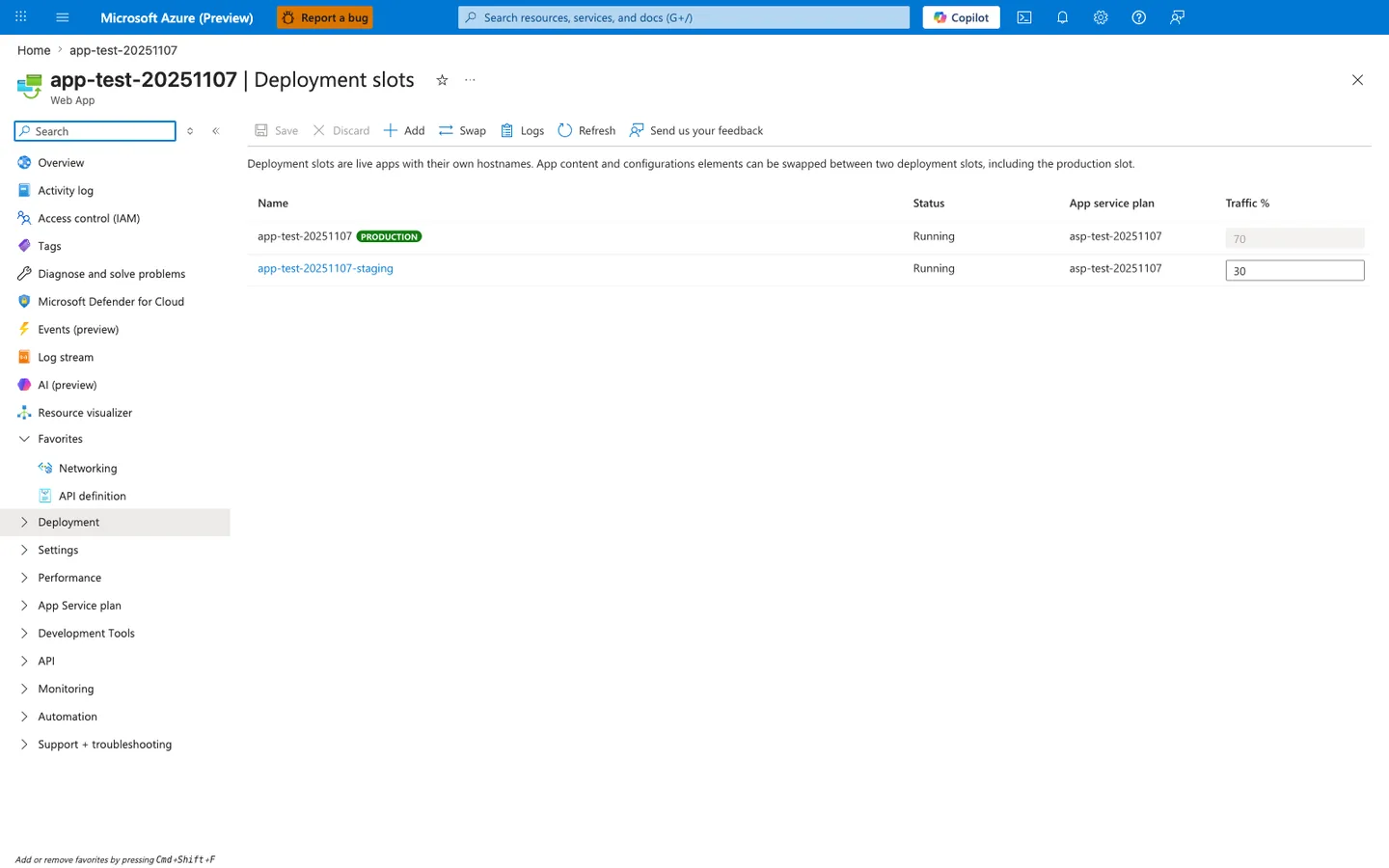
The Deployment slots blade confirms that the az webapp deployment slot create command produced the expected topology. Both rows share the same App service plan (asp-test-20251107) because slots run on the parent plan and consume its worker capacity — sizing the plan for production load alone will starve the staging slot during pre-swap validation. The green PRODUCTION badge on the parent slot is the platform's anchor for the swap target, and the editable Traffic % column (70 / 30) is the canary-routing surface used later in this guide. The toolbar Swap action is the manual equivalent of az webapp deployment slot swap, and Logs is where to look first if a swap fails the post-warm-up health probe.
Configure Slot-Specific Settings
Application-defined app settings and connection strings are not slot-specific by default. They follow the code during a swap unless you explicitly mark them with the --slot-settings flag (or check the Deployment slot setting box in the Portal). A setting created on staging will move to production on swap, which can contaminate production with staging configuration.
Some other categories are already non-swapped by default on the platform side (for example, publishing endpoints, scaling settings, IP restrictions, Always On, and managed identities). Microsoft Learn maintains the authoritative list of which settings swap and which do not — consult it whenever the behavior is ambiguous for a given setting category.
Use sticky settings for any app-setting or connection-string value that must remain pinned to a specific slot (environment name, feature flags, downstream endpoint URLs, diagnostic keys):
az webapp config appsettings set \
  --resource-group $RG \
  --name $APP_NAME \
  --slot staging \
  --slot-settings \
    APP_ENVIRONMENT=staging \
    FEATURE_FLAG_NEW_CHECKOUT=true \
  --output none
| Flag | Description |
|---|---|
az webapp config appsettings set | Writes application settings to the selected slot. |
--resource-group $RG | Targets the resource group that contains the app. |
--name $APP_NAME | Selects the app whose slot-specific settings you want to update. |
--slot staging | Applies the change to the staging slot instead of production. |
--slot-settings APP_ENVIRONMENT=staging FEATURE_FLAG_NEW_CHECKOUT=true | Takes space-separated NAME=VALUE pairs, writes each one to the slot, and marks it as a deployment slot setting so it stays with the slot during swaps. A bare name without =VALUE is not valid. |
--output none | Suppresses the command output so setting values are not printed in the command's result output. |
--slot-settings both sets the value and marks it sticky; do not repeat the same names under --settings. Updating an already-sticky setting through --settings does not remove its sticky designation.
To confirm the flag, read back only the names and the slotSetting value. The --query projection leaves value out of the formatted output (shell tracing, command history and debug logging can still expose values):
az webapp config appsettings list \
  --resource-group $RG \
  --name $APP_NAME \
  --slot staging \
  --query "[?contains(['APP_ENVIRONMENT','FEATURE_FLAG_NEW_CHECKOUT'], name)].{name:name,slotSetting:slotSetting}" \
  --output table
| Flag | Description |
|---|---|
az webapp config appsettings list | Reads the settings configured on the selected slot. |
--resource-group $RG | Targets the resource group that contains the app. |
--name $APP_NAME | Selects the app to inspect. |
--slot staging | Reads the staging slot instead of production. |
--query "[?contains(['APP_ENVIRONMENT','FEATURE_FLAG_NEW_CHECKOUT'], name)].{name:name,slotSetting:slotSetting}" | Keeps only the two names and their slotSetting flag; value is deliberately not projected. |
--output table | Prints one row per setting for a quick visual check. |
Each listed setting should show slotSetting as True; for an application-defined setting like these, a False row will still swap with the code (the platform-default exceptions listed above are separate). This is the documented command shape (see Slots and Swap, which carries the compact version of this procedure); it was not executed against Azure for this page.
Commonly slot-pinned categories:
- Environment identifiers (
APP_ENVIRONMENT,DEPLOYMENT_TIER) - Feature flags scoped to a specific environment
- External endpoint URLs that differ between staging and production
- Diagnostic and telemetry keys (Application Insights connection strings per environment)
- Connection strings to environment-specific data stores
Keep critical secrets slot-sticky
Connection strings, external endpoint URLs, and diagnostic keys should be configured as slot settings when values differ between environments. Forgetting to mark them as sticky is one of the most common causes of post-swap production incidents.
Configure Slot Warm-Up Before Swap
Slot swap is not instantaneous. Before the platform routes the new slot as production, it sends warm-up requests so the runtime can JIT, hydrate caches, open connection pools, and pass startup health checks. Configure the warm-up surface explicitly — relying on the default site root often misses critical initialization paths.
Windows: applicationInitialization in web.config
Ship a web.config in your deployment package that declares the URLs IIS should hit before completing a swap:
<configuration>
  <system.webServer>
    <applicationInitialization doAppInitAfterRestart="true">
      <add initializationPage="/health" />
      <add initializationPage="/api/warmup" />
    </applicationInitialization>
  </system.webServer>
</configuration>
Each initializationPage is hit on the target slot during swap, and the swap blocks until each warm-up request returns or times out. Use a lightweight readiness URL plus any expensive paths you want primed (cache load, lookup table hydration, DI container build).
Linux: WEBSITE_SWAP_WARMUP_PING_PATH app setting
Linux App Service does not honor web.config. Use the slot-swap-specific warm-up app settings on the slot being swapped so the platform pings the configured path before completing the swap:
az webapp config appsettings set \
  --resource-group $RG \
  --name $APP_NAME \
  --slot staging \
  --settings \
    WEBSITE_SWAP_WARMUP_PING_PATH=/health \
    WEBSITE_SWAP_WARMUP_PING_STATUSES=200,202 \
  --output json
| Flag | Description |
|---|---|
--resource-group $RG | Targets the resource group that contains the app. |
--name $APP_NAME | Selects the app whose Linux slot warm-up behavior you want to configure. |
--slot staging | Applies the warm-up settings to the staging slot that will be swapped. |
--settings WEBSITE_SWAP_WARMUP_PING_PATH=/health WEBSITE_SWAP_WARMUP_PING_STATUSES=200,202 | Sets /health as the warm-up path and only treats HTTP 200 or 202 responses as successful swap warm-up results. |
--output json | Returns the updated app settings payload as JSON. |
WEBSITE_SWAP_WARMUP_PING_PATH— path the platform pings on the target slot before completing the swap. Without it, the platform falls back to probing the site root (/), which may not exercise the code paths you want primed.WEBSITE_SWAP_WARMUP_PING_STATUSES— comma-separated list of HTTP status codes that count as a successful warm-up. By default, every response code (including 5xx) is treated as valid, so if you want a failing endpoint to actually block the swap, set this explicitly to the codes you accept.
Make warm-up actually gate the swap
Because the default WEBSITE_SWAP_WARMUP_PING_STATUSES accepts every response code, a warm-up endpoint that returns 5xx will still pass the swap unless you restrict the acceptable codes via the setting above. Set WEBSITE_SWAP_WARMUP_PING_STATUSES so that real failures hold the swap. Also keep warm-up paths cheap, idempotent, and independent of swap-time configuration changes — for example, do not call downstream services that are themselves being swapped.
WEBSITE_WARMUP_PATH exists separately and applies to site restarts (not specifically to slot swap), so use the WEBSITE_SWAP_WARMUP_PING_* settings above to gate the swap itself.
Deploy to Staging and Validate
Example deployment with ZIP package:
az webapp deploy \
  --resource-group $RG \
  --name $APP_NAME \
  --slot staging \
  --src-path ./artifacts/release.zip \
  --type zip \
  --restart true \
  --output json
| Flag | Description |
|---|---|
--resource-group $RG | Targets the resource group that contains the app. |
--name $APP_NAME | Selects the app that should receive the package deployment. |
--slot staging | Deploys the package to the staging slot instead of production. |
--src-path ./artifacts/release.zip | Uploads the local ZIP package as the deployment artifact. |
--type zip | Tells App Service to process the artifact as a ZIP deployment. |
--restart true | Restarts the slot after deployment so the new package is active. |
--output json | Returns the deployment operation response as JSON. |
Run health check and smoke test:
Perform Standard Swap
az webapp deployment slot swap \
  --resource-group $RG \
  --name $APP_NAME \
  --slot staging \
  --target-slot production \
  --output json
| Flag | Description |
|---|---|
--resource-group $RG | Targets the resource group that contains the app and its slots. |
--name $APP_NAME | Selects the app whose slots should be swapped. |
--slot staging | Uses the staging slot as the source slot for the swap. |
--target-slot production | Swaps the source slot into the production slot. |
--output json | Returns the slot-swap operation result as JSON. |
Perform Swap with Preview
Use preview when additional verification is required before final cutover.
Authentication Limitation
Swap with preview cannot be used when App Service authentication (Easy Auth) is enabled on either slot. Disable authentication or use standard swap instead.
az webapp deployment slot swap \
  --resource-group $RG \
  --name $APP_NAME \
  --slot staging \
  --target-slot production \
  --action preview \
  --output json
| Flag | Description |
|---|---|
--resource-group $RG | Targets the resource group that contains the app and its slots. |
--name $APP_NAME | Selects the app whose slots should enter swap preview. |
--slot staging | Uses the staging slot as the source slot. |
--target-slot production | Previews how the staging slot will be applied to production. |
--action preview | Starts swap preview so target-slot settings are applied before final cutover. |
--output json | Returns the preview operation response as JSON. |
If validation succeeds:
az webapp deployment slot swap \
  --resource-group $RG \
  --name $APP_NAME \
  --slot staging \
  --target-slot production \
  --action swap \
  --output json
| Flag | Description |
|---|---|
--resource-group $RG | Targets the resource group that contains the app and its slots. |
--name $APP_NAME | Selects the app whose previewed swap should be completed. |
--slot staging | Uses the staging slot as the source slot. |
--target-slot production | Finishes promotion into the production slot. |
--action swap | Completes the previewed swap and moves traffic to the new production content. |
--output json | Returns the completed swap operation response as JSON. |
If validation fails:
az webapp deployment slot swap \
  --resource-group $RG \
  --name $APP_NAME \
  --slot staging \
  --target-slot production \
  --action reset \
  --output json
| Flag | Description |
|---|---|
--resource-group $RG | Targets the resource group that contains the app and its slots. |
--name $APP_NAME | Selects the app whose previewed swap should be abandoned. |
--slot staging | Uses the staging slot as the source slot. |
--target-slot production | Resets the preview state for the production target slot. |
--action reset | Cancels the preview swap so the slot settings return to their pre-preview state. |
--output json | Returns the reset operation response as JSON. |
Roll Back Quickly
Rollback is usually a reverse swap.
az webapp deployment slot swap \
  --resource-group $RG \
  --name $APP_NAME \
  --slot staging \
  --target-slot production \
  --output json
| Flag | Description |
|---|---|
--resource-group $RG | Targets the resource group that contains the app and its slots. |
--name $APP_NAME | Selects the app whose slots you are swapping back for rollback. |
--slot staging | Uses the current staging slot as the source for the reverse swap. |
--target-slot production | Restores the staging content into the production slot. |
--output json | Returns the rollback swap operation response as JSON. |
Use Traffic Routing for Canary Testing
Route a small percentage of production traffic to staging.
az webapp traffic-routing set \
  --resource-group $RG \
  --name $APP_NAME \
  --distribution staging=10 \
  --output json
| Flag | Description |
|---|---|
--resource-group $RG | Targets the resource group that contains the app. |
--name $APP_NAME | Selects the app whose live traffic split you want to change. |
--distribution staging=10 | Routes 10 percent of production traffic to the staging slot for canary validation. |
--output json | Returns the updated traffic-routing configuration as JSON. |
Disable route split:
az webapp traffic-routing set \
  --resource-group $RG \
  --name $APP_NAME \
  --distribution staging=0 \
  --output json
| Flag | Description |
|---|---|
--resource-group $RG | Targets the resource group that contains the app. |
--name $APP_NAME | Selects the app whose live traffic split you want to reset. |
--distribution staging=0 | Removes canary routing by sending zero percent of production traffic to the staging slot. |
--output json | Returns the updated traffic-routing configuration as JSON. |
Automate Slot Creation with Bicep
param location string
param webAppName string

resource webApp 'Microsoft.Web/sites@2022-09-01' existing = {
  name: webAppName
}

resource stagingSlot 'Microsoft.Web/sites/slots@2022-09-01' = {
  name: 'staging'
  parent: webApp
  location: location
  properties: {
    siteConfig: {
      appSettings: [
        {
          name: 'SLOT_NAME'
          value: 'staging'
        }
      ]
    }
  }
}
Verification
az webapp show \
  --resource-group $RG \
  --name $APP_NAME \
  --query "{host:defaultHostName,rampUpRules:experiments.rampUpRules,slotSwapStatus:slotSwapStatus}" \
  --output json
| Flag | Description |
|---|---|
--resource-group $RG | Targets the resource group that contains the app. |
--name $APP_NAME | Selects the app whose post-release slot state you want to inspect. |
--query "{host:defaultHostName,rampUpRules:experiments.rampUpRules,slotSwapStatus:slotSwapStatus}" | Returns the default hostname, any traffic-routing ramp-up rules, and the current slot-swap status from the app resource. |
--output json | Formats the filtered release-state data as JSON. |
Sample output (PII-masked):
{
  "host": "app-shared-platform.azurewebsites.net",
  "rampUpRules": [
    {
      "actionHostName": "app-shared-platform-staging.azurewebsites.net",
      "reroutePercentage": 10
    }
  ],
  "slotSwapStatus": null
}
Operational Checklist
Before swap:
- Staging deployment completed successfully
- Health endpoint returns success
- Critical dependencies reachable
- Sticky settings validated
- Rollback owner and command prepared
After swap:
- Production health checks pass
- Error rate and latency are within thresholds
- Route split reset if canary test was used
- Incident channel observes no regression window alerts
Rollback / Troubleshooting
Slot not available
- Confirm plan is Standard/Premium tier
- Confirm slot count limit not exceeded
Swap fails due to unhealthy target
- Validate both slots are running
- Check health endpoint and startup logs
- Verify access restrictions do not block platform probes
Sticky setting not retained
- Ensure setting exists on both slots
- Reapply with
--slot-settings
Canary behavior seems inconsistent
- Browser may be pinned by
x-ms-routing-namecookie - Test using private browsing or clear cookies
Advanced Topics
Release Strategies
- Blue/green: full swap from staging to production
- Canary: partial traffic routing to staging first
- Ring-based: multiple slot environments with sequential promotion
Safe Deployment Gates
Use automated and manual gates before production swap:
- synthetic checks
- dependency checks
- performance regression threshold checks
- approver gate in CI/CD environment
Slot Design at Scale
- Standardize slot names (
staging,preprod,hotfix) - Keep slot configuration under IaC
- Periodically compare slot settings to detect drift
Enterprise Considerations
For critical workloads, require swap-with-preview plus automated smoke tests and a manual approval gate. Keep a documented rollback objective (for example, within 5 minutes).
Language-Specific Details
For language-specific operational guidance, see: - Node.js Guide - Python Guide - Java Guide - .NET Guide
See Also
- Operations Index
- Slots and Swap
- Health and Recovery
- Security
- Windows slot-swap first-request latency playbook
- Windows slot-swap binding drift and worker recycle playbook
- Deployment slots (Microsoft Learn)