Private Endpoints
Connect a Flask app on App Service to Azure SQL, Azure Cache for Redis, and Key Vault through private endpoints while keeping standard service hostnames.
flowchart TD
    A[Flask app on App Service with VNet integration] --> B[Private DNS zones]
    B --> C[Private Endpoint SQL]
    B --> D[Private Endpoint Redis]
    B --> E[Private Endpoint Key Vault]
    C --> F[Private backend connectivity]
    D --> F
E --> FPrerequisites
- App Service Plan tier that supports VNet integration
- Virtual network with integration subnet and private endpoint subnet
- Azure SQL, Redis, and Key Vault resources where private endpoint is allowed
Main Content
1) Prepare subnet layout for app and private endpoints
Use separate subnets:
snet-appservice-integrationfor App Service VNet integrationsnet-private-endpointsfor private endpoint NICs
2) Enable VNet integration for the Flask app
az webapp vnet-integration add \
  --resource-group "$RG" \
  --name "$APP_NAME" \
  --vnet "$VNET_NAME" \
  --subnet "snet-appservice-integration" \
  --output json
| Flag | Description |
|---|---|
--resource-group "$RG" | Targets the resource group that contains the web app and VNet. |
--name "$APP_NAME" | Selects the web app that should use VNet integration. |
--vnet "$VNET_NAME" | Chooses the virtual network that provides the outbound private path. |
--subnet "snet-appservice-integration" | Attaches the app to the delegated subnet reserved for App Service integration. |
--output json | Returns the VNet integration result as JSON. |
3) Create private endpoint for Azure SQL
az network private-endpoint create \
  --resource-group "$RG" \
  --name "pe-sql-python" \
  --vnet-name "$VNET_NAME" \
  --subnet "snet-private-endpoints" \
  --private-connection-resource-id "/subscriptions/<subscription-id>/resourceGroups/<sql-rg>/providers/Microsoft.Sql/servers/<sql-server>" \
  --group-id sqlServer \
  --connection-name "pe-sql-python-conn" \
  --output json
| Flag | Description |
|---|---|
--resource-group "$RG" | Creates the private endpoint resource in the specified resource group. |
--name "pe-sql-python" | Names the private endpoint resource and its NIC-related artifacts. |
--vnet-name "$VNET_NAME" | Places the private endpoint inside the specified virtual network. |
--subnet "snet-private-endpoints" | Uses the subnet reserved for private endpoint NICs. |
--private-connection-resource-id "/subscriptions/<subscription-id>/resourceGroups/<sql-rg>/providers/Microsoft.Sql/servers/<sql-server>" | Points the private endpoint at the Azure SQL server resource that should be reached privately. |
--group-id sqlServer | Selects the Azure SQL private-link subresource for the connection. |
--connection-name "pe-sql-python-conn" | Names the private-link connection object created for the SQL endpoint. |
--output json | Returns the created private endpoint details as JSON. |
4) Create private endpoint for Redis and Key Vault
az network private-endpoint create \
  --resource-group "$RG" \
  --name "pe-redis-python" \
  --vnet-name "$VNET_NAME" \
  --subnet "snet-private-endpoints" \
  --private-connection-resource-id "/subscriptions/<subscription-id>/resourceGroups/<redis-rg>/providers/Microsoft.Cache/Redis/<redis-name>" \
  --group-id redisCache \
  --connection-name "pe-redis-python-conn" \
  --output json

az network private-endpoint create \
  --resource-group "$RG" \
  --name "pe-kv-python" \
  --vnet-name "$VNET_NAME" \
  --subnet "snet-private-endpoints" \
  --private-connection-resource-id "/subscriptions/<subscription-id>/resourceGroups/<kv-rg>/providers/Microsoft.KeyVault/vaults/<kv-name>" \
  --group-id vault \
  --connection-name "pe-kv-python-conn" \
  --output json
| Command | Description |
|---|---|
az network private-endpoint create --resource-group "$RG" --name "pe-redis-python" --vnet-name "$VNET_NAME" --subnet "snet-private-endpoints" --private-connection-resource-id "/subscriptions/<subscription-id>/resourceGroups/<redis-rg>/providers/Microsoft.Cache/Redis/<redis-name>" --group-id redisCache --connection-name "pe-redis-python-conn" --output json | Creates a private endpoint and private-link connection for the Azure Cache for Redis instance. |
az network private-endpoint create --resource-group "$RG" --name "pe-kv-python" --vnet-name "$VNET_NAME" --subnet "snet-private-endpoints" --private-connection-resource-id "/subscriptions/<subscription-id>/resourceGroups/<kv-rg>/providers/Microsoft.KeyVault/vaults/<kv-name>" --group-id vault --connection-name "pe-kv-python-conn" --output json | Creates a private endpoint and private-link connection for the Key Vault. |
5) Configure app settings as Flask environment variables
az webapp config appsettings set \
  --resource-group "$RG" \
  --name "$APP_NAME" \
  --settings \
    SQL_SERVER_FQDN="<sql-server>.database.windows.net" \
    SQL_DATABASE_NAME="<db-name>" \
    REDIS_HOST="<redis-name>.redis.cache.windows.net" \
    REDIS_PORT="6380" \
    KEY_VAULT_URI="https://<kv-name>.vault.azure.net/" \
  --output json
| Flag | Description |
|---|---|
--resource-group "$RG" | Targets the resource group that contains the web app. |
--name "$APP_NAME" | Selects the web app that should receive the backend connection settings. |
--settings SQL_SERVER_FQDN="<sql-server>.database.windows.net" SQL_DATABASE_NAME="<db-name>" REDIS_HOST="<redis-name>.redis.cache.windows.net" REDIS_PORT="6380" KEY_VAULT_URI="https://<kv-name>.vault.azure.net/" | Writes the SQL, Redis, and Key Vault hostnames and related settings that the app will use over private networking. |
--output json | Returns the updated app-settings payload as JSON. |
6) Use managed identity and DefaultAzureCredential in Flask code
import os
import pyodbc
import redis
from azure.identity import DefaultAzureCredential

credential = DefaultAzureCredential()

sql_token = credential.get_token("https://database.windows.net/.default").token
token_bytes = sql_token.encode("utf-16-le")

conn_string = (
    "Driver={ODBC Driver 18 for SQL Server};"
    f"Server=tcp:{os.environ['SQL_SERVER_FQDN']},1433;"
    f"Database={os.environ['SQL_DATABASE_NAME']};"
    "Encrypt=yes;TrustServerCertificate=no;"
)

sql_conn = pyodbc.connect(conn_string, attrs_before={1256: token_bytes})

redis_client = redis.Redis(
    host=os.environ["REDIS_HOST"],
    port=int(os.environ["REDIS_PORT"]),
    ssl=True,
)
7) Validate private DNS zone links
Confirm the VNet is linked to these private DNS zones:
privatelink.database.windows.netprivatelink.redis.cache.windows.netprivatelink.vaultcore.azure.net
8) Add CI validation for private endpoint readiness
- name: Validate private endpoint status
  run: |
    az network private-endpoint list \
      --resource-group "$RG" \
      --output table
Private endpoint without DNS is incomplete
Most connectivity failures come from DNS mismatch, not Flask application code. Validate private zone links and effective DNS resolution from app runtime.
Verification
- Confirm VNet integration is listed for the app.
- Confirm private endpoints are approved.
- Confirm backend hostnames resolve to private IP addresses from app runtime.
| Flag | Description |
|---|---|
--resource-group "$RG" | Looks up VNet integration on the web app in the specified resource group. |
--name "$APP_NAME" | Selects the web app whose integration mapping should be listed. |
--output table | Formats the integration list as a readable table for verification. |
Troubleshooting
SQL or Redis connection timeout
- Review NSG rules and user-defined routes on integration subnet.
- Confirm private endpoint status is
Approved. - Confirm backend firewall allows private endpoint traffic.
Hostname resolves to public IP
- Check private DNS zone links to the integration VNet.
- Verify no custom DNS server is overriding private zone resolution.
Managed identity auth failure
- Verify system-assigned identity is enabled on the web app.
- Confirm SQL permissions for managed identity principal and Key Vault access policy or RBAC.
Run It in the Portal
Portal view: Networking blade (app-side precondition for backend private endpoints)
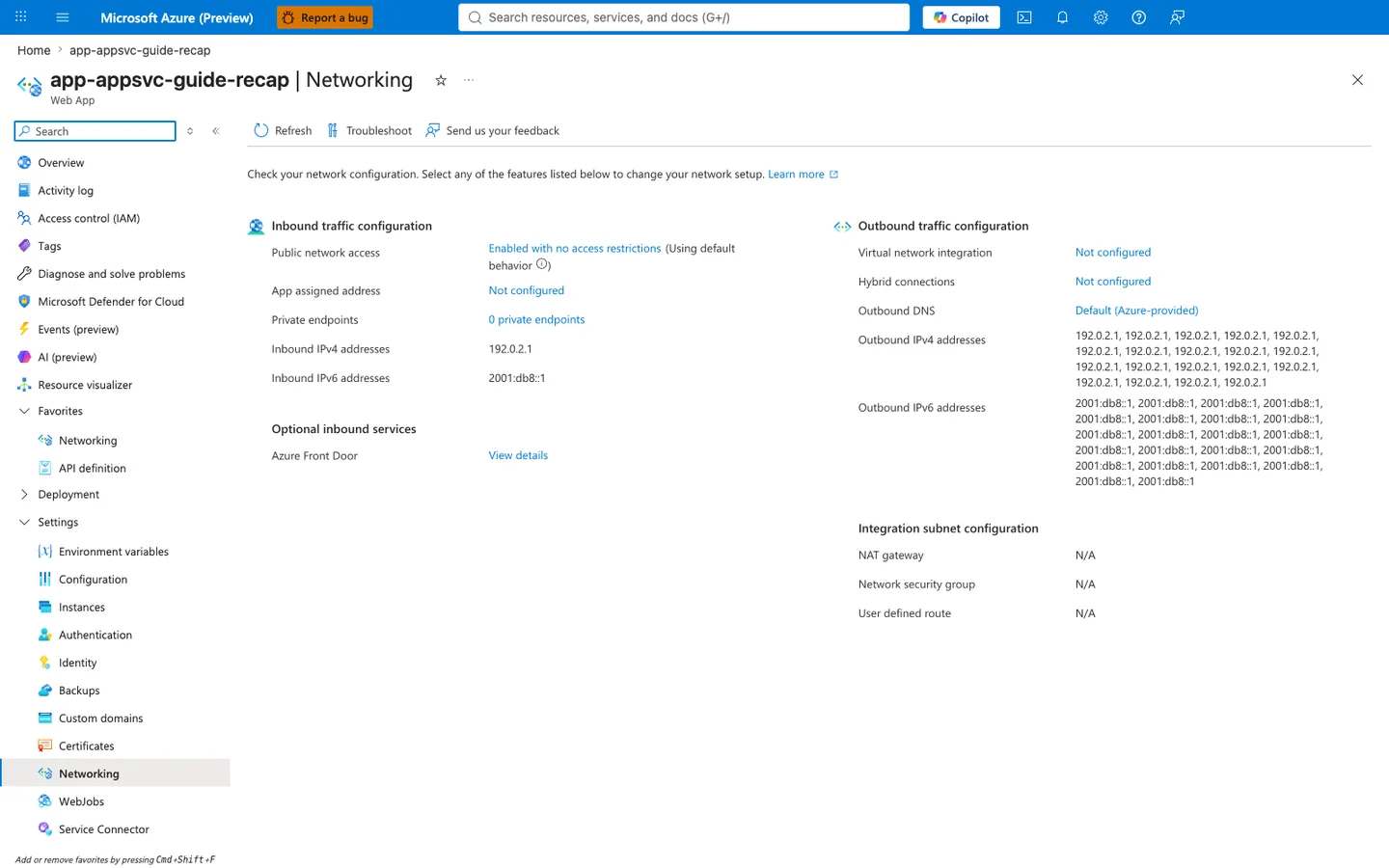
Purpose: Show the app's inbound and outbound network configuration on one page.
Look for: Public network access and Private endpoints under inbound traffic, and Virtual network integration, Outbound DNS, and the outbound address lists under outbound traffic.
Expected result: This capture shows the displayed configuration of a public app without VNet integration: the listed outbound addresses are the platform's potential outbound address pool (not a measured egress address for any connection), and the integration subnet settings show N/A.
This web-app Networking blade is a supporting before-state for the recipe rather than the place where the SQL, Redis, and Key Vault private endpoints themselves are listed. The visible Virtual network integration: Not configured row is the app-side prerequisite the recipe changes before private DNS for those backend services can work, while Private endpoints: 0 private endpoints also makes clear the screenshot is not showing downstream private endpoints attached to other resources. Use this capture as the pre-integration checkpoint before running the recipe's VNet and backend private-endpoint steps.