Python Runtime
Quick lookup reference.
graph TD
    A[Zip Deploy or Source Deploy] --> B[Oryx detects requirements.txt]
    B --> C[Create Python venv + install deps]
    C --> D[Generate startup metadata]
    D --> E[Gunicorn binds to PORT]
    E --> F[Flask app serves requests]
Supported Runtime Versions
App Service Python Versions (Linux)
Use one of the currently supported major/minor versions for production deployments:
- Python 3.9
- Python 3.10
- Python 3.11
- Python 3.12
Set runtime version:
| Flag | Description |
|---|---|
--resource-group $RG | Targets the resource group that contains the web app. |
--name $APP_NAME | Selects the web app whose runtime stack should be updated. |
--linux-fx-version "PYTHON|3.12" | Sets the Linux runtime stack for the app to Python 3.12. |
Verify runtime:
az webapp config show \
  --resource-group $RG \
  --name $APP_NAME \
  --query "linuxFxVersion" \
  --output tsv
| Flag | Description |
|---|---|
--resource-group $RG | Looks up configuration for the web app in the specified resource group. |
--name $APP_NAME | Selects the web app whose runtime configuration should be displayed. |
--query "linuxFxVersion" | Extracts only the runtime-stack value from the configuration response. |
--output tsv | Returns the runtime-stack value as plain text for quick verification. |
Oryx Build Process
What Oryx Does for Python Apps
On Zip Deploy and source-based deployments, App Service uses Oryx to detect Python and build dependencies.
Typical behavior:
- Detects Python app based on files (for example
requirements.txt). - Creates a virtual environment during build.
- Installs dependencies from
requirements.txt. - Generates startup script and launch metadata.
Recommended dependency flow:
Build controls (common app settings):
az webapp config appsettings set \
  --resource-group $RG \
  --name $APP_NAME \
  --settings SCM_DO_BUILD_DURING_DEPLOYMENT=true
| Flag | Description |
|---|---|
--resource-group $RG | Targets the resource group that contains the web app. |
--name $APP_NAME | Selects the web app whose build behavior you want to change. |
--settings SCM_DO_BUILD_DURING_DEPLOYMENT=true | Enables App Service remote build so Oryx installs Python dependencies during deployment. |
Use Oryx build logs in deployment center/Kudu to validate install failures.
Startup Command Patterns
Default Gunicorn Entrypoint
Use explicit host and port binding:
If your Flask object is in app/app.py with app = Flask(__name__), a common command is:
Set startup command:
az webapp config set \
  --resource-group $RG \
  --name $APP_NAME \
  --startup-file "gunicorn --bind=0.0.0.0:$PORT src.app:app"
| Flag | Description |
|---|---|
--resource-group $RG | Targets the resource group that contains the web app. |
--name $APP_NAME | Selects the web app whose startup command should be updated. |
--startup-file "gunicorn --bind=0.0.0.0:$PORT src.app:app" | Sets Gunicorn as the startup command and binds it to the App Service port using the src.app:app entry point. |
Using gunicorn.conf.py
Alternative startup command:
Example gunicorn.conf.py:
import os

bind = f"0.0.0.0:{os.getenv('PORT', '8000')}"
workers = int(os.getenv("WEB_CONCURRENCY", "2"))
worker_class = "sync"
timeout = int(os.getenv("GUNICORN_TIMEOUT", "120"))
graceful_timeout = int(os.getenv("GUNICORN_GRACEFUL_TIMEOUT", "30"))
ASGI Frameworks with uvicorn
For ASGI frameworks like FastAPI and Starlette, run uvicorn directly or run Gunicorn with the uvicorn worker class. Both patterns bind to the App Service-injected PORT.
Direct uvicorn (FastAPI example):
Set as App Service startup command:
az webapp config set \
  --resource-group $RG \
  --name $APP_NAME \
  --startup-file "uvicorn main:app --host 0.0.0.0 --port \$PORT"
| Flag | Description |
|---|---|
--resource-group $RG | Targets the resource group that contains the web app. |
--name $APP_NAME | Selects the web app whose startup command should be updated. |
--startup-file "uvicorn main:app --host 0.0.0.0 --port \$PORT" | Configures App Service to start the ASGI app with uvicorn bound to the injected PORT. |
Gunicorn with the uvicorn worker (recommended for production ASGI workloads that benefit from process-level worker management):
Set as App Service startup command:
az webapp config set \
  --resource-group $RG \
  --name $APP_NAME \
  --startup-file "gunicorn main:app --bind=0.0.0.0:\$PORT --worker-class uvicorn.workers.UvicornWorker"
| Flag | Description |
|---|---|
--resource-group $RG | Targets the resource group that contains the web app. |
--name $APP_NAME | Selects the web app whose startup command should be updated. |
--startup-file "gunicorn main:app --bind=0.0.0.0:\$PORT --worker-class uvicorn.workers.UvicornWorker" | Configures App Service to run the ASGI app with Gunicorn managing uvicorn workers on the App Service port. |
Pin both uvicorn and (when used) gunicorn in requirements.txt so Oryx installs them during build:
Add upper-bound pins (for example fastapi<1, uvicorn[standard]<1, gunicorn<24) once you have an integration-tested baseline; the unpinned form above is intended only to keep this example forward-compatible. Pin exact versions in your own requirements.txt for reproducible builds.
Choose direct uvicorn for simplicity and small workloads. Choose Gunicorn + uvicorn worker when you need worker recycling, graceful restarts, and the same Gunicorn-style tuning options described in the next section. The Gunicorn settings under Worker and Timeout Tuning apply equally when worker_class is uvicorn.workers.UvicornWorker.
Gunicorn Configuration
Worker and Timeout Tuning
Core settings:
workers: Number of worker processes.worker_class: Usuallysyncfor standard Flask workloads.timeout: Hard worker timeout for hung requests.graceful_timeout: Drain period before forced stop.
Useful environment settings:
WEB_CONCURRENCY: Overrides worker count.PYTHON_ENABLE_GUNICORN_MULTIWORKERS: Enables App Service multiworker handling for Gunicorn (true/false).
Example:
az webapp config appsettings set \
  --resource-group $RG \
  --name $APP_NAME \
  --settings \
    WEB_CONCURRENCY=3 \
    PYTHON_ENABLE_GUNICORN_MULTIWORKERS=true
| Flag | Description |
|---|---|
--resource-group $RG | Targets the resource group that contains the web app. |
--name $APP_NAME | Selects the web app whose Gunicorn-related app settings should be updated. |
--settings WEB_CONCURRENCY=3 PYTHON_ENABLE_GUNICORN_MULTIWORKERS=true | Sets the Gunicorn worker count and enables App Service multiworker handling for Gunicorn. |
Practical tuning guidance:
- Start with
workers=2for small plans. - Increase only after checking memory headroom.
- Raise
timeoutfor slow external dependencies, but fix root cause where possible.
Port Binding and Networking
Always Bind to Platform Port
App Service injects PORT at runtime for Linux containers.
Rules:
- Prefer
--bind=0.0.0.0:$PORTin Gunicorn command. - For local fallback, use
8000. - Never hardcode random ports in production startup command.
Flask development pattern:
File System and Persistence
/home Is Persistent, App Root Is Not
On Linux App Service with a built-in Python runtime (a custom container differs: /home is durable only when WEBSITES_ENABLE_APP_SERVICE_STORAGE is true; see Platform Limits: Storage and File System):
- Files under
/homepersist across restarts. - App content under the runtime extraction path can be replaced on redeploy; with build automation the app is served from
/tmp/<uid>, not/home/site/wwwroot. - Changes outside
/homeare stored in the container and do not persist beyond a restart.
Use /home for:
- Uploaded files that must survive restarts.
- Cached artifacts safe to retain.
- Diagnostic dumps/log snapshots.
Avoid storing durable application state on non-persistent paths.
Common Import and Startup Errors
Module and Path Failures
ModuleNotFoundErrorafter deploy- Cause: Missing package in
requirements.txtor build skipped. - Fix: Add package, redeploy withSCM_DO_BUILD_DURING_DEPLOYMENT=true.
- Cause: Missing package in
Failed to find attribute 'app'/ WSGI import errors- Cause: Incorrect module path in startup command. - Fix: Match
module:callableexactly (src.app:app,app:app, etc.).
- Cause: Incorrect module path in startup command. - Fix: Match
No module named src- Cause: Wrong working directory assumptions. - Fix: Adjust startup path to deployed folder layout.
- App starts locally but fails in App Service
- Cause: OS-level native dependencies missing or case-sensitive import mismatch. - Fix: Pin compatible wheels and validate Linux import casing.
Fast Validation Commands
| Flag | Description |
|---|---|
--resource-group $RG | Streams logs from the web app in the specified resource group. |
--name $APP_NAME | Selects the web app whose live logs should be tailed. |
| Flag | Description |
|---|---|
--resource-group $RG | Opens the SSH session against the web app in the specified resource group. |
--name $APP_NAME | Selects the running web app container to connect to over SSH. |
Check installed packages and startup process from SSH/Kudu when diagnosing import issues.
Run It in the Portal
Portal view: Environment variables blade (runtime app settings managed here)
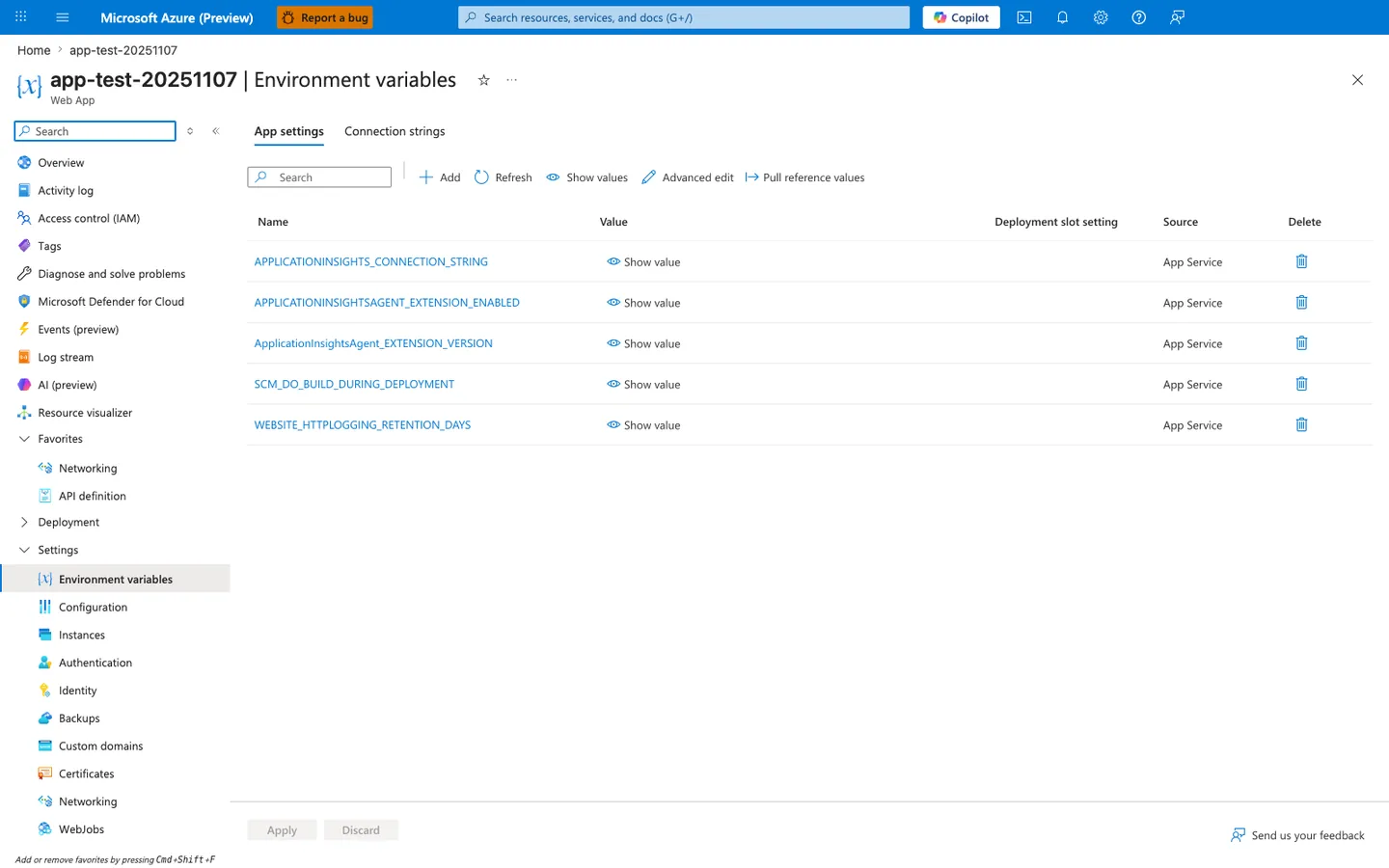
Purpose: Show where app settings are reviewed in the Portal.
Look for: The Name, Value, Deployment slot setting, and Source columns, and Show values.
Expected result: Settings added with az webapp config appsettings set appear as rows here, with values hidden until you select Show value.
The Environment variables blade with the App settings tab selected is the Portal view of the runtime settings table for this Python app. In this screenshot, the visible row SCM_DO_BUILD_DURING_DEPLOYMENT appears alongside other App Service-managed entries in the same Name, Value, Deployment slot setting, and Source layout. The Show value, Advanced edit, and Pull reference values actions in the toolbar make this the same surface where those settings are inspected in the Portal. The highlighted Environment variables entry in the left navigation confirms the exact blade readers should open when checking runtime configuration.