02. First Deploy
Time estimate: 5 minutes
Deploy the Express app from 01. Local Run to Azure App Service with a single az webapp up command.
Need private networking or managed identity?
Use the advanced recipe: Private Network Deploy.
flowchart TD
    DEV[Local Node.js app] -->|az webapp up| APP[Azure App Service\nLinux Node 24 LTS]
    USER[Browser] -->|HTTPS| APP
    APP --> LOGS[App Service log stream]

    style APP fill:#0078d4,color:#fff
style LOGS fill:#E3F2FDOverview
flowchart TD
    A[Set RG APP_NAME LOCATION] --> B[Run az webapp up]
    B --> C[Open the site]
    C --> D[Stream logs]
D --> E[Delete resource group]Prerequisites
- Completed 01. Local Run
- Azure CLI installed and authenticated with
az login - Node.js installed locally
Main Content
Step 1: Set deployment variables
| Command/Parameter | Purpose |
|---|---|
RG="rg-express-tutorial" | Defines the resource group that will hold the App Service resources. |
APP_NAME="app-express-tutorial-abc123" | Sets the globally unique web app name. |
LOCATION="koreacentral" | Selects the Azure region for the deployment. |
Step 2: Deploy with az webapp up
Run this command from the Node.js app folder.
az webapp up --name $APP_NAME --resource-group $RG --location $LOCATION --runtime "NODE:24-lts" --sku B1
| Command/Parameter | Purpose |
|---|---|
az webapp up --name $APP_NAME --resource-group $RG --location $LOCATION --runtime "NODE:24-lts" --sku B1 | Creates the resource group, App Service plan, and web app if needed, then uploads and deploys the current app source. |
--name $APP_NAME | Uses the specified globally unique web app name. |
--resource-group $RG | Places the deployment in the selected resource group. |
--location $LOCATION | Creates resources in the selected Azure region. |
--runtime "NODE:24-lts" | Uses the Node.js 24 LTS runtime on Linux App Service. |
--sku B1 | Uses the Basic B1 pricing tier. |
Expected output
The webapp 'app-express-tutorial-abc123' doesn't exist
Creating Resource group 'rg-express-tutorial' ...
Creating AppServicePlan 'appsvc_asp_Linux_koreacentral' ...
Creating webapp 'app-express-tutorial-abc123' ...
Configuring default logging for the app, if not already enabled
Starting zip deployment...
You can launch the app at http://app-express-tutorial-abc123.azurewebsites.net
Build automation: quick-start vs production
az webapp up performs an Oryx/Kudu build on App Service during deployment (equivalent to SCM_DO_BUILD_DURING_DEPLOYMENT=true). That is fine for this quick-start and for local development, but production deployments should publish a pre-built artifact and set SCM_DO_BUILD_DURING_DEPLOYMENT=false for deterministic, reproducible releases. See Best Practices: SCM_DO_BUILD vs pre-built artifacts.
Step 3: Verify deployment
WEB_APP_URL="https://$(az webapp show --resource-group $RG --name $APP_NAME --query defaultHostName --output tsv)"
curl $WEB_APP_URL
| Command/Parameter | Purpose |
|---|---|
WEB_APP_URL="https://$(az webapp show --resource-group $RG --name $APP_NAME --query defaultHostName --output tsv)" | Builds the app URL from the hostname returned by App Service. |
az webapp show --resource-group $RG --name $APP_NAME --query defaultHostName --output tsv | Returns only the default hostname so the shell can build the site URL. |
--resource-group $RG | Queries the web app inside the tutorial resource group. |
--name $APP_NAME | Selects the deployed Node.js web app to inspect. |
--query defaultHostName | Extracts only the default hostname field from the response. |
--output tsv | Formats the hostname as plain text for shell substitution. |
curl $WEB_APP_URL | Confirms the deployed app responds over HTTPS. |
Step 4: View logs
Note:
az webapp log tailmay not work reliably for Linux App Service. Use the Azure Portal Log stream or/home/LogFilesas alternatives.
| Command/Parameter | Purpose |
|---|---|
az webapp log tail --resource-group $RG --name $APP_NAME | Streams live application logs from the deployed web app. |
--resource-group $RG | Reads logs from the resource group that contains the app. |
--name $APP_NAME | Streams logs for the deployed Node.js web app. |
Step 5: Cleanup
| Command/Parameter | Purpose |
|---|---|
az group delete --name $RG --yes --no-wait | Deletes the resource group and all App Service resources created by the tutorial. |
--name $RG | Targets the tutorial resource group for deletion. |
--yes | Skips the interactive confirmation prompt. |
--no-wait | Returns immediately while Azure continues the deletion in the background. |
Advanced Topics
az webapp up is the fastest way to publish a Node.js app, but production environments often add VNet integration, private endpoints, and managed identity after the first deployment.
Run It in the Portal
Portal view: Web App Overview blade - first-deploy verification surface
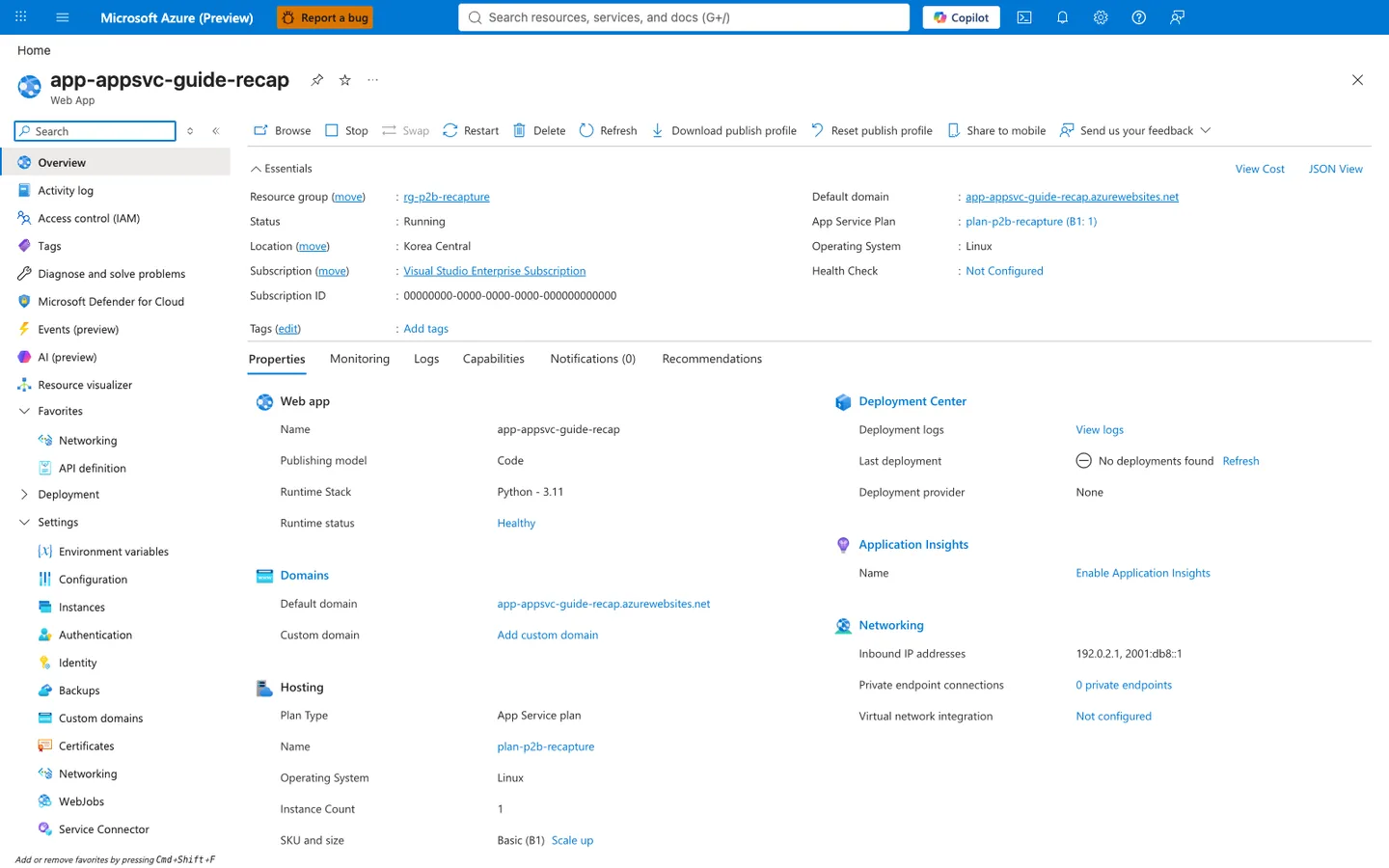
After running az webapp up --runtime "NODE:24-lts" in this tutorial, the Overview blade is the first Portal verification surface. The Essentials panel confirms the app the command created or reused: Status: Running, Operating System: Linux, Default domain, and the attached App Service Plan are all visible on this blade. The selected Properties tab adds Runtime Stack and Runtime status rows under Web app — the screenshot was captured from a Python deployment, so the visible value is Runtime Stack: Python - 3.11; the same row reports the Node.js stack value for this tutorial's Express app after deployment. Use the Default domain value to open the deployed app in a browser, which is the Portal-side check that corresponds to this tutorial's curl verification step.