VNet Integration
Enable VNet integration for an Express app on App Service so outbound dependency traffic flows over private network paths.
flowchart TD
    A[Express app on App Service] --> B[VNet integration subnet]
    B --> C[Private Endpoint SQL]
    B --> D[Private Endpoint Key Vault]
    B --> E[Private Endpoint Redis]
B --> F[NSG and UDR controls]Prerequisites
- App Service Plan tier that supports VNet integration
- Existing virtual network and delegated subnet for App Service
- Permissions to manage VNet, NSG, private endpoints, and DNS links
Main Content
1) Create delegated subnet
az network vnet subnet create \
  --resource-group "$RG" \
  --vnet-name "vnet-appservice" \
  --name "snet-appservice-integration" \
  --address-prefixes "10.10.1.0/24" \
  --delegations "Microsoft.Web/serverFarms" \
  --output json
| Flag | Description |
|---|---|
--resource-group "$RG" | Creates the subnet inside the specified resource group. |
--vnet-name "vnet-appservice" | Selects the virtual network that will host the integration subnet. |
--name "snet-appservice-integration" | Names the subnet dedicated to App Service VNet integration. |
--address-prefixes "10.10.1.0/24" | Assigns the address space used by the integration subnet. |
--delegations "Microsoft.Web/serverFarms" | Delegates the subnet so App Service plans can attach to it. |
--output json | Returns the created subnet definition as JSON. |
2) Connect App Service to subnet
az webapp vnet-integration add \
  --resource-group "$RG" \
  --name "$APP_NAME" \
  --vnet "vnet-appservice" \
  --subnet "snet-appservice-integration" \
  --output json
| Flag | Description |
|---|---|
--resource-group "$RG" | Targets the resource group that contains the web app and VNet. |
--name "$APP_NAME" | Selects the web app that should use VNet integration. |
--vnet "vnet-appservice" | Chooses the virtual network that will carry outbound traffic. |
--subnet "snet-appservice-integration" | Attaches the app to the delegated integration subnet. |
--output json | Returns the integration result as JSON. |
3) Enable route-all for strict egress control (optional)
az webapp config appsettings set \
  --resource-group "$RG" \
  --name "$APP_NAME" \
  --settings WEBSITE_VNET_ROUTE_ALL=1 \
  --output json
| Flag | Description |
|---|---|
--resource-group "$RG" | Targets the resource group that contains the web app. |
--name "$APP_NAME" | Selects the web app whose routing behavior you want to change. |
--settings WEBSITE_VNET_ROUTE_ALL=1 | Forces all outbound traffic from the app through the integrated virtual network. |
--output json | Returns the updated app-settings payload as JSON. |
4) Apply NSG baseline
Allow outbound traffic only to required private dependencies (for example 1433, 6380, 443), then collect NSG flow logs for troubleshooting.
5) Create private endpoints and DNS links
Use dedicated private endpoint subnets for SQL, Key Vault, and Redis and link these private DNS zones:
privatelink.database.windows.netprivatelink.vaultcore.azure.netprivatelink.redis.cache.windows.net
6) Configure Express runtime settings with process.env
az webapp config appsettings set \
  --resource-group "$RG" \
  --name "$APP_NAME" \
  --settings \
    SQL_SERVER_FQDN="<sql-private-fqdn>" \
    SQL_DATABASE_NAME="<db-name>" \
    REDIS_HOST="<redis-private-fqdn>" \
    REDIS_PORT="6380" \
    KEY_VAULT_URI="https://<kv-name>.vault.azure.net/" \
  --output json
| Flag | Description |
|---|---|
--resource-group "$RG" | Targets the resource group that contains the web app. |
--name "$APP_NAME" | Selects the web app that should receive the private-endpoint connection settings. |
--settings SQL_SERVER_FQDN="<sql-private-fqdn>" SQL_DATABASE_NAME="<db-name>" REDIS_HOST="<redis-private-fqdn>" REDIS_PORT="6380" KEY_VAULT_URI="https://<kv-name>.vault.azure.net/" | Writes the SQL, Redis, and Key Vault hostnames and related settings the app will use over the VNet path. |
--output json | Returns the updated app-settings payload as JSON. |
7) Use managed identity and private FQDNs in Node.js
const { DefaultAzureCredential } = require("@azure/identity");
const sql = require("mssql");

const credential = new DefaultAzureCredential();

async function queryHealth() {
  const token = await credential.getToken("https://database.windows.net/.default");
  const pool = await sql.connect({
    server: process.env.SQL_SERVER_FQDN,
    database: process.env.SQL_DATABASE_NAME,
    options: { encrypt: true },
    authentication: {
      type: "azure-active-directory-access-token",
      options: { token: token.token },
    },
  });
  return pool.request().query("SELECT 1 AS ok");
}
8) Add validation checks in CI pipeline
- name: Validate VNet integration and endpoint state
  run: |
    az webapp vnet-integration list \
      --resource-group "$RG" \
      --name "$APP_NAME" \
      --output table
    az network private-endpoint list \
      --resource-group "$RG" \
      --output table
Inbound versus outbound
VNet integration is outbound-only for App Service. Inbound private access requires additional architecture such as private endpoint for the app.
Verification
az webapp vnet-integration listreturns expected VNet and subnet.- Dependency hostnames resolve to private IP addresses in runtime diagnostics.
- App can access SQL, Redis, and Key Vault without public endpoint access.
Troubleshooting
Private endpoint exists but app still cannot connect
- Validate DNS zone links and A records.
- Confirm NSG and route table do not block outbound dependency traffic.
Public DNS resolution from app runtime
- Check DNS server configuration for the VNet.
- Ensure split-horizon DNS rules are forwarding to Azure private DNS.
Failure after enabling route-all
- Validate default route and firewall path for required Azure services.
- Temporarily disable route-all to verify routing as the root cause.
Run It in the Portal
Portal view: Networking blade (Virtual network integration not yet configured)
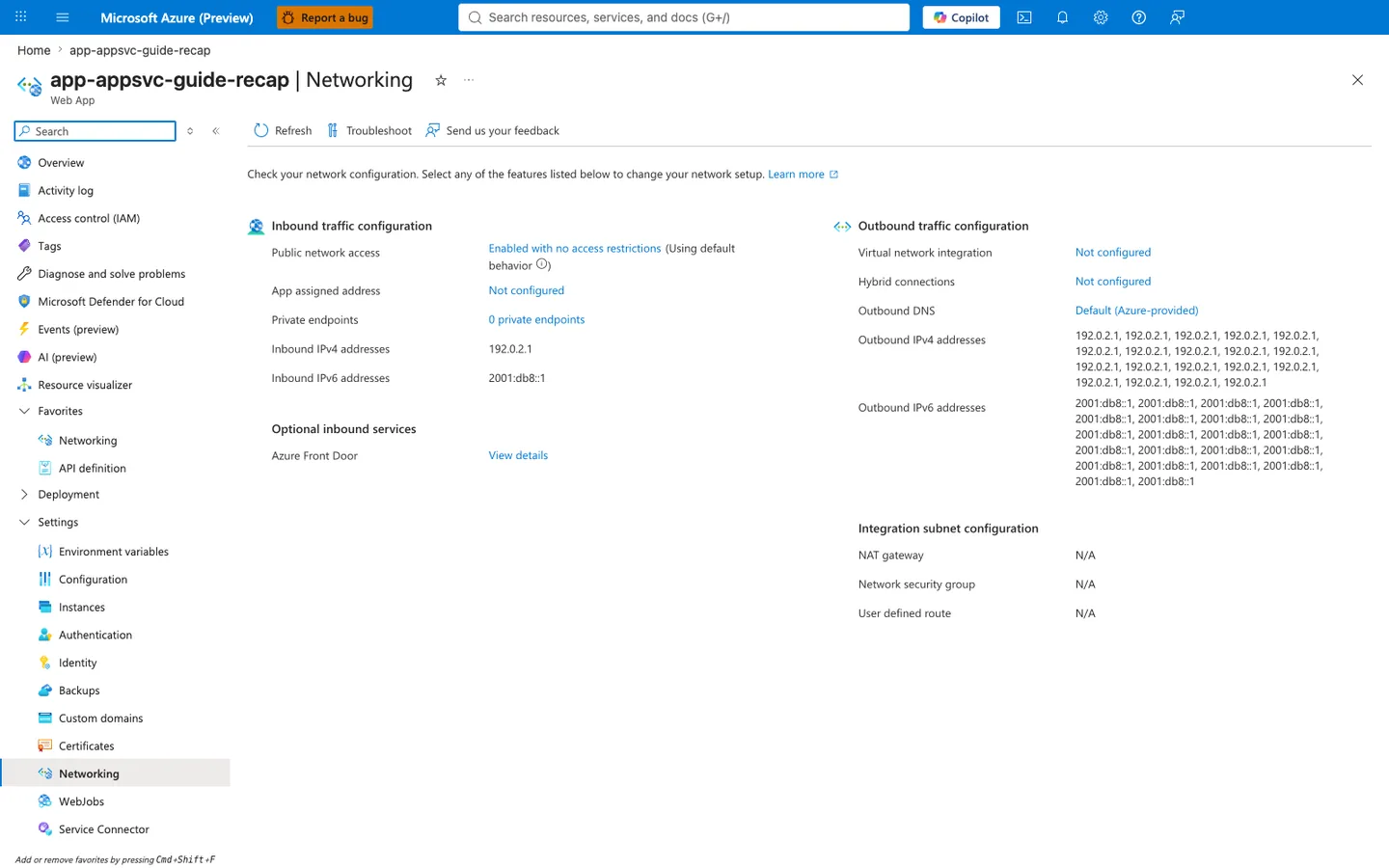
The Networking blade is the Portal surface where this recipe's outbound VNet connection becomes visible. In the pre-recipe state shown here, Virtual network integration: Not configured is the key row; after az webapp vnet-integration add, this is the row to revisit to confirm the app is attached to the delegated subnet. The Inbound traffic configuration card remains separate, which matches the recipe's point that VNet integration changes outbound connectivity rather than inbound exposure on its own.