Private Network Deploy
Deploy the Java app with private outbound connectivity, a storage private endpoint, and system-assigned managed identity.
flowchart TD
    USER[Internet client] -->|HTTPS| APP[App Service\nLinux Java 17]
    APP -.->|System-assigned MI| ENTRA[Microsoft Entra ID]

    subgraph VNET[Virtual Network 10.10.0.0/16]
        INT[Integration subnet\n10.10.1.0/24]
        PE[Private endpoint subnet\n10.10.2.0/24]
    end

    APP --> INT
    PE_ST[Private Endpoint: Storage blob] --> STORAGE[Storage Account]
    PE --> PE_ST
    DNS[Private DNS zone\nprivatelink.blob.core.windows.net] -.-> PE_ST
    APP -->|Private DNS resolution| DNS

    style APP fill:#0078d4,color:#fff
    style VNET fill:#E8F5E9,stroke:#4CAF50
    style DNS fill:#E3F2FD
Prerequisites
- Completed 02. First Deploy
- Basic or higher App Service plan
- Permission to create VNets, subnets, private endpoints, private DNS zones, and role assignments
- Existing Java app that already runs in App Service
Main Content
Step 1: Set advanced deployment variables
RG="rg-java-guide"
APP_NAME="app-java-guide-abc123"
LOCATION="koreacentral"
VNET_NAME="vnet-java-guide"
INTEGRATION_SUBNET_NAME="snet-appservice-integration"
PRIVATE_ENDPOINT_SUBNET_NAME="snet-private-endpoints"
STORAGE_NAME="stjavaguideabc123"
PRIVATE_DNS_ZONE_NAME="privatelink.blob.core.windows.net"
| Command/Parameter | Purpose |
RG="rg-java-guide" | Reuses the resource group that contains the deployed web app. |
APP_NAME="app-java-guide-abc123" | Targets the existing App Service app. |
LOCATION="koreacentral" | Keeps networking resources in the same Azure region. |
VNET_NAME="vnet-java-guide" | Names the virtual network used for private connectivity. |
INTEGRATION_SUBNET_NAME="snet-appservice-integration" | Names the delegated subnet for App Service VNet integration. |
PRIVATE_ENDPOINT_SUBNET_NAME="snet-private-endpoints" | Names the subnet reserved for private endpoint NICs. |
STORAGE_NAME="stjavaguideabc123" | Sets a globally unique storage account name for the private endpoint example. |
PRIVATE_DNS_ZONE_NAME="privatelink.blob.core.windows.net" | Defines the private DNS zone used by the storage blob private endpoint. |
Step 2: Create the VNet and both subnets
az network vnet create --resource-group $RG --name $VNET_NAME --location $LOCATION --address-prefixes 10.10.0.0/16
az network vnet subnet create --resource-group $RG --vnet-name $VNET_NAME --name $INTEGRATION_SUBNET_NAME --address-prefixes 10.10.1.0/24 --delegations Microsoft.Web/serverFarms
az network vnet subnet create --resource-group $RG --vnet-name $VNET_NAME --name $PRIVATE_ENDPOINT_SUBNET_NAME --address-prefixes 10.10.2.0/24 --disable-private-endpoint-network-policies true
| Command/Parameter | Purpose |
az network vnet create | Creates the virtual network that hosts integration and private endpoint subnets. |
--resource-group $RG | Places the VNet in the selected resource group. |
--name $VNET_NAME | Sets the VNet name. |
--location $LOCATION | Creates the VNet in the selected Azure region. |
--address-prefixes 10.10.0.0/16 | Defines the overall address space for the VNet. |
az network vnet subnet create | Creates a subnet inside the VNet. |
--vnet-name $VNET_NAME | Targets the named VNet. |
--name $INTEGRATION_SUBNET_NAME | Names the App Service integration subnet. |
--address-prefixes 10.10.1.0/24 | Defines the CIDR range for the integration subnet. |
--delegations Microsoft.Web/serverFarms | Delegates the subnet to App Service. |
--name $PRIVATE_ENDPOINT_SUBNET_NAME | Names the private endpoint subnet. |
--address-prefixes 10.10.2.0/24 | Defines the CIDR range for the private endpoint subnet. |
--disable-private-endpoint-network-policies true | Disables policies that block private endpoint NICs. |
Step 3: Connect the web app to the integration subnet
az webapp vnet-integration add --resource-group $RG --name $APP_NAME --vnet $VNET_NAME --subnet $INTEGRATION_SUBNET_NAME
| Command/Parameter | Purpose |
az webapp vnet-integration add | Routes the app's outbound traffic through the delegated subnet. |
--resource-group $RG | Selects the resource group containing the web app. |
--name $APP_NAME | Selects the target App Service app. |
--vnet $VNET_NAME | Chooses the virtual network used for integration. |
--subnet $INTEGRATION_SUBNET_NAME | Chooses the delegated subnet used for outbound connectivity. |
Step 4: Enable managed identity
az webapp identity assign --resource-group $RG --name $APP_NAME
APP_PRINCIPAL_ID="$(az webapp identity show --resource-group $RG --name $APP_NAME --query principalId --output tsv)"
| Command/Parameter | Purpose |
az webapp identity assign | Enables a system-assigned managed identity on the web app. |
--resource-group $RG | Selects the resource group containing the app. |
--name $APP_NAME | Targets the web app receiving the identity. |
APP_PRINCIPAL_ID="$(...)" | Stores the managed identity principal ID in a shell variable. |
az webapp identity show | Reads the managed identity details from the web app. |
--query principalId | Returns only the service principal object ID. |
--output tsv | Formats the principal ID as plain text for shell assignment. |
Step 5: Create a storage account, private endpoint, and private DNS zone
az storage account create --resource-group $RG --name $STORAGE_NAME --location $LOCATION --sku Standard_LRS --kind StorageV2
STORAGE_ID="$(az storage account show --resource-group $RG --name $STORAGE_NAME --query id --output tsv)"
az network private-endpoint create --resource-group $RG --name pe-storage-blob --vnet-name $VNET_NAME --subnet $PRIVATE_ENDPOINT_SUBNET_NAME --private-connection-resource-id $STORAGE_ID --group-id blob --connection-name pe-storage-blob-connection
az network private-dns zone create --resource-group $RG --name $PRIVATE_DNS_ZONE_NAME
az network private-dns link vnet create --resource-group $RG --zone-name $PRIVATE_DNS_ZONE_NAME --name link-java-guide-vnet --virtual-network $VNET_NAME --registration-enabled false
az network private-endpoint dns-zone-group create --resource-group $RG --endpoint-name pe-storage-blob --name storage-blob-zone-group --private-dns-zone $PRIVATE_DNS_ZONE_NAME --zone-name blob
| Command/Parameter | Purpose |
az storage account create | Creates the storage account used in the private endpoint scenario. |
--resource-group $RG | Places the storage account in the selected resource group. |
--name $STORAGE_NAME | Sets the storage account name. |
--location $LOCATION | Creates the storage account in the selected region. |
--sku Standard_LRS | Uses standard locally redundant storage. |
--kind StorageV2 | Creates a general-purpose v2 storage account. |
STORAGE_ID="$(...)" | Stores the storage account resource ID in a shell variable. |
az storage account show | Reads the storage account metadata. |
--query id | Returns only the storage account resource ID. |
--output tsv | Formats the resource ID as plain text. |
az network private-endpoint create | Creates the private endpoint for blob access. |
--name pe-storage-blob | Names the private endpoint resource. |
--vnet-name $VNET_NAME | Places the endpoint in the selected VNet. |
--subnet $PRIVATE_ENDPOINT_SUBNET_NAME | Uses the dedicated private endpoint subnet. |
--private-connection-resource-id $STORAGE_ID | Points the private endpoint at the storage account. |
--group-id blob | Targets the Blob service subresource. |
--connection-name pe-storage-blob-connection | Names the private link connection object. |
az network private-dns zone create | Creates the private DNS zone for blob endpoint resolution. |
--name $PRIVATE_DNS_ZONE_NAME | Sets the blob private DNS zone name. |
az network private-dns link vnet create | Links the private DNS zone to the VNet. |
--zone-name $PRIVATE_DNS_ZONE_NAME | Selects the private DNS zone to link. |
--name link-java-guide-vnet | Names the VNet link resource. |
--virtual-network $VNET_NAME | Connects the DNS zone to the App Service VNet. |
--registration-enabled false | Disables auto-registration because Azure Storage records are managed by the private endpoint. |
az network private-endpoint dns-zone-group create | Associates the private endpoint with the DNS zone. |
--endpoint-name pe-storage-blob | Targets the storage private endpoint. |
--name storage-blob-zone-group | Names the DNS zone group resource. |
--private-dns-zone $PRIVATE_DNS_ZONE_NAME | Selects the private DNS zone to attach. |
--zone-name blob | Uses the blob zone group label for the mapping. |
Step 6: Grant the managed identity access to Storage
az role assignment create --assignee-object-id $APP_PRINCIPAL_ID --assignee-principal-type ServicePrincipal --role "Storage Blob Data Contributor" --scope $STORAGE_ID
| Command/Parameter | Purpose |
az role assignment create | Creates an RBAC role assignment for the managed identity. |
--assignee-object-id $APP_PRINCIPAL_ID | Targets the web app's managed identity object ID. |
--assignee-principal-type ServicePrincipal | Tells Azure RBAC that the assignee is a service principal. |
--role "Storage Blob Data Contributor" | Grants blob data read and write permissions. |
--scope $STORAGE_ID | Applies the role assignment at the storage account scope. |
az webapp config appsettings set --resource-group $RG --name $APP_NAME --settings STORAGE_ACCOUNT_URL="https://$STORAGE_NAME.blob.core.windows.net"
| Command/Parameter | Purpose |
az webapp config appsettings set | Writes application settings into the App Service configuration. |
--resource-group $RG | Selects the resource group containing the app. |
--name $APP_NAME | Targets the App Service app to configure. |
--settings | Passes one or more app settings to store. |
STORAGE_ACCOUNT_URL="https://$STORAGE_NAME.blob.core.windows.net" | Stores the standard blob endpoint hostname that private DNS resolves to the private endpoint. |
Step 8: Use DefaultAzureCredential in the app
import com.azure.identity.DefaultAzureCredentialBuilder;
import com.azure.storage.blob.BlobServiceClient;
import com.azure.storage.blob.BlobServiceClientBuilder;

BlobServiceClient blobServiceClient = new BlobServiceClientBuilder()
    .endpoint(System.getenv("STORAGE_ACCOUNT_URL"))
    .credential(new DefaultAzureCredentialBuilder().build())
    .buildClient();
| Command/Code | Purpose |
new DefaultAzureCredentialBuilder().build() | Uses the App Service managed identity in Azure and developer credentials locally. |
.endpoint(System.getenv("STORAGE_ACCOUNT_URL")) | Connects to the normal blob hostname, which private DNS maps to the private endpoint address inside the VNet. |
.buildClient() | Creates the Blob service client used by the application. |
Step 9: Verify networking and identity
az webapp vnet-integration list --resource-group $RG --name $APP_NAME --output table
az network private-endpoint show --resource-group $RG --name pe-storage-blob --query "{name:name,provisioningState:provisioningState}" --output json
az role assignment list --assignee $APP_PRINCIPAL_ID --scope $STORAGE_ID --output table
| Command/Parameter | Purpose |
az webapp vnet-integration list | Shows the VNet integration attached to the web app. |
--resource-group $RG | Selects the app resource group. |
--name $APP_NAME | Targets the web app being validated. |
--output table | Formats the VNet integration output for quick review. |
az network private-endpoint show | Displays a single private endpoint resource. |
--name pe-storage-blob | Targets the storage private endpoint. |
--query "{name:name,provisioningState:provisioningState}" | Returns only the endpoint name and provisioning state. |
--output json | Formats the endpoint status as JSON. |
az role assignment list | Lists RBAC assignments for the managed identity. |
--assignee $APP_PRINCIPAL_ID | Filters the role assignments to the web app identity. |
--scope $STORAGE_ID | Limits the results to the storage account scope. |
Step 10: Restrict the storage account's public network access
With the private endpoint, private DNS zone, and RBAC role in place, close the storage account's public endpoint.
az storage account update --resource-group $RG --name $STORAGE_NAME --public-network-access Disabled --default-action Deny
| Command/Parameter | Purpose |
az storage account update | Updates the storage account network configuration. |
--public-network-access Disabled | Turns off the public endpoint; only private endpoints can reach the account. |
--default-action Deny | Denies traffic not matched by an explicit network rule. |
Network path and data authorization are independent
Disabling public access controls only the network path; the Storage Blob Data Contributor role granted in Step 6 handles data authorization. See App Service to Azure Storage connectivity.
Verification
az webapp vnet-integration list shows the integration subnetaz network private-endpoint show returns Succeededaz role assignment list shows Storage Blob Data Contributor- The app uses
DefaultAzureCredential and does not require a storage key or connection string
Troubleshooting
The app still resolves the public storage endpoint
- Confirm the private DNS zone is linked to the same VNet used for App Service integration.
- Confirm the private endpoint DNS zone group exists.
The app gets 403 Forbidden from Storage
- Wait a few minutes for RBAC propagation.
- Recheck the role assignment scope and principal ID.
The app cannot reach the private endpoint
- Confirm the app is integrated with the expected subnet.
- Review NSG and route table changes if you added them after initial validation.
Run It in the Portal
Portal view: Access Restrictions blade (before-state inbound access configuration)
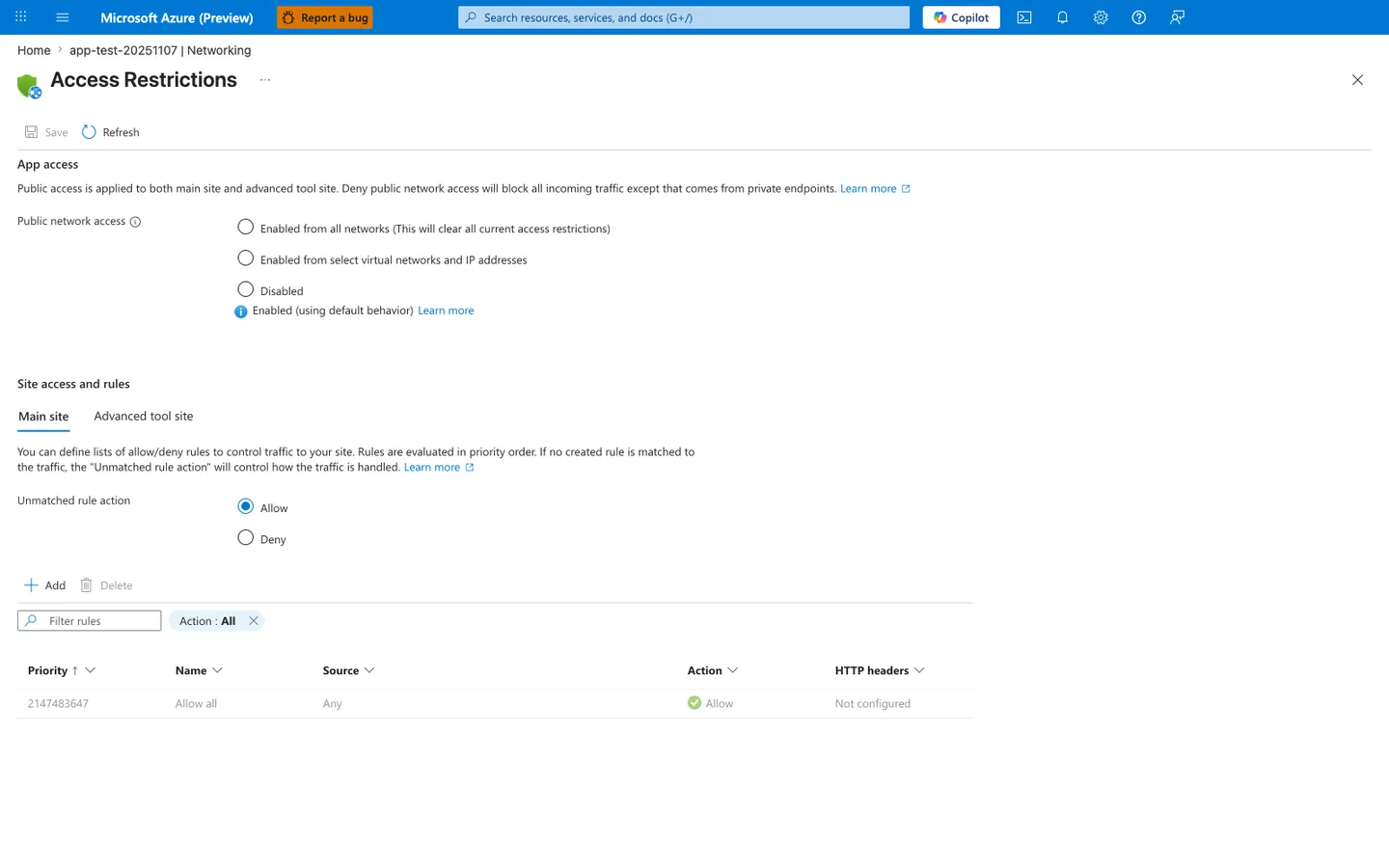
Purpose: Show the inbound access state before any access restriction is added.
Look for: Public network access shows Enabled (using default behavior), Unmatched rule action is Allow, and the only rule is Allow all with priority 2147483647.
Expected result: With no custom rules, the displayed default-endpoint policy admits any source until you add rules or disable public network access. This is a configuration reading, not a measured reachability test.
The Access Restrictions blade is the Portal surface that displays the access configuration of this app while you work through the recipe's VNet integration, managed identity, and storage private endpoint steps for the Spring Boot BlobServiceClient flow. In the visible default state, Public network access is enabled with default behavior and the rules table contains only Allow all, so this screenshot works as a before-state reminder that those outbound/private-connectivity steps do not by themselves change the displayed inbound configuration. The blade shows configuration, not whether any client can reach the app: a private endpoint, DNS, routing and the applicable main-site or SCM policy (depending on the target and ingress path) also decide that, and the effective-policy reading is in Private Endpoint and Access Restriction Decisions. Use it only as a before-state configuration reference, not as evidence that the recipe itself has already added access-restriction rules.
See Also
Sources