Deployment Slots for Zero-Downtime Releases
Use App Service deployment slots to validate Java releases in staging, then swap traffic to production with near-zero downtime.
Prerequisites
- App Service Plan tier that supports deployment slots
- Production app deployed and healthy
- CI/CD pipeline capable of targeting a slot
Main Content
Slot-based release flow
flowchart TD
    A[Deploy new build to staging slot] --> B[Run smoke tests on staging URL]
    B --> C[Warm up app and dependencies]
    C --> D[Swap staging -> production]
    D --> E[Monitor and rollback if needed]
Step 1: create staging slot
export SLOT_NAME="staging"

az webapp deployment slot create \
  --resource-group "$RG" \
  --name "$APP_NAME" \
  --slot "$SLOT_NAME" \
  --configuration-source "$APP_NAME" \
  --output json
export SLOT_NAME="staging" | Stores the slot name in a shell variable so later commands target the same slot consistently. | | az webapp deployment slot create --resource-group "$RG" --name "$APP_NAME" --slot "$SLOT_NAME" --configuration-source "$APP_NAME" --output json | Creates the staging deployment slot and copies the production app configuration into it. | Step 2: mark slot-sticky settings
Keep environment-specific values pinned to each slot:
az webapp config appsettings set \
  --resource-group "$RG" \
  --name "$APP_NAME" \
  --slot "$SLOT_NAME" \
  --slot-settings \
    SPRING_PROFILES_ACTIVE=staging \
    API_BASE_URL=https://staging-api.example.internal \
  --output json
az webapp config appsettings set | Writes app settings into the selected slot configuration. | | --resource-group "$RG" | Targets the resource group that contains the app. | | --name "$APP_NAME" | Selects the web app whose slot settings will change. | | --slot "$SLOT_NAME" | Applies the settings to the staging slot. | | --slot-settings SPRING_PROFILES_ACTIVE=staging API_BASE_URL=... | Creates slot-sticky settings that stay with staging during swaps. | | --output json | Returns the updated slot settings as JSON. | Examples of often-sticky settings:
- third-party API endpoints
- diagnostic verbosity
- canary feature flags
Step 3: deploy to slot with Maven plugin
Set plugin target slot before deploy (plugin config/profile or command parameter strategy), then deploy artifact to staging slot from CI.
If using Azure CLI zip deploy for slot-specific release verification:
az webapp deploy \
  --resource-group "$RG" \
  --name "$APP_NAME" \
  --slot "$SLOT_NAME" \
  --src-path "apps/java-springboot/target/<artifact-name>.jar" \
  --type jar \
  --output json
az webapp deploy | Deploys the built JAR artifact to the selected deployment slot. | | --resource-group "$RG" | Targets the resource group that contains the app. | | --name "$APP_NAME" | Selects the web app that will receive the deployment. | | --slot "$SLOT_NAME" | Sends the deployment to the staging slot. | | --src-path "apps/java-springboot/target/<artifact-name>.jar" | Uploads the JAR produced by the build pipeline. | | --type jar | Treats the uploaded artifact as a Java JAR deployment package. | | --output json | Returns deployment metadata as JSON. | Step 4: run staging smoke tests
curl "https://$APP_NAME-$SLOT_NAME.azurewebsites.net/health"
curl "https://$APP_NAME-$SLOT_NAME.azurewebsites.net/info"
curl "https://$APP_NAME-$SLOT_NAME.azurewebsites.net/api/requests/log-levels?userId=slot-test"
Step 5: perform swap
az webapp deployment slot swap \
  --resource-group "$RG" \
  --name "$APP_NAME" \
  --slot "$SLOT_NAME" \
  --target-slot production \
  --output json
az webapp deployment slot swap | Swaps the selected source slot into the target slot. | | --resource-group "$RG" | Targets the resource group that contains the app. | | --name "$APP_NAME" | Selects the web app whose slots will be swapped. | | --slot "$SLOT_NAME" | Uses the staging slot as the swap source. | | --target-slot production | Promotes the staging slot into production. | | --output json | Returns the swap operation details as JSON. | After swap, former production becomes staging for quick rollback.
Canary routing option
Split traffic before full swap:
az webapp traffic-routing set \
  --resource-group "$RG" \
  --name "$APP_NAME" \
  --distribution "$SLOT_NAME"=10 \
  --output json
az webapp traffic-routing set | Configures percentage-based traffic routing to a slot. | | --resource-group "$RG" | Targets the resource group that contains the app. | | --name "$APP_NAME" | Selects the web app whose routing weights will change. | | --distribution "$SLOT_NAME"=10 | Sends 10 percent of traffic to the staging slot for canary validation. | | --output json | Returns the updated traffic-routing configuration as JSON. | Gradually increase canary percentage as confidence grows.
Rollback strategy
If production regression is detected, swap back immediately:
az webapp deployment slot swap \
  --resource-group "$RG" \
  --name "$APP_NAME" \
  --slot "$SLOT_NAME" \
  --target-slot production \
  --output json
az webapp deployment slot swap | Swaps the selected source slot into the target slot again for rollback. | | --resource-group "$RG" | Targets the resource group that contains the app. | | --name "$APP_NAME" | Selects the web app whose slots will be swapped back. | | --slot "$SLOT_NAME" | Uses the current staging slot as the rollback source. | | --target-slot production | Moves traffic back to the original production content. | | --output json | Returns the rollback swap operation details as JSON. | Sticky setting hygiene
Misclassified slot settings are a common source of swap incidents. Audit swap behavior before production cutover.
Pre-warm critical paths
Hit /health and one business endpoint repeatedly on staging before swap to reduce post-swap cold latency.
Platform architecture
For platform architecture details, see Platform: How App Service Works.
Verification
- Staging slot is healthy before swap
- Production remains available during swap
- Post-swap health and log checks succeed
- Rollback path is tested and documented
Troubleshooting
Swap succeeds but app errors increase
Validate slot-sticky settings, backend dependency endpoints, and profile-specific config differences.
Staging behaves differently than production
Ensure parity for non-sticky settings and dependent resource access policies.
Canary routing not taking effect
Check slot name, distribution values, and caching/CDN layers that may mask split traffic behavior.
Run It in the Portal
Portal view: Deployment slots with Swap dialog (zero-downtime promotion)
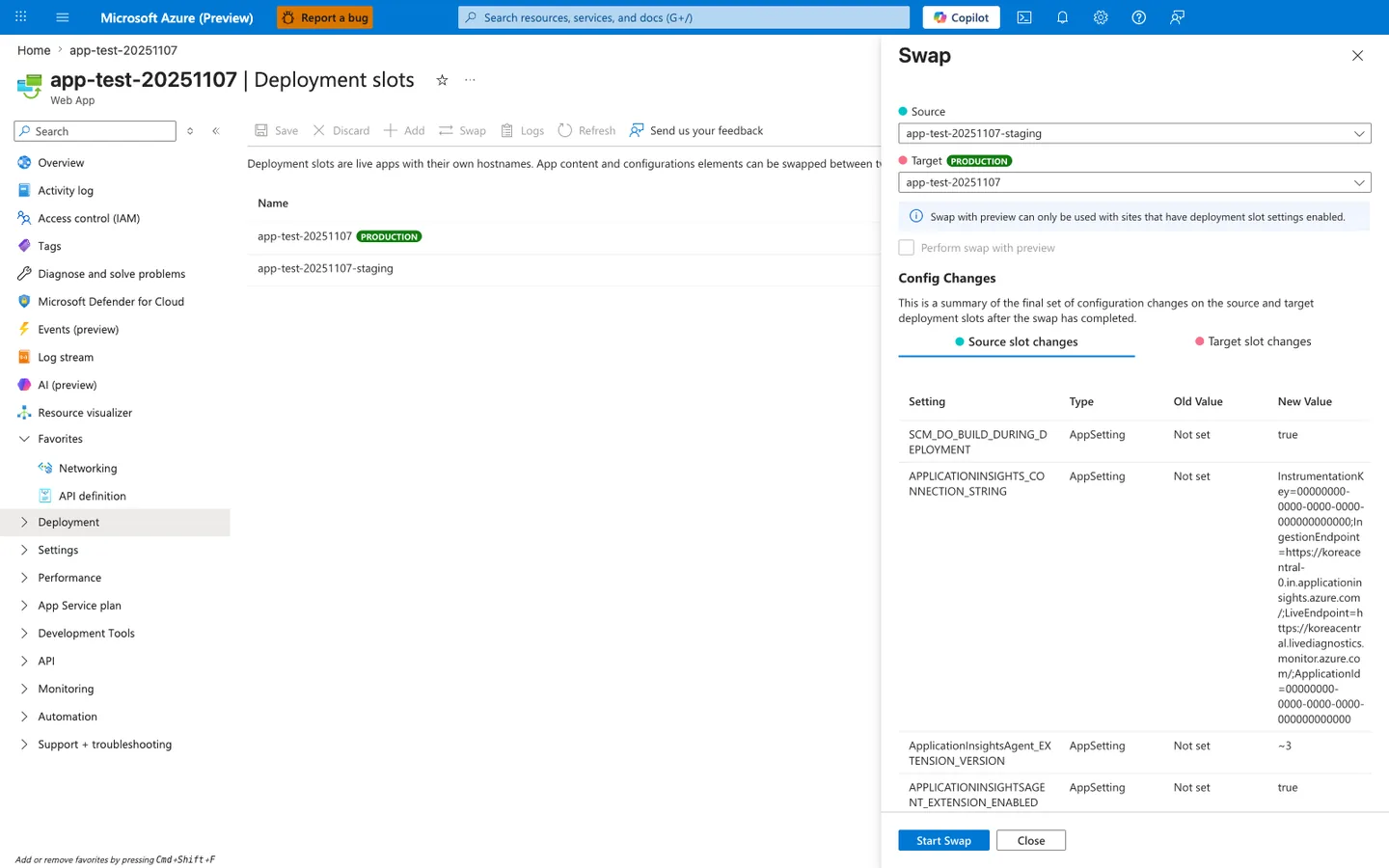
Purpose: Show the configuration changes a swap will apply before you start it.
Look for: The Source and Target slots, Perform swap with preview, and the Config Changes table.
Expected result: The table lists every setting that changes on swap; review each row before selecting Start Swap.
The Deployment slots blade with the Swap panel open is the Portal counterpart to the az webapp deployment slot swap command this recipe drives from CI. The Source: app-test-20251107-staging and Target: app-test-20251107 selectors mirror the staging-to-production promotion direction the recipe validates against. The Config Changes table at the bottom previews how slot-sticky settings will move during the swap, including the APPLICATIONINSIGHTS_CONNECTION_STRING and SCM_DO_BUILD_DURING_DEPLOYMENT rows visible here — the same delta you should inspect before clicking Start Swap. Use this Portal view as the manual checkpoint complementing the automated pre-swap warm-up and health probe steps the recipe issues against the staging slot.