02 - First Deploy
Deploy the ASP.NET Core 8 sample to Azure App Service in a few minutes by publishing the app locally and using az webapp up.
flowchart TD
    DEV[Developer machine] -->|dotnet publish| PUB[Published ASP.NET Core app]
    PUB -->|az webapp up| APP[Azure App Service\nB1 plan\n.NET 8]
    USER[Browser] -->|HTTPS| APP

    style APP fill:#0078d4,color:#fff
    style PUB fill:#E3F2FD
flowchart TD
A[Set RG APP_NAME LOCATION] --> B[dotnet publish]
B --> C[az webapp up]
C --> D[Verify site]
D --> E[View logs]
E --> F[Cleanup]Prerequisites
- Completed 01 - Local Run
- Azure CLI authenticated with
az login - .NET 8 SDK installed
Need private networking later?
For VNet integration, private endpoints, and managed identity, continue with Private network deploy.
Main Content
Step 1: Set deployment variables
| Command/Parameter | Purpose |
|---|---|
RG="rg-dotnet-guide" | Defines the resource group name for the tutorial deployment. |
APP_NAME="app-dotnet-guide-abc123" | Sets a globally unique App Service app name. |
LOCATION="koreacentral" | Chooses the Azure region for the App Service resources. |
Step 2: Build the app
Run dotnet publish from the repository root to create deployable output in ./publish.
dotnet publish "apps/dotnet-aspnetcore/GuideApi/GuideApi.csproj" --configuration Release --output "./publish"
| Command/Parameter | Purpose |
|---|---|
dotnet publish "apps/dotnet-aspnetcore/GuideApi/GuideApi.csproj" --configuration Release --output "./publish" | Restores, builds, and writes the App Service-ready files to the publish directory. |
dotnet publish | Runs the .NET publish pipeline for the specified project. |
"apps/dotnet-aspnetcore/GuideApi/GuideApi.csproj" | Points dotnet publish to the ASP.NET Core project file to build. |
--configuration Release | Produces optimized release artifacts instead of development output. |
--output "./publish" | Places the deployment files in a predictable folder for the next step. |
Expected output
Step 3: Deploy with az webapp up
Run the deployment from the publish directory so App Service receives the published artifacts.
cd "./publish"
az webapp up --name "$APP_NAME" --resource-group "$RG" --location "$LOCATION" --runtime "DOTNETCORE:8.0" --sku B1
| Command/Parameter | Purpose |
|---|---|
cd "./publish" | Moves into the folder that contains the published deployment payload. |
"./publish" | Specifies the directory that contains the published ASP.NET Core files. |
az webapp up --name "$APP_NAME" --resource-group "$RG" --location "$LOCATION" --runtime "DOTNETCORE:8.0" --sku B1 | Creates the resource group, App Service plan, and web app if needed, then deploys the current directory. |
--name "$APP_NAME" | Uses the globally unique web app name for the deployment target. |
--resource-group "$RG" | Places all created resources in the selected resource group. |
--location "$LOCATION" | Creates the App Service resources in the selected Azure region. |
--runtime "DOTNETCORE:8.0" | Selects the .NET 8 App Service runtime. |
--sku B1 | Uses the Basic B1 App Service pricing tier. |
Expected output
Step 4: Verify deployment
WEB_APP_URL="https://$(az webapp show --resource-group "$RG" --name "$APP_NAME" --query defaultHostName --output tsv)"
curl --include "$WEB_APP_URL/health"
| Command/Parameter | Purpose |
|---|---|
WEB_APP_URL="https://$(az webapp show --resource-group "$RG" --name "$APP_NAME" --query defaultHostName --output tsv)" | Builds the app URL from the default hostname returned by App Service. |
az webapp show --resource-group "$RG" --name "$APP_NAME" --query defaultHostName --output tsv | Returns only the default hostname for the deployed app. |
--resource-group "$RG" | Queries the web app in the tutorial resource group. |
--name "$APP_NAME" | Selects the deployed ASP.NET Core app to inspect. |
--query defaultHostName | Extracts only the default hostname field from the response. |
--output tsv | Formats the hostname as plain text for shell substitution. |
curl --include "$WEB_APP_URL/health" | Calls the sample health endpoint to confirm the deployment is serving requests. |
--include | Includes the HTTP response headers in the curl output. |
Step 5: View logs
az webapp log config --resource-group "$RG" --name "$APP_NAME" --application-logging filesystem --level information
az webapp log tail --resource-group "$RG" --name "$APP_NAME"
| Command/Parameter | Purpose |
|---|---|
az webapp log config --resource-group "$RG" --name "$APP_NAME" --application-logging filesystem --level information | Enables filesystem application logging so you can stream recent app events. |
--resource-group "$RG" | Targets the resource group that contains the web app. |
--name "$APP_NAME" | Selects the web app to configure for logging. |
--application-logging filesystem | Stores application logs on the App Service filesystem. |
--level information | Captures informational, warning, and error log events. |
az webapp log tail --resource-group "$RG" --name "$APP_NAME" | Streams live application logs from the deployed web app. |
--resource-group "$RG" | Reads logs from the tutorial resource group. |
--name "$APP_NAME" | Streams logs for the deployed ASP.NET Core app. |
Step 6: Cleanup
| Command/Parameter | Purpose |
|---|---|
az group delete --name "$RG" --yes --no-wait | Deletes the resource group and all App Service resources created by this tutorial. |
--name "$RG" | Targets the tutorial resource group for deletion. |
--yes | Skips the interactive confirmation prompt. |
--no-wait | Starts deletion asynchronously so the shell returns immediately. |
Verification
az webapp upcompletes successfully/healthreturns HTTP 200- Log streaming connects without errors
Troubleshooting
App name already taken
App Service names are globally unique. Change the app name and rerun deployment.
| Command/Parameter | Purpose |
|---|---|
APP_NAME="app-dotnet-guide-$(date +%s)" | Creates a more unique app name when the original name is unavailable. |
date +%s | Generates a Unix timestamp to make the app name unique. |
Health check fails after deployment
- Wait a minute for startup to finish and retry the request.
- Review
az webapp log tailoutput for startup exceptions. - Confirm the publish step completed successfully before deployment.
Run It in the Portal
Portal view: Web App Overview blade - first-deploy verification surface
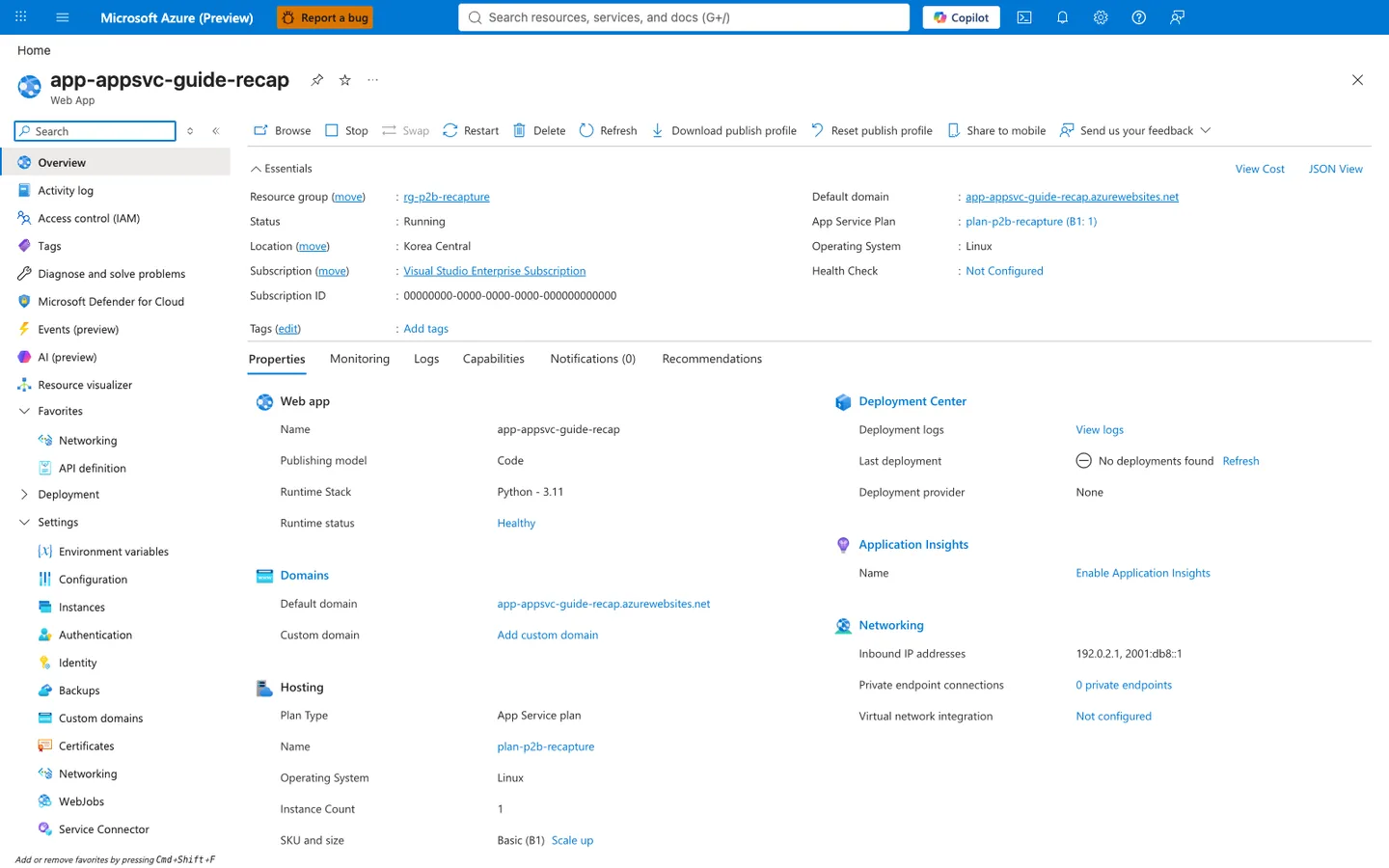
After running az webapp up --runtime "DOTNETCORE:8.0" in this tutorial, the Overview blade is the first Portal verification surface. This particular screenshot was captured from a Python deployment, so the visible Operating System: Linux and Runtime Stack: Python - 3.11 reflect that deployment; for this .NET 8 tutorial the equivalent values read Windows and .NET 8 because az webapp up provisions a Windows App Service plan with the specified DOTNETCORE:8.0 runtime. The OS-agnostic Essentials fields — Status: Running, Default domain, and the attached App Service Plan — are the values you compare against the CLI deployment output, and the Default domain value is what you open in a browser to perform the curl $WEB_APP_URL/health verification step from this tutorial.