Private Endpoints
Connect App Service to backend services over private networking using VNet integration and private endpoints for SQL, Redis, and Storage.
flowchart TD
    A[App Service VNet integration subnet] --> B[Private DNS resolution]
    B --> C[Private Endpoint SQL]
    B --> D[Private Endpoint Redis]
    B --> E[Private Endpoint Storage]
    C --> F[Backend traffic stays private]
    D --> F
E --> FPrerequisites
- App Service Plan tier that supports VNet integration
- Virtual network with dedicated integration subnet
- Backend services configured for private endpoint support
Main content
1) Networking architecture
Recommended layout:
subnet-appservice-integration: delegated for App Service VNet integrationsubnet-private-endpoints: hosts private endpoint NICs- Private DNS zones linked to the VNet
2) Enable VNet integration (Windows App Service)
az webapp vnet-integration add \
  --resource-group "$RESOURCE_GROUP_NAME" \
  --name "$WEB_APP_NAME" \
  --vnet "$VNET_NAME" \
  --subnet "$APP_INTEGRATION_SUBNET_NAME" \
  --output json
az webapp vnet-integration add | Connects the web app to a delegated subnet for outbound VNet integration. | | --resource-group "$RESOURCE_GROUP_NAME" | Targets the resource group that contains the web app. | | --name "$WEB_APP_NAME" | Selects the web app that will join the VNet. | | --vnet "$VNET_NAME" | Uses the specified virtual network for the integration. | | --subnet "$APP_INTEGRATION_SUBNET_NAME" | Attaches the app to the delegated integration subnet. | | --output json | Returns the VNet-integration configuration as JSON. | 3) Create private endpoint for Azure SQL
az network private-endpoint create \
  --resource-group "$RESOURCE_GROUP_NAME" \
  --name "pe-sql-guide" \
  --vnet-name "$VNET_NAME" \
  --subnet "$PRIVATE_ENDPOINT_SUBNET_NAME" \
  --private-connection-resource-id "/subscriptions/<subscription-id>/resourceGroups/<sql-rg>/providers/Microsoft.Sql/servers/<sql-server>" \
  --group-id sqlServer \
  --connection-name "pe-sql-guide-conn" \
  --output json
az network private-endpoint create | Creates a private endpoint NIC for the target Azure SQL server. | | --resource-group "$RESOURCE_GROUP_NAME" | Targets the resource group where the private endpoint resource will be created. | | --name "pe-sql-guide" | Names the private endpoint resource. | | --vnet-name "$VNET_NAME" | Places the private endpoint inside the specified virtual network. | | --subnet "$PRIVATE_ENDPOINT_SUBNET_NAME" | Uses the subnet reserved for private endpoint NICs. | | --private-connection-resource-id "/subscriptions/.../Microsoft.Sql/servers/<sql-server>" | Points the private endpoint at the Azure SQL server resource. | | --group-id sqlServer | Selects the SQL server private-link subresource. | | --connection-name "pe-sql-guide-conn" | Names the private-link connection object. | | --output json | Returns the created private endpoint resource as JSON. | 4) Create private endpoint for Redis
az network private-endpoint create \
  --resource-group "$RESOURCE_GROUP_NAME" \
  --name "pe-redis-guide" \
  --vnet-name "$VNET_NAME" \
  --subnet "$PRIVATE_ENDPOINT_SUBNET_NAME" \
  --private-connection-resource-id "/subscriptions/<subscription-id>/resourceGroups/<redis-rg>/providers/Microsoft.Cache/Redis/<redis-name>" \
  --group-id redisCache \
  --connection-name "pe-redis-guide-conn" \
  --output json
az network private-endpoint create | Creates a private endpoint NIC for the target Azure Cache for Redis instance. | | --resource-group "$RESOURCE_GROUP_NAME" | Targets the resource group where the private endpoint resource will be created. | | --name "pe-redis-guide" | Names the private endpoint resource. | | --vnet-name "$VNET_NAME" | Places the private endpoint inside the specified virtual network. | | --subnet "$PRIVATE_ENDPOINT_SUBNET_NAME" | Uses the subnet reserved for private endpoint NICs. | | --private-connection-resource-id "/subscriptions/.../Microsoft.Cache/Redis/<redis-name>" | Points the private endpoint at the Redis cache resource. | | --group-id redisCache | Selects the Redis private-link subresource. | | --connection-name "pe-redis-guide-conn" | Names the private-link connection object. | | --output json | Returns the created private endpoint resource as JSON. | 5) NSG and route guidance
Allow outbound from integration subnet to:
- SQL private endpoint IP on 1433
- Redis private endpoint IP on 6380
- Storage private endpoint IP on required service ports
Block broad internet egress only after dependencies are confirmed reachable.
6) Connection string and DNS assumptions
Keep service hostnames unchanged (for example, <sql-server>.database.windows.net). Private DNS resolution should map these names to private endpoint IPs within the VNet.
7) App code stays unchanged
builder.Services.AddDbContext<AppDbContext>(options =>
    options.UseSqlServer(builder.Configuration["ConnectionStrings:MainDb"]));

builder.Services.AddStackExchangeRedisCache(options =>
    options.Configuration = builder.Configuration["Redis:Connection"]);
The same code can run with public or private networking if configuration and DNS are consistent.
8) Azure DevOps networking validation step
- task: AzureCLI@2
  displayName: Validate private endpoint state
  inputs:
    azureSubscription: $(azureSubscription)
    scriptType: bash
    scriptLocation: inlineScript
    inlineScript: |
      az network private-endpoint list \
        --resource-group $(resourceGroupName) \
        --output table
Private endpoint without DNS is incomplete
Most connectivity incidents are DNS-related, not code-related. Always validate private DNS zone links and effective name resolution from the app environment.
Verification
- Confirm VNet integration is connected.
- Confirm private endpoints are in
Approvedstate. - Confirm app can reach SQL/Redis with normal hostnames.
az webapp vnet-integration list --resource-group "$RESOURCE_GROUP_NAME" --name "$WEB_APP_NAME" --output table
az webapp vnet-integration list | Lists the current VNet integration attachments for the web app. | | --resource-group "$RESOURCE_GROUP_NAME" | Targets the resource group that contains the web app. | | --name "$WEB_APP_NAME" | Selects the web app whose VNet integration will be listed. | | --output table | Formats the integration list as a readable table. | Use dependency telemetry and synthetic API checks to verify end-to-end connectivity.
Troubleshooting
Name resolution still points to public IP
- Validate private DNS zone records.
- Ensure VNet links are correct.
- Confirm app is integrated with expected VNet/subnet.
Connection timeout to backend
- Review NSG rules and UDRs.
- Confirm backend firewall permits private endpoint traffic.
- Check TLS settings for SQL/Redis client configuration.
Intermittent connectivity during scale events
Use resilient retry settings (EnableRetryOnFailure, Redis reconnect behavior) and monitor transient errors.
Run It in the Portal
Portal view: Networking blade (app-side precondition for backend private endpoints)
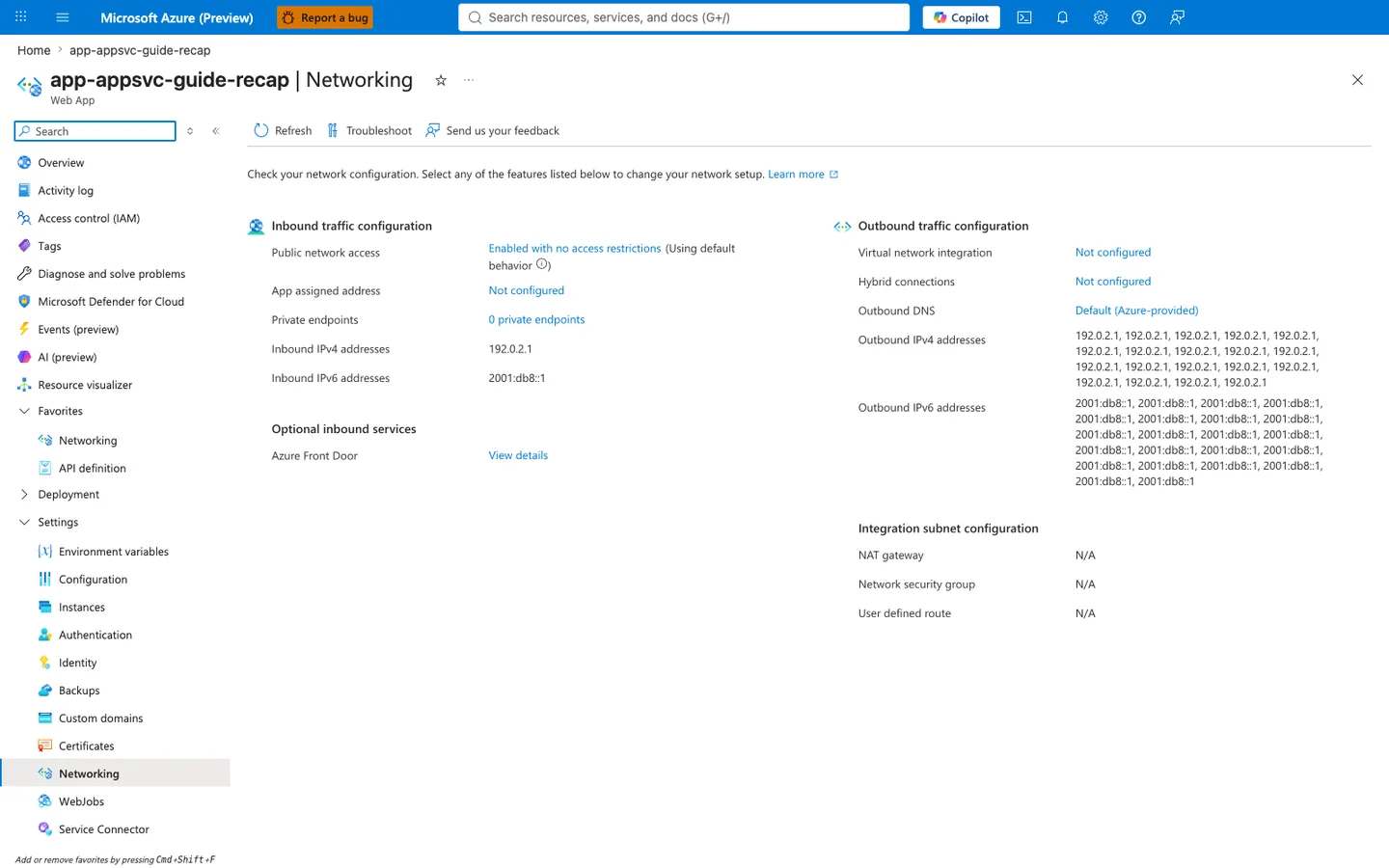
Purpose: Show the app's inbound and outbound network configuration on one page.
Look for: Public network access and Private endpoints under inbound traffic, and Virtual network integration, Outbound DNS, and the outbound address lists under outbound traffic.
Expected result: This capture shows the displayed configuration of a public app without VNet integration: the listed outbound addresses are the platform's potential outbound address pool (not a measured egress address for any connection), and the integration subnet settings show N/A.
This web-app Networking blade is a supporting before-state for the recipe rather than the place where the SQL, Redis, and Key Vault private endpoints themselves are listed for the ASP.NET Core app. The visible Virtual network integration: Not configured row is the app-side prerequisite the recipe changes before private DNS for those backend services can work, while Private endpoints: 0 private endpoints also makes clear the screenshot is not showing downstream private endpoints attached to other resources. Use this capture as the pre-integration checkpoint before running the recipe's VNet and backend private-endpoint steps.
See Also
- Azure SQL
- Redis Cache
- For platform details, see Azure App Service Guide