Managed Identity
Use App Service managed identity with Azure.Identity and DefaultAzureCredential to access Azure resources without storing credentials.
flowchart TD
    A[Enable system-assigned identity] --> B[Get principal ID]
    B --> C[Grant RBAC on target resource]
    C --> D[Use DefaultAzureCredential in code]
    D --> E[Request token at runtime]
    E --> F[Access Azure service]
How RBAC Connects Identity to Resources
A managed identity alone does not grant access. Azure RBAC binds three elements into a role assignment:
flowchart TD
    P[Principal<br/>Who: Managed Identity or Service Principal] --> RA[Role Assignment<br/>Unique GUID per binding]
    RD[Role Definition<br/>What: Key Vault Secrets User, Storage Blob Data Reader, etc.] --> RA
    S[Scope<br/>Where: Subscription, Resource Group, or Resource] --> RA
    RA --> ACCESS[Access Granted]

style RA fill:#f5c542,stroke:#333,color:#000| Element | Question it answers | Example |
|---|---|---|
| Principal | Who needs access? | App Service's managed identity |
| Role Definition | What permission? | Key Vault Secrets User, Storage Blob Data Reader |
| Scope | On which resource? | A specific Key Vault, Storage account, or resource group |
| Role Assignment | The binding itself | Unique GUID — one per (principal + role + scope) combination |
Azure RBAC enforces a uniqueness constraint: only one role assignment can exist for the same (principal, role definition, scope) triple. Attempting to create a duplicate with a different assignment GUID results in a RoleAssignmentExists conflict.
Prerequisites
- App Service app deployed and running
- Permission to assign RBAC roles on target Azure resources
Azure.Identityand relevant Azure SDK packages installed
Main content
1) Enable system-assigned managed identity
az webapp identity assign \
  --resource-group "$RESOURCE_GROUP_NAME" \
  --name "$WEB_APP_NAME" \
  --output json
az webapp identity assign | Enables a system-assigned managed identity on the web app. | | --resource-group "$RESOURCE_GROUP_NAME" | Targets the resource group that contains the app. | | --name "$WEB_APP_NAME" | Selects the web app that will receive the managed identity. | | --output json | Returns the identity object, including principalId, clientId, and type, as JSON. | Capture principal ID:
export WEB_APP_PRINCIPAL_ID=$(az webapp identity show \
  --resource-group "$RESOURCE_GROUP_NAME" \
  --name "$WEB_APP_NAME" \
  --query "principalId" \
  --output tsv)
export WEB_APP_PRINCIPAL_ID=$(az webapp identity show --resource-group "$RESOURCE_GROUP_NAME" --name "$WEB_APP_NAME" --query "principalId" --output tsv) | Queries the web app identity object, selects the principalId field, and stores that object ID in WEB_APP_PRINCIPAL_ID for later RBAC commands. | 2) Grant RBAC on target resource
Example: Key Vault secrets reader role assignment.
az role assignment create \
  --assignee-object-id "$WEB_APP_PRINCIPAL_ID" \
  --assignee-principal-type ServicePrincipal \
  --role "Key Vault Secrets User" \
  --scope "/subscriptions/<subscription-id>/resourceGroups/<rg-name>/providers/Microsoft.KeyVault/vaults/<vault-name>" \
  --output json
az role assignment create | Creates an Azure RBAC role assignment for the managed identity. | | --assignee-object-id "$WEB_APP_PRINCIPAL_ID" | Uses the web app managed identity principal object ID as the assignee. | | --assignee-principal-type ServicePrincipal | Declares that the assignee object is a service principal-backed managed identity. | | --role "Key Vault Secrets User" | Grants permission to read secret values from the target Key Vault. | | --scope "/subscriptions/.../vaults/<vault-name>" | Limits the role assignment to the specified Key Vault resource scope. | | --output json | Returns the created role-assignment record as JSON. | 3) Add Azure SDK packages
<ItemGroup>
  <PackageReference Include="Azure.Identity" Version="1.12.0" />
  <PackageReference Include="Azure.Security.KeyVault.Secrets" Version="4.6.0" />
  <PackageReference Include="Azure.Storage.Blobs" Version="12.21.1" />
</ItemGroup>
4) Use DefaultAzureCredential in code
using Azure.Identity;
using Azure.Security.KeyVault.Secrets;

builder.Services.AddSingleton(_ =>
{
    var vaultUri = new Uri("https://<vault-name>.vault.azure.net/");
    return new SecretClient(vaultUri, new DefaultAzureCredential());
});
Read secret in endpoint:
[ApiController]
[Route("api/secrets")]
public sealed class SecretsController : ControllerBase
{
    private readonly SecretClient _secretClient;
    public SecretsController(SecretClient secretClient) => _secretClient = secretClient;

    [HttpGet("sample")]
    public async Task<IActionResult> GetSampleSecret(CancellationToken cancellationToken)
    {
        var secret = await _secretClient.GetSecretAsync("sample-secret", cancellationToken: cancellationToken);
        return Ok(new { name = secret.Value.Name, length = secret.Value.Value.Length });
    }
}
5) Local development behavior
DefaultAzureCredential uses local identity chain during development (Azure CLI / VS sign-in) and managed identity in App Service automatically.
var credential = new DefaultAzureCredential(new DefaultAzureCredentialOptions
{
    ExcludeInteractiveBrowserCredential = true
});
6) Code-free auth pattern for Azure clients
Many Azure SDK clients only need endpoint + credential:
var blobServiceClient = new BlobServiceClient(new Uri("https://<storage-account>.blob.core.windows.net"), new DefaultAzureCredential());
7) Azure DevOps identity-aware validation snippet
- task: AzureCLI@2
  displayName: Verify managed identity principal exists
  inputs:
    azureSubscription: $(azureSubscription)
    scriptType: bash
    scriptLocation: inlineScript
    inlineScript: |
      az webapp identity show \
        --resource-group $(resourceGroupName) \
        --name $(webAppName) \
        --output table
Least privilege first
Assign only the minimum role at the narrowest scope. Prefer resource-level scope over subscription-level assignments.
Verification
Expect successful response without any secret stored in source code or App Settings plain text.
Troubleshooting
403 from target resource
- Confirm correct role assignment and scope.
- Wait for RBAC propagation (can take several minutes).
- Verify managed identity principal ID used in assignment is current.
Works locally but fails in App Service
- Confirm system-assigned identity is enabled on deployed app.
- Confirm outbound networking and DNS allow resource access.
- Remove local-only credential assumptions from code.
Unexpected credential in local development
Set explicit exclusions in DefaultAzureCredentialOptions to prevent credential chain surprises.
Run It in the Portal
Portal view: Identity blade (canonical managed-identity enablement surface)
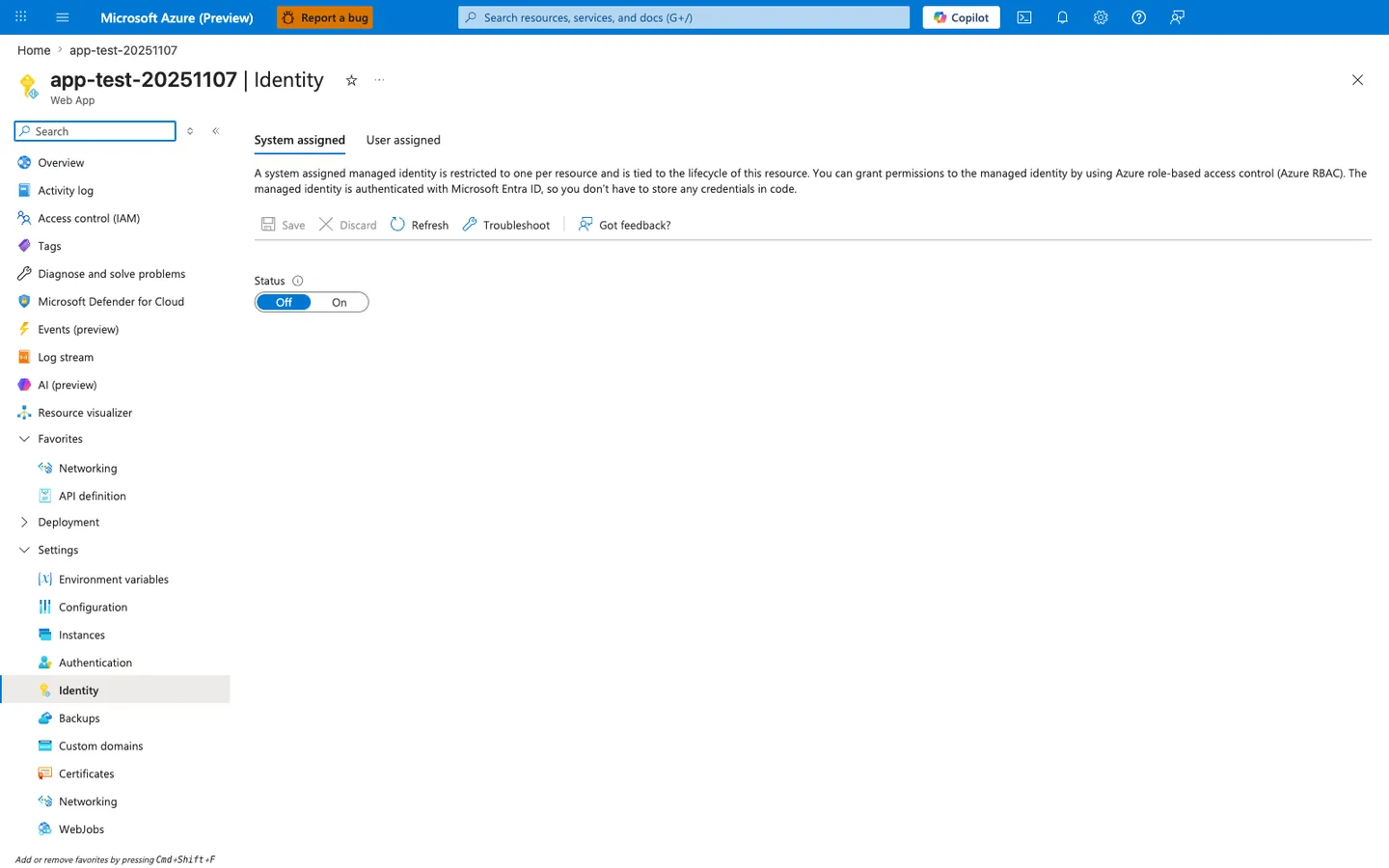
Purpose: Show where the system-assigned managed identity is turned on.
Look for: The System assigned tab and the Status toggle.
Expected result: The toggle is Off in this capture. After you turn it on and save, the blade shows the identity's object (principal) ID.
The Identity blade is the canonical Portal surface for the managed-identity flow this recipe walks through for the ASP.NET Core app. With System assigned active and the Status toggle moved from Off to On, App Service creates the Entra ID principal that the recipe then uses with Azure.Identity DefaultAzureCredential to access downstream resources via Azure.Security.KeyVault.Secrets, Azure.Storage.Blobs, and other Entra-aware SDK clients. The descriptive header on this blade restates the lifecycle guarantee the recipe relies on — the identity is tied to the resource — and the User assigned tab is the alternative path the recipe covers for identities shared across multiple apps. Use this blade as step 1 of the recipe before issuing any downstream role assignments via the CLI.
See Also
- Key Vault References
- Azure SQL
- For platform details, see Azure App Service Guide