Deployment Slots Validation
Use staging slots to validate deployments before production swap, with health checks and automated safeguards in Azure DevOps.
flowchart TD
    A[Deploy build to staging slot] --> B[Apply slot-sticky settings]
    B --> C[Run health endpoints]
    C --> D[Run readyz check]
    D --> E{Validation passed?}
    E -- Yes --> F[Swap staging to production]
E -- No --> G[Rollback and investigate]Prerequisites
- App Service plan supports deployment slots
- Production app already running
- CI/CD pipeline can deploy to specific slot
Main content
1) Create staging slot
az webapp deployment slot create \
  --resource-group "$RESOURCE_GROUP_NAME" \
  --name "$WEB_APP_NAME" \
  --slot "staging" \
  --output json
az webapp deployment slot create | Creates a new deployment slot for the web app. | | --resource-group "$RESOURCE_GROUP_NAME" | Targets the resource group that contains the app. | | --name "$WEB_APP_NAME" | Selects the production web app that will own the new slot. | | --slot "staging" | Names the new slot staging. | | --output json | Returns the created slot resource as JSON. | 2) Configure slot-sticky settings
Mark environment-specific values so they do not swap:
az webapp config appsettings set \
  --resource-group "$RESOURCE_GROUP_NAME" \
  --name "$WEB_APP_NAME" \
  --slot "staging" \
  --slot-settings ASPNETCORE_ENVIRONMENT=Staging FeatureFlags__UseBeta=true \
  --output json
az webapp config appsettings set | Writes app settings into the specified slot configuration. | | --resource-group "$RESOURCE_GROUP_NAME" | Targets the resource group that contains the app. | | --name "$WEB_APP_NAME" | Selects the web app whose staging slot will be updated. | | --slot "staging" | Applies the settings to the staging slot instead of production. | | --slot-settings ASPNETCORE_ENVIRONMENT=Staging FeatureFlags__UseBeta=true | Creates slot-sticky settings that stay with staging during swaps. | | --output json | Returns the updated slot settings as JSON. | 3) Deploy artifact to staging slot
az webapp deploy \
  --resource-group "$RESOURCE_GROUP_NAME" \
  --name "$WEB_APP_NAME" \
  --slot "staging" \
  --src-path "/tmp/guideapi.zip" \
  --type zip \
  --output json
az webapp deploy | Deploys an artifact to the selected web app slot using OneDeploy. | | --resource-group "$RESOURCE_GROUP_NAME" | Targets the resource group that contains the app. | | --name "$WEB_APP_NAME" | Selects the web app that will receive the deployment. | | --slot "staging" | Sends the deployment to the staging slot. | | --src-path "/tmp/guideapi.zip" | Uploads the ZIP package located at /tmp/guideapi.zip. | | --type zip | Treats the uploaded artifact as a ZIP deployment package. | | --output json | Returns deployment metadata as JSON. | 4) Add explicit health endpoint checks
curl --fail --silent "https://$WEB_APP_NAME-staging.azurewebsites.net/health"
curl --fail --silent "https://$WEB_APP_NAME-staging.azurewebsites.net/info"
5) Add version-aware validation endpoint
app.MapGet("/readyz", (IHostEnvironment env) => Results.Ok(new
{
    status = "ready",
    environment = env.EnvironmentName,
    buildVersion = Environment.GetEnvironmentVariable("BUILD_VERSION") ?? "unknown"
}));
6) Swap staging to production
az webapp deployment slot swap \
  --resource-group "$RESOURCE_GROUP_NAME" \
  --name "$WEB_APP_NAME" \
  --slot "staging" \
  --target-slot "production" \
  --output json
az webapp deployment slot swap | Swaps the selected source slot into the target slot. | | --resource-group "$RESOURCE_GROUP_NAME" | Targets the resource group that contains the app. | | --name "$WEB_APP_NAME" | Selects the web app whose slots will be swapped. | | --slot "staging" | Uses the staging slot as the swap source. | | --target-slot "production" | Promotes staging into the production slot. | | --output json | Returns the swap operation details as JSON. | 7) Optional auto-swap configuration
az webapp deployment slot auto-swap \
  --resource-group "$RESOURCE_GROUP_NAME" \
  --name "$WEB_APP_NAME" \
  --slot "staging" \
  --auto-swap-slot "production" \
  --output json
az webapp deployment slot auto-swap | Configures automatic swap behavior for the selected slot. | | --resource-group "$RESOURCE_GROUP_NAME" | Targets the resource group that contains the app. | | --name "$WEB_APP_NAME" | Selects the web app whose slot policy will change. | | --slot "staging" | Applies the auto-swap setting to the staging slot. | | --auto-swap-slot "production" | Makes the staging slot swap into production after successful deployments. | | --output json | Returns the updated auto-swap configuration as JSON. | Linux Limitation
Auto-swap is not supported for web apps on Linux and Web App for Containers. Use manual swap or CI/CD-triggered swap instead. See Deployment Slots for details.
Use auto-swap only when health checks and deployment confidence are high.
8) Azure DevOps staged deployment example
- stage: DeployStaging
  jobs:
    - deployment: DeployToStaging
      environment: 'staging'
      strategy:
        runOnce:
          deploy:
            steps:
              - task: AzureWebApp@1
                inputs:
                  azureSubscription: $(azureSubscription)
                  appType: webApp
                  appName: $(webAppName)
                  deployToSlotOrASE: true
                  resourceGroupName: $(resourceGroupName)
                  slotName: staging
                  package: '$(Pipeline.Workspace)/drop/**/*.zip'

- stage: ValidateAndSwap
  dependsOn: DeployStaging
  jobs:
    - job: Validate
      steps:
        - script: curl --fail --silent "https://$(webAppName)-staging.azurewebsites.net/health"
    - job: Swap
      dependsOn: Validate
      steps:
        - task: AzureCLI@2
          inputs:
            azureSubscription: $(azureSubscription)
            scriptType: bash
            scriptLocation: inlineScript
            inlineScript: |
              az webapp deployment slot swap \
                --resource-group $(resourceGroupName) \
                --name $(webAppName) \
                --slot staging \
                --target-slot production \
                --output none
Validate before swap, always
A successful deployment is not the same as a healthy runtime. Require endpoint validation and telemetry checks before production swap.
Verification
- Staging serves expected build version.
- Production remains stable before swap.
- Swap completes without config leakage.
- Post-swap
/healthremains healthy.
Troubleshooting
Staging healthy, production fails after swap
- Check slot-sticky config alignment.
- Verify hostnames/certs for slot-specific behavior.
- Confirm staging used production-like dependencies where required.
Swap operation blocked
Validate no pending restart/operation exists and check App Service Activity Log for conflicts.
Auto-swap caused unexpected release
Disable auto-swap and enforce manual approval stage in Azure DevOps for high-risk environments.
Run It in the Portal
Portal view: Deployment slots with Swap dialog (validated promotion)
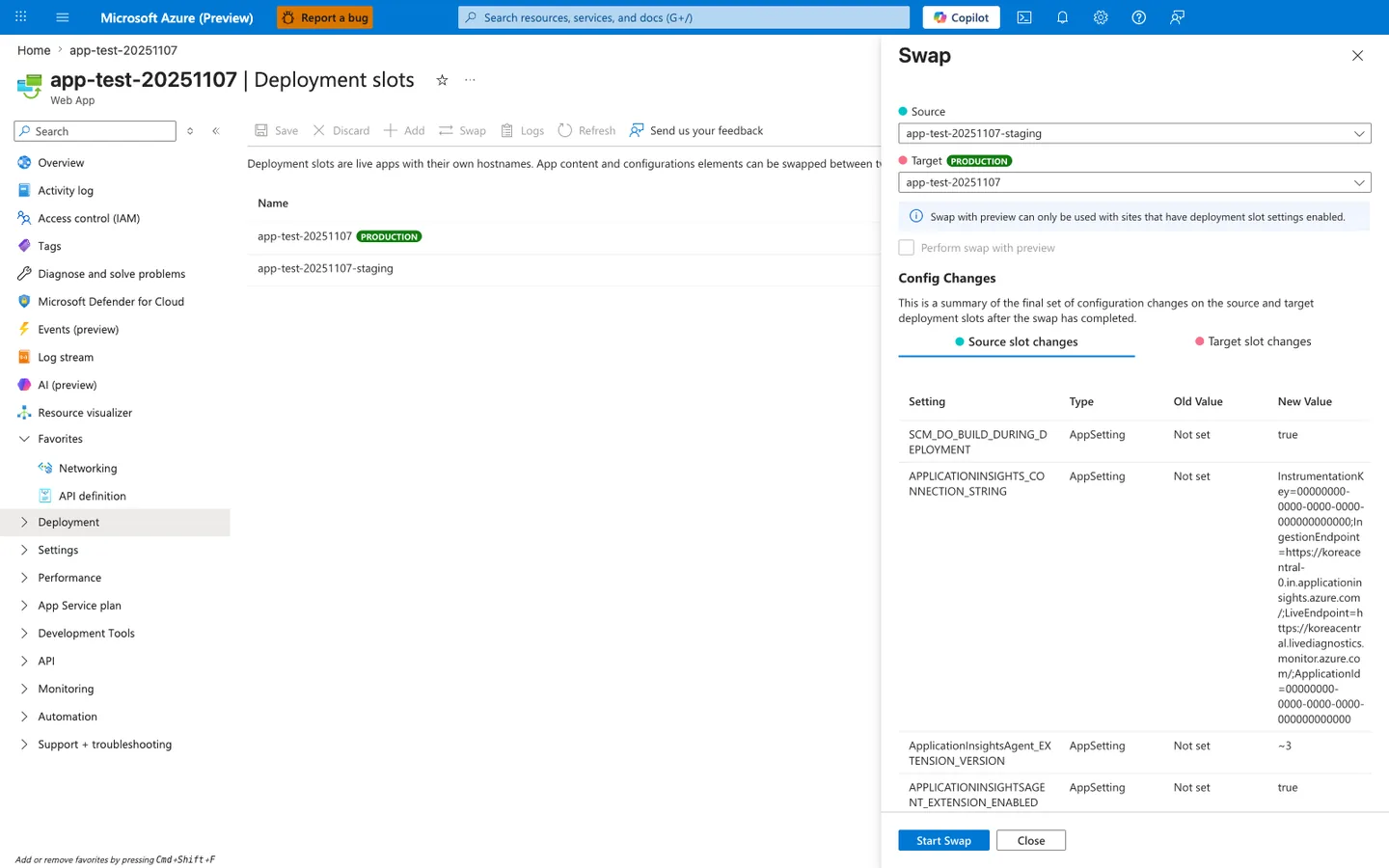
Purpose: Show the configuration changes a swap will apply before you start it.
Look for: The Source and Target slots, Perform swap with preview, and the Config Changes table.
Expected result: The table lists every setting that changes on swap; review each row before selecting Start Swap.
The Deployment slots blade with the Swap panel open is the Portal counterpart to the az webapp deployment slot swap command this recipe drives from CI for the ASP.NET Core app. The Source: app-test-20251107-staging and Target: app-test-20251107 selectors mirror the staging-to-production promotion direction the recipe validates against. The Config Changes table at the bottom previews how slot-sticky settings will move during the swap, including the APPLICATIONINSIGHTS_CONNECTION_STRING and SCM_DO_BUILD_DURING_DEPLOYMENT rows visible here — the same delta you should inspect before clicking Start Swap. Use this Portal view as the manual checkpoint complementing the automated pre-swap validation calls (health probe, smoke test) the recipe issues against the staging slot.
See Also
- Tutorial: 06. CI/CD
- Tutorial: 03. Configuration
- For platform details, see Azure App Service Guide