Security Best Practices
Security in Azure App Service is strongest when controls are layered: identity, secret management, authentication, network isolation, edge protection, and strict application policy. This guide defines practical defaults for production architecture decisions.
Why This Matters
Adopt a defense-in-depth model so a single control failure does not immediately expose the workload.
flowchart TD
    A[Internet] --> B[WAF Layer]
    B --> C[Network Isolation]
    C --> D[Authentication Layer]
    D --> E[Application Layer]
    E --> F[Identity to Dependencies]
    F --> G[Secrets and Data Access]

    C --> C1[Private Endpoints]
    C --> C2[Access Restrictions]
    D --> D1[Easy Auth]
    E --> E1[CORS Policy]
    F --> F1[Managed Identity]
    G --> G1[Key Vault References]
Recommended Practices
Prerequisites
- Existing Web App and App Service Plan
- Azure Entra tenant and required permissions
- Security ownership defined across application, platform, and network teams
- Variables set:
RGAPP_NAMEKV_NAME
Managed identity first (system vs user-assigned)
Managed identity should be the default credential model for App Service apps accessing Azure dependencies.
Identity type guidance:
| Identity type | Use when | Trade-off |
|---|---|---|
| System-assigned | App has independent lifecycle and permissions | Simple lifecycle, identity deleted with app |
| User-assigned | Multiple apps share one identity or lifecycle must be decoupled | More governance overhead, better reuse control |
Enable system-assigned identity:
| Command | Purpose | Key flags |
|---|---|---|
az webapp identity assign | Enable system-assigned managed identity on the web app | --resource-group, --name scope the target; no identity ID needed for system-assigned |
Attach user-assigned identity:
az webapp identity assign \
  --resource-group $RG \
  --name $APP_NAME \
  --identities "/subscriptions/<subscription-id>/resourceGroups/$RG/providers/Microsoft.ManagedIdentity/userAssignedIdentities/id-shared-app" \
  --output json
| Command | Purpose | Key flags |
|---|---|---|
az webapp identity assign --identities | Attach an existing user-assigned managed identity to the web app | --identities takes the full resource ID of the userAssignedIdentity |
Verify identity configuration:
az webapp identity show \
  --resource-group $RG \
  --name $APP_NAME \
  --query "{type:type,principalId:principalId,userAssigned:userAssignedIdentities}" \
  --output json
| Command | Purpose | Key flags |
|---|---|---|
az webapp identity show | Read the current identity configuration for verification | --query extracts type, principalId, and userAssignedIdentities for RBAC follow-up |
Portal view: Identity blade
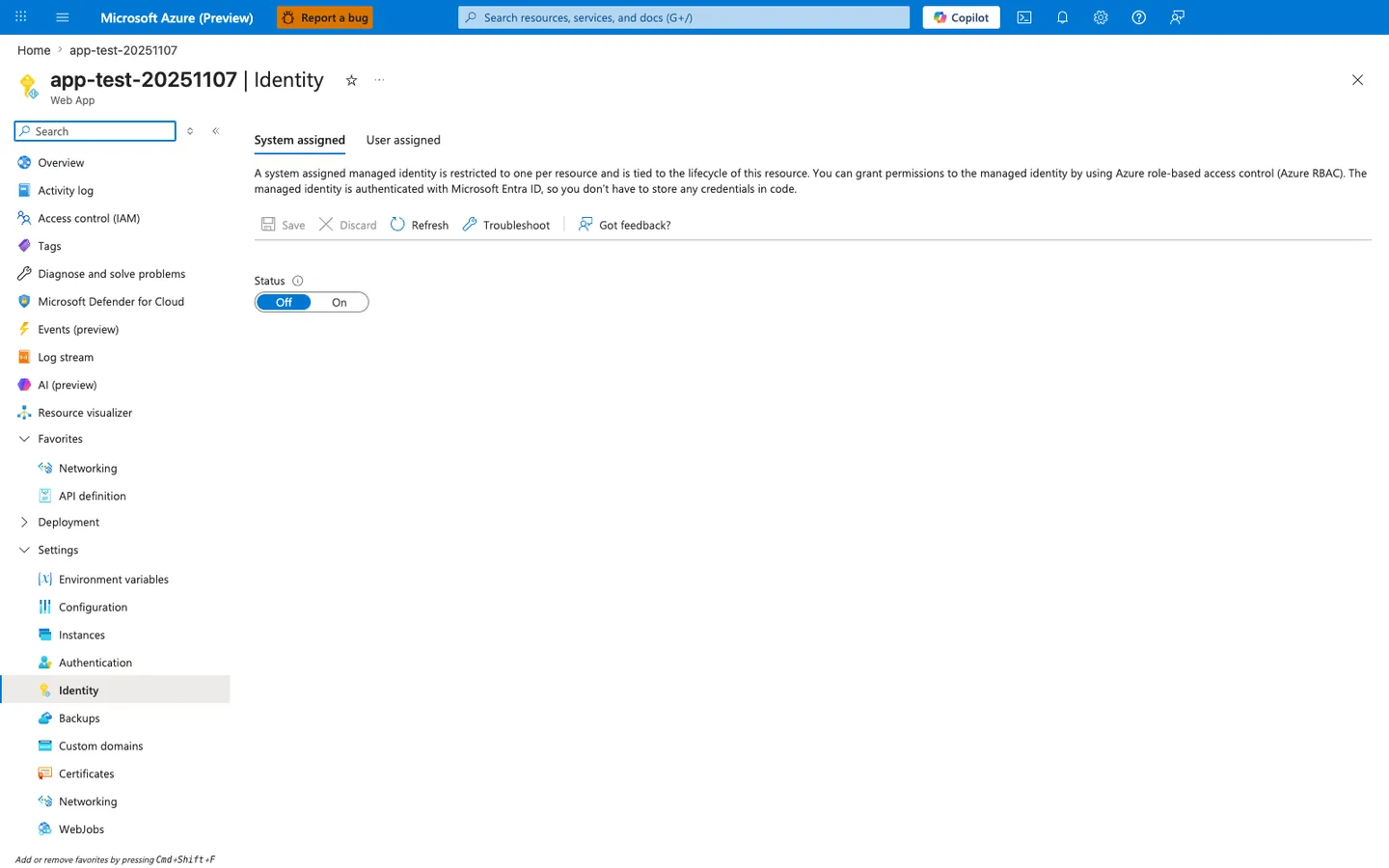
Purpose: Show where the system-assigned managed identity is turned on.
Look for: The System assigned tab and the Status toggle.
Expected result: The toggle is Off in this capture. After you turn it on and save, the blade shows the identity's object (principal) ID.
The Identity blade is the surface where the "managed identity first" principle is either enforced or quietly skipped. The visible Status: Off state is the App Service default for a newly created Web App and is also the most common source of secret-leakage incidents — until this toggle is flipped to On, every Azure-resource access from the app must use a static credential. The System assigned and User assigned tabs map directly to the identity-type decision table above: use System assigned when the app's lifecycle owns its identity, and switch to User assigned when one identity must be shared across multiple apps. After az webapp identity assign, this blade should show Status: On together with a principalId value, which is the input required for the RBAC role assignments that follow.
Start with least privilege
Grant only the minimum required roles at the narrowest possible scope. Review and trim permissions regularly.
Use Key Vault references for secret material
Do not place raw secrets in source code, pipeline variables without governance, or ad hoc app settings.
Preferred pattern:
- Store secret in Azure Key Vault.
- Grant app identity access to secret.
- Reference secret from app setting using Key Vault reference syntax.
Set Key Vault reference app setting:
az webapp config appsettings set \
  --resource-group $RG \
  --name $APP_NAME \
  --settings "DB_PASSWORD=@Microsoft.KeyVault(SecretUri=https://$KV_NAME.vault.azure.net/secrets/db-password/)" \
  --output json
| Command | Purpose | Key flags |
|---|---|---|
az webapp config appsettings set | Set an app setting whose value is a Key Vault reference | --settings NAME=@Microsoft.KeyVault(SecretUri=...) uses reference syntax that resolves at runtime |
Inspect setting metadata safely:
az webapp config appsettings list \
  --resource-group $RG \
  --name $APP_NAME \
  --query "[?name=='DB_PASSWORD'].{name:name,value:value}" \
  --output json
| Command | Purpose | Key flags |
|---|---|---|
az webapp config appsettings list | Inspect a Key Vault reference setting without exposing secret contents | --query "[?name=='X']" filters to the one setting; the value field shows the reference expression, not the resolved secret |
Reference syntax does not replace authorization
Key Vault references work only when network access and identity permissions are correctly configured. Confirm both during deployment validation.
Use Easy Auth for platform authentication
App Service Authentication/Authorization (Easy Auth) is a strong default for many web and API workloads.
When Easy Auth is beneficial:
- You want centralized identity provider integration.
- You need consistent auth behavior across multiple apps.
- You want to reduce custom auth boilerplate in code.
Enable Easy Auth (baseline):
az webapp auth update \
  --resource-group $RG \
  --name $APP_NAME \
  --enabled true \
  --action LoginWithAzureActiveDirectory \
  --output json
| Command | Purpose | Key flags |
|---|---|---|
az webapp auth update | Enable Easy Auth (App Service Authentication) with Entra ID as the provider | --enabled true activates Easy Auth; --action LoginWithAzureActiveDirectory sets the unauthenticated-request policy |
Review auth configuration:
| Command | Purpose | Key flags |
|---|---|---|
az webapp auth show | Review the current Easy Auth configuration | Returns provider settings, enabled state, and unauthenticated action for audit |
Platform auth and app auth must be intentional
If you combine Easy Auth with custom in-app authorization logic, clearly define responsibility boundaries to avoid conflicting behavior.
Apply network isolation by default
Security posture improves significantly when internet exposure is reduced and explicitly controlled.
Recommended inbound model:
- Private endpoint for private inbound access
- Access restrictions for explicit allow/deny controls
- Optional edge gateway/WAF for internet-facing patterns
Example access restriction rules:
az webapp config access-restriction add \
  --resource-group $RG \
  --name $APP_NAME \
  --rule-name AllowCorp \
  --action Allow \
  --ip-address 203.0.113.0/24 \
  --priority 100 \
  --output json

az webapp config access-restriction add \
  --resource-group $RG \
  --name $APP_NAME \
  --rule-name DenyAll \
  --action Deny \
  --ip-address 0.0.0.0/0 \
  --priority 2147483647 \
  --output json
| Command | Purpose | Key flags |
|---|---|---|
az webapp config access-restriction add --action Allow | Add an explicit allow rule for a trusted CIDR range | --priority controls evaluation order (lower first); --ip-address accepts CIDR notation |
az webapp config access-restriction add --action Deny | Add a catch-all deny rule as the final priority | --priority 2147483647 places the rule last; --ip-address 0.0.0.0/0 matches all remaining traffic |
Integrate WAF for edge protection
For internet-facing applications, place a Web Application Firewall layer in front of App Service.
Common options:
- Azure Front Door with WAF policy
- Application Gateway with WAF policy
WAF value areas:
- Managed rule sets for common attack classes
- Centralized policy and logging
- Rate limiting and edge inspection controls
WAF is not a substitute for app security
WAF reduces risk but does not replace secure coding, input validation, patch management, and least-privilege identity.
CORS configuration with explicit origins
CORS should be explicit, minimal, and environment-specific.
Add allowed origins:
az webapp cors add \
  --resource-group $RG \
  --name $APP_NAME \
  --allowed-origins "https://portal.contoso.com" "https://admin.contoso.com" \
  --output json
| Command | Purpose | Key flags |
|---|---|---|
az webapp cors add | Add explicit CORS origins to the app | --allowed-origins takes a space-separated list of exact origin URLs; wildcards are discouraged in production |
Show configured origins:
| Command | Purpose | Key flags |
|---|---|---|
az webapp cors show | Show the currently configured CORS origins | Output lists all allowedOrigins currently on the app for audit |
Remove obsolete origin:
az webapp cors remove \
  --resource-group $RG \
  --name $APP_NAME \
  --allowed-origins "https://legacy.contoso.com" \
  --output json
| Command | Purpose | Key flags |
|---|---|---|
az webapp cors remove | Remove obsolete CORS origins from the app | --allowed-origins takes the exact origin URL to delete; must match a currently configured origin |
Avoid wildcard origins in production
* origins increase exposure and can undermine frontend trust boundaries. Prefer exact origin lists with regular review.
Enforce transport security baseline
Even with other controls, transport settings are non-negotiable:
- HTTPS-only enabled
- Minimum TLS 1.2 or higher
- Insecure FTP modes disabled where policy requires
Apply transport baseline:
az webapp update \
  --resource-group $RG \
  --name $APP_NAME \
  --https-only true \
  --output json

az webapp config set \
  --resource-group $RG \
  --name $APP_NAME \
  --min-tls-version 1.2 \
  --ftps-state Disabled \
  --output json
| Command | Purpose | Key flags |
|---|---|---|
az webapp update --https-only true | Enforce HTTPS-only for all inbound traffic | Redirects HTTP requests to HTTPS at the platform edge |
az webapp config set --min-tls-version 1.2 --ftps-state Disabled | Set the minimum inbound TLS version and disable insecure FTP modes | --min-tls-version accepts 1.0, 1.1, 1.2, or 1.3; --ftps-state Disabled blocks FTP and FTPS deployment protocols |
Advanced Topics
- Use conditional access and identity protection policies for operator access paths.
- Add workload identity governance with periodic role attestation.
- Correlate WAF events, App Service logs, and identity logs for incident investigations.
- Apply policy-as-code to block insecure transport and missing identity configurations.
Common Mistakes / Anti-Patterns
- Long-lived secrets hardcoded in app settings.
- Shared broad-privilege identity across unrelated workloads.
- Easy Auth enabled without clear route-level authorization model.
- Public exposure left open during or after private endpoint rollout.
- Wildcard CORS used permanently because of early integration convenience.
Validation Checklist
Validate these controls before go-live:
- [ ] Managed identity enabled and role assignments reviewed.
- [ ] Key Vault references used for all sensitive configuration.
- [ ] Easy Auth configured or equivalent app-level model documented.
- [ ] Private endpoint and access restrictions implemented as designed.
- [ ] WAF policy deployed for internet-facing workloads.
- [ ] CORS origins explicitly listed and environment-specific.
- [ ] HTTPS/TLS baseline enforced.
- [ ] Security logs routed to centralized monitoring.