Reliability Best Practices
Reliability in Azure App Service comes from deliberate architecture and operational discipline. This guide focuses on practical design decisions that reduce outage frequency, shorten recovery time, and improve user trust.
Why This Matters
For production systems, reliability should be expressed through measurable targets:
- Availability target (for example, 99.9% or higher)
- Recovery Time Objective (RTO)
- Recovery Point Objective (RPO)
- Error budget and incident response thresholds
Reliability is multi-layered
Platform health, application behavior, and dependency resilience all contribute to end-to-end uptime.
Recommended Practices
Prerequisites
Before implementing advanced reliability patterns, ensure:
- Structured logging and distributed tracing are enabled
- Health endpoint exists and validates critical dependencies
- Backups are configured and periodically tested
- Incident runbooks have clear ownership and escalation
Health Check Probe Configuration
Health checks are the first reliability control in App Service. They allow unhealthy instances to be detected and removed from rotation.
Design Principles for Health Endpoints
- Keep response lightweight and deterministic
- Validate required dependencies (database, cache, key services)
- Separate readiness from deep diagnostics where possible
- Return clear status codes and minimal payload
Example Health Check Configuration
az webapp config set \
    --resource-group $RG \
    --name $APP_NAME \
    --generic-configurations '{"healthCheckPath":"/healthz"}'
| Command | Purpose | Key flags |
|---|---|---|
az webapp config set --generic-configurations '{"healthCheckPath":"/healthz"}' | Register the health-probe path so App Service can remove unhealthy instances from rotation | --generic-configurations accepts a JSON string; healthCheckPath is the property the platform reads to enable health probing |
What a Good /healthz Should Validate
- Process liveness and request handling loop
- Dependency connectivity with timeout guard
- Critical configuration presence
- Version metadata for rollout debugging
Portal view: Health check blade
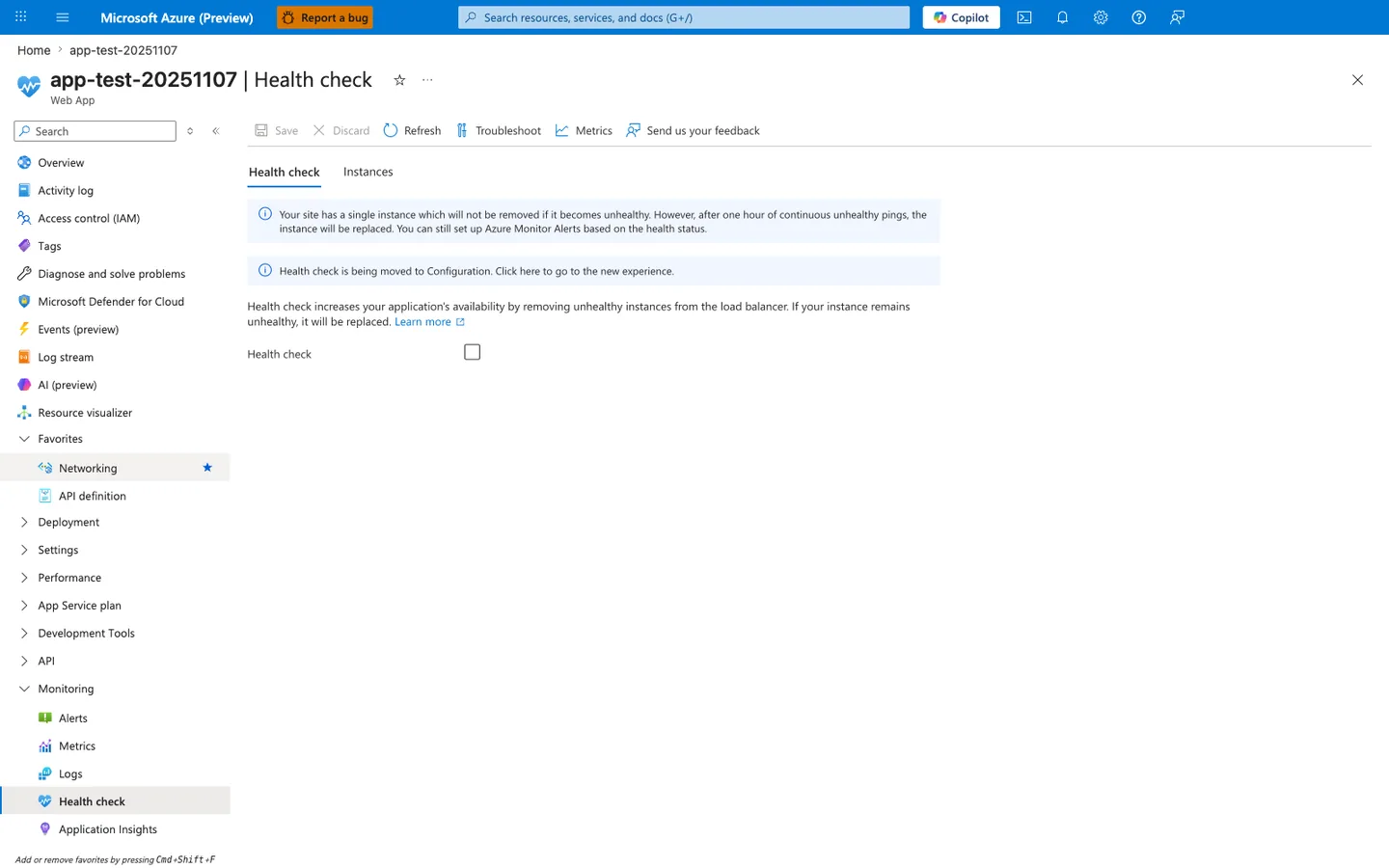
The Health check blade is the platform's enforcement point for the rotation-removal behavior every reliability strategy depends on. The visible state captures both the most common anti-pattern and the platform's own warning about it: the Health check checkbox is unchecked, and the blue banner explicitly states that a single-instance plan cannot remove an unhealthy instance — it can only be replaced after a full hour of failing pings. This is why this guide pairs /healthz configuration with the minimum two instances rule: without the checkbox enabled and at least two instances, neither rotation nor fast replacement is available. Enable the checkbox, set the path to /healthz, and verify the change moves the platform from "replace after an hour" to "remove from rotation immediately".
Do not fake healthy status
If key dependencies are unavailable, return unhealthy. Hiding failures delays detection and increases incident impact.
Minimum Instance Count for High Availability
For production workloads, run at least two instances.
Why minimum two instances matters:
- Reduces single-instance failure impact
- Supports rolling maintenance without complete service loss
- Improves resilience during transient host issues
Single instance is a single failure domain
One instance in production means any restart, crash, or host issue can become user-visible downtime.
Multi-Region Deployment Patterns
Single-region design is often acceptable for low-criticality apps, but production-critical systems should plan for regional disruption.
Pattern 1: Active-Passive
- Primary region serves all traffic
- Secondary region stays warm for failover
- DNS or traffic manager performs failover routing
Pros:
- Simpler operational model
- Lower write consistency complexity
Cons:
- Secondary capacity may be underutilized
- Failover testing is mandatory to avoid surprise failures
Pattern 2: Active-Active
- Multiple regions serve traffic concurrently
- Global routing distributes traffic by priority, latency, or geography
- Requires stronger data and session architecture
Pros:
- Better regional resilience
- Potentially lower user latency by geography
Cons:
- Higher architecture and operations complexity
- Harder consistency and incident isolation
Reliability Architecture with Health Checks
flowchart TD
    U[Users] --> G[Global traffic routing]
    G --> R1[Region A App Service]
    G --> R2[Region B App Service]
    R1 --> H1[/healthz probes/]
    R2 --> H2[/healthz probes/]
    R1 --> D1[(Regional data tier)]
    R2 --> D2[(Regional data tier)]
    H1 --> M[Monitoring and alerting]
    H2 --> M
    M --> O[On-call and incident runbook]
Graceful Termination
App Service can recycle instances during scale, patching, and deployment events. Applications should use the runtime and hosting model's supported graceful-shutdown mechanism, but must remain safe if the callback doesn't arrive or the available time expires.
Plan for a short, bounded grace period
Microsoft Learn documents a container-specific graceful-termination control rather than a universal signal sequence for every App Service recycle path:
- For Linux containers,
WEBSITES_CONTAINER_STOP_TIME_LIMITis the number of seconds App Service waits for the container to terminate gracefully. - The documented default is 5 seconds, and the setting can be increased to a maximum of 120 seconds.
Treat this period as bounded, not as a durability guarantee. Do not assume that every code-based app, operating system, hosting model, or lifecycle path receives SIGTERM, SIGKILL, or the same drain interval unless its current platform documentation establishes that contract.
Why Graceful Termination Matters
- Prevents abrupt termination of in-flight requests
- Reduces partial writes and data corruption risk
- Enables cleaner release transitions and scale-in events
Graceful Shutdown Checklist
- Register the runtime and hosting model's supported shutdown callback
- Stop accepting new requests quickly (close the listener or health endpoint)
- Finish in-flight requests within the platform's grace window for your hosting model
- For Linux containers, raise
WEBSITES_CONTAINER_STOP_TIME_LIMITif 5 seconds is insufficient, up to the documented 120-second maximum - Flush logs/telemetry and close outbound connections cleanly
- Move long-running cleanup (large flush, archive upload) outside the request path so it does not depend on shutdown
Language-specific implementation
Use this document for design guidance, then implement signal handlers in your language guide runtime section.
Retry and Circuit Breaker Patterns
Most production outages are dependency-driven, not web-tier-driven. Reliability requires controlled failure handling for downstream calls.
Retry Best Practices
- Retry only transient failure types
- Use exponential backoff with jitter
- Set upper bounds on attempts and timeout budget
- Avoid infinite retries
Circuit Breaker Best Practices
- Open circuit when error threshold exceeded
- Fail fast while circuit is open
- Probe with limited half-open requests
- Emit breaker state metrics for visibility
Retries can amplify outages
Without backoff and limits, retries create thundering herds against already-failing dependencies.
Backup and Restore Strategy
Backups are a reliability control for data/configuration recovery, not a substitute for high availability.
Strategy Components
- Scheduled app backups with defined retention
- Database-native backup alignment with app backup schedule
- Storage account durability review
- Documented restore sequence and ownership
Validation Requirements
- Perform periodic restore drills in non-production
- Measure real restore time against RTO target
- Verify restored app boots and passes health checks
# Example: list current backup configuration
az webapp config backup show \
    --resource-group $RG \
    --webapp-name $APP_NAME
| Command | Purpose | Key flags |
|---|---|---|
az webapp config backup show | Inspect the current backup configuration to verify schedule, retention, and storage target | Uses --webapp-name (not --name) to target the app; use --resource-group to scope |
Failure Scenario Planning
Scenario A: One Instance Unhealthy
Expected behavior:
- Health checks detect and remove unhealthy instance from rotation
- Remaining instances continue serving traffic
Scenario B: Dependency Latency Spike
Expected behavior:
- Timeout and retry policy engages
- Circuit breaker opens if sustained failures occur
- Alerting notifies operators before full outage
Scenario C: Regional Outage
Expected behavior:
- Global routing removes affected region
- Secondary region serves traffic within RTO
- Post-failover validation runbook executes
Reliability Operating Model
Pre-Production
- Load and chaos-style failure testing
- Dependency failure simulations
- Runbook dry-runs for failover and restore
Production
- SLO dashboards and error budget tracking
- Alert tuning to reduce noise and improve signal
- Weekly review of high-severity incident trends
Post-Incident
- Root cause analysis with timeline accuracy
- Preventive action items with ownership and deadlines
- Documentation updates in operations and best-practices sections
Common Mistakes / Anti-Patterns
Single instance in production
One instance in production means any restart, crash, or host issue can become user-visible downtime. Run at least two instances (see Minimum Instance Count).
Health check that always returns success
Returning healthy when key dependencies are unavailable hides failures and delays incident detection. Health probes must fail when the app cannot serve real traffic — a probe that always reports healthy converts a fast rotation event into a slow full-hour instance replacement.
Retry without backoff or upper bound
Unbounded or immediate retries create thundering herds against already-failing dependencies. Combine exponential backoff, jitter, and per-attempt timeout budgets. Cap the total attempt count so retry logic does not amplify the outage.
Treating backup as a substitute for HA
Backups recover data and configuration but do not deliver availability during a live outage. Pair backups with high availability (minimum two instances) and multi-region design so backup remains a recovery control, not a downtime workaround.
Deep health checks that run full diagnostics
Health probes that hit every dependency deeply can cascade failures under load and increase mean-time-to-restore. Keep probes lightweight and deterministic. Separate readiness from deep diagnostics so a slow dependency check does not trigger rotation of a still-serving instance.
Validation Checklist
Before calling a reliability posture production-ready, verify:
- [ ] Availability, RTO, and RPO targets are documented and reviewed.
- [ ] Health endpoint validates critical dependencies with bounded timeout.
- [ ] Health check is enabled in the App Service configuration (Portal or CLI).
- [ ] Minimum 2 instances configured for production workloads.
- [ ] Multi-region pattern (active-passive or active-active) is chosen when SLO requires regional resilience.
- [ ] Graceful-shutdown callback and termination-time configuration are validated for the hosting model.
- [ ] Retry logic uses exponential backoff, jitter, and attempt caps.
- [ ] Circuit breaker thresholds are tuned and emit state metrics.
- [ ] Backup schedule aligned with database backup schedule; restore drill executed within RTO.
- [ ] Failover runbook rehearsed for all documented scenarios (unhealthy instance, dependency spike, regional outage).
See Also
- Platform - How App Service Works
- Operations - Health and Recovery
- Operations - Backup and Restore
- Best Practices - Deployment
- Best Practices - Common Anti-Patterns
Sources
- Best practices for Azure App Service (Microsoft Learn)
- Monitor instances in Azure App Service with Health check (Microsoft Learn)
- Back up and restore your app in Azure App Service (Microsoft Learn)
- Create and manage deployment slots in Azure App Service (Microsoft Learn)
- App Service environment variables and app settings reference (Microsoft Learn)