Networking Best Practices
Networking design in Azure App Service is primarily about controlling direction and trust boundaries: private inbound paths, predictable outbound paths, and reliable DNS behavior across those paths.
Why This Matters
Networking is the first control plane an App Service workload exposes to the outside world, and it is also the layer that most often fails silently in production. Getting these decisions right up front is materially cheaper than retrofitting them:
- Outbound IPs can change under scale operations, region moves, or SKU changes — hard-coded allowlists break with no explicit warning.
- Private Endpoint and VNet Integration solve different problems (inbound privacy vs outbound reachability); confusing them leads to either data-plane exposure or broken egress.
- SNAT port exhaustion presents as intermittent connectivity issues that are indistinguishable from remote-service faults without the right diagnostic signals in place.
- DNS resolution paths differ across shared-plan, VNet-integrated, and Private Endpoint topologies; a stale mental model causes reproducible-but-unexplained lookup failures.
This document consolidates the concrete design and validation practices that keep those failure modes from becoming incidents.
Prerequisites
- Existing Web App and App Service Plan
- Existing virtual network and required subnets
- Permissions to manage App Service, networking, and private DNS resources
- Variables set:
RGAPP_NAMEVNET_NAMEINTEGRATION_SUBNET_NAMEPRIVATE_ENDPOINT_SUBNET_NAME
Recommended Practices
Networking goals for production
Use App Service networking to achieve four outcomes:
- Inbound exposure is intentionally restricted.
- Outbound traffic to private dependencies is deterministic.
- SNAT behavior is managed under concurrency.
- DNS resolution aligns with your private topology.
graph TD
    Internet[Internet Users] --> WAF[WAF or Reverse Proxy]
    WAF --> PE[Private Endpoint for App Service]

    subgraph VNet[Azure Virtual Network]
        subgraph PE_SUBNET[Private Endpoint Subnet]
            PE
        end
        subgraph APP_SUBNET[VNet Integration Subnet]
            VNETINT[VNet Integration]
        end
        subgraph DEP_SUBNET[Private Dependency Subnet]
            SQL[(Azure SQL Private Endpoint)]
            REDIS[(Azure Cache Private Endpoint)]
            API[Internal API]
        end
        DNS[Private DNS Zones]
    end

    App[Azure App Service App] --> VNETINT
    VNETINT --> SQL
    VNETINT --> REDIS
    VNETINT --> API
    App --> DNS
    DNS --> PE
    DNS --> SQL
    DNS --> REDIS
1) Use VNet Integration for outbound traffic
VNet Integration is the primary App Service feature for private outbound connectivity.
Use it when your app must reach:
- Private endpoints for PaaS dependencies
- Internal services reachable through peering/express routes
- Internal DNS zones and split-horizon naming schemes
Configure integration:
az webapp vnet-integration add \
  --resource-group $RG \
  --name $APP_NAME \
  --vnet $VNET_NAME \
  --subnet $INTEGRATION_SUBNET_NAME \
  --output json
| Flag | Description |
|---|---|
--resource-group $RG | Targets the resource group that contains the web app. |
--name $APP_NAME | Selects the App Service app to connect to the VNet. |
--vnet $VNET_NAME | Chooses the virtual network that provides private outbound reachability. |
--subnet $INTEGRATION_SUBNET_NAME | Uses the delegated integration subnet that App Service will attach for outbound traffic. |
--output json | Returns the integration result as JSON so you can confirm the attached subnet details. |
Route all app outbound through VNet path where required:
az webapp config appsettings set \
  --resource-group $RG \
  --name $APP_NAME \
  --settings WEBSITE_VNET_ROUTE_ALL=1 \
  --output json
| Flag | Description |
|---|---|
--resource-group $RG | Targets the resource group that contains the app. |
--name $APP_NAME | Selects the web app whose runtime settings will be updated. |
--settings WEBSITE_VNET_ROUTE_ALL=1 | Writes the setting that forces outbound app traffic onto the VNet-integrated path. |
--output json | Returns the updated app settings payload in JSON format. |
Validate integration state:
| Flag | Description |
|---|---|
--resource-group $RG | Scopes the query to the resource group that contains the app. |
--name $APP_NAME | Lists the VNet integration entries attached to this web app. |
--output table | Shows the integration subnet and VNet details in a quick-readable table. |
Outbound only
VNet Integration controls outbound connectivity. It does not make inbound access private by itself.
2) Use Private Endpoint for inbound privacy
Private Endpoint is the standard pattern for private inbound access to an App Service app.
Use it when:
- App must not be publicly reachable
- Access should originate only from approved VNets
- You need private IP resolution for app endpoints
Create private endpoint:
APP_RESOURCE_ID=$(az webapp show \
  --resource-group $RG \
  --name $APP_NAME \
  --query id \
  --output tsv)

az network private-endpoint create \
  --resource-group $RG \
  --name "pe-$APP_NAME" \
  --vnet-name $VNET_NAME \
  --subnet $PRIVATE_ENDPOINT_SUBNET_NAME \
  --private-connection-resource-id $APP_RESOURCE_ID \
  --group-id sites \
  --connection-name "pec-$APP_NAME" \
  --output json
| Command | Description |
|---|---|
APP_RESOURCE_ID=$(az webapp show --resource-group $RG --name $APP_NAME --query id --output tsv) | Reads the web app ARM resource ID into a shell variable so the Private Endpoint can target that app resource. |
az network private-endpoint create ... | Creates a Private Endpoint in the specified subnet and connects it to the App Service sites private link group. |
Check connection status:
az network private-endpoint show \
  --resource-group $RG \
  --name "pe-$APP_NAME" \
  --query "{state:provisioningState,connection:privateLinkServiceConnections[0].privateLinkServiceConnectionState.status}" \
  --output json
| Flag | Description |
|---|---|
--resource-group $RG | Looks up the Private Endpoint in the given resource group. |
--name "pe-$APP_NAME" | Selects the specific Private Endpoint created for the app. |
--query "{state:provisioningState,connection:privateLinkServiceConnections[0].privateLinkServiceConnectionState.status}" | Returns the endpoint provisioning state plus the first private link connection approval status. |
--output json | Formats the reduced status payload as JSON. |
3) Design for SNAT port efficiency
SNAT exhaustion is a frequent cause of intermittent outbound failures under concurrency.
Use these patterns to reduce SNAT pressure:
- Connection pooling for database and HTTP clients
- Async I/O patterns to avoid thread starvation and long-held sockets
- Reuse HTTP clients instead of creating per-request clients
- Bounded retries with jitter to avoid retry storms
- Short dependency timeouts to free sockets faster
Practical implementation guidance:
| Dependency type | SNAT-friendly pattern | Anti-pattern |
|---|---|---|
| HTTP APIs | Shared client instance with keep-alive | New client object per request |
| SQL/DB | Runtime-level connection pool | Open/close connection on every small operation |
| Cache | Reused multiplexer/client | Frequent reconnect loops |
| Messaging | Persistent channels where supported | Burst connect/disconnect cycles |
SNAT symptoms are often misleading
SNAT exhaustion can look like random timeouts, dependency flakiness, or transient DNS failures. Always inspect connection lifecycle and concurrency patterns before blaming downstream services.
4) Own DNS behavior in private topologies
Private networking fails most often at DNS, not at routing.
For App Service private endpoint scenarios:
- Configure
privatelink.azurewebsites.netprivate DNS zone. - Link the zone to the correct VNets.
- Ensure clients resolve app hostname to private IP.
- Validate dependency hostnames resolve to private addresses where expected.
Create and link private DNS zone:
az network private-dns zone create \
  --resource-group $RG \
  --name privatelink.azurewebsites.net \
  --output json

az network private-dns link vnet create \
  --resource-group $RG \
  --zone-name privatelink.azurewebsites.net \
  --name "link-$VNET_NAME" \
  --virtual-network $VNET_NAME \
  --registration-enabled false \
  --output json
| Command | Description |
|---|---|
az network private-dns zone create ... | Creates the Private DNS zone that maps App Service private endpoint names under privatelink.azurewebsites.net. |
az network private-dns link vnet create ... | Links that Private DNS zone to the VNet so clients in the VNet can resolve the app hostname to the private IP. |
Validate DNS from private network context:
Expected: private IP address in your VNet range.
Do not mix unresolved DNS ownership
If platform, network, and app teams each assume another team owns DNS, incidents become long and repetitive. Assign explicit DNS ownership and validation steps.
5) Hybrid Connections vs VNet Integration
VNet Integration provides outbound private connectivity. Private Endpoint provides inbound private access. They solve different directions of traffic flow.
| Decision area | Hybrid Connections | VNet Integration |
|---|---|---|
| Connectivity model | App-level relay to specific host:port endpoints | Network-level integration to a delegated subnet |
| Scope | Targeted dependency access | Broad private network access |
| Operational complexity | Simpler for limited cases | Better for comprehensive private dependency strategy |
| Protocol flexibility | Host/port specific constraints | Works with broader private routing patterns |
| Typical use case | Few legacy endpoints without full VNet adoption | Standard enterprise private architecture |
Decision guideline:
- Choose Hybrid Connections for a narrow, transitional requirement.
- Choose VNet Integration for strategic private networking.
flowchart TD
    A[Need private outbound connectivity?] --> B{Only a few specific host:port endpoints?}
    B -->|Yes| C[Consider Hybrid Connections]
    B -->|No| D[Use VNet Integration]
    C --> E{Long-term enterprise private architecture?}
    E -->|Yes| D
    E -->|No| F[Keep Hybrid Connections with explicit limits]
    D --> G[Plan DNS, routes, and subnet capacity]
6) Inbound control layering
Even with private endpoints, define layered inbound control:
- Edge control (WAF/reverse proxy)
- App access restrictions for explicit allow/deny where applicable
- Private endpoint approval workflow
- Monitoring for unauthorized or unexpected requests
Example access restriction rule:
az webapp config access-restriction add \
  --resource-group $RG \
  --name $APP_NAME \
  --rule-name AllowCorp \
  --action Allow \
  --ip-address 203.0.113.0/24 \
  --priority 100 \
  --output json
| Flag | Description |
|---|---|
--resource-group $RG | Targets the resource group that contains the app. |
--name $APP_NAME | Applies the access restriction to this web app. |
--rule-name AllowCorp | Names the rule so it can be reviewed or removed later. |
--action Allow | Permits requests that match the specified source range. |
--ip-address 203.0.113.0/24 | Limits the allow rule to that corporate CIDR block. |
--priority 100 | Evaluates this rule before the default catch-all rule because lower numbers run first. |
--output json | Returns the created rule details in JSON. |
Portal view: Access Restrictions blade
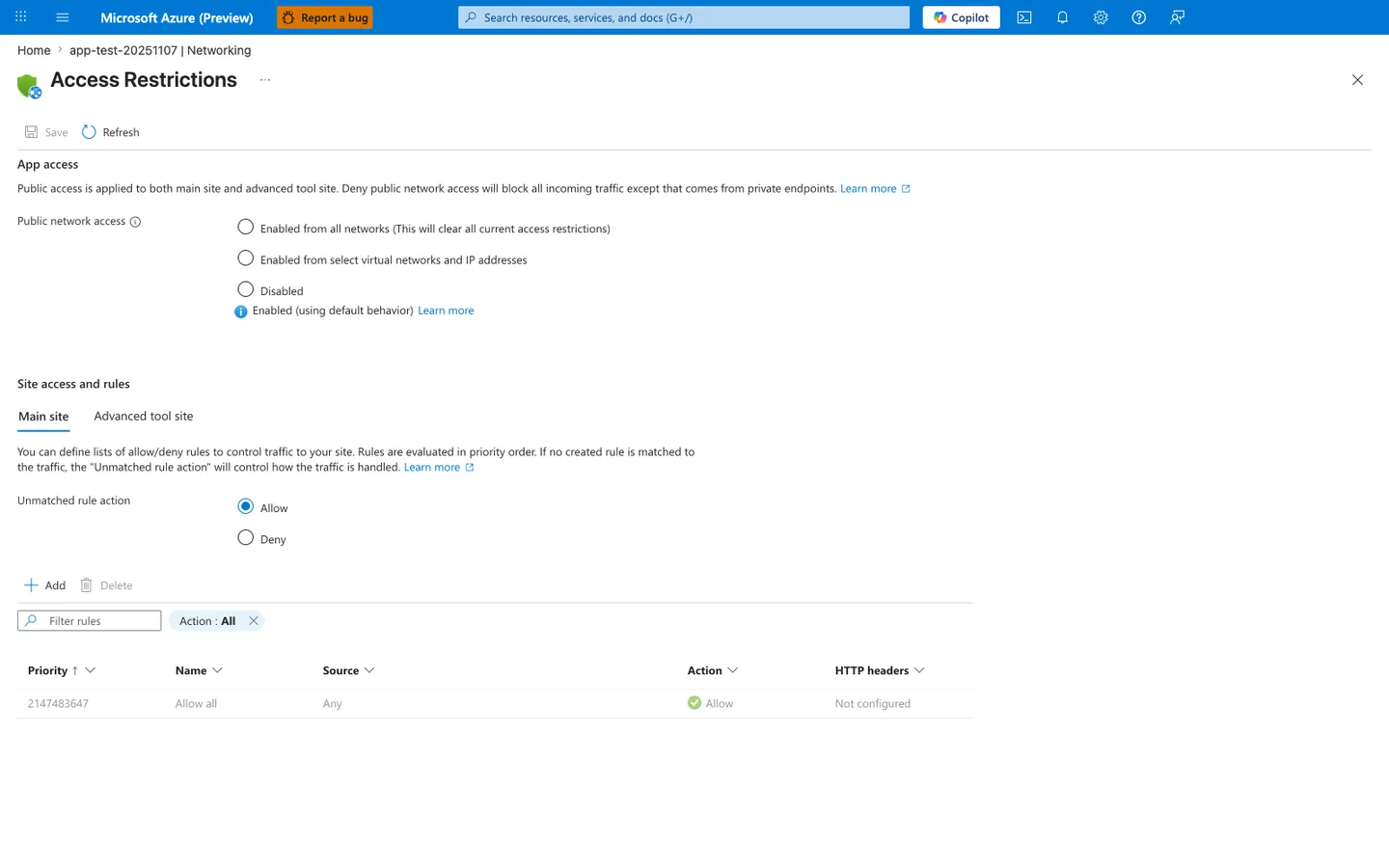
Purpose: Show the inbound access state before any access restriction is added.
Look for: Public network access shows Enabled (using default behavior), Unmatched rule action is Allow, and the only rule is Allow all with priority 2147483647.
Expected result: With no custom rules, the displayed default-endpoint policy admits any source until you add rules or disable public network access. This is a configuration reading, not a measured reachability test.
The Access Restrictions blade is where the layered inbound model described above is enforced. The visible default state shows the two most important behaviors this guide warns against assuming away: Public network access is Enabled (using default behavior), which is the portal wording for an unset property whose documented default is enabled when no private endpoint exists, and the implicit Allow all rule at priority 2147483647 with Unmatched rule action: Allow means that without any explicit rules the main-site policy admits every source on the default endpoint. This displays configuration; it does not show whether any client can reach the app. The Main site and Advanced tool site tabs separate runtime traffic from SCM/Kudu management traffic — both must be hardened. After running the az webapp config access-restriction add command above with priority 100, the new AllowCorp rule should appear above the default Allow all row, and the Unmatched rule action should be flipped to Deny to convert the implicit allow-by-default posture into an explicit deny-by-default posture.
7) Troubleshooting patterns to pre-plan
Include these commands in runbooks:
az webapp show \
  --resource-group $RG \
  --name $APP_NAME \
  --query "{defaultHostName:defaultHostName,outboundIpAddresses:outboundIpAddresses}" \
  --output json

az network private-endpoint list \
  --resource-group $RG \
  --output table

az network private-dns record-set a list \
  --resource-group $RG \
  --zone-name privatelink.azurewebsites.net \
  --output table
| Command | Description |
|---|---|
az webapp show ... --query "{defaultHostName:defaultHostName,outboundIpAddresses:outboundIpAddresses}" | Shows the app hostname and its current outbound IP set for quick incident triage. |
az network private-endpoint list --resource-group $RG --output table | Lists Private Endpoints in the resource group so you can confirm the app endpoint exists and identify its name. |
az network private-dns record-set a list ... | Lists A records in the App Service private DNS zone so you can verify hostname-to-private-IP mappings. |
8) Manage IP address changes proactively
App Service IP addresses are not static. Treating them as fixed causes allowlist drift, broken firewall rules, and silent connectivity failures after scale events.
Outbound IP allowlist strategy
Two CLI fields exist for outbound IPs — use the right one:
| Field | What it represents | When to use |
|---|---|---|
outboundIpAddresses | IPs currently active | Read-only diagnostics |
possibleOutboundIpAddresses | All IPs the app may ever use on this plan | Firewall allowlists — always use this |
Query both to understand current vs. potential exposure:
az webapp show \
    --resource-group "$RG" \
    --name "$APP_NAME" \
    --query "{active:outboundIpAddresses,possible:possibleOutboundIpAddresses}" \
    --output json
| Flag | Description |
|---|---|
--resource-group "$RG" | Queries the web app from the specified resource group. |
--name "$APP_NAME" | Selects the app whose outbound IP ranges you need to review. |
--query "{active:outboundIpAddresses,possible:possibleOutboundIpAddresses}" | Returns the current outbound IPs and the full possible outbound IP set in one object. |
--output json | Preserves both IP lists as JSON for allowlist review or automation. |
Example output (PII masked):
| Output field | Meaning | Operational use |
|---|---|---|
active | Currently in-use outbound IPs on this plan | Diagnostic snapshot only — do not allowlist |
possible | Full candidate set the plan could rotate through | Union of active+possible is the correct allowlist |
{
  "active": "<13 outbound IPv4 addresses; run the command above to retrieve current values>",
  "possible": "<31 additional outbound IPv4 addresses; the union of active + possible is the full allowlist candidate set>"
}
Events that change outbound IPs
- Scaling the App Service Plan up or down (SKU change)
- Moving the app to a different region or scale unit
- Enabling or disabling VNet Integration
- Platform-side infrastructure updates
After any of these events, re-query possibleOutboundIpAddresses and update downstream allowlists before traffic is restored.
Outbound IP behavior under VNet Integration
With route-all enabled (formerly WEBSITE_VNET_ROUTE_ALL=1, now exposed as a platform setting through the portal or CLI), all outbound traffic is routed through the VNet. The source IP remains one of the app's standard outbound IPs unless the integration subnet uses a NAT Gateway or forces traffic through a firewall or NVA, in which case the egress IP becomes that device's IP.
Verify after enabling:
# Confirm VNet integration is active
az webapp vnet-integration list \
    --resource-group "$RG" \
    --name "$APP_NAME" \
    --output table

# Confirm route-all setting
az webapp config appsettings list \
    --resource-group "$RG" \
    --name "$APP_NAME" \
    --query "[?name=='WEBSITE_VNET_ROUTE_ALL']" \
    --output table
| Command | Description |
|---|---|
az webapp vnet-integration list --resource-group "$RG" --name "$APP_NAME" --output table | Confirms that the app is attached to the expected integration subnet and VNet. |
az webapp config appsettings list --resource-group "$RG" --name "$APP_NAME" --query "[?name=='WEBSITE_VNET_ROUTE_ALL']" --output table | Filters the app settings list to the WEBSITE_VNET_ROUTE_ALL entry so you can verify whether route-all is enabled. |
Location       Name              ResourceGroup     VnetResourceId
-------------  ----------------  ----------------  -------------------------------------------------
Korea Central  snet-integration  rg-<masked>       .../virtualNetworks/vnet-<masked>/subnets/snet-integration
Update downstream allowlists after enabling VNet Integration
Route-all changes the path of outbound traffic, but not necessarily the observed source IP. Downstream services will continue to see one of the app's standard outbound IPs unless the integration subnet uses a NAT Gateway or routes traffic through a firewall or NVA. Update allowlists to reflect the actual egress design before enabling route-all in production.
Inbound IP and Private Endpoint behavior
Creating a Private Endpoint assigns a private IP from the endpoint subnet. Whether the default (public) inbound endpoint stays reachable depends on the raw publicNetworkAccess value, whether a private endpoint exists, and the main and SCM access restrictions: when the property is unset and a private endpoint exists the documented default is disabled, while an explicit Enabled value keeps it on. For private-only inbound access, set and verify publicNetworkAccess deliberately. Site access restrictions are not evaluated for private endpoint traffic, so they constrain only the default endpoint while it stays enabled. See Private Endpoint and Access Restriction Decisions.
Query the current inbound IP:
az webapp show \
    --resource-group "$RG" \
    --name "$APP_NAME" \
    --query "inboundIpAddress" \
    --output tsv
| Flag | Description |
|---|---|
--resource-group "$RG" | Looks up the app in the specified resource group. |
--name "$APP_NAME" | Selects the web app whose current public inbound IP you want to inspect. |
--query "inboundIpAddress" | Returns only the app's inbound IP address field. |
--output tsv | Prints the IP as plain text so it can be copied into tests or notes. |
Query the Private Endpoint's assigned private IP:
az network private-endpoint show \
    --resource-group "$RG" \
    --name "pe-$APP_NAME" \
    --query "customDnsConfigs[0].ipAddresses" \
    --output json
| Flag | Description |
|---|---|
--resource-group "$RG" | Reads the Private Endpoint from the given resource group. |
--name "pe-$APP_NAME" | Selects the app's Private Endpoint resource. |
--query "customDnsConfigs[0].ipAddresses" | Returns the IP list from the first custom DNS config entry attached to the Private Endpoint. |
--output json | Keeps the returned private IP list in JSON array form. |
Example output:
Validate that DNS resolves to the private IP from within the VNet:
When run from a VM inside the VNet with the private DNS zone configured, the response resolves to the Private Endpoint IP (for example, 192.0.2.4) instead of the public IP. The Private Endpoint IP was confirmed via az network private-endpoint show (koreacentral, 2026-05-01) and sanitized for publication.
A Private Endpoint does not by itself prove public access is closed
A Private Endpoint adds a private inbound path. Default-endpoint access depends on the raw publicNetworkAccess value, whether a private endpoint exists, and the main and SCM access restrictions: when the property is unset and a private endpoint exists the documented default is disabled, while an explicit Enabled value keeps it on. Complete the sequence:
- Create the Private Endpoint.
- Verify DNS resolves to the private IP from the target VNet.
- Record the raw
publicNetworkAccessvalue and set it deliberately (Disabled for private-only access). If the default endpoint must stay enabled, add access restrictions that constrain it. - Validate main and SCM separately, with a negative control against the default endpoint.
If the default endpoint stays enabled, a rule like the following constrains only default-endpoint traffic; site rules are not evaluated for private endpoint traffic.
az webapp config access-restriction add \
    --resource-group "$RG" \
    --name "$APP_NAME" \
    --rule-name "DenyPublic" \
    --action Deny \
    --ip-address 0.0.0.0/0 \
    --priority 65000 \
    --output json
| Flag | Description |
|---|---|
--resource-group "$RG" | Targets the resource group that contains the app. |
--name "$APP_NAME" | Applies the deny rule to this web app. |
--rule-name "DenyPublic" | Names the rule that blocks public sources. |
--action Deny | Rejects traffic that matches the specified source range. |
--ip-address 0.0.0.0/0 | Matches all IPv4 sources on the default endpoint. IPv6 and the separate SCM site policy need their own rules or inheritance. |
--priority 65000 | Places the deny rule late in the list, so earlier rules (including Allow rules) are evaluated first and a matching earlier Allow still admits the request. |
--output json | Returns the created restriction rule in JSON. |
9) Choose the right outbound path to Azure Storage
When your app connects to Azure Storage (Blob, Files, Queue, Table) and the storage account has a firewall, pick one of three supported patterns and configure all four connectivity layers — DNS, routing, storage firewall, and data-plane authorization — deliberately.
| Pattern | When to use | Configuration |
|---|---|---|
| Public endpoint (no firewall) | Non-sensitive data, simplest setup | Storage default-action Allow; no VNet integration required |
| Service endpoint | Same-VNet apps, no private DNS overhead | VNet integration + Microsoft.Storage service endpoint + storage network rule for the subnet |
| Private endpoint | Strict private-only access, cross-region, hub-spoke | VNet integration + private endpoint + privatelink.<service>.core.windows.net private DNS zone; disable storage public network access |
Do not rely on outbound IP allowlists for same-region Storage access
App Service outbound IPs are shared across the scale unit and can change. For same-region App Service to Storage traffic, IP-based storage firewall rules are not honored — Microsoft Learn documents that IP network rules have no effect on requests from the same region because same-region Azure services use private Azure IP addresses. Use a service endpoint or private endpoint, not an IP allowlist. See App Service to Azure Storage connectivity for the full decision model.
Network access and data authorization are independent layers
Passing the storage firewall (network layer) does not grant data access. The identity must still hold a data-plane RBAC role such as Storage Blob Data Reader, or use a valid shared key / SAS. A 403 / AuthorizationFailure is ambiguous — it can be a network-rule denial or a missing data-plane role. Confirm the network path is open (and check the Storage error detail) before concluding it is a role gap.
Common Mistakes / Anti-Patterns
- Enabling VNet Integration but forgetting DNS design.
- Creating private endpoints without private DNS zone links.
- Assuming private endpoint also controls outbound traffic.
- Treating intermittent timeouts as dependency faults without SNAT analysis.
- Using Hybrid Connections as a permanent architecture without review.
Validation Checklist
Before production cutover:
- [ ] App can resolve private dependency FQDNs correctly.
- [ ] App can connect to dependency private endpoints.
- [ ] Connection pooling is enabled and tuned.
- [ ] Dependency timeouts are explicit and bounded.
- [ ] Retry policy prevents connection storms.
- [ ] NAT/SNAT behavior is observed under peak load tests.
Advanced Topics
- Use Azure Front Door or Application Gateway with WAF for edge security plus private origin reachability.
- Add synthetic connectivity probes from inside trusted networks.
- Build dependency maps with expected DNS resolution source and fallback behavior.
- Track connection reuse metrics and tune pooling values with load tests.
See Also
- Best Practices
- Production Baseline
- Security Best Practices
- Operations - Networking
- App Service to Azure Storage connectivity